
SHIDU wireless voice amplifier
SHIDU Voice Amplifier User Manual
Model: wireless voice amplifier
Brand: SHIDU
1. Introduction
Thank you for purchasing the SHIDU Voice Amplifier. This portable PA system is designed to amplify your voice clearly and powerfully, making it ideal for teachers, tour guides, public speakers, and anyone needing to project their voice to a large audience. With its compact size, wireless microphone, and long-lasting battery, it provides a convenient and effective solution for various speaking environments.
2. Safety Information
Please read all safety instructions carefully before using this product to ensure proper operation and prevent damage or injury.
- Do not expose the device to water, moisture, or extreme temperatures.
- Avoid dropping or subjecting the device to strong impacts.
- Do not attempt to disassemble, repair, or modify the device yourself. Refer all servicing to qualified personnel.
- Use only the specified charging cable and adapter to charge the device.
- Keep the speaker and microphone at a sufficient distance from each other and facing away to prevent feedback (howling noise).
- Store the device in a cool, dry place when not in use.
3. Package Contents
Verify that all items are present in the package:
- SHIDU Voice Amplifier Unit
- Wireless Microphone
- USB Charging Cable
- User Manual
4. Product Overview
Familiarize yourself with the components of your SHIDU Voice Amplifier and Wireless Microphone.
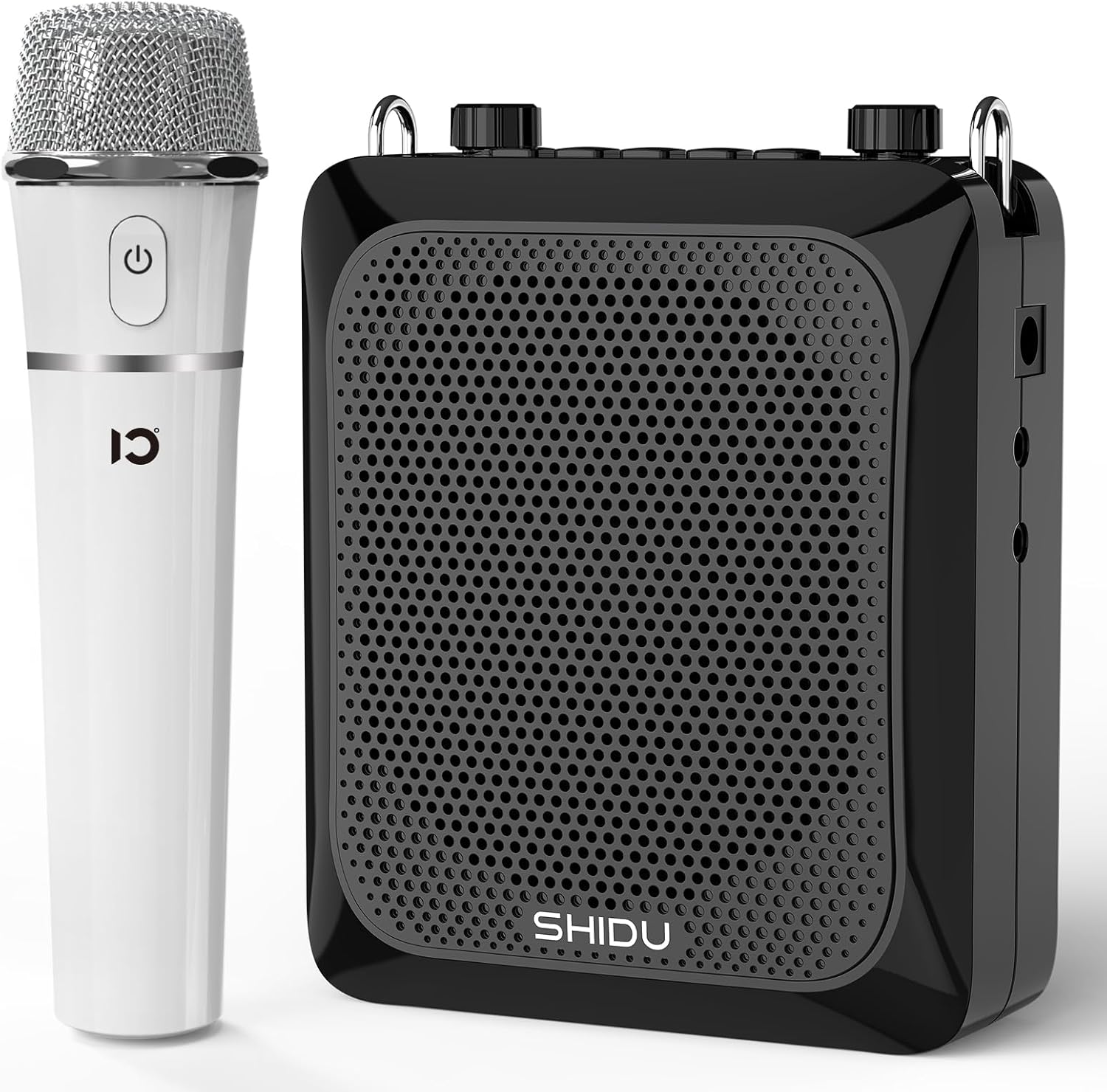
Figure 4.1: SHIDU Voice Amplifier unit and accompanying wireless microphone.
4.1 Amplifier Unit
- Speaker Grille: Front-facing speaker for sound output.
- Control Panel: Buttons and knobs for power, volume, mode selection, and recording.
- HD LED Screen: Displays current status and mode.
- MIC Input (DC-5V): Port for wired microphone or charging.
- AUX Input: For connecting external audio sources like PCs or smartphones.
- USB Port: For USB drive playback.
- TF Card Slot: For TF (MicroSD) card playback.
- Volume Knobs: Adjust master volume and echo.

Figure 4.2: Amplifier unit highlighting Bluetooth 5.0, Original Voice Amplifier, Independent ECHO control, and TF card & USB support.
4.2 Wireless Microphone
- Microphone Head: Captures sound.
- Power Button: Turns the microphone on/off.
- Indicator Light: Shows power and pairing status.
- Ergonomic Design: Lightweight and adjustable for comfortable use.
5. Setup
5.1 Charging the Device
Before first use, fully charge both the voice amplifier and the wireless microphone.
- Connect the USB charging cable to the DC-5V port on the amplifier unit and to a USB power adapter (not included) or computer USB port.
- The LED screen will indicate charging status. A full charge typically takes about 3 hours.
- For the wireless microphone, connect its charging port to a USB power source using its dedicated cable. The indicator light will show charging status.

Figure 5.1: The amplifier provides up to 12 hours of amplification time on a 3-hour charge.
5.2 Pairing the Wireless Microphone
The wireless microphone should automatically pair with the amplifier unit upon powering on both devices.
- Turn on the SHIDU Voice Amplifier by pressing and holding the power button.
- Turn on the wireless microphone by pressing and holding its power button.
- The microphone's indicator light will flash during pairing and become solid once connected.
- If pairing fails, turn both devices off and on again, ensuring they are close to each other.
6. Operating Instructions
6.1 Basic Amplification
- Ensure both the amplifier and wireless microphone are charged and powered on.
- Speak into the microphone. Adjust the main volume knob on the amplifier to your desired loudness.
- Adjust the ECHO knob for desired reverberation effect.
- Maintain a suitable distance between the microphone and the amplifier to prevent acoustic feedback.

Figure 6.1: The SHIDU Wireless Voice Amplifier is suitable for presentations and public speaking.
6.2 Bluetooth Mode
Connect your smartphone or other Bluetooth-enabled devices to play audio through the amplifier.
- Turn on the amplifier. The LED screen will show the current mode.
- Press the Mode button until "Bluetooth" or a Bluetooth icon appears on the screen.
- On your device, enable Bluetooth and search for "SHIDU" or a similar device name.
- Select the amplifier to pair. Once connected, you can play music or audio from your device.
6.3 AUX Input Mode
Use the AUX input to connect devices via a 3.5mm audio cable.
- Connect one end of a 3.5mm audio cable (not included) to the AUX port on the amplifier.
- Connect the other end to the headphone jack or audio output of your external device (e.g., PC, MP3 player).
- The amplifier will automatically switch to AUX mode, or you may need to select it using the Mode button.
6.4 USB/TF Card Playback
Play audio files directly from a USB flash drive or TF (MicroSD) card.
- Insert a USB flash drive into the USB port or a TF card into the TF card slot.
- The amplifier will automatically detect the storage device and begin playback, or you may need to select the mode.
- Use the control buttons to play, pause, skip tracks, or adjust volume.
6.5 Recording Function
The amplifier supports one-touch Hi-Fi recording.
- Ensure a USB flash drive or TF card is inserted for storage.
- Press the Record button (refer to amplifier controls for exact button).
- Speak into the microphone to record. Press the Record button again to stop recording.
- Recordings are saved to the inserted storage device.
7. Maintenance
- Cleaning: Use a soft, dry cloth to clean the surface of the amplifier and microphone. Do not use abrasive cleaners or solvents.
- Storage: When not in use for extended periods, store the device in a cool, dry place away from direct sunlight and extreme temperatures.
- Battery Care: To prolong battery life, avoid fully discharging the battery frequently. Charge the device regularly, even if not in use, to maintain battery health.
8. Troubleshooting
| Problem | Possible Cause | Solution |
|---|---|---|
| No sound from amplifier | Device not powered on; Low battery; Microphone not paired; Volume too low. | Ensure power is on; Charge the device; Re-pair microphone; Increase volume. |
| Feedback (howling noise) | Microphone too close to speaker; Microphone pointing at speaker; Volume too high. | Increase distance between mic and speaker; Point mic away from speaker; Reduce volume. |
| Bluetooth connection issues | Device not in pairing mode; Amplifier too far from source; Interference. | Ensure amplifier is in Bluetooth pairing mode; Move devices closer; Avoid obstacles. |
| Poor sound quality | Low battery; Microphone not positioned correctly; Source audio quality. | Charge device; Adjust microphone position; Check audio source. |
9. Specifications
| Feature | Detail |
|---|---|
| Model Number | wireless voice amplifier |
| Power Output | 25W |
| Battery Capacity | 2000mAh (Rechargeable) |
| Amplify Time | Up to 12 Hours |
| Charging Time | Approximately 3 Hours |
| Connectivity | Bluetooth 5.0 EDR, AUX |
| Audio Input | AUX, USB, TF Card |
| Material | Acrylonitrile Butadiene Styrene (ABS) |
| Dimensions (Package) | 9.37 x 7.09 x 3.11 inches |
| Item Weight | 1.79 pounds |
| Recommended Uses | Classroom speech, meetings, outdoors |

Figure 9.1: The amplifier features 25W power output and a 4000mAh battery for extended use.

Figure 9.2: The amplifier is capable of covering an area of approximately 25,000 square feet, suitable for large groups.
10. Warranty and Support
SHIDU provides comprehensive support for its products:
- Return Policy: 30-day return and refund without reason.
- Warranty: 12-month warranty from the date of purchase.
- Technical Support: Lifetime technical support is available.
- Contact: For any questions or issues, please contact SHIDU customer support through Amazon.
Related Documents - wireless voice amplifier
 |
SHIDU S308 Voice Amplifier User Manual - Portable Sound Enhancement Comprehensive user manual for the SHIDU S308 Voice Amplifier. Learn about its features, operation, specifications, and how to wear it for clear and amplified sound. |
 |
SHIDU U8 Wireless Microphone User Manual - Features, Setup, and Troubleshooting Comprehensive user manual for the SHIDU U8 Acoustic Wireless Microphone. Learn about its features, how to disassemble, install, charge, pair, and troubleshoot. Includes specifications and FCC statement. |
 |
SHIDU S258 Portable Voice Amplifier User Manual Comprehensive user manual for the SHIDU S258 Portable Voice Amplifier, detailing features, specifications, operation instructions, and troubleshooting tips for optimal sound amplification and music playback. |
 |
SHIDU S40 Voice Amplifier User Manual - Features, Specs, and Operation Comprehensive user manual for the SHIDU S40 Voice Amplifier. Learn about features, specifications, troubleshooting, charging, microphone pairing, TF/USB playback, and Bluetooth connectivity. |
 |
SHIDU SD-M800 User Manual: Features, Specifications, and Usage Guide Comprehensive user manual for the SHIDU SD-M800 voice amplifier, detailing its functions, features, specifications, and troubleshooting tips. Covers multimedia playback, UHF wireless amplification, recording, and Bluetooth connectivity. |
 |
Shidu SD-M800 Voice Amplifier User Guide: Setup and Operation Learn how to set up and use your Shidu SD-M800 voice amplifier with this comprehensive user guide. Covers charging, power on, and connecting wired headsets, Bluetooth devices, AUX inputs, USB drives, and Micro SD cards for optimal audio performance. |
Ask a question about this manual
Ask about setup, troubleshooting, compatibility, parts, safety, or missing instructions. Manuals+ will review the question and use this page’s manual context to help answer it.