1. Introduction
This manual provides comprehensive instructions for the assembly, operation, and maintenance of your Dystler Display Cabinet with Doors and Adjustable Shelves, Model 97009. Please read this manual thoroughly before assembly and use to ensure safe and correct operation.
2. Safety Information
Important Safety Precautions:
- Avoid placing the cabinet near heat sources or open flames.
- Ensure all screws and fasteners are securely tightened during assembly to prevent instability.
- Do not exceed the maximum weight limit of 40 pounds per shelf.
- Always use appropriate tools for assembly as instructed.
- Keep small parts away from children during assembly to prevent choking hazards.
3. Product Overview
The Dystler Display Cabinet (Model 97009) is a versatile storage solution designed for various rooms, including bedrooms, home offices, kitchens, and living rooms. It features adjustable shelves, LED lighting with a human sensor, and durable construction.
Key Features:
- Smart Sensor LED Light: Equipped with three LED light modes (blue, white, yellow). The light automatically activates when motion is detected within 2-3 meters and turns off after 30 seconds of no detection, conserving energy.
- Sufficient Storage Space: Includes 2 adjustable shelves and 2 fixed shelves, offering flexible organization for books, collectibles, and other items.
- Concise Design: Features smoked black acrylic doors that allow visibility of displayed items while complementing various interior styles.
- High-Quality Wooden Material: Constructed from FSC-certified wood, ensuring durability, longevity, and ease of cleaning.
- Pneumatic Gate Design: Ensures smooth and silent door operation.
- Top Storage Area: A 1.97-inch top fence prevents items from falling, maximizing storage potential.
Dimensions:
- Overall: 13.78" D x 27.56" W x 64.96" H
- Inner Width: 26.61"
- Inner Depth: 13.3"
- Weight Limit per Shelf: 40 Pounds
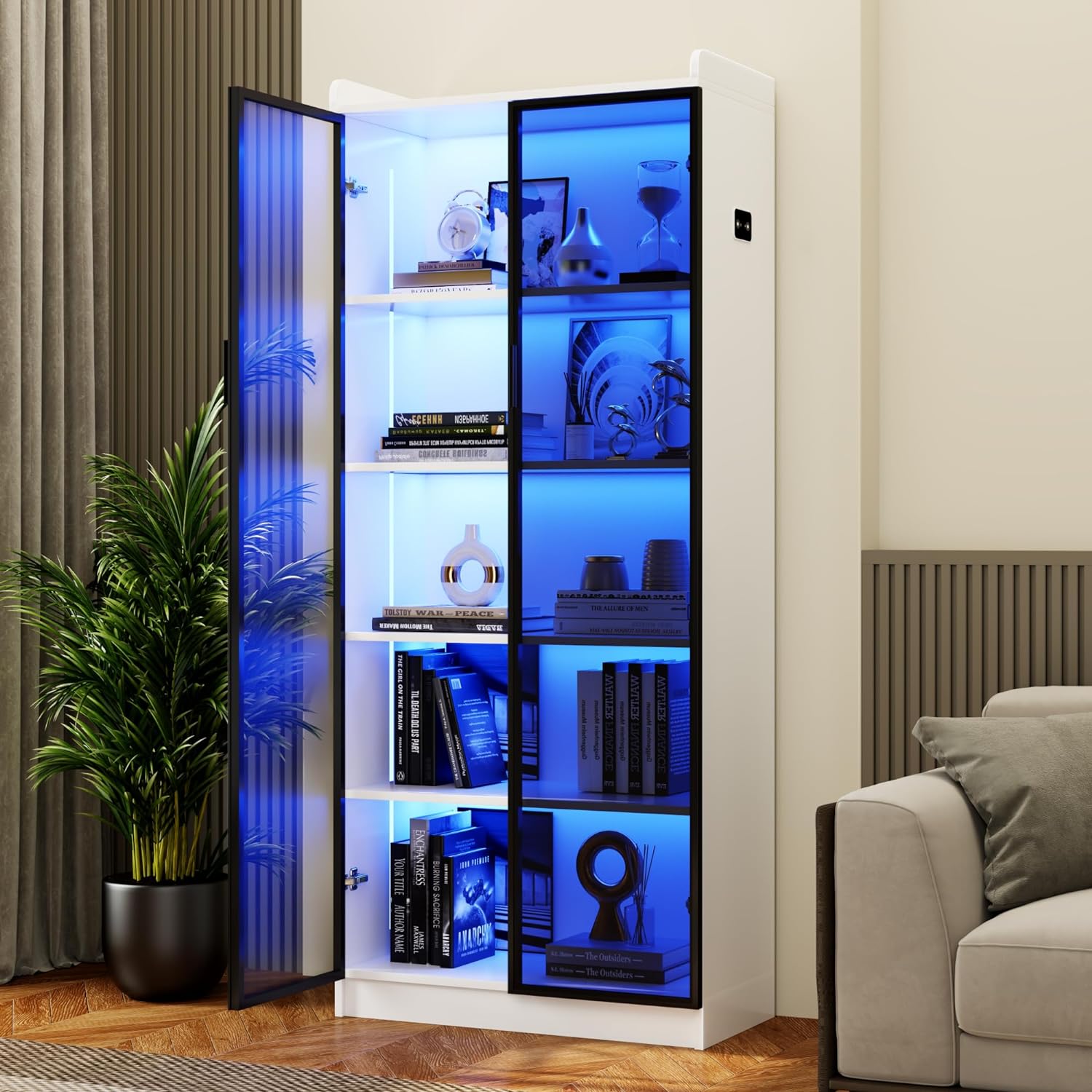
Image: The Dystler Display Cabinet (Model 97009) in a living room setting, showcasing its blue LED lighting and modern design.

Image: Detailed product specifications including dimensions and shelf weight limits.
4. Setup and Assembly
The Dystler Display Cabinet is designed for easy assembly. All necessary tools and an assembly guide are included. Follow the steps below and refer to the provided video for visual guidance.
Assembly Steps:
- Prepare Components: Unpack all components and verify against the parts list in the included assembly guide. Organize parts by their labels (A, B, C, etc.).
- Assemble Base and Side Panels: Attach the side panels to the base using the provided fasteners. Ensure all connections are secure.
- Install Shelves: Insert the fixed and adjustable shelves into their designated slots. The adjustable shelves can be moved to different heights to accommodate various items.
- Attach Backboard: Connect the backboard panels using the card strip and secure them to the main frame.
- Install Top Panel: Secure the top panel to the assembled frame.
- Mount Doors: Attach the smoked black acrylic doors using the hinges. Ensure the hinges are tightened correctly. Refer to the video for hinge adjustment to ensure proper door alignment and spacing.
- Connect LED Lighting: Connect the lamp strip ports in pairs.
Video: Official Dystler-US installation guide for the display cabinet, demonstrating step-by-step assembly and hinge adjustments.

Image: Visual guide for assembling the base and side panels of the cabinet.

Image: Illustration of how the movable shelves can be adjusted to different heights.
5. Operating Instructions
LED Lighting and Human Sensor:
- The LED lighting system offers three color modes: blue, white, and yellow.
- To change the light color, short press the control button located on the cabinet.
- The integrated human sensor automatically turns the lights on when motion is detected within 2-3 meters.
- The lights will automatically turn off approximately 30 seconds after no motion is detected, helping to conserve energy.

Image: The display cabinet showcasing its three distinct LED lighting colors: yellow, blue, and white.

Image: Visual representation of the human sensor detecting motion and activating the lights.
Adjustable Shelves:
The cabinet includes two adjustable shelves. To reposition a shelf, carefully remove any items, lift the shelf, and place it into the desired set of shelf pin holes. Ensure the shelf is level and securely seated before placing items on it.
Door Operation:
The smoked black acrylic doors operate smoothly due to their pneumatic gate design. To open, gently pull the handle. To close, push the door until it latches securely.
6. Maintenance
To maintain the appearance and longevity of your Dystler Display Cabinet, follow these simple maintenance guidelines:
- Cleaning: The cabinet's wooden material is waterproof and easy to clean. Use a soft, damp cloth to wipe down surfaces. For stubborn stains, a mild soap solution can be used, followed by wiping with a clean, dry cloth. Avoid abrasive cleaners or harsh chemicals.
- Dusting: Regularly dust the cabinet and shelves with a soft, dry cloth to prevent dust buildup.
- Hinge Adjustment: If doors do not close properly or appear misaligned, refer to the assembly video or the hinge adjustment section in the assembly guide. Tightening screws to the right increases the gap between doors/cabinet, while tightening to the left decreases it.
- Avoid Overloading: Do not exceed the 40-pound weight limit per shelf to prevent damage or instability.
7. Troubleshooting
Common Issues and Solutions:
| Problem | Possible Cause | Solution |
|---|---|---|
| Doors do not close properly or are misaligned. | Hinges are not correctly adjusted or screws are loose. | Adjust the hinge screws. Tightening to the right increases the gap, tightening to the left decreases it. Ensure all hinge screws are secure. Refer to the assembly video for detailed hinge adjustment. |
| LED lights do not turn on. | Power connection issue, sensor obstruction, or light mode setting. | Check if the power adapter is securely connected. Ensure the lamp strip ports are connected in pairs. Verify the human sensor is not obstructed. Short press the control button to cycle through light modes. |
| LED lights turn off too quickly. | Human sensor timeout. | The human sensor is designed to turn off lights after approximately 30 seconds of no motion detection to conserve energy. This timeout is not adjustable. |
| Cabinet feels unstable. | Loose fasteners or uneven surface. | Re-tighten all assembly screws. Ensure the cabinet is placed on a flat, level surface. |
8. Specifications
| Feature | Detail |
|---|---|
| Brand | Dystler |
| Model Name | LY-97009-25 |
| Item Model Number | 97009 |
| Color | White |
| Product Dimensions | 13.78"D x 27.56"W x 64.96"H |
| Item Weight | 68.2 pounds (31 Kilograms) |
| Material | Wood (FSC-certified) |
| Number of Shelves | 5 (2 adjustable, 2 fixed) |
| Weight Limit | 40 Pounds per shelf |
| Special Features | 3 Color LED Lights, Adjustable Shelf, Human Sensor, Smoked Black Acrylic Door |
| Mounting Type | Floor Mount |
| Door Style | Smoked Black Acrylic Door |
| Included Components | Assembly Guide, Installation Tool, Storage Cabinet * 1 |
| Assembly Required | Yes |
| UPC | 756940531967 |
9. Warranty and Support
For customer support, please refer to the contact information provided at the point of purchase or visit the official Dystler website. Protection plans may be available for purchase separately.
For additional assistance, you may contact Dystler-US customer service.


