
Insta360 CINSABMA
Insta360 X4 Motorcycle Bundle Instruction Manual
Model: CINSABMA | Brand: Insta360
1. Introduction
The Insta360 X4 Motorcycle Bundle is an advanced 8K waterproof 360 action camera designed for capturing immersive footage in various environments, especially during motorcycle rides. It features cutting-edge technology for superior image quality, stabilization, and ease of use.
Key features include:
- Stunning 8K 360 video capture and 5.7K 60fps recording.
- Active HDR for accurate colors in challenging lighting.
- Easy reframing capabilities with the AI-powered Insta360 app.
- Invisible Selfie Stick effect for unique third-person perspectives.
- 4K 60fps wide-angle video and 170° MaxView at 4K 30fps.
- FlowState Stabilization and 360° Horizon Lock for smooth footage.
- Durable, rugged build with upgraded removable lens guards.
- Waterproof up to 33ft (10m) without a dive case, and cold resistant to -4°F (-20°C).
- Extended 2290mAh battery life, offering up to 135 minutes of recording.
- Bright 2.5" Gorilla Glass touchscreen for easy control and preview.
2. Setup
2.1 What's in the Box
Your Insta360 X4 Motorcycle Bundle includes the following components:
- 1x Insta360 X4 Camera
- 1x Standard Lens Guards (pre-installed or in packaging)
- 1x Action Invisible Selfie Stick
- 1x Heavy Duty Clamp
- 1x Lens Cap
- 1x 256GB microSD Card

Figure 2.1: Insta360 X4 Motorcycle Bundle contents.
2.2 Battery Installation and Charging
The Insta360 X4 is equipped with a 2290mAh battery, providing up to 135 minutes of recording time. To install the battery, locate the battery compartment on the side of the camera, open the latch, and insert the battery with the contacts facing inward. Close the latch securely.
For charging, connect the camera to a power source using the provided USB-C cable. The camera supports fast charging to minimize downtime.

Figure 2.2: The Insta360 X4 features a 2290mAh battery for extended use.
2.3 MicroSD Card Insertion
Insert the included 256GB MicroSD card into the designated slot on the camera. Ensure the card is inserted correctly until it clicks into place. A high-speed U3 or V30 microSD card is recommended for optimal performance with 8K video recording.
2.4 Attaching Lens Guards
The Insta360 X4 comes with standard lens guards that are easy to apply and remove. Align the guards with the camera lenses and screw them on gently until secure. These guards provide essential protection against scratches and impacts.
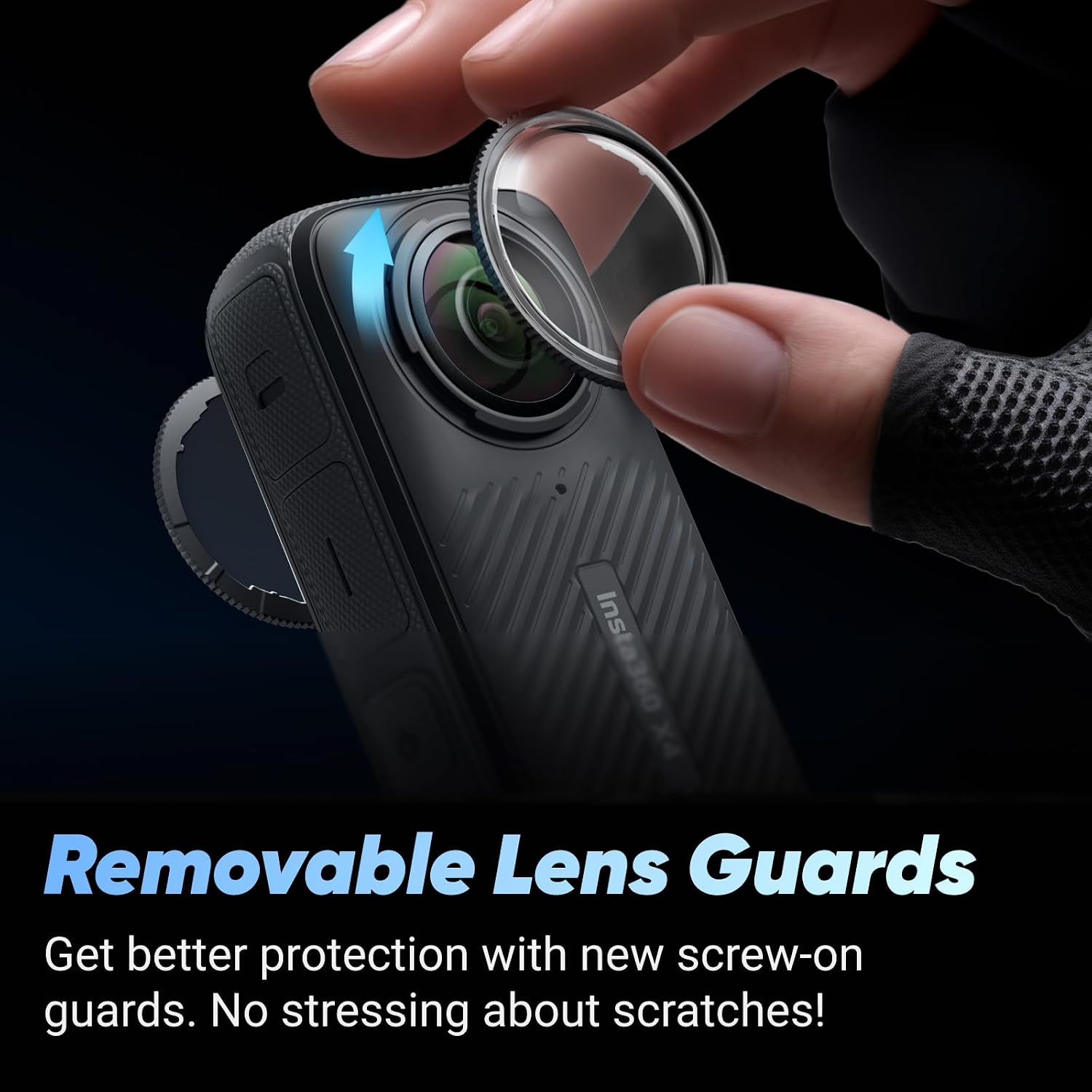
Figure 2.3: Attaching the removable lens guards for protection.
3. Operating the Insta360 X4
3.1 Powering On/Off and Basic Controls
Press and hold the power button to turn the camera on or off. The 2.5" Gorilla Glass touchscreen allows for intuitive navigation through menus and settings. Swipe and tap to access different modes and options.

Figure 3.1: The 2.5" touchscreen provides clear control and preview.
3.2 Recording 8K 360 Video
The Insta360 X4 captures stunning 360-degree video in 8K resolution, or 5.7K at 60 frames per second. This allows for comprehensive capture of your surroundings without needing to aim the camera.

Figure 3.2: 8K 360° Video provides an immersive experience.
3.3 Easy Reframing and AI Editing
With the Insta360 X4, you can 'shoot first, reframe later'. This means you capture everything in 360 degrees and then use the AI-powered Insta360 app to select and export specific angles and perspectives from your footage. The AI editing features can automatically identify highlights and create dynamic edits.

Figure 3.3: Easy reframing allows for flexible post-production.

Figure 3.4: AI editing simplifies the creation of highlights.
3.4 Invisible Selfie Stick Effect
The unique design of the Insta360 X4, combined with the Invisible Selfie Stick, allows the stick to be automatically removed from your 360-degree footage. This creates a third-person perspective, similar to drone shots, without any visible equipment.

Figure 3.5: Achieve impossible third-person views with the Invisible Selfie Stick.
3.5 FlowState Stabilization and Horizon Lock
The Insta360 X4 features FlowState Stabilization and 360° Horizon Lock, ensuring your footage remains incredibly smooth and level, regardless of intense action or challenging terrain. This technology compensates for camera shake and maintains a stable horizon.

Figure 3.6: FlowState Stabilization provides super smooth shots.
3.6 4K Wide-Angle Video (Single-Lens Mode)
Beyond 360-degree capture, the X4 can also function as a traditional wide-angle action camera. It records crisp 4K video at 60 frames per second, or an ultra-wide 170° MaxView at 4K 30fps, perfect for standard action camera shots.
3.7 Voice Control and Gesture Control
The Insta360 X4 supports voice commands for hands-free operation, allowing you to start/stop recording or take photos by simply speaking. It also features AI Gesture Control, enabling you to control the camera with quick hand gestures.

Figure 3.7: Hands-free control with voice and gesture commands.
4. Maintenance
4.1 Waterproofing and Cold Resistance
The Insta360 X4 is waterproof to 33ft (10m) without a dive case, making it suitable for various water activities. For deeper dives, an Invisible Dive Case (sold separately) allows submersion up to 164ft (60m). The camera is also designed to operate in cold temperatures, down to -4°F (-20°C).

Figure 4.1: The X4 is built for tough conditions, including water and cold.
4.2 Lens Care
Always ensure the lens guards are securely attached during use to protect the lenses from scratches and impacts. Clean the lenses with a soft, lint-free cloth. Avoid using abrasive materials or harsh chemicals that could damage the lens coating.
5. Troubleshooting
5.1 Software Compatibility Issues
Some users have reported compatibility issues with the Insta360 Studio desktop application on certain newer versions of Windows (e.g., Windows 11). If you encounter difficulties installing or running the software, ensure your operating system is fully updated and check the official Insta360 support website for the latest software versions and compatibility information. Consider using the mobile app for editing if desktop software issues persist, as it offers many reframing and editing features.
5.2 Overexposed Sky in Footage
If your footage, particularly the sky, appears overexposed, especially in bright daylight conditions, adjust the exposure settings manually within the camera or during post-production in the Insta360 app or Studio. Experiment with different exposure values or consider using the Active HDR mode, which is designed to balance highlights and shadows.
5.3 Audio Beep Glitches
If the audio beep for start/stop recording is inconsistent or produces only a partial sound, ensure the camera's firmware is up to date. If the issue persists, contact Insta360 support for further assistance.
6. Specifications
| Feature | Detail |
|---|---|
| Brand Name | Insta360 |
| Item Model Number | CINSABMA |
| Item Weight | 7.2 ounces |
| Package Dimensions | 12.05 x 8.03 x 6.26 inches |
| Batteries | 1 Lithium Polymer battery required (included) |
| Photo Sensor Technology | CMOS |
| Video Capture Resolution | 8K |
| Maximum Focal Length | 35 Millimeters |
| Flash Memory Type | Micro SD |
| Video Capture Format | MP4, INSV |
| Supported Audio Format | AAC |
| Screen Size | 2.5 Inches |
| Connectivity Technology | Wi-Fi |
| Special Features | 360 Degree Capture |
| Visible Screen Diagonal | 3" / 7 cm |
7. Warranty and Support
7.1 Warranty Information
For detailed warranty information, please refer to the warranty card included with your product or visit the official Insta360 website. Keep your proof of purchase for warranty claims.
7.2 Customer Support
If you require technical assistance, have questions about your product, or need to report an issue, please contact Insta360 customer support through their official website. You can find FAQs, troubleshooting guides, and contact information at www.insta360.com/support.
Related documentsCINSABMA


Ask a question about this manual
Ask about setup, troubleshooting, compatibility, parts, safety, or missing instructions. Manuals+ will review the question and use this page’s manual context to help answer it.