
1. Introduction
Thank you for choosing the UGREEN Nexode 65W 3C1A Foldable GaN Travel Charger. This device is designed to provide efficient and safe charging for a wide range of electronic devices, including smartphones, tablets, and laptops. Featuring advanced GaN technology and a compact, foldable design, it is an ideal solution for both home and travel use.
2. Key Features
- 65W Power Delivery: Supports PD3.0 protocol, delivering up to 65W from a single port, capable of charging a MacBook Pro 16" to 100% in approximately 1.5 hours. Also supports PPS 45W Galaxy Super Fast Charging 2.0.
- 4-in-1 Multi-Port Design: Equipped with 3 USB-C ports and 1 USB-A port, allowing simultaneous fast charging of up to four devices.
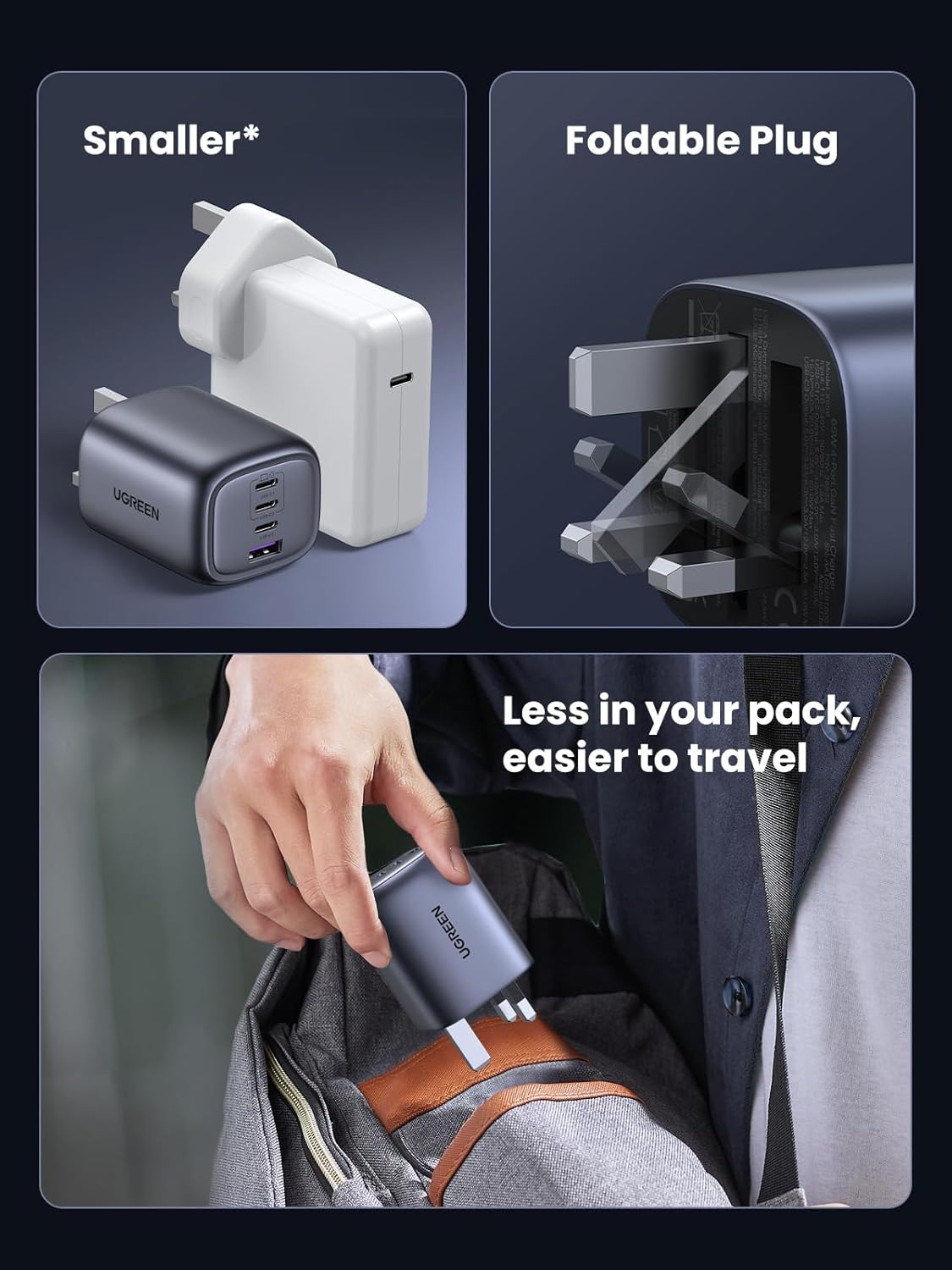
- Compact & Foldable: Features a foldable plug and a compact design (57*50*46 mm) for enhanced portability, making it suitable for travel.
- GaN Technology: Utilizes innovative Hybrid Power Solution with GaN (Gallium Nitride) technology, increasing power conversion rate to 95% for energy efficiency.
- Comprehensive Safety: Incorporates multiple protection mechanisms against short circuits, overvoltage, overheating, and overcharging to ensure device and user safety.
3. Package Contents
- UGREEN Nexode 65W 3C1A Foldable GaN Travel Charger (Model 35532)
- Instruction Manual
Note: Charging cables are not included and must be purchased separately.
4. Safety Information
- Do not expose the charger to liquids, moisture, or extreme temperatures.
- Avoid dropping, disassembling, or attempting to repair the charger yourself.
- Use only certified charging cables that are compatible with your devices and the charger.
- Ensure the charger is plugged into a properly grounded power outlet.
- Unplug the charger during lightning storms or when unused for extended periods.
- Keep out of reach of children.
5. Setup and Connection
- Unfold the Plug: Gently pull out the foldable prongs until they lock into place.
- Connect to Power: Insert the charger into a standard wall outlet (Input Voltage: 240 Volts).
- Connect Devices: Use appropriate USB-C to USB-C or USB-C to USB-A cables to connect your devices to the available ports on the charger.

6. Operating Instructions
6.1. Charging Single Device
When charging a single device, the charger will automatically detect the optimal charging protocol (e.g., PD3.0, PPS) and deliver the maximum power supported by both the charger and your device. For example, a single USB-C port can output up to 65W.

6.2. Charging Multiple Devices
When multiple devices are connected, the charger intelligently distributes the 65W total power output across the active ports. The power distribution may vary based on the connected devices' power requirements and charging protocols. Refer to the 'Power Guide' in the specifications section for typical power allocation scenarios.

6.3. Foldable Plug Mechanism
The charger features a foldable plug for easy storage and portability. To fold, gently push the prongs back into the charger body until they are flush. To deploy, pull them out until they click into place.
7. Specifications
| Feature | Detail |
|---|---|
| Brand | UGREEN |
| Model Number | 35532 |
| Wattage | 65 watts |
| Total USB Ports | 4 (3x USB-C, 1x USB-A) |
| Connector Type | USB Type C |
| Input Voltage | 240 Volts |
| Output Current | 15 Amps |
| Output Voltage | 120.00 |
| Power Source | AC (Alternating Current) |
| Power Plug Type | Type F - 2 pin (German) |
| Special Features | 4 Ports GaN Charger, Fast Charging, Foldable, Traveling |
| Compatible Devices | Cellular Phones, iPhone 16 Pro Max/15/14, Samsung Galaxy S20 and newer, MacBook Pro/Air, iPad, Pixel 10, Laptops |
| Dimensions | 57 x 50 x 46 mm (approximate) |
| Material | Aluminium |
| Certification | CE |
8. Maintenance and Care
- Clean the charger with a soft, dry cloth. Do not use liquid cleaners or aerosols.
- Store the charger in a cool, dry place when not in use.
- Avoid exposing the charger to direct sunlight or heat sources for prolonged periods.
- Regularly check cables for any signs of wear or damage. Replace damaged cables immediately.
9. Troubleshooting
9.1. Device Not Charging
- Ensure the charger is securely plugged into a working wall outlet.
- Verify that the charging cable is properly connected to both the charger and your device.
- Try using a different charging cable to rule out cable issues.
- Test the charger with a different device to confirm charger functionality.
- Check if your device's charging port is clean and free of debris.
9.2. Slow Charging
- Ensure you are using a high-quality, compatible charging cable that supports fast charging.
- If charging multiple devices, the power output per port is shared. Disconnect other devices to maximize power to a single device.
- Confirm your device supports the fast charging protocols (e.g., PD3.0, PPS) offered by the charger.
- Close unnecessary applications on your device to reduce power consumption during charging.
9.3. Charger Overheating
- It is normal for the charger to become warm during operation, especially under heavy load.
- If the charger becomes excessively hot, disconnect it immediately and allow it to cool down.
- Ensure adequate ventilation around the charger; do not cover it.
- Avoid charging in direct sunlight or hot environments.
10. Warranty and Support
UGREEN products come with a standard manufacturer's warranty. For detailed warranty information, product support, or technical assistance, please visit the official UGREEN website or contact their customer service. Keep your purchase receipt as proof of purchase for warranty claims.
UGREEN Official Website: www.ugreen.com