
1. Product Overview
The Trueque Wireless Keyboard and Mouse Combo offers a full-size keyboard with retro round keycaps and a matching ergonomic mouse. Designed for comfort and efficiency, this combo features a 2.4GHz cordless connection via a single USB receiver, adjustable tilt legs, a convenient phone/tablet holder, and an auto-sleep function to conserve battery life.
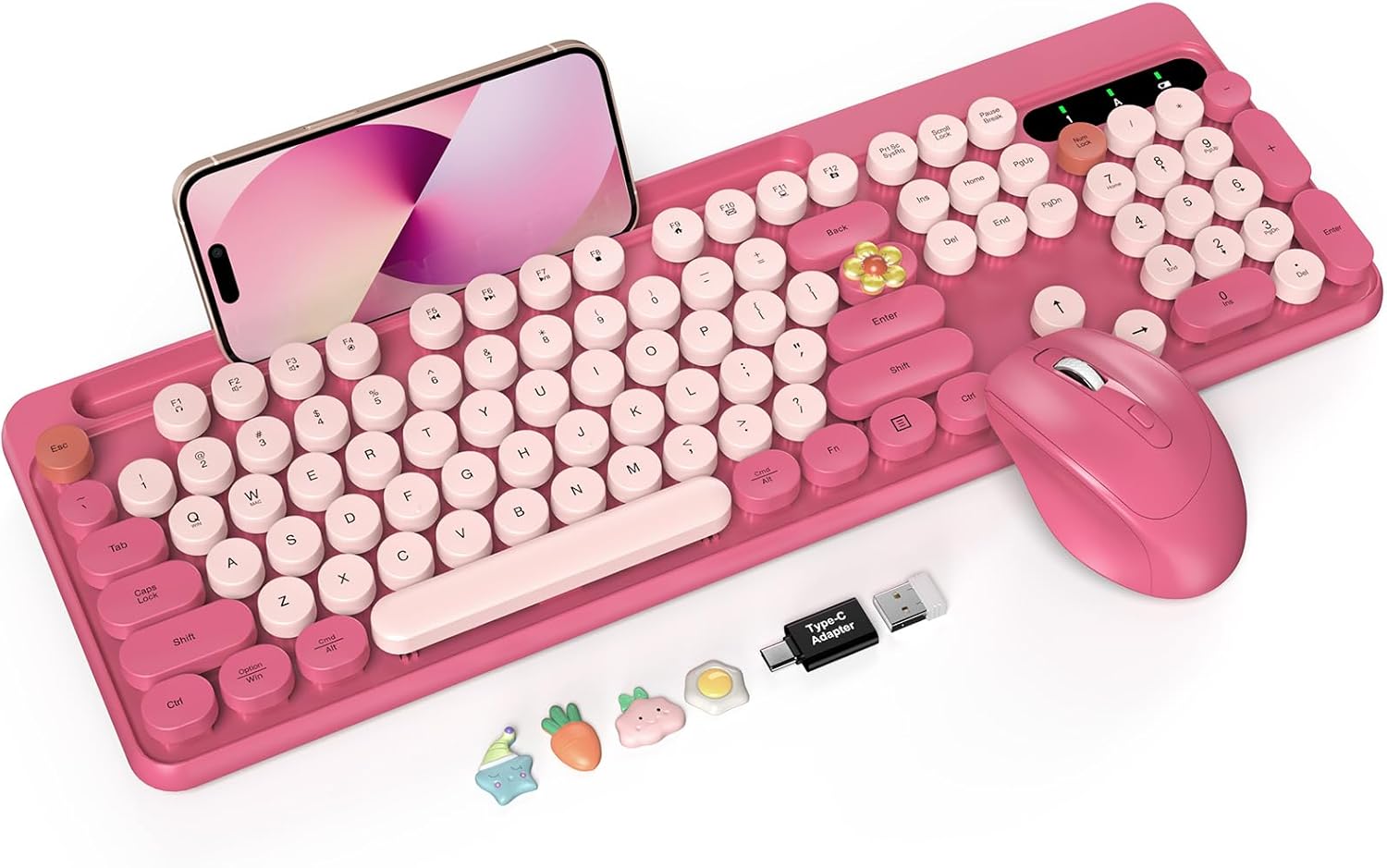
Image 1: Trueque Wireless Keyboard and Mouse Combo (Camellia Rose)
2. Package Contents
- Wireless Keyboard
- Wireless Mouse
- 2-in-1 USB Receiver (located inside the mouse battery compartment)
- User Manual
3. Setup Instructions
3.1. Battery Installation
The keyboard requires one AAA battery, and the mouse requires one AA battery (batteries are not included). Ensure correct polarity when inserting batteries.
- Open the battery compartment on the back of the keyboard/mouse.
- Insert the required battery (AAA for keyboard, AA for mouse).
- Close the battery compartment securely.
Video 1: Battery Installation and USB Receiver Connection Guide
3.2. Connecting the USB Receiver
The 2-in-1 USB receiver is stored in the battery compartment of the mouse for convenience.
- Remove the USB receiver from the mouse's battery compartment.
- Plug the USB receiver into an available USB port on your computer (PC/Laptop).

Image 2: USB Receiver and 2.4GHz Wireless Connection
3.3. Powering On
- Locate the power switch on the top right of the keyboard and on the bottom of the mouse.
- Slide the switches to the 'ON' position for both the keyboard and mouse.
- The devices should automatically connect to your computer.
4. Operating Instructions
4.1. Keyboard Features
- Retro Round Keycaps: The keys offer a smooth, tactile typing experience and can be easily removed for cleaning.
- Adjustable Tilt Legs: Two-position adjustable feet (6° and 8.8°) reduce wrist fatigue during prolonged use. Four non-slip rubber pads stabilize the keyboard.
- Large Phone/Tablet Holder: A 10.27-inch slot is integrated into the keyboard for holding your phone or tablet. Note: This holder does not support Bluetooth or multi-device connections.
- Multimedia Shortcut Keys: Use the 'Fn' key in combination with F1-F12 for quick access to functions like calculator, sleep, volume control, and more. Note: Multimedia keys are NOT compatible with Mac and iOS systems.

Image 3: Integrated Phone/Tablet Holder

Image 4: Multimedia Shortcut Keys
4.2. Mouse Features
- Ergonomic Design: The wireless mouse is designed for smoother movement and includes a thumb rest for comfort.
- Adjustable DPI: Cycle through 800/1200/1600 DPI settings for precise cursor control.
- Multi-Function Buttons: Includes forward and backward buttons for seamless page navigation and file browsing.
- Quiet Click: Designed for minimal noise during use.

Image 5: Ergonomic Mouse with Adjustable DPI
5. Maintenance
5.1. Cleaning
- The round keycaps are removable for thorough cleaning. Gently pull them off to clean underneath.
- Use a soft, damp cloth to wipe down the keyboard and mouse surfaces. Avoid harsh chemicals.
- The keyboard features a splash-resistant design, but avoid submerging it in liquids.

Image 6: Removable Keycaps for Easy Cleaning
5.2. Auto-Sleep Function
Both the keyboard and mouse feature an automatic sleep mode after 10 minutes of inactivity to extend battery life. Tap twice to wake the devices.

Image 7: Auto-Sleep Mode for Extended Battery Life
6. Troubleshooting
6.1. No Response from Keyboard/Mouse
- Check Batteries: Ensure fresh batteries are correctly installed in both devices.
- Power Switch: Verify that both the keyboard and mouse power switches are in the 'ON' position.
- USB Receiver: Ensure the USB receiver is securely plugged into a working USB port on your computer. Try a different USB port.
- Distance: Make sure the keyboard and mouse are within the 2.4GHz wireless range (up to 33 ft / 10 meters) of the USB receiver.
- Re-pairing (Mouse): If the mouse is unresponsive, long-press the mouse wheel and right button simultaneously until the LED light is continuously on. This may re-establish the connection.
- Re-pairing (Keyboard): If the keyboard is unresponsive, press 'Esc' + 'K' at the same time. The indicator lights will flash continuously until they stop, indicating a successful re-connection.
6.2. Compatibility Issues
- This keyboard and mouse combo is designed for Windows/PC/Laptop systems. It is NOT compatible with Mac and iOS systems.
7. Specifications
| Feature | Detail |
|---|---|
| Product Dimensions | 16.94 x 5.75 x 1.37 inches |
| Item Weight | 1.69 pounds |
| Connectivity Technology | Advanced Wireless Connection (using USB receiver) |
| Compatible Devices | Laptop, Personal Computer, Projector (Windows OS) |
| Special Features | Colorful Typewriter Style, Floating Round Keycaps, Large Phone/Tablet Holder, Removable Keycaps, Splash-proof Design, Auto Sleep, Foldable Tilt Legs |
| Keyboard Battery | 1 AAA battery (not included) |
| Mouse Battery | 1 AA battery (not included) |
8. Warranty and Support
Trueque provides a 12-month free warranty and 360 days of brand service for this product.
Contact Support:
- Phone (US): 1-866-608-6766
- Hours: Mon-Fri, 9am-1pm, 2pm-6pm (PST)

Image 8: Trueque Customer Support Information