
Kuulaa KL-YD60
Kuulaa 10000mAh Magnetic Power Bank User Manual
Model: KL-YD60
Product Overview
The Kuulaa 10000mAh Magnetic Power Bank is a portable charging solution designed for convenience and efficiency. It features a strong magnetic attachment for compatible devices, dual charging modes (wireless and wired), and a built-in foldable stand. This power bank is equipped with a 10000mAh high-capacity battery and an LED digital display for real-time power monitoring.
Key features include:
- Strong Magnetic Hold: Ensures secure attachment to MagSafe-compatible iPhones (16/15/14/13/12 series).
- PD 20W Fast Charging: USB-C port provides 20W Power Delivery for rapid wired charging.
- Wireless Charging: Offers 7.5W wireless charging for compatible devices.
- 10000mAh Capacity: Sufficient power to charge an iPhone 15 Pro Max approximately 1.5 times.
- LED Digital Display: Provides clear indication of remaining battery percentage.
- Foldable Stand: Integrated stand for hands-free viewing in both horizontal and vertical orientations.
- Superior Safety: Constructed with aluminum alloy for efficient heat dissipation and equipped with smart chip protection against overcharging, overcurrent, short circuits, and high temperatures.
Package Contents
Please check the package for the following items:
- Kuulaa 10000mAh Magnetic Power Bank
- USB-C Charging Cable
- User Manual (this document)
Setup and Initial Use
Charging the Power Bank
Before first use, fully charge the power bank. Connect the provided USB-C cable to the power bank's USB-C port and the other end to a compatible USB power adapter (not included). The LED digital display will show the charging progress, indicating 100% when fully charged.

Image: The Kuulaa power bank connected via USB-C cable for charging, demonstrating its PD 20W fast charging capability. The display shows 100% charge on the power bank.
Operating Instructions
Magnetic Wireless Charging
Align the power bank with the back of your MagSafe-compatible iPhone (iPhone 16/15/14/13/12 series). The strong magnets will automatically snap the power bank into place, initiating wireless charging. The LED display on the power bank will show its remaining battery level.

Image: The Kuulaa magnetic power bank securely attached to an iPhone, illustrating the strong magnetic connection and the integrated LED display showing battery percentage.

Image: An illustration detailing the magnetic charging mechanism and compatibility with MagSafe cases, highlighting the "Snap. Charge. Go." feature.
Wired Charging (PD 20W Fast Charging)
For wired charging, connect your device to the power bank's USB-C port using a compatible charging cable. The power bank supports 20W Power Delivery (PD) fast charging, allowing for rapid charging of devices like the iPhone 15 up to 50% in 30 minutes.

Image: A visual representation of the two charging options: 15W Max Wireless Charging and PD 20W Fast Charging with Wired Charging.
Using the Foldable Stand
The power bank features a built-in foldable stand. Gently pull out the ring from the back of the power bank to deploy the stand. This allows you to prop up your phone for hands-free viewing in both horizontal and vertical orientations, ideal for watching videos or video calls.
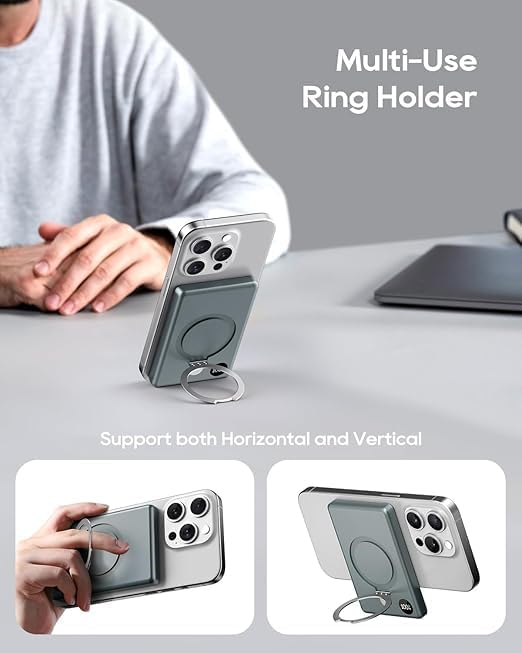
Image: The multi-use ring holder functioning as a stand, supporting the phone in both horizontal and vertical positions for hands-free viewing.
Maintenance
- Keep the power bank away from water, moisture, and extreme temperatures.
- Clean the surface with a soft, dry cloth. Do not use harsh chemicals or abrasive materials.
- Avoid dropping or subjecting the power bank to strong impacts.
- Store in a cool, dry place when not in use for extended periods.
Troubleshooting
| Problem | Possible Cause | Solution |
|---|---|---|
| Power bank not charging device wirelessly. | Device is not MagSafe compatible or not aligned correctly. Device case is too thick or not MagSafe compatible. Power bank battery is depleted. | Ensure your device is MagSafe compatible and properly aligned with the power bank's magnetic area. Remove non-MagSafe cases or use a MagSafe-compatible case. Recharge the power bank. |
| Power bank not charging via USB-C cable. | Cable is faulty or not properly connected. Power bank battery is depleted. Device is not compatible with PD charging. | Try a different USB-C cable and ensure it is securely connected to both the power bank and the power adapter/device. Recharge the power bank. Ensure your device supports USB-C charging. |
| LED display not lighting up. | Power bank is completely discharged. Internal malfunction. | Connect the power bank to a power source to charge it. If it still doesn't light up after charging for some time, contact customer support. |
| Power bank gets warm during charging. | Normal operation during fast charging. Poor ventilation. | A slight increase in temperature is normal during charging. Ensure the power bank is in a well-ventilated area and not covered. If it becomes excessively hot, discontinue use and contact support. |
Specifications
| Feature | Detail |
|---|---|
| Model Number | KL-YD60 |
| Battery Capacity | 10000mAh |
| Wired Charging Output | PD 20W (USB-C) |
| Wireless Charging Output | 7.5W (for iPhone) |
| Input | USB-C (PD 20W) |
| Dimensions | 4.11 x 2.72 x 0.57 inches |
| Weight | 6.9 ounces |
| Material | Aluminum Alloy |
| Special Features | Auto Shut-Off, Digital Display, Fast Charging, Lightweight, Pocket Size, Foldable Stand |
Safety Information
- Do not disassemble, open, or shred the battery pack.
- Do not expose the power bank to heat or fire. Avoid storage in direct sunlight.
- Do not short-circuit the battery pack.
- Do not expose the power bank to mechanical shock.
- In the event of a battery leak, do not allow the liquid to come into contact with skin or eyes. If contact has occurred, wash the affected area with copious amounts of water and seek medical advice.
- Keep the power bank out of reach of children.
- Dispose of the power bank according to local regulations. Do not dispose of with household waste.
Warranty and Support
Kuulaa products come with a standard manufacturer's warranty. For specific warranty details, please refer to the warranty card included with your purchase or visit the official Kuulaa website. For technical support, troubleshooting assistance, or warranty claims, please contact Kuulaa customer service through their official channels.
You can find more information and contact details on the Kuulaa Store on Amazon.
Related documentsKL-YD60


Ask a question about this manual
Ask about setup, troubleshooting, compatibility, parts, safety, or missing instructions. Manuals+ will review the question and use this page’s manual context to help answer it.