
1. Introduction
The GeRRit SW-743A is an electronic halogen gas detector designed for identifying leaks in air conditioning and refrigeration systems. This device offers high sensitivity and accuracy, making it suitable for both residential and commercial HVAC applications. It detects various refrigerants, including R134a, R410a, and R22, providing both audible and visual alarms upon leak detection. Its compact and durable design ensures reliable performance in diverse working conditions.
2. Product Overview
Familiarize yourself with the components of your SW-743A detector.
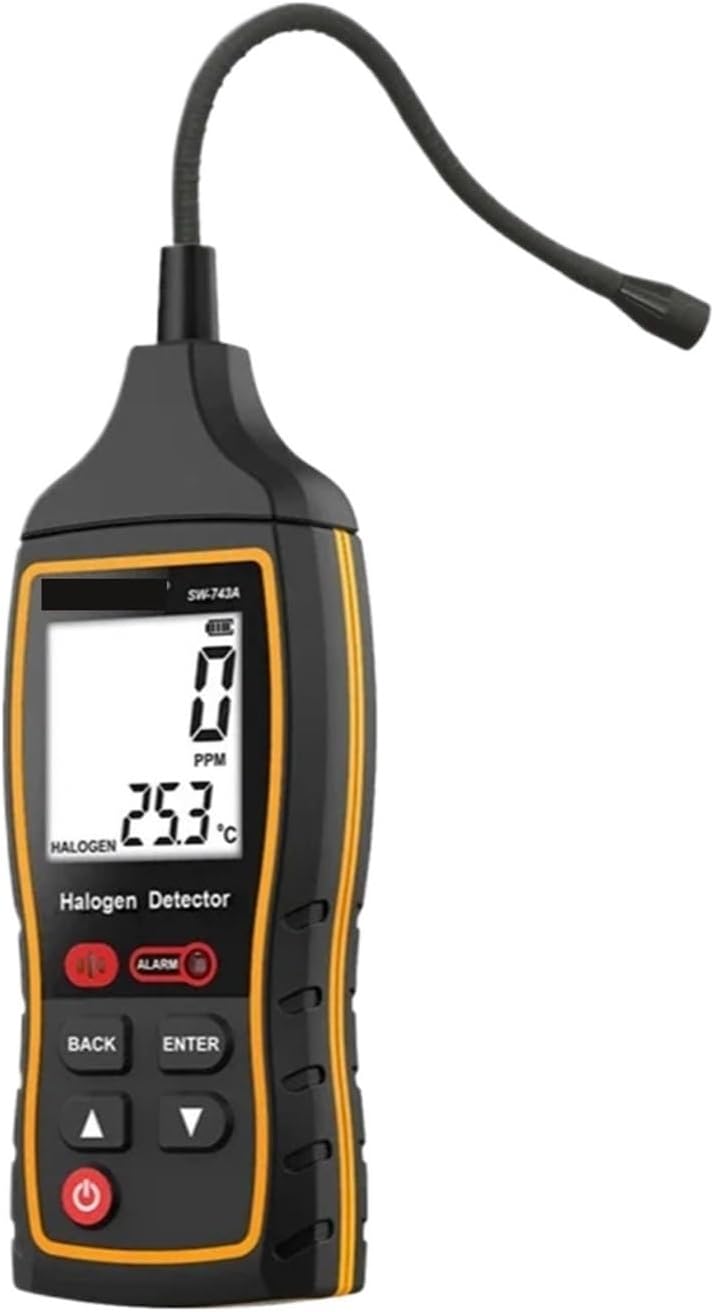
Figure 1: Front view of the GeRRit SW-743A Electronic Refrigerant Leak Detector, showing the display, control buttons, and flexible probe.

Figure 2: Close-up view of the detector's display and control panel, highlighting the 'ALARM' indicator and navigation buttons.

Figure 3: Angled view of the detector, illustrating the flexible probe for reaching confined spaces.
3. Setup
- Unpacking: Carefully remove the detector from its packaging. Inspect for any signs of damage.
- Battery Installation: The device typically uses standard batteries (not specified, assume common types like AA or AAA). Open the battery compartment (usually on the back) and insert the batteries, observing correct polarity.
- Power On: Press and hold the power button (usually marked with a ⑂ symbol) until the display illuminates. The detector will perform a brief self-test.
- Warm-up: Allow the detector to warm up for approximately 30-60 seconds as indicated on the display. This ensures optimal sensor performance.
4. Operating Instructions
Follow these steps for effective leak detection:
- Preparation: Ensure the area is well-ventilated. Turn on the detector as described in the Setup section.
- Scanning for Leaks: Slowly move the flexible probe of the detector around potential leak points in the air conditioning or refrigeration system. Maintain a consistent speed of approximately 1-2 inches per second.
- Detection Indication: When a halogen gas leak is detected, the device will:
- Emit an audible alarm (beeping sound).
- Flash a visual indicator (e.g., an LED or a specific icon on the display).
- The display may show a reading indicating the concentration of the detected gas (e.g., in PPM).
- Pinpointing the Leak: Once an alarm is triggered, move the probe away from the area and then slowly approach it again to pinpoint the exact source of the leak. The alarm intensity or display reading may increase as you get closer to the leak.
- Compatible Refrigerants: The SW-743A is compatible with common halogen-based refrigerants, including but not limited to R134a, R410a, and R22.
- Power Off: After use, press and hold the power button until the device shuts down.
5. Maintenance
- Cleaning: Wipe the exterior of the detector with a soft, dry cloth. Do not use abrasive cleaners or solvents, as these can damage the casing or display.
- Sensor Care: Keep the sensor tip clean and free from dust or debris. Avoid direct contact with liquids.
- Battery Replacement: Replace batteries promptly when the low battery indicator appears on the display to ensure accurate readings and prevent device malfunction.
- Storage: Store the detector in a cool, dry place, away from direct sunlight and extreme temperatures. If storing for extended periods, remove the batteries to prevent leakage.
6. Troubleshooting
| Problem | Possible Cause | Solution |
|---|---|---|
| Detector does not power on | Dead or incorrectly installed batteries | Check battery polarity; replace with fresh batteries. |
| No alarm when leak is present | Sensor dirty or damaged; low sensitivity setting; insufficient warm-up time | Clean sensor tip; ensure adequate warm-up; check for sensor damage. |
| False alarms or inconsistent readings | Interference from other gases/vapors; rapid movement of probe; sensor contamination | Ensure proper ventilation; move probe slowly; clean sensor. |
| Display not working correctly | Low battery; device malfunction | Replace batteries; if problem persists, contact support. |
7. Specifications
| Feature | Detail |
|---|---|
| Model | SW-743A |
| Brand | GeRRit |
| Detection Principle | Halogen Gas Detection |
| Compatible Refrigerants | R134a, R410a, R22, and other halogen-based refrigerants |
| Alarm Type | Audible, Visual |
| Item Weight | 500 g |
| Parcel Dimensions | 3 x 2 x 1 cm (approximate, packaging) |
| Power Source | Battery (type not specified, typically AA/AAA) |
| Country of Origin | China |
8. Warranty and Support
For warranty information, please refer to the documentation provided at the time of purchase or contact your retailer. For technical support or inquiries, please reach out to the seller or manufacturer directly through their official contact channels.