
1. Introduction
The Logickeyboard Titan is a wireless backlit keyboard specifically designed to enhance your workflow in Avid Pro Tools on Mac. It features dedicated shortcut keys, a dual-connectivity system for both wireless and wired use, and adjustable backlighting to optimize your editing environment.
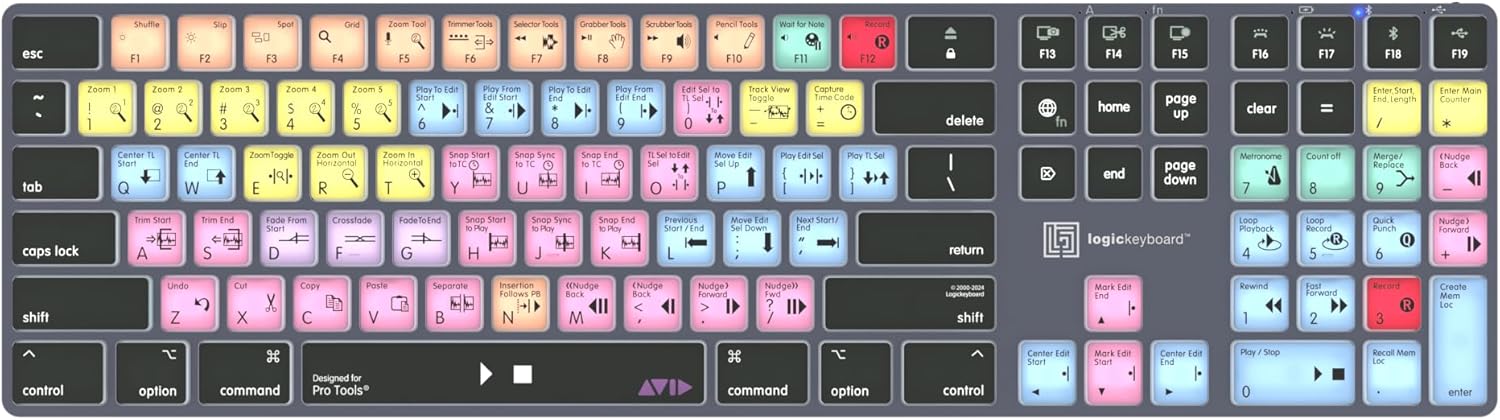
Figure 1: Logickeyboard Titan Wireless Backlit Keyboard.
2. Setup
2.1 Package Contents
- Logickeyboard Titan Wireless Backlit Keyboard
- USB Cable
2.2 Connecting Your Keyboard
The Titan keyboard offers dual connectivity: wireless (Bluetooth) and wired (USB-C).
- Wired Connection: Connect the provided USB cable from the keyboard's USB-C port to an available USB port on your Mac. The keyboard will automatically be recognized and powered.
- Wireless Connection (Bluetooth):
- Ensure the keyboard is charged.
- Turn on the keyboard using the power switch.
- On your Mac, go to System Settings > Bluetooth and ensure Bluetooth is enabled.
- The keyboard should appear in the list of nearby devices. Select it to pair.
- The Titan keyboard features a dual connectivity system, allowing you to switch between wireless and wired connections with a keystroke. It can connect to two Macs simultaneously, one wirelessly and one wired.
3. Operating Instructions
3.1 Shortcut Keys for Avid Pro Tools
The Logickeyboard Titan features over 70 color-coded shortcut keys specifically designed for Avid Pro Tools. These visual cues help streamline your editing process by making commands easily identifiable.

Figure 2: Color-coded shortcut keys for Avid Pro Tools.
3.2 Backlit Keys
The keys are backlit for optimal visibility in low-light environments. The illumination is dimmable in 5 levels to suit various lighting conditions.
- Adjusting Brightness: Use the dedicated brightness control keys (usually located on the function row) to increase or decrease the backlight intensity.
Video 1: Discover the 'TITAN' Logickeyboard designed for Pro Tools. This video highlights the keyboard's features, including its backlit keys and dedicated Pro Tools shortcuts.
3.3 Battery Management
The Titan keyboard is equipped with a long-lasting rechargeable lithium-ion battery for wireless connectivity. When the backlit feature is off, the keyboard can provide up to 300 hours of constant use before requiring a recharge.
- Recharging: Connect the keyboard via the USB-C cable to your computer or a USB power adapter. The battery indicator will show charging status.
4. Maintenance
4.1 Cleaning
To maintain optimal performance and appearance, regularly clean your keyboard. Use a soft, lint-free cloth slightly dampened with water or a mild cleaning solution. Avoid harsh chemicals or abrasive materials.
4.2 Keycap Care
If a keycap needs to be removed for cleaning or replacement, use a keycap puller or a small, flat tool (like a ruler or a Stanley knife) to gently pry it off. Be careful not to damage the small hinges underneath. When reattaching, align the keycap with the switch and press down firmly until it clicks into place.
5. Troubleshooting
- Keyboard Not Responding:
- Check the USB cable connection if using wired mode.
- Ensure the keyboard is powered on and charged if using wireless mode.
- For wireless, re-pair the Bluetooth connection with your Mac.
- Backlight Not Working:
- Ensure the keyboard is powered on.
- Adjust the brightness levels using the dedicated keys.
- Check battery level; low battery may disable backlighting.
- Incorrect Shortcut Function:
- Ensure you are using the keyboard with Avid Pro Tools.
- Verify that the correct keyboard layout is selected in your Mac's system settings.
For further assistance, please refer to the support section.
Video 2: Logickeyboard Designed for Avid Pro Tools. This video provides an overview of a Logickeyboard's functionality within Avid Pro Tools, demonstrating how dedicated keys can improve editing efficiency.
6. Specifications
| Feature | Detail |
|---|---|
| Product Dimensions | 16.93 x 4.69 x 0.51 inches |
| Item Weight | 1.28 pounds |
| Item Model Number | LKB-PT-TM-US |
| Batteries | 1 Lithium Ion batteries required (included) |
| Compatible Devices | Avid Pro Tools Software, Mac |
| Connectivity Technology | USB-C, Wireless (Bluetooth) |
| Keyboard Description | Multimedia |
| Recommended Uses | Audio Composing, Business, Multimedia, Personal |
| Special Features | Backlit, Rechargeable, Wireless |
| Keyboard Backlighting Color Support | Single Color |
7. Warranty and Support
7.1 Product Warranty
Logickeyboard products typically come with a manufacturer's warranty covering defects in materials and workmanship. Please refer to the warranty card included with your product or visit the official Logickeyboard website for specific warranty terms and conditions.
7.2 Customer Support
For technical support, troubleshooting, or any inquiries regarding your Logickeyboard Titan, please visit the Logickeyboard Store on Amazon or the official Logickeyboard website. You may find FAQs, driver downloads, and contact information for direct support.