
Silonn SLIM32T-WF
Contents
Silonn Smart Pebble Ice Machine User Manual
Brand: Silonn
Model: SLIM32T-WF
Introduction
The Silonn Smart Pebble Ice Machine is designed to provide you with soft, chewable nugget ice quickly and conveniently. With its smart control features via the Silonn App, you can schedule ice making, monitor status alerts, and maintain the unit with ease. This manual provides essential information for the safe and efficient operation of your new ice maker.

Figure 1: Silonn Smart Pebble Ice Machine
What's in the Box
Please ensure all items are present and in good condition:
- Silonn Smart Pebble Ice Machine
- Portable Ice Basket
- Ice Scoop
- User Manual (this document)
Specifications
| Feature | Detail |
|---|---|
| Product Dimensions | 13.6"D x 13.6"W x 14.8"H |
| Weight | 26.5 Pounds |
| Model Number | SLIM32T-WF |
| Capacity | 44 lbs per day |
| Voltage | 120 Volts |
| Connectivity | Wi-Fi (Silonn App) |
| Ice Type | Nugget Ice (Pebble Ice) |
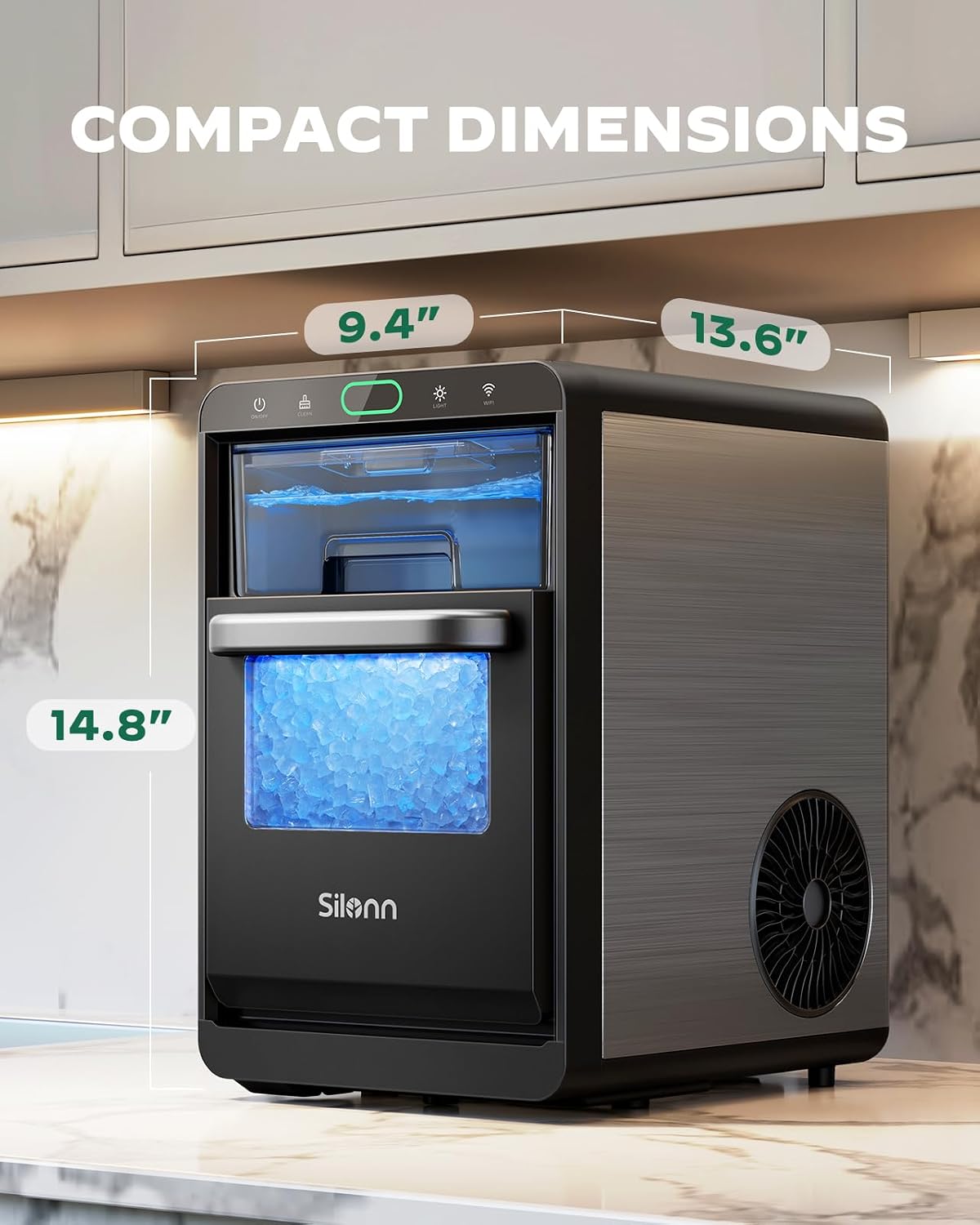
Figure 2: Compact Dimensions of the Ice Maker
Setup Guide
1. Placement
Place the Silonn Ice Maker on a flat, stable, and level surface. Ensure there is adequate ventilation around the unit, especially at the sides and rear, to allow for proper heat dissipation. Avoid placing it near heat sources or in direct sunlight.
2. Initial Cleaning
- Before first use, clean the ice basket and water tank with mild detergent and warm water. Rinse thoroughly.
- Run the self-cleaning cycle (refer to the Maintenance section for details) with clean water before making ice for consumption.
3. Water Filling
Pull out the water tank located at the front of the unit. Fill it with potable water up to the MAX fill line. Push the water tank back into place until it clicks securely.

Figure 3: Water Tank Filling
Operating Instructions
1. Basic Ice Making
- Ensure the water tank is filled and the ice basket is properly placed.
- Press the ON/OFF button on the control panel to start the ice making process. The indicator light will illuminate.
- The machine will begin producing nugget ice in approximately 10 minutes.
- When the ice basket is full, the "Ice Full" indicator will light up, and the machine will pause ice production.
- When the water level is low, the "Add Water" indicator will light up. Refill the water tank to resume ice making.

Figure 4: Fast Ice Production
2. Smart App Control
Download the Silonn App from your device's app store to unlock smart features:
- Timer Function: Schedule when you want your nugget ice to be ready.
- Status Alerts: Receive notifications when the ice basket is full or the water is low.
- Remote Control: Turn the ice maker on or off from anywhere.

Figure 5: Silonn App for Smart Control
3. Ice Collection
The ice basket is removable for easy access. Use the provided ice scoop to transfer ice to your beverages or storage containers.
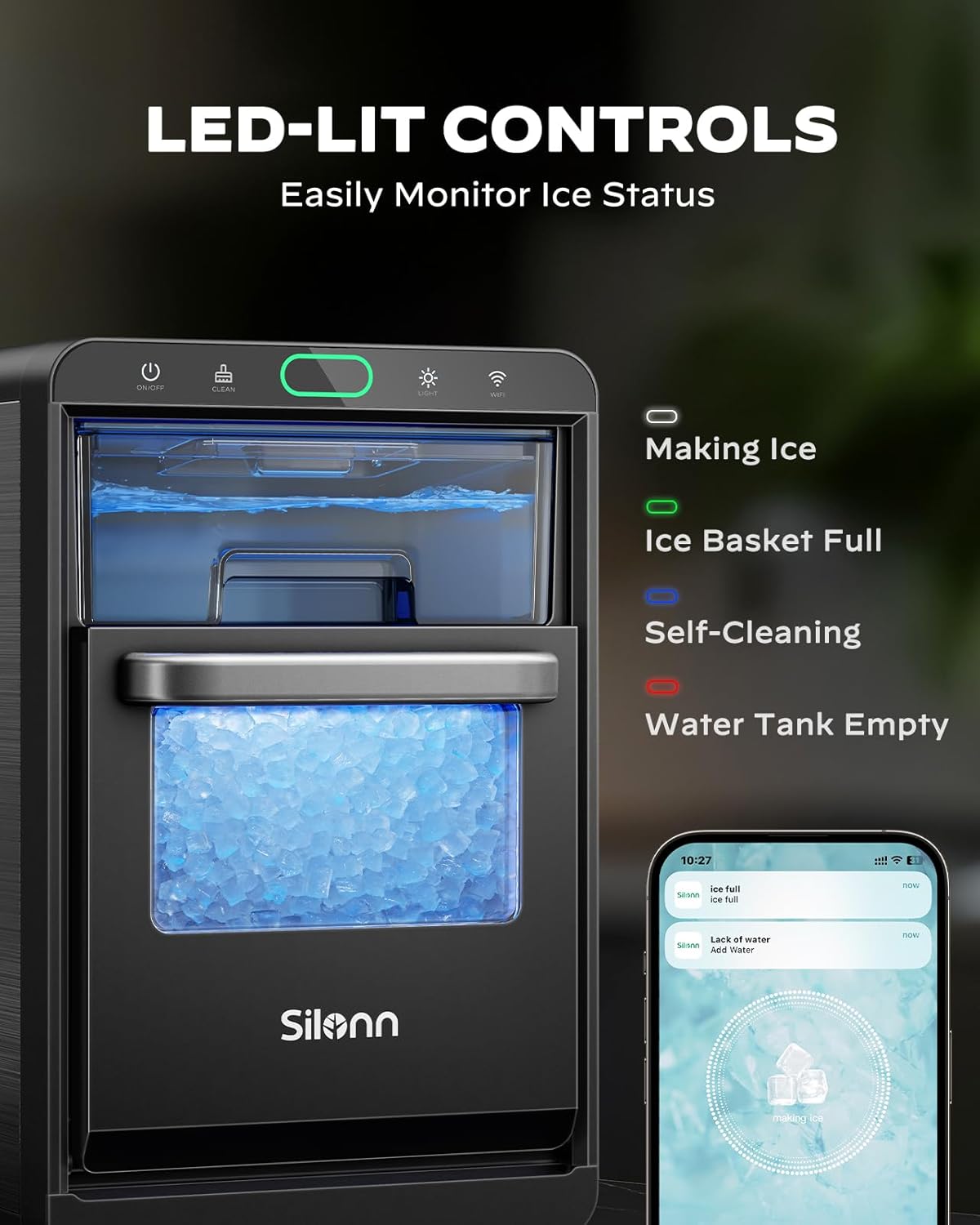
Figure 6: LED-Lit Controls and Ice Basket
Maintenance
1. Self-Cleaning Function
The ice maker features a convenient self-cleaning function:
- Ensure the water tank is filled with clean water.
- Press and hold the CLEAN button for 5 seconds to activate the self-cleaning mode.
- The machine will automatically clean its internal components. This cycle typically takes several minutes.
- Once the cycle is complete, drain any remaining water from the unit.

Figure 7: Self-Cleaning Process
2. Manual Cleaning
For thorough cleaning, the ice basket and water tank are removable and can be washed with mild soap and water. Rinse thoroughly before reassembling.
3. Descaling
Depending on your water hardness, descaling may be necessary to prevent mineral buildup and maintain optimal performance. Descale monthly in moderately hard water areas, or every two to three weeks in hard to very hard water areas. Use a descaling solution recommended for ice makers or a mixture of water and white vinegar.

Figure 8: Hard Water Map and Descaling Frequency
Troubleshooting
If you encounter any issues with your Silonn Ice Maker, please refer to the table below for common problems and solutions:
| Problem | Possible Cause | Solution |
|---|---|---|
| Ice not being produced. | Low water level; Ice basket full; Unit not powered on. | Refill water tank; Empty ice basket; Press ON/OFF button. |
| Ice is soft or melts quickly. | High ambient temperature; Poor ventilation; Water temperature too high. | Move unit to cooler area; Ensure proper ventilation; Use colder water. |
| Machine is noisy. | Normal operation sounds (compressor, water pump); Unit not level. | Ensure unit is on a flat, stable surface. |
| "Add Water" indicator is on, but tank is full. | Water tank not fully pushed in; Sensor issue. | Ensure water tank is securely in place. |
Warranty and Support
For warranty information, technical support, or service inquiries, please refer to the warranty card included with your product or visit the official Silonn website. Do not attempt to repair the unit yourself, as this may void your warranty.
You can also find additional resources and frequently asked questions on the Silonn support page.
Official Product Videos
Silonn Wi-Fi Nugget Ice Maker SLIM32T-WF Overview
Video 1: Official overview of the Silonn SLIM32T-WF Ice Maker.
Ask a question about this manual
Ask about setup, troubleshooting, compatibility, parts, safety, or missing instructions. Manuals+ will review the question and use this page’s manual context to help answer it.