
1. Introduction
The DUSKTEC Socket Fan Light is a 2-in-1 device combining a ceiling fan and an LED light, designed for easy installation into standard E26/E27 light sockets. This unit provides adjustable airflow and customizable lighting for various indoor spaces.
2. Safety Information
- Read all instructions: Before installation and use, carefully read and understand all instructions.
- Power Disconnection: Always turn off the power at the circuit breaker or fuse box before installing, cleaning, or performing any maintenance on the fan light.
- Electrical Safety: Ensure the light socket is rated for the fan light's wattage and voltage (120 Volts, 26 Watts). Do not use with dimmer switches unless specifically designed for LED fan lights.
- Secure Installation: Ensure the light socket is securely mounted and capable of supporting the fan light's weight (1.31 pounds).
- Blade Clearance: Maintain adequate clearance around the fan blades to prevent obstruction during operation.
- Avoid Moisture: Do not install in damp or wet locations. This product is for indoor use only.
- Children and Pets: Keep children and pets away from the fan light during operation.
3. Package Contents
Verify that all components are present in the package:
- 1x Socket Fan Light Unit
- 1x Remote Control (batteries not included)
- 1x Socket Extender (for deep sockets, if needed)
- 5x Fan Blades
- 1x User Manual
4. Setup and Installation
Follow these steps for proper installation:
- Turn off Power: Before beginning installation, ensure the power to the light socket is turned off at the circuit breaker or wall switch.
- Install Fan Blades: Carefully attach the five fan blades to the main fan unit. Ensure they are securely fastened.
- Screw into E26 Socket: Screw the fan light unit directly into a standard E26/E27 light socket. If the socket is deep, use the included socket extender. Ensure it is screwed in firmly but do not overtighten.
- Restore Power: Once the fan light is securely installed, restore power at the circuit breaker or wall switch.

The DUSKTEC Socket Fan Light is designed for effortless installation by screwing directly into a standard E26/E27 light socket. A socket extender is included for deeper sockets.

Visual guide for the installation process, highlighting the simplicity of attaching the fan blades and screwing the unit into an E26 socket.
5. Operating Instructions
The DUSKTEC Socket Fan Light is controlled using the included remote control. Ensure batteries are installed in the remote (not included).
5.1 Remote Control Functions

The remote control provides full functionality for the fan light, including fan speed, light settings, and timer functions.

A comprehensive guide to the remote control layout, indicating buttons for light and fan master on/off, 3-color changeable, night light mode, color temperature adjustment, brightness control, 2-hour timer, natural wind mode, and fan speed levels (1-6).
- ON/OFF Button: Turns the fan and light on or off.
- Fan Speed Control (1-6): Adjusts the fan speed from 1 (lowest) to 6 (highest).
- Light ON/OFF: Toggles the light on or off independently.
- Color Temperature Adjustment: Cycles through 3000K (Warm White), 4500K (Natural White), and 6000K (Cool White).
- Brightness Adjustment: Dims the light from 10% to 100%.
- Night Light Mode: Activates a low-brightness, warm light setting.
- 2-Hour Timer: Sets the fan and/or light to turn off automatically after 2 hours.
- Natural Breeze Mode: Simulates a natural breeze by varying fan speeds.
- Memory Function: The fan light remembers the last used light color temperature and brightness settings.
5.2 Fan Speed Operation
The fan offers 6 adjustable speeds to suit your comfort needs.

Visual representation of the 6 fan speeds, categorized for different comfort levels: comfortable sleep (1-2), air circulation (3-4), and cool breeze (5-6).

Examples of fan operation in various environments, demonstrating the effect of low, medium, and high wind speeds.
5.3 Light Settings
The integrated LED light offers adjustable color temperature and brightness.
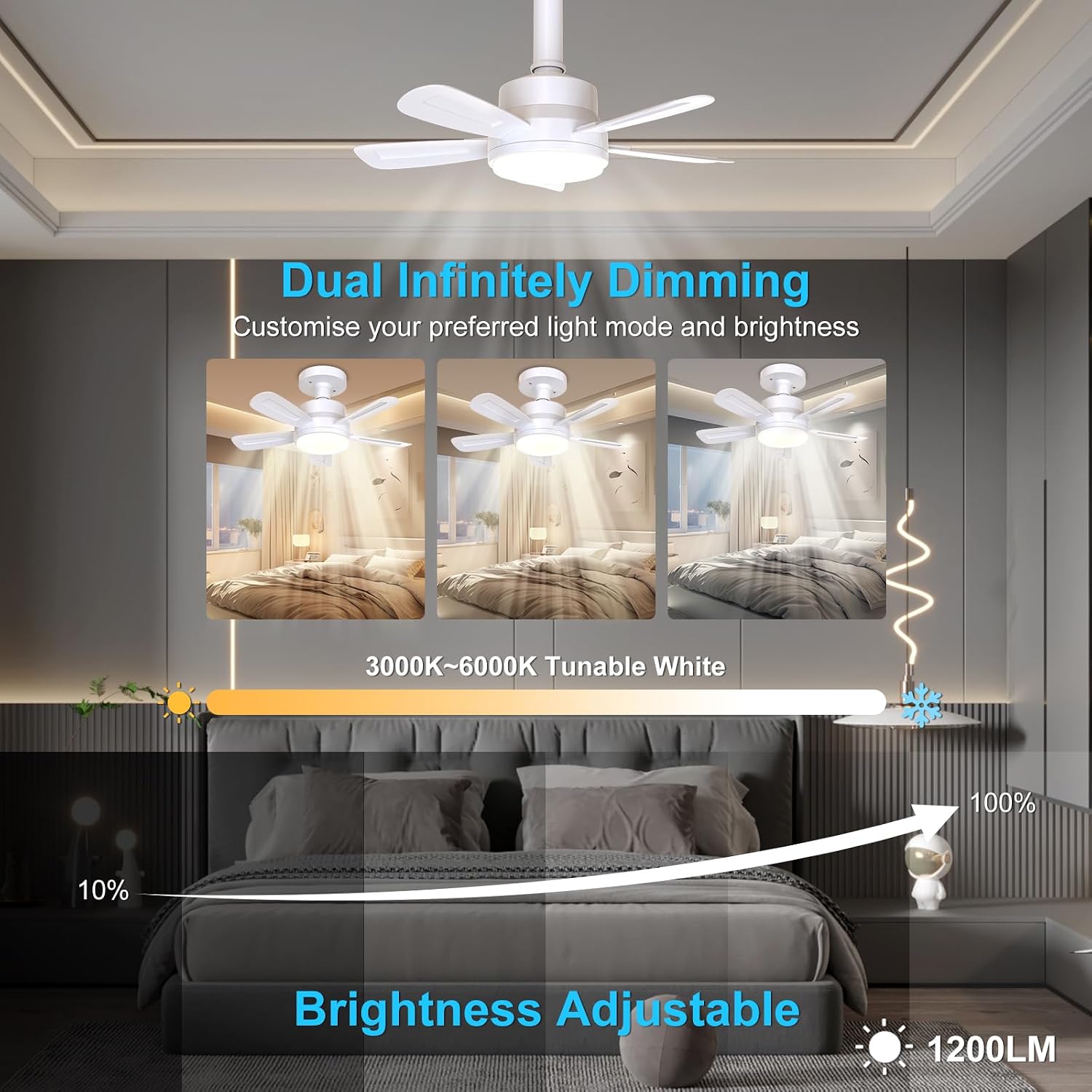
The light offers tunable white from 3000K to 6000K and brightness adjustment from 10% to 100% (1200 Lumens max).

The fan light provides three distinct color modes: Warm light (3000K), Daylight (4500K), and White light (6000K), adjustable via the remote control.

The brightness of the light can be adjusted from 10% to 100% using the remote control.
5.4 Timer Function
Activate the 2-hour timer for automatic shut-off.

The 2-hour timer function allows for automatic shut-off, promoting a gentle breeze for sleep.
6. Maintenance
Regular maintenance ensures optimal performance and longevity of your DUSKTEC Socket Fan Light.
- Cleaning: Before cleaning, ensure the power is turned off. Use a soft, dry cloth to wipe down the fan blades and light housing. Do not use abrasive cleaners or solvents.
- Dust Removal: Periodically remove dust from the fan blades and motor vents to maintain efficient airflow and prevent overheating.
- No Lubrication Required: The motor is permanently lubricated and does not require additional oiling.
7. Troubleshooting
If you encounter issues with your DUSKTEC Socket Fan Light, refer to the following common problems and solutions:
| Problem | Possible Cause | Solution |
|---|---|---|
| Fan or Light does not turn on | No power to the socket; Remote control batteries are dead; Fan light not screwed in properly. | Check circuit breaker/wall switch; Replace remote batteries; Ensure fan light is securely screwed into the socket. |
| Fan makes excessive noise | Loose blades; Obstruction; Unit not securely installed. | Ensure blades are tightly secured; Check for any objects interfering with blade rotation; Re-tighten the fan light in the socket. |
| Remote control not working | Dead batteries; Obstruction between remote and fan light; Remote not paired (if applicable). | Replace batteries; Ensure clear line of sight; Refer to remote pairing instructions (if provided in a separate guide). |
| Light flickers or is dim | Loose connection; Incorrect dimmer switch (if applicable). | Ensure fan light is securely screwed in; Do not use with incompatible dimmer switches. |
| Fan airflow is upward only | Fan design is fixed for upward airflow. | This model may have a fixed upward airflow direction. Consider placement for desired air circulation. |
8. Specifications
Detailed technical specifications for the DUSKTEC Socket Fan Light (Model AXW-SFL001).

Visual representation of the fan light's dimensions (15.7 inches width, 5.5 inches height) and a table of key product parameters.
| Feature | Specification |
|---|---|
| Model Name | Socket fan light (AXW-SFL001) |
| Brand | DUSKTEC |
| Color | White |
| Electric Fan Design | Ceiling Fan |
| Power Source | AC |
| Product Dimensions | 7.23"D x 7.24"W x 6.49"H (approx. 15.7" diameter when blades extended) |
| Item Weight | 1.31 Pounds |
| Room Type | Kids Room, Bedroom, Kitchen, Living Room, Nursery, Garages, Closet, Balcony, Small Room, Home Office, Dorm Room, Study Room, Dining Room |
| Special Features | 2-in-1 Socket Fan Light, Super Quiet, Energy Efficient, 6 Fan Speeds, 3 Light Color Temperatures, LED Light with 1200 Lumens, Easy Installation, Lightweight, Remote Control, Sudden-stop protection, Timing & Memory Function |
| Noise Level | 30 Decibels |
| Wattage | 26 watts (Light Power: 16W, Fan Power: 10W) |
| Number of Blades | 5 |
| Speed | 6 RPM (6 fan speeds) |
| Voltage | 120 Volts (110-265V compatible) |
| Switch Type | Toggle (via remote control) |
| Included Components | 1x Remote Control (no batteries included), 1x Socket Extender, 1x Socket Fan, 5x Blades, 1x User Manual |
| Indoor/Outdoor Usage | Indoor |
| Control Method | Remote |
| Motor Type | DC |
| Installation Type | Flush Mount (screw-in) |
| Light Color Temperature | 3000K-6000K CCT (adjustable) |
| Lumen Output | 1200-1500lm |
| Material | ABS+PC+Metal |
| Certifications | CE, Energy Star, FCC, RoHS |
9. Warranty and Support
For warranty information or technical support, please contact DUSKTEC customer service. Details regarding specific warranty periods and support channels are typically provided with your purchase documentation or on the official DUSKTEC website.
Please retain your proof of purchase for any warranty claims.
10. Product Overview Video
This video provides a general overview of the DUSKTEC Socket Fan Light, demonstrating its features and functionality. It showcases the fan's operation, light adjustments, and remote control usage.