
1. Introduction
Welcome to the user manual for your new De'Longhi Magnifica EVO ECAM29064XB Automatic Coffee Machine. This guide provides essential information for the safe and efficient operation, maintenance, and troubleshooting of your appliance. Please read this manual thoroughly before using the machine and keep it for future reference.

This image displays the De'Longhi Magnifica EVO ECAM29064XB automatic coffee machine in black, featuring a milk carafe, a glass of layered latte, and two espresso cups. The machine highlights its one-touch operation for four different menus.
2. Safety Instructions
To prevent injury or damage, always observe the following safety precautions:
- Ensure the power supply voltage matches the rating on the appliance.
- Do not immerse the appliance, power cord, or plug in water or other liquids.
- Keep the appliance out of reach of children.
- Avoid touching hot surfaces, such as the coffee spouts or steam wand, during and immediately after operation.
- Unplug the machine from the power outlet before cleaning and when not in use for extended periods.
- Do not operate the machine if it has a damaged cord or plug, or if it malfunctions or has been damaged in any way.
- Only use accessories and spare parts recommended by the manufacturer.
3. Product Overview
Familiarize yourself with the main components of your De'Longhi Magnifica EVO coffee machine:
- Control Panel: Intuitive interface with direct menu icons for various beverages.
- Bean Hopper: For whole coffee beans.
- Water Tank: Removable for easy refilling.
- LatteCrema System: Automatic milk frother for perfect milk-based drinks.
- Coffee Spouts: Adjustable height for different cup sizes.
- Drip Tray: Collects excess water and coffee drips.
- Coffee Grounds Container: Collects used coffee pucks.
- Brewing Unit: Removable for easy cleaning.
4. Setup
4.1 Unpacking and Placement
- Remove all packaging materials from the machine.
- Place the machine on a stable, level surface away from water splashes and heat sources.
- Ensure adequate space around the machine for ventilation and access to components.
4.2 Initial Cleaning
- Wash the water tank, drip tray, coffee grounds container, and milk carafe with warm water and mild detergent. Rinse thoroughly.
- Wipe the exterior of the machine with a damp cloth.
4.3 Water Hardness Test
Use the included water hardness checker to determine your water's hardness level. This information is crucial for setting up the machine's descaling frequency and ensuring optimal performance.
4.4 Filling Water Tank and Bean Hopper
- Fill the water tank with fresh, cold tap water up to the MAX level.
- Open the bean hopper lid and pour whole coffee beans into the hopper. Do not fill above the MAX level.

A close-up view of coffee beans being poured into the integrated bean hopper of the De'Longhi Magnifica EVO, emphasizing the machine's bean-to-cup functionality.
4.5 First Use / Priming
Follow the on-screen instructions or refer to the quick start guide for the initial priming cycle. This prepares the internal circuits for coffee preparation.
5. Operating Instructions
5.1 Control Panel Overview
The Magnifica EVO features a user-friendly control panel with direct access buttons for your favorite beverages.
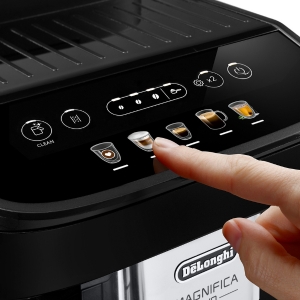
A detailed view of the intuitive control panel of the Magnifica EVO, showing illuminated icons for various coffee selections and a finger pressing one of the buttons, illustrating ease of use.
5.2 Coffee Preparation
Your machine offers four direct menu options: Espresso, Cafe Japone, My Latte, and Cappuccino.

This image illustrates the four direct menu options available on the Magnifica EVO: My Latte (with a heart icon), Cappuccino, Espresso, and Cafe Japone, demonstrating the variety of beverages the machine can prepare.
To make a coffee:
- Place a cup under the coffee spouts.
- Select your desired beverage by pressing the corresponding icon on the control panel.
- The machine will automatically grind the beans, brew the coffee, and dispense it into your cup.
Customizing 'My Latte':
The 'My Latte' function allows you to customize the milk quantity to your preference. Simply press and hold the 'My Latte' button to enter programming mode, then release when the desired milk volume is reached.
5.3 LatteCrema System
The exclusive LatteCrema system automatically froths milk to the perfect consistency and temperature (60-65°C) for creamy cappuccinos and lattes.

This image shows the LatteCrema system in operation, dispensing perfectly frothed milk into a glass to create a multi-layered coffee beverage, highlighting the automatic milk frothing capability.
The LatteCrema system is also compatible with various plant-based milk alternatives, allowing you to enjoy frothed milk with soy, almond, or oat milk.

An image showcasing three different plant-based milk options – soy milk, almond milk, and oat milk – in separate pitchers, indicating the LatteCrema system's versatility with various milk types.

A close-up of the detachable milk carafe, showing clear measurement markings for different milk volumes, labeled for cappuccino (C) and latte macchiato (LM), aiding in precise milk preparation.
6. Maintenance
Regular cleaning and maintenance ensure the longevity and optimal performance of your coffee machine.
6.1 Daily Cleaning
- Empty and rinse the drip tray and coffee grounds container daily.
- After each use, clean the LatteCrema system by running the cleaning cycle or disassembling and rinsing its components.
6.2 Brewing Unit Cleaning
The brewing unit is removable for easy cleaning. Rinse it under running water at least once a month or as indicated by the machine.
6.3 Descaling
The machine will indicate when descaling is required. Use only De'Longhi descaling solution and follow the instructions provided with the descaler or in the machine's display. Regular descaling prevents limescale buildup and maintains coffee quality. The machine comes with a water filter to help reduce limescale formation.

This image displays several removable parts of the coffee machine, such as the brewing unit being rinsed under a faucet, along with the milk carafe, cleaning brush, and other accessories, emphasizing the ease of cleaning and maintenance.
7. Troubleshooting
If you encounter issues with your coffee machine, refer to the following common problems and solutions:
| Problem | Possible Cause | Solution |
|---|---|---|
| No coffee dispensed | Water tank empty, bean hopper empty, brewing unit clogged. | Refill water tank/bean hopper, clean brewing unit. |
| Coffee is too weak/strong | Grind setting incorrect, pre-ground coffee bypass used incorrectly. | Adjust grind setting, ensure correct pre-ground coffee usage. |
| No milk foam or poor quality foam | Milk carafe dirty, milk type unsuitable, milk temperature too high/low. | Clean milk carafe, use cold fresh milk, try different milk types. |
| Machine displays an error message | Specific internal malfunction. | Refer to the full manual for specific error codes or contact customer support. |
8. Specifications
| Feature | Detail |
|---|---|
| Manufacturer | De'Longhi |
| Model Number | ECAM29064XB |
| Color | Black |
| Product Dimensions (L x W x H) | 44 x 24 x 36 cm |
| Item Weight | 10 kg |
| Capacity | 1.9 Liters |
| Wattage | 1450 W |
| Coffee Maker Type | Drip Coffee Machine (Automatic Espresso Machine) |
| Features | Water filter, LatteCrema System, Direct Menu Icons |
| Included Components | Water filter, Cleaning brush, Water hardness checker, Measuring spoon, Descaling agent |
| Battery Usage | No |
9. Warranty and Support
9.1 Warranty Information
Your De'Longhi Magnifica EVO ECAM29064XB comes with a 3-year warranty upon registration with the De'Longhi Family program. Repairs are generally handled within 72 hours. Please retain your proof of purchase for warranty claims.
9.2 Customer Support
For further assistance, technical support, or to inquire about spare parts and accessories, please contact De'Longhi customer service. You can find contact details on the official De'Longhi website or in the warranty booklet included with your product.
Ask a question about this manual
Ask about setup, troubleshooting, compatibility, parts, safety, or missing instructions. Manuals+ will review the question and use this page’s manual context to help answer it.