
1. Introduction
Welcome to the user manual for your LAMAX Dots2 Play True Wireless Earbuds. This guide provides detailed instructions to help you set up, operate, and maintain your earbuds, ensuring you get the best audio experience. Please read this manual thoroughly before using your device.
2. Package Contents
Please check the package for the following items:
- LAMAX Dots2 Play True Wireless Earbuds
- Charging Case
- USB-C Charging Cable
- User Manual
3. Product Overview
Familiarize yourself with the components and features of your LAMAX Dots2 Play earbuds and charging case.

Image: The LAMAX Dots2 Play True Wireless Earbuds are shown resting inside their open charging case. The earbuds are black with a blue 'V' logo, and the case is also black with LED indicators on the front, indicating battery status.
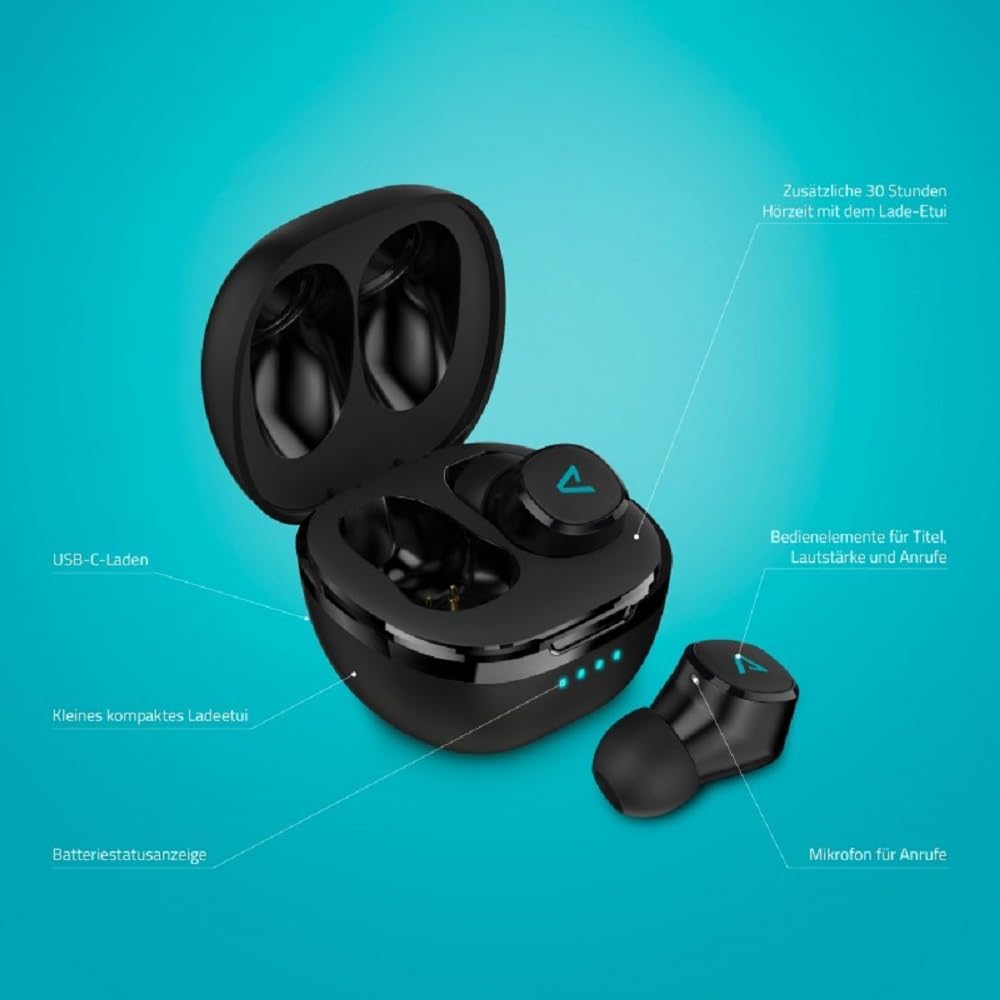
Image: A detailed diagram highlighting key components of the LAMAX Dots2 Play earbuds and charging case. Labels point to: USB-C charging port, the compact charging case, battery status indicator LEDs, touch controls on the earbuds for track, volume, and calls, a microphone for calls, and notes that the charging case provides an additional 30 hours of playtime.

Image: An infographic illustrating the main features of the LAMAX Dots2 Play earbuds. Icons and text highlight: USB-C charging capability, up to 7 hours of battery life on a single earbud charge, Bluetooth 5.1 connectivity with a range of up to 10 meters, enhanced LAMAX BeatBass® sound technology, and integrated call and volume control functions.
4. Charging the Earbuds and Case
To ensure optimal performance, fully charge your earbuds and charging case before first use.
4.1 Charging the Charging Case
- Connect the provided USB-C charging cable to the charging port on the back of the case.
- Connect the other end of the cable to a USB power adapter (not included) or a computer's USB port.
- The LED indicators on the front of the case will illuminate to show the charging status. All four LEDs will be solid white when fully charged.
4.2 Charging the Earbuds
- Place the earbuds into their respective slots in the charging case. Ensure they are correctly seated.
- Close the charging case. The earbuds will automatically begin charging.
- The LED indicators on the case will show the charging status of the earbuds. The earbuds themselves may have small indicators that turn off when fully charged.
A full charge provides up to 7 hours of playback for the earbuds, and the charging case extends total listening time to approximately 37 hours.
5. Bluetooth Pairing
Follow these steps to connect your LAMAX Dots2 Play earbuds to your device:
- Initial Pairing: Open the charging case. The earbuds will automatically enter pairing mode, indicated by a flashing LED on one or both earbuds.
- Activate Bluetooth: On your smartphone, tablet, or other Bluetooth-enabled device, go to the Bluetooth settings and ensure Bluetooth is turned on.
- Select Device: Look for "LAMAX Dots2 Play" in the list of available devices and select it to connect.
- Confirmation: Once connected, you will hear an audible confirmation from the earbuds, and the LED indicators will stop flashing.
The earbuds feature Bluetooth 5.1 for a stable connection and a wireless range of up to 10 meters (33 feet).
6. Operating Controls
The LAMAX Dots2 Play earbuds feature intuitive touch controls for managing your audio and calls.
6.1 Music Playback
- Play/Pause: Tap once on either earbud.
- Next Track: Double-tap the right earbud.
- Previous Track: Double-tap the left earbud.
6.2 Call Management
- Answer/End Call: Tap once on either earbud.
- Reject Call: Press and hold either earbud for 2 seconds.
6.3 Voice Assistant
- Activate Voice Assistant: Triple-tap either earbud to activate your device's voice assistant (e.g., Siri, Google Assistant).
7. Maintenance and Care
Proper care will extend the lifespan of your earbuds.
- Cleaning: Use a soft, dry, lint-free cloth to clean the earbuds and charging case. Do not use abrasive cleaners or solvents.
- Storage: When not in use, always store the earbuds in their charging case to protect them and keep them charged.
- Avoid Moisture: Keep the earbuds and case away from water, humidity, and extreme temperatures.
- Charging Port: Ensure the USB-C charging port is free of dust and debris.
8. Troubleshooting
If you encounter issues with your LAMAX Dots2 Play earbuds, try the following solutions:
- Earbuds not pairing: Ensure both earbuds are charged. Place them back in the case, close it, then open it again to re-enter pairing mode. Check your device's Bluetooth settings and try reconnecting.
- No sound from one earbud: Try placing both earbuds back in the case, closing it, and then taking them out again. Ensure they are both connected to your device.
- Charging issues: Verify the USB-C cable is securely connected to both the case and the power source. Try a different USB-C cable or power adapter. Clean the charging contacts on the earbuds and inside the case.
- Poor sound quality: Ensure the earbuds are properly seated in your ears. Try different ear tip sizes for a better seal. Check your device's volume and audio settings.
- Earbuds not responding: Place the earbuds back in the charging case, close the lid, and wait a few seconds before taking them out again. This can often resolve minor glitches.
9. Specifications
| Feature | Detail |
|---|---|
| Model Name | Dots2 Play |
| Connectivity Technology | Wireless (Bluetooth) |
| Bluetooth Version | 5.1 |
| Bluetooth Range | Up to 10 meters (33 feet) |
| Earbud Battery Life | Up to 7 hours |
| Total Battery Life (with case) | Up to 37 hours |
| Charging Port | USB-C |
| Control Type | Touch Control, Voice Control |
| Microphone | Integrated for calls |
| Sound Technology | LAMAX BeatBass® |
| Ear Placement | In Ear |
| Color | Black |
| Item Weight | 100 Grams (3.53 ounces) |
| Model Number | LXIHMDOTS2PBA |
10. Safety Information
Please observe the following safety guidelines:
- Hearing Protection: Avoid listening at high volume levels for extended periods to prevent hearing damage.
- Driving Safety: Do not use earbuds while driving or cycling in situations where it could be dangerous.
- Water and Moisture: These earbuds are not waterproof. Avoid exposure to rain, moisture, or submersion in liquids.
- Temperature: Do not expose the product to extreme temperatures (hot or cold).
- Disposal: Dispose of the product and its battery responsibly according to local regulations. Do not dispose of with household waste.
11. Warranty and Support
Your LAMAX Dots2 Play True Wireless Earbuds come with a standard manufacturer's warranty. For detailed warranty information, technical support, or service inquiries, please refer to the official LAMAX website or contact your local retailer.
For further assistance, please visit www.lamax-electronics.com.