
1. Introduction
The Windgoo E-bike E20 is a versatile 20-inch electric bicycle designed for both urban commuting and light off-road adventures. It features a foldable frame for easy transport and storage, 3.0-inch thick tires for enhanced grip, a 250W rear motor, and a 36V 12.5Ah battery providing a range of up to 70 km. This manual provides essential information for the safe and efficient operation, maintenance, and troubleshooting of your E20 e-bike.

Figure 1.1: The Windgoo E-bike E20, showcasing its design and robust tires.
2. Safety Information
Before operating the Windgoo E20, carefully read and understand all safety warnings and instructions. Failure to do so may result in serious injury or damage to the product.
- Always wear a certified helmet and appropriate safety gear when riding.
- Perform a pre-ride inspection before each use, checking brakes, tires, and battery level.
- Adhere to all local traffic laws and regulations regarding electric bicycles.
- Do not ride under the influence of alcohol or drugs.
- The E20 has an IPX4 waterproof rating, meaning it is resistant to splashing water from any direction. Avoid submerging the bike or riding in heavy rain for extended periods.
- Observe warning labels on the bike, such as those on the battery and front fork.
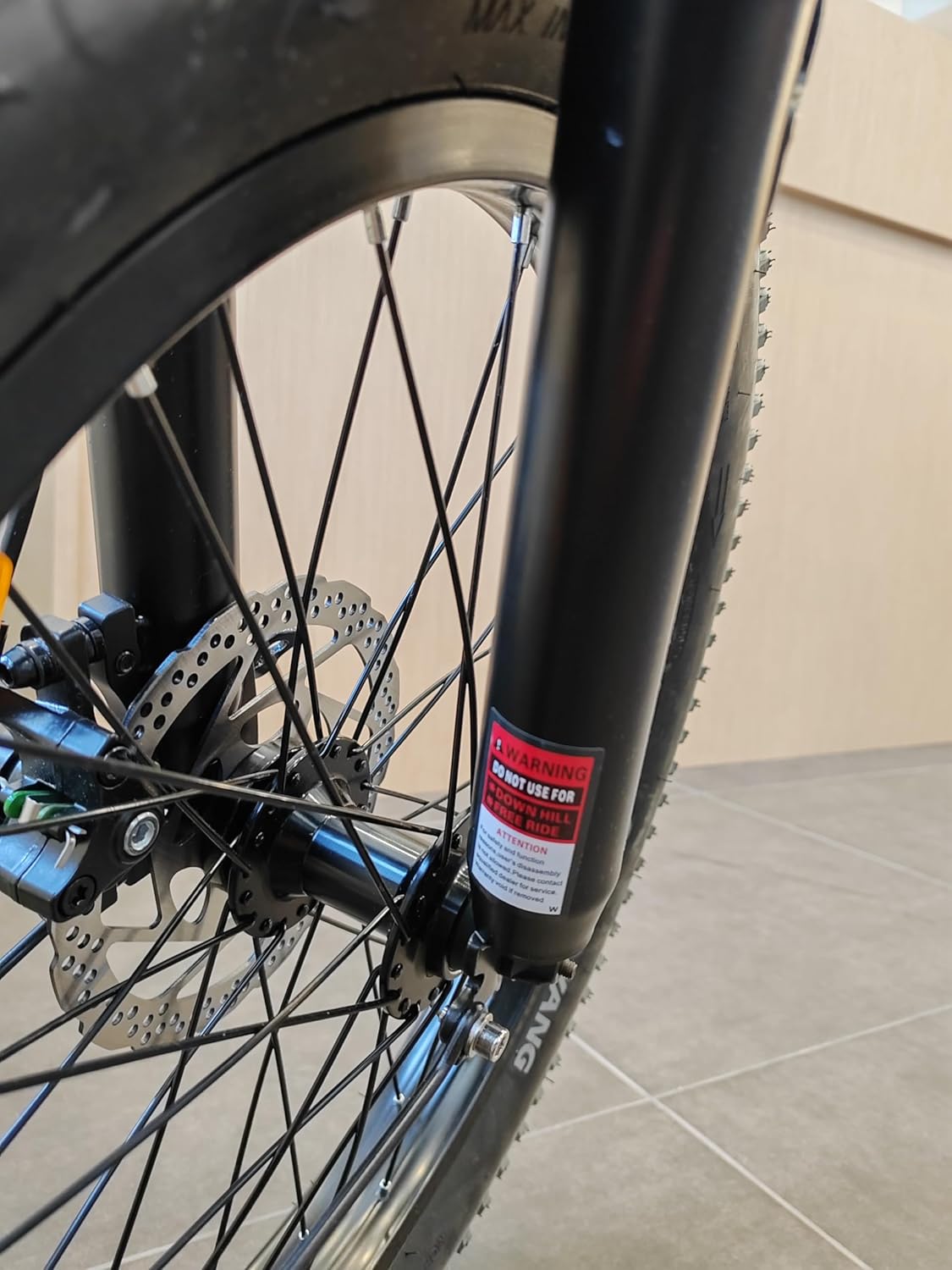
Figure 2.1: Important warning label located on the front fork of the E20.
3. Setup and Assembly
Your Windgoo E20 comes partially assembled. Follow these steps for initial setup and preparation for your first ride.
3.1 Unfolding the E-bike
- Carefully remove the E-bike from its packaging.
- Locate the folding mechanism on the frame and release the safety latch.
- Unfold the frame until it locks securely into place. Ensure the latch is fully engaged.
- Raise the handlebar stem and lock it into position.
- Adjust the handlebar height and angle to your preference, then secure it.
- Insert the seat post and adjust the saddle height for comfortable riding. Secure the quick-release lever.
- Attach the pedals (if not pre-installed). Note that pedals are typically marked 'L' for left and 'R' for right.

Figure 3.1: The Windgoo E20 in its folded configuration, demonstrating its portability.
3.2 Battery Installation and Charging
The E20 features a removable 36V 12.5Ah lithium-ion battery. For optimal performance, fully charge the battery before first use.
- To install the battery, align it with the frame compartment and slide it in until it clicks into place. Use the provided key to lock the battery for security.
- To remove the battery, unlock it with the key and slide it out.
- Connect the charger to the charging port on the battery (or directly on the bike if charging while installed). Plug the charger into a standard wall outlet.
- The charging indicator light on the charger will typically turn red during charging and green when fully charged. Charging takes approximately 5.5 hours.
- Always use the original charger provided by Windgoo.

Figure 3.2: The removable battery pack of the Windgoo E20, showing its specifications label.
4. Operating Instructions
Familiarize yourself with the controls and functions of your Windgoo E20 for a safe and enjoyable riding experience.
4.1 Powering On/Off and Pedal Assist
- To power on the E-bike, press and hold the power button on the handlebar display. The display will illuminate.
- To power off, press and hold the power button again until the display turns off.
- The E20 operates with pedal assist. As you pedal, the motor will provide assistance based on the selected assist level. Use the '+' and '-' buttons on the display to cycle through different assist levels.
- The pedal assist mode can provide a range of 70-80 km on a single charge, depending on terrain, rider weight, and assist level.
4.2 Gear Shifting
The E20 is equipped with a 7-speed gear system. Use the gear shifter on the handlebar to change gears according to terrain and desired speed. Shift to lower gears for climbing hills and higher gears for flat terrain or downhill riding.
4.3 Braking System
The E20 features front and rear mechanical disc brakes for reliable stopping power. The brake levers are located on the handlebars. Apply both brakes simultaneously for effective and controlled stopping. Electronic braking also provides additional protection.
4.4 Smart App Control (Windgoo Smart)
Enhance your riding experience by connecting your E20 to the "Windgoo Smart" app, available on Android and iOS devices.
- Download the "Windgoo Smart" app from your device's app store.
- Enable Bluetooth on your smartphone and open the app.
- Follow the in-app instructions to pair your phone with the Windgoo E20.
- The app allows for quick security checks, real-time GPS navigation, and potentially other smart features.

Figure 4.1: The Windgoo E20 ready for use in an urban setting.
5. Maintenance
Regular maintenance ensures the longevity and safe operation of your Windgoo E20.
- Battery Care: Charge the battery regularly, even if not in use, to maintain its health. Store the battery in a cool, dry place. Avoid fully discharging the battery frequently.
- Tire Pressure: Check tire pressure before each ride. Maintain the recommended pressure (usually indicated on the tire sidewall) for optimal performance and safety. The 3.0-inch fat tires provide better traction across various surfaces.
- Brakes: Regularly inspect brake pads for wear and ensure brake levers provide firm and responsive stopping power. Adjust or replace as needed.
- Chain: Keep the chain clean and lubricated to prevent rust and ensure smooth gear changes.
- Cleaning: Clean the bike with a damp cloth and mild soap. Avoid high-pressure washing, especially near electrical components. Dry thoroughly after cleaning.
- General Inspection: Periodically check all bolts, nuts, and quick-release levers to ensure they are tight and secure.
6. Troubleshooting
This section addresses common issues you might encounter with your Windgoo E20.
| Problem | Possible Cause | Solution |
|---|---|---|
| E-bike does not power on. | Battery is not charged or not properly installed. | Ensure battery is fully charged and securely locked in place. Check connections. |
| Motor not assisting. | Low battery, pedal assist level set to zero, or sensor issue. | Charge battery. Increase pedal assist level on the display. Check for any obstructions around the pedal sensor. |
| Brakes feel weak. | Worn brake pads or loose brake cable. | Inspect brake pads and replace if worn. Adjust brake cable tension. If unsure, consult a professional. |
| Unusual noises during riding. | Loose components, dry chain, or brake rub. | Check all bolts and nuts for tightness. Lubricate the chain. Inspect brake calipers for rubbing against the disc. |
7. Specifications
Key technical specifications for the Windgoo E-bike E20.
| Feature | Specification |
|---|---|
| Model | E20 |
| Motor Power | 250W Rear Motor |
| Battery | 36V 12.5Ah Lithium-ion (450Wh) |
| Max Speed | 25 km/h (EU standard) |
| Range (Pedal Assist) | Up to 70-80 km |
| Tire Size | 20 x 3.0 inches Fat Tires |
| Gears | 7-speed |
| Brake Type | Front and Rear Mechanical Disc Brakes |
| Frame Material | Alloy Steel |
| Folded Dimensions | 87cm x 38cm x 60cm |
| Waterproof Rating | IPX4 |
| Included Components | Battery, Bike, Charger, Instruction manual, User Manual, pedals |

Figure 7.1: Detailed power specifications label on the E20 battery.
8. Warranty and Support
For information regarding warranty coverage, terms, and conditions, please refer to the warranty card included with your product packaging. For technical support, spare parts, or any other inquiries, please contact Windgoo customer service through their official website or the contact information provided in your purchase documentation.
Always provide your model number (E20) and purchase date when contacting support for faster assistance.


