Introduction
The Polti Coffea G50S is a manual espresso machine featuring an integrated bean grinder, designed for coffee enthusiasts who appreciate precision and quality. With 30 adjustable grinding levels, this machine allows you to customize your coffee preparation to achieve your desired taste and consistency. It also includes a professional Steamymilk system for frothing milk, a manometer to monitor brewing pressure, and adjustable coffee temperature settings.
This manual provides detailed instructions for the safe and efficient use, maintenance, and troubleshooting of your Polti Coffea G50S coffee machine. Please read all instructions carefully before first use.
Setup
1. Unpacking and Initial Placement
Carefully remove all packaging materials and place the machine on a stable, flat, and heat-resistant surface. Ensure there is adequate ventilation around the machine.

Image: The Polti Coffea G50S machine shown with its various accessories, including the portafilter, tamper, milk pitcher, and cleaning tools.
2. Initial Cleaning
Before first use, clean the water tank, portafilter, and milk pitcher with warm water and a mild detergent. Rinse thoroughly.
3. Filling the Water Tank
Remove the water tank from the back of the machine. Fill it with fresh, cold drinking water up to the 'MAX' level indicator. Reinsert the tank securely.
4. Filling the Bean Hopper
Open the lid of the bean hopper located on top of the machine. Pour fresh whole coffee beans into the hopper. Ensure the lid is securely closed after filling.

Image: A hand demonstrating the rotation of the bean hopper to select one of the 30 grinding levels.
Operating the Coffee Machine
1. Powering On and Preheating
Plug the machine into a suitable power outlet. Press the power button. The machine will begin to preheat. Wait for the indicator lights to signal that the machine has reached the optimal brewing temperature.
2. Grinding Coffee
Select your desired grind level by rotating the bean hopper. The Polti Coffea G50S offers 30 levels of grind adjustment. Insert the portafilter into the grinding cradle and press the grind button to dispense freshly ground coffee directly into the portafilter.

Image: A close-up of a hand holding the portafilter as it receives freshly ground coffee from the integrated grinder.
3. Tamping and Brewing Espresso
After grinding, use the provided tamper to press the coffee grounds firmly and evenly into the portafilter. Lock the portafilter into the brew group head. Place your cup(s) on the drip tray. Select the desired brewing option (e.g., single or double espresso). The manometer will indicate the brewing pressure, helping you assess the quality of your extraction.
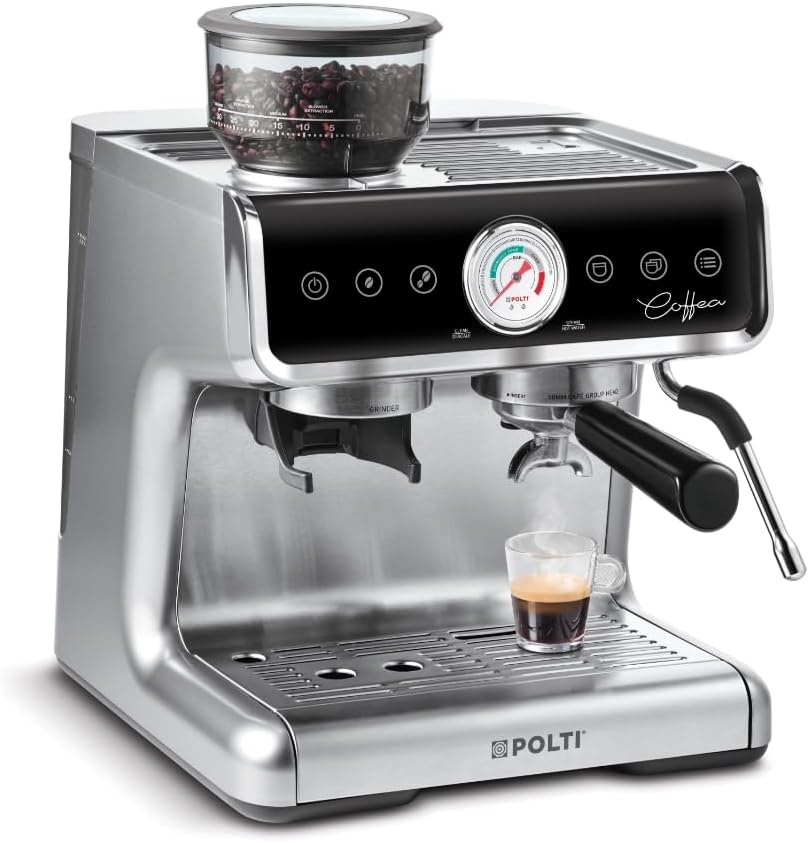
Image: The Polti Coffea G50S in operation, with espresso being dispensed into a glass cup, showcasing the machine's sleek design.
4. Frothing Milk with Steamymilk
Fill the stainless steel milk pitcher with cold milk. Position the Steamymilk wand into the milk. Activate the steam function. Move the pitcher up and down to create rich, creamy foam for cappuccinos or lattes. The Steamymilk system can also be used to heat water for teas or infusions.

Image: A hand demonstrating the use of the Steamymilk wand to froth milk in a stainless steel pitcher.
5. Adjusting Coffee Temperature
The Polti Coffea G50S allows for 4 levels of adjustable coffee temperature to ensure your coffee is brewed at the perfect heat. Refer to the machine's controls for temperature selection.
Maintenance and Cleaning
1. Daily Cleaning
- Drip Tray: Empty and clean the drip tray daily.
- Portafilter: After each use, remove the spent coffee grounds and rinse the portafilter and filter basket under running water. Use the provided brush for thorough cleaning.
- Steam Wand: Immediately after frothing milk, wipe the Steamymilk wand with a damp cloth to prevent milk residue from drying. Purge a small amount of steam to clear any internal blockages.
2. Descaling
Regular descaling is crucial to maintain machine performance and extend its lifespan. The frequency depends on water hardness and usage. Follow the descaling instructions provided in the full product manual or on the Polti website, using a suitable descaling solution.
3. Grinder Cleaning
Periodically clean the integrated grinder to ensure optimal performance and prevent blockages. Refer to the full product manual for detailed instructions on how to access and clean the grinding burrs. Use the provided brush and tip for cleaning.
Troubleshooting
This section addresses common issues you might encounter with your Polti Coffea G50S. For more complex problems, please contact Polti customer support.
| Problem | Possible Cause | Solution |
|---|---|---|
| No coffee dispensed | Water tank empty; Brew group clogged; No coffee beans. | Refill water tank; Clean brew group; Refill bean hopper. |
| Weak or watery coffee | Grind too coarse; Insufficient coffee dose; Tamping too light. | Adjust grind finer; Increase coffee dose; Tamp more firmly. Check manometer for optimal pressure. |
| No steam from wand | Steam wand clogged; Not preheated for steam. | Clean steam wand hole with pin; Allow machine to fully heat for steam function. |
| Machine not turning on | Not plugged in; Power outage. | Check power connection; Verify power supply. |
| Machine enters standby mode too quickly | Automatic standby function activated. | The Polti Coffea G50S enters standby mode after 15 minutes of inactivity. This is normal operation. |
Specifications
| Feature | Specification |
|---|---|
| Brand | Polti |
| Model Number | G50S (PCEU0130) |
| Color | Silver |
| Dimensions (L x W x H) | 35 x 32.5 x 33.5 cm |
| Weight | 8.7 Kilograms |
| Water Tank Capacity | 2.8 Liters |
| Power | 1550 Watts |
| Voltage | 230 Volts |
| Material | Plastic, Metal, Aluminum, Stainless Steel |
| Integrated Features | Integrated Coffee Grinder, Milk Frother (Steamymilk), Removable Water Tank, Manometer |
| Grind Levels | 30 |
| Coffee Temperature Settings | 4 Levels |
| Automatic Shut-off | Yes (after 15 minutes of inactivity) |
Warranty and Support
For information regarding the product warranty, please refer to the warranty card included with your purchase or visit the official Polti website. Polti provides customer support for any technical assistance or inquiries.
You can find more information and support resources by visiting the official Polti store on Amazon: Polti Store


