1. Introduction
Thank you for choosing the PISEN 10000mAh Portable Power Bank. This compact and powerful device is designed to keep your mobile devices charged on the go, featuring built-in cables for convenience and 30W fast charging capabilities. Its mini LED display provides precise battery monitoring, and its shell is made from 80% recycled plastic, contributing to reduced carbon emissions. Please read this manual carefully to ensure proper use and maintenance of your power bank.

Image: The PISEN 10000mAh Portable Power Bank, showcasing its compact design, built-in cables, and digital display.
2. Product Overview
Key Features
- Built-in iOS and Type-C Cables: Eliminates the need to carry multiple cables, compatible with a wide range of smart devices including iPhone 16/15/14/13/12/11 series, iPad series, Samsung, and more.
- PD30W Bi-directional Fast Charging: Both the Type-C port and cable support 30W fast charging for rapid device charging and quick power bank recharging (up to 55% in 30 minutes).
- Pocket-sized and Lightweight: Weighs just 7.35 oz and measures 3.39 x 2.56 x 1.28 inches, making it an ideal travel companion.
- Precise LED Digital Display: Provides accurate battery monitoring, showing the remaining charge percentage.
- Enhanced Safety Protections: Built-in safeguards against overvoltage, overcurrent, short-circuit, overdischarge, overcharge, and temperature fluctuations.
- Eco-friendly Design: Shell made from 80% recycled plastic to reduce carbon emissions.

Image: Visual representation of the power bank's six safety protection features: overvoltage, overcurrent, short-circuit, overdischarge, overcharge, and temperature protection.
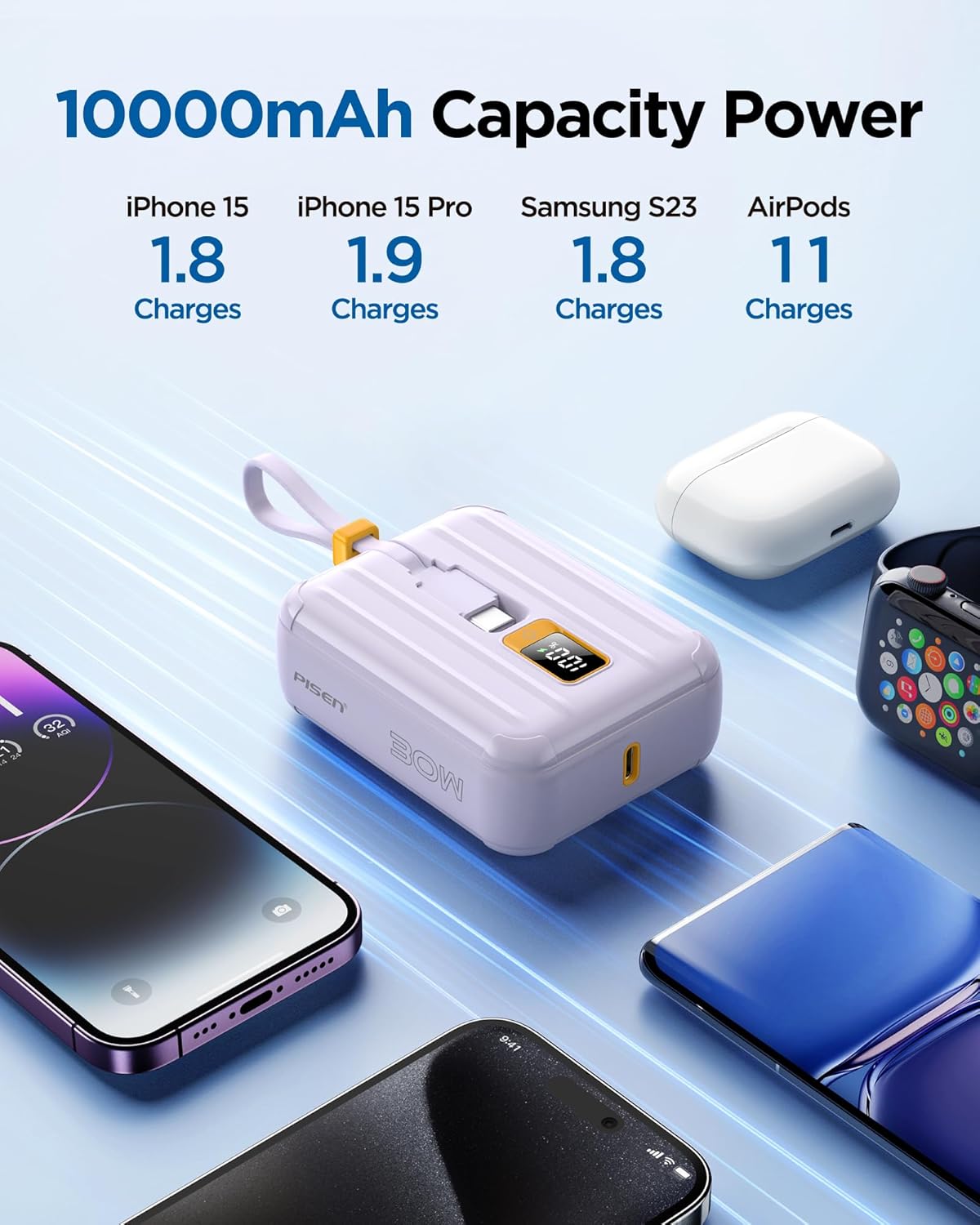
Image: An infographic illustrating the 10000mAh capacity, showing approximate charges for iPhone 15 (1.8), iPhone 15 Pro (1.9), Samsung S23 (1.8), and AirPods (11).

Image: A visual comparison highlighting the convenience of the integrated dual cable design (top, neat) versus the clutter of carrying multiple external cables (bottom, tangled).

Image: The power bank is shown being held in a hand and easily fitting into a jeans pocket, emphasizing its compact and portable nature with dimensions and weight listed.
What's Included
- 1 x PISEN 10000mAh Power Bank (Model: TS-D364)
- 1 x USB Cable (Lightning Cable) - Note: The Type-C cable is built-in.
- 1 x User Manual
3. Setup
Charging the Power Bank
Before first use, fully charge your PISEN Power Bank. The power bank supports 30W bi-directional fast charging via its built-in Type-C cable or the dedicated Type-C port. Connect the power bank to a compatible USB wall charger (not included) using the built-in Type-C cable or an external Type-C to Type-C cable. The LED digital display will show the charging progress.
Video: An official PISEN video demonstrating the compact size and charging capabilities of the PISEN Mini Power Bank 10,000 mAh, including how it charges various devices and its fast charging performance.
Connecting Your Devices
The power bank is equipped with two built-in cables and one USB-C port for versatile charging.
- Using Built-in Cables: Simply pull out the integrated iOS (Lightning) or Type-C cable and connect it directly to your compatible device.
- Using the USB-C Port: For devices requiring a different connection or for additional charging, use your device's original USB-C cable and plug it into the power bank's USB-C port.

Image: The PISEN power bank simultaneously charging three devices: a smartphone via the built-in Type-C cable, another smartphone via the built-in Lightning cable, and a pair of earbuds via the USB-C port, demonstrating its multi-device charging capability.
4. Operating Instructions
Initiating Charging
Once your device is connected, the power bank should automatically begin charging. If charging does not start, press the power button located on the side of the power bank to activate it.
Understanding the LED Display
The mini LED digital display shows the remaining battery percentage of the power bank. This allows you to accurately monitor the power level and know when it's time to recharge the power bank.

Image: A close-up view of the power bank's LED display, clearly showing a '100%' charge indicator, along with its compact dimensions.
5. Maintenance
Care and Cleaning
- Keep the power bank away from water, moisture, and extreme temperatures.
- Avoid dropping or subjecting the power bank to strong impacts.
- Clean the surface with a soft, dry cloth. Do not use harsh chemicals or abrasive materials.
- Ensure the built-in cables are properly tucked away when not in use to prevent damage.
Storage
When storing the power bank for extended periods, ensure it is charged to approximately 50-75% capacity. Recharge it every 3-6 months to maintain battery health.
6. Troubleshooting
Common Issues and Solutions
- Device not charging:
- Ensure the power bank is charged. Check the LED display.
- Verify that the cable is securely connected to both the power bank and your device.
- Press the power button on the power bank to activate charging.
- Try a different cable or port if available.
- Power bank not charging:
- Ensure the wall adapter is functioning correctly and the cable is securely connected.
- Try a different wall adapter or USB port.
- Check if the charging cable (built-in or external) is damaged.
- Slow charging:
- Ensure you are using a PD30W compatible wall adapter for optimal charging speed.
- Check if your device supports fast charging.
- Avoid using your device heavily while charging.
7. Specifications
| Feature | Detail |
|---|---|
| Model Number | TS-D364 |
| Battery Capacity | 10000 Milliamp Hours |
| Product Dimensions | 5.7 x 3.9 x 1.3 inches |
| Item Weight | 8.8 ounces |
| Connector Type | USB Type C, Lightning (built-in) |
| Special Features | Digital Display, Lightweight, Fast Charging, Pocket Size, Built In Cable |
| Manufacturer | Guangdong Pisen Electronics Co., Ltd. |
| Country of Origin | China |
| Date First Available | April 1, 2024 |
8. Warranty and Support
PISEN is committed to providing high-quality products and excellent customer service.
- Warranty: Your PISEN 10000mAh Portable Power Bank comes with a 12-month replacement warranty.
- Returns: A 30-day refund policy is available for dissatisfaction.
- Customer Support: For any concerns or assistance, PISEN offers 24/7 online support. Please refer to the contact information provided on the product packaging or the official PISEN website for support details.