
1. Introduction
This manual provides essential instructions for the safe and efficient installation, operation, and maintenance of your Luminous Ultra Charge UCTT-18066 Tall Tubular Inverter Battery. Please read this manual thoroughly before using the product and retain it for future reference. This battery is designed to provide reliable power backup for residential and commercial applications.
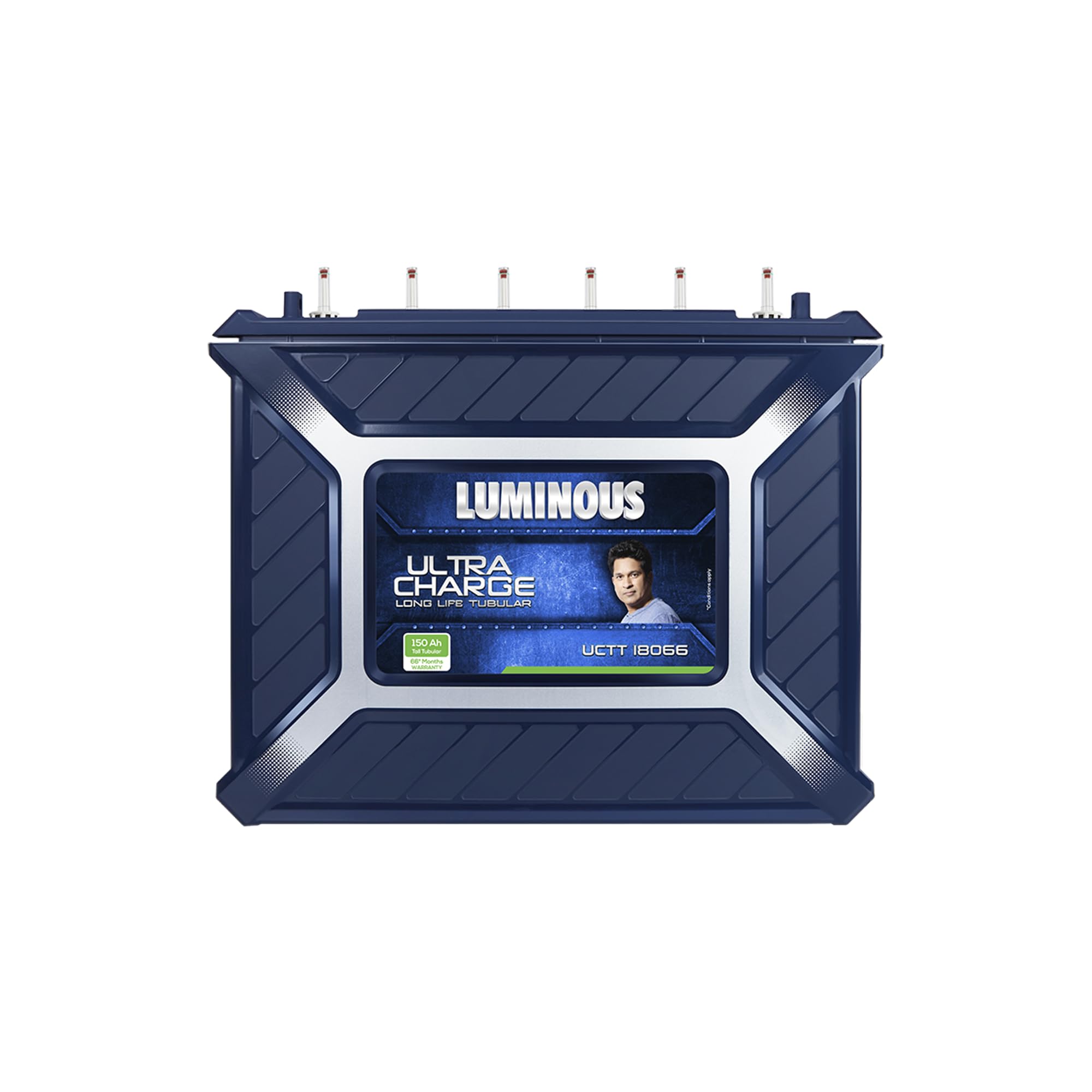
Figure 1: Luminous Ultra Charge UCTT-18066 Tall Tubular Inverter Battery. This image shows the overall design of the battery unit.
2. Safety Information
Always observe the following safety precautions to prevent injury or damage to the battery and connected equipment:
- Wear Protective Gear: Always wear safety glasses and gloves when handling the battery, especially during installation or maintenance.
- Ventilation: Install the battery in a well-ventilated area to allow for the dissipation of gases produced during charging. Avoid enclosed spaces.
- Flammable Materials: Keep the battery away from open flames, sparks, and flammable materials. Batteries produce hydrogen gas, which is highly flammable.
- Electrical Shock: Do not touch the battery terminals with bare hands or metal objects. High voltage can cause severe electrical shock.
- Proper Connections: Ensure all connections are tight and correct (positive to positive, negative to negative) to prevent short circuits and damage.
- Children and Pets: Keep the battery out of reach of children and pets.
- Spill-Proof Tray: Utilize the spill-proof tray provided to contain any electrolyte leakage.

Figure 2: The battery features pure lead plates, a ribbed durable container, DSIR approved design, and a spill-proof tray for enhanced safety and durability.
3. Setup
3.1 Unpacking and Inspection
- Carefully remove the battery from its packaging.
- Inspect the battery for any visible damage during transit. Contact your supplier immediately if any damage is found.
- Ensure all accessories, such as terminal caps and the spill-proof tray, are present.
3.2 Placement
- Place the battery on a flat, level, and sturdy surface.
- Ensure the location is well-ventilated and away from direct sunlight, heat sources, and moisture.
- Maintain adequate clearance around the battery for air circulation.
3.3 Connecting the Battery
Before connecting, ensure the inverter is turned off and disconnected from the main power supply.
- Connect the positive (+) terminal of the battery to the positive (+) terminal of the inverter using the appropriate cable. Ensure a secure and tight connection.
- Connect the negative (-) terminal of the battery to the negative (-) terminal of the inverter using the appropriate cable. Ensure a secure and tight connection.
- Apply petroleum jelly or a suitable anti-corrosion grease to the terminals to prevent corrosion.
- Place the terminal caps securely over the connections.
3.4 Initial Charging
After connecting, turn on the inverter and allow the battery to undergo an initial full charge cycle. This ensures optimal performance from the start.
4. Operating Instructions
4.1 Understanding Load Capacity
The 150 Ah capacity of this battery provides significant backup power. The actual backup time will depend on the total load connected to your inverter and the inverter's capacity. Avoid overloading the inverter to ensure efficient operation and prolong battery life.

Figure 3: Illustrates common appliances and their typical load, helping users understand the battery's capacity in relation to their power needs. Load capacity is dependent on inverter capacity and concurrent load.
4.2 General Usage
- Ensure the inverter is always connected to the main power supply when available to keep the battery charged.
- During power outages, the inverter will automatically switch to battery power.
- Monitor the inverter's display for battery charge status and load levels.
- Avoid deep discharge of the battery frequently, as this can reduce its lifespan. Allow the battery to recharge fully after each discharge cycle.
4.3 Inverter and Battery Buying Guide
Refer to the following guide for typical backup times based on common household setups:
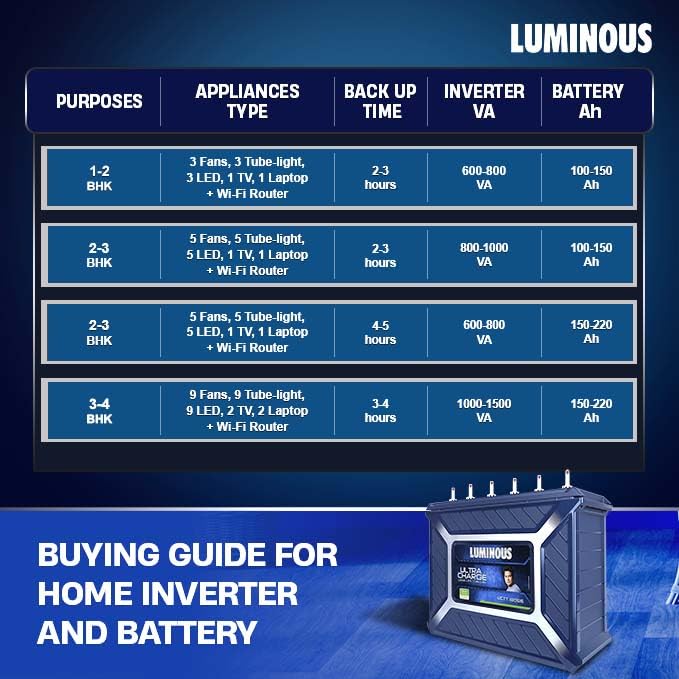
Figure 4: This table provides a buying guide for home inverter and battery combinations, showing estimated backup times for different appliance types and room configurations (BHK).
5. Maintenance
Regular maintenance ensures optimal performance and extends the lifespan of your Luminous Ultra Charge battery.
5.1 Water Level Check (Every 2-3 Months)
- Ensure the inverter is off and disconnected from the mains.
- Carefully remove the vent caps.
- Check the electrolyte level in each cell. It should be between the maximum and minimum level indicators.
- If the level is low, top up with only distilled water. Do not use tap water or acid.
- Replace the vent caps securely.
5.2 Terminal Cleaning (Every 6 Months or as needed)
- Ensure the inverter is off and disconnected from the mains.
- Disconnect the battery terminals.
- Clean any corrosion or dirt from the terminals and cable connectors using a wire brush and a solution of baking soda and water.
- Rinse with clean water and dry thoroughly.
- Reconnect the terminals and apply petroleum jelly or anti-corrosion grease.
5.3 Ventilation
- Ensure the battery area remains well-ventilated at all times.
- Keep the area around the battery clean and free from obstructions.
5.4 Charging Practices
- Allow the battery to fully charge after each discharge cycle.
- Avoid prolonged periods of deep discharge.
6. Troubleshooting
If you encounter issues with your battery, perform the following basic checks before contacting customer support:
| Problem | Possible Cause | Solution |
|---|---|---|
| Battery not charging | Loose connections, inverter fault, power outage | Check all cable connections. Verify inverter operation. Ensure main power supply is active. |
| Low backup time | Overload, low electrolyte level, battery aging | Reduce connected load. Check and top up electrolyte levels. If battery is old, consider replacement. |
| Corrosion on terminals | Lack of maintenance, acid fumes | Clean terminals as per maintenance section. Apply petroleum jelly. Ensure proper ventilation. |
| Unusual smell or heat | Overcharging, internal fault | Immediately disconnect the battery from the inverter and mains. Contact customer support. |
7. Specifications
Key technical specifications for the Luminous Ultra Charge UCTT-18066 Tall Tubular Inverter Battery:
- Model Name: UCTT-18066
- Brand: Luminous
- Battery Type: Tall Tubular
- Battery Capacity: 150 Amp Hours (Ah)
- Recommended Uses: Home, Shop
- Power Source: Battery Powered
- Electrical Output Waveform (Inverter Dependent): Pure Sine Wave
- Frequency (Inverter Dependent): 50 Hz
- Unit Count: 1.00 Count
8. Warranty & Support
8.1 Warranty Information
The Luminous Ultra Charge UCTT-18066 Tall Tubular Inverter Battery is backed by a 66-month warranty. This warranty includes both pro-rata and free replacement terms. Please refer to your warranty card for detailed terms and conditions regarding coverage and claims.
8.2 Customer Support
For any technical assistance, service requests, or warranty claims, please contact Luminous customer support. Have your product model number (UCTT-18066) and purchase details ready when you call.
Contact information for Luminous customer support can typically be found on the product packaging, warranty card, or the official Luminous website.
