
Introduction
This manual provides essential information for the safe and efficient operation of your DATOUBOSS 2000W 24V Pure Sine Wave Power Inverter. Please read these instructions carefully before installation and use. Keep this manual for future reference.
Safety Precautions
- Ensure proper ventilation around the inverter to prevent overheating.
- Do not expose the inverter to water, rain, or excessive moisture.
- Avoid operating the inverter near flammable materials or gases.
- Connect the inverter only to a 24V DC power source.
- Always disconnect the power source before performing any maintenance or cleaning.
- Do not open the inverter casing; there are no user-serviceable parts inside.
- Keep out of reach of children.
Product Overview
The DATOUBOSS 2000W 24V Pure Sine Wave Power Inverter converts 24V DC battery power to 230V AC household power, suitable for sensitive electronics. It features a continuous output of 2000W and a peak power of 4000W.
Key Features
- Pure Sine Wave Output: Provides clean, stable power suitable for sensitive electronics, reducing noise and energy consumption.
- Comprehensive Protection: Includes protection against reverse connection, short circuit, undervoltage, overvoltage, overheating, overload, and overcurrent.
- Intelligent Cooling Fan: Activates automatically when the load exceeds 40% or internal temperature reaches 45°C, ensuring efficient heat dissipation and quiet operation.
- Durable Construction: Aluminum casing for enhanced heat dissipation.
- Remote Control Capability: Allows for convenient power management from a distance.
Component Identification

Figure 1: Inverter Front and Rear Panel Layout
This image illustrates the various ports and controls on the inverter. The front panel includes AC output sockets, USB and Type-C ports, an ON/OFF switch, and an LCD display. The rear panel shows the DC input terminals (positive and negative) and cooling fans.
- AC Output Sockets: Two EU standard AC 230V outlets for connecting appliances.
- USB Interface: For charging USB-powered devices.
- Type-C Interface: For charging Type-C powered devices.
- ON/OFF Switch: Main power switch for the inverter.
- Remote Switch Connection: Port for connecting the wired remote control.
- LCD Display: Shows output voltage, power, and error codes.
- DC Input Terminals: Red for positive (+), Black for negative (-) connection to the 24V battery.
- Cooling Fans: Two high-speed fans for thermal management.
- Ground Terminal: For safety grounding.

Figure 2: Inverter Dimensions and Output Waveform
This image displays the physical dimensions of the inverter (approximately 32.6cm length, 20cm width, 7.9cm height) and a graphical representation of its pure sine wave output, indicating stable and efficient power delivery.

Figure 3: Intelligent Cooling System
This image highlights the inverter's dual high-speed cooling fans and intelligent chip control, which activate based on load and temperature to maintain optimal operating conditions and ensure quiet performance.
Setup Instructions
Follow these steps to properly set up your DATOUBOSS power inverter.
1. Choosing a Location
- Place the inverter in a dry, well-ventilated area, away from direct sunlight, heat sources, and moisture.
- Ensure there is sufficient space around the inverter for proper airflow, especially around the cooling fans.
- Mount the inverter securely on a stable surface using the integrated mounting brackets.
2. Connecting to a 24V DC Power Source
- Ensure the inverter's ON/OFF switch is in the "OFF" position.
- Connect the red battery cable to the positive (+) terminal of your 24V battery bank.
- Connect the other end of the red cable to the positive (+) DC input terminal on the inverter.
- Connect the black battery cable to the negative (-) terminal of your 24V battery bank.
- Connect the other end of the black cable to the negative (-) DC input terminal on the inverter.
- Ensure all connections are tight and secure to prevent loose connections and sparking.
- Connect the ground terminal of the inverter to a proper earth ground.
Important: Always connect the positive (+) terminals first, then the negative (-) terminals. When disconnecting, disconnect the negative (-) terminals first.
3. Connecting the Remote Control (Optional)
- If using the remote control, plug its cable into the "Remote Switch Connection" port on the inverter.
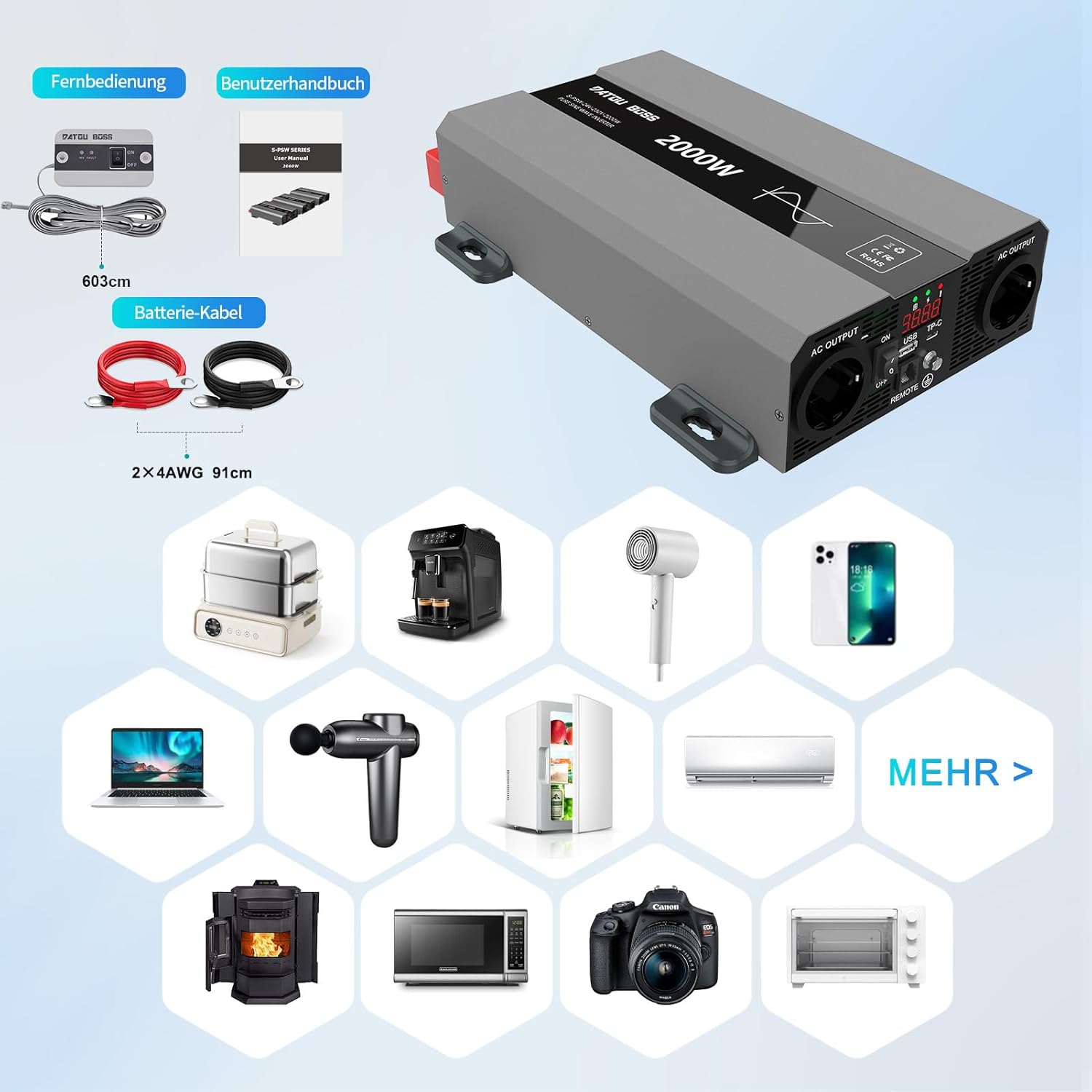
Figure 4: Included Components
This image shows the items typically included with the inverter: the inverter unit, battery connection cables (red and black), and a remote control unit with its cable. A user manual is also included.
Operating Instructions
1. Powering On the Inverter
- After ensuring all DC connections are secure, switch the inverter's ON/OFF switch to the "ON" position.
- The LCD display will illuminate, showing the output voltage and power.
- The cooling fans may briefly spin up during startup.
2. Connecting AC Appliances
- Plug your 230V AC appliances into the AC output sockets on the inverter.
- Ensure the total wattage of all connected appliances does not exceed the inverter's continuous power rating (2000W).
- For inductive loads (e.g., motors, refrigerators), consider their startup surge power, which can be several times their running wattage.
3. Using USB and Type-C Ports
- Connect your USB or Type-C compatible devices to the respective ports for charging.
4. Powering Off the Inverter
- Disconnect all AC appliances from the inverter.
- Switch the inverter's ON/OFF switch to the "OFF" position.

Figure 5: Inverter in an Outdoor Application
This image demonstrates the inverter being used outdoors to power a laptop, highlighting its portability and utility for various scenarios like camping or remote work.
Maintenance
Regular maintenance ensures the longevity and optimal performance of your inverter.
Cleaning
- Periodically clean the exterior of the inverter with a soft, dry cloth.
- Ensure the cooling vents and fans are free from dust and debris. Use compressed air if necessary to clear blockages.
- Do not use liquid cleaners or solvents.
Connection Inspection
- Regularly check all DC and AC connections for tightness and signs of corrosion.
- Loose connections can cause overheating and damage to the inverter or battery.
Storage
- When not in use for extended periods, store the inverter in a cool, dry place.
- Ensure the battery connected to the inverter is properly maintained and charged according to its manufacturer's instructions.
Troubleshooting
This section addresses common issues you might encounter with your inverter. The inverter is equipped with multiple protection functions, and an alarm will sound with an LED flashing to indicate a protection state.

Figure 6: Inverter Protection Features
This diagram illustrates the internal components and various protection mechanisms of the inverter, including reverse polarity, over-temperature, overload, over-voltage, under-voltage, and short-circuit protection.
| Problem | Possible Cause | Solution |
|---|---|---|
| No output voltage / Inverter not turning on |
|
|
| Inverter shuts down with alarm / LED flashing |
|
|
| Low output power / Appliances not working correctly |
|
|
Specifications
| Feature | Detail |
|---|---|
| Brand | DATOUBOSS |
| Model Number | SAK-2000W24V |
| Continuous Power | 2000 Watts |
| Peak Power | 4000 Watts |
| Input Voltage | 24 Volts DC |
| Output Voltage | 230 Volts AC |
| Output Waveform | Pure Sine Wave |
| Efficiency | > 95% |
| Product Dimensions | 32.6L x 20W x 7.9H centimeters |
| Color | Grey |
| Recommended Uses | Office, Home, Vehicle (RV, Camping) |
| Included Components | 1 Pure Sine Wave Inverter, 2 Connection Cables, 1 Remote Control, 1 User Manual |
Warranty Information
This product is typically covered by a return policy that allows for refund or replacement within 30 days of purchase, as per standard retail terms. For specific warranty details, including duration and coverage, please refer to the documentation provided with your purchase or contact the seller directly.
Keep your proof of purchase for any warranty claims.
Customer Support
If you encounter any issues or have questions regarding the DATOUBOSS 2000W 24V Pure Sine Wave Power Inverter that are not covered in this manual, please contact the seller or manufacturer for assistance.


