
iScooter i10MAX
Contents
iScooter i10Max Electric Scooter User Manual
Model: i10MAX | Brand: iScooter
Introduction
This manual provides essential information for the safe and efficient operation of your iScooter i10Max Electric Scooter. Please read it thoroughly before first use and keep it for future reference.
The iScooter i10Max is designed for urban mobility, offering a powerful 750W motor, a long-range 54.6V 15.6Ah battery, and a top speed of 28 Mph. It features dual suspension for a comfortable ride, turn signals, and a double braking system for enhanced safety. The scooter also includes smart app connectivity for navigation and control.

Figure 1: iScooter i10Max Electric Scooter with app display and storage bag.
Setup
Your iScooter i10Max comes largely pre-assembled. Follow these steps for initial setup:
- Unboxing: Carefully remove all components from the packaging. Ensure all items listed in the "Everything You Need Right Out of the Box!" section are present.
- Handlebar Assembly: Lift the handlebar stem and secure it into the upright position. Connect the internal cables and attach the handlebar to the stem using the provided screws and Allen wrench.
- Initial Charge: Before first use, fully charge the scooter's battery. Refer to the "Charging Operation" section for detailed instructions.

Figure 2: Contents of the i10Max Electric Scooter box, including the scooter, charger, storage bag, inner tube, screws, Allen wrench, extension tube, and product manual.
Video 1: This video demonstrates the unboxing and initial installation steps for the iScooter i10Max, showing how to unpack the scooter and its accessories, and perform the basic assembly of the handlebar.
Operating Instructions
Power On/Off and Speed Modes
To power on the scooter, press and hold the power button on the display. The display will illuminate, showing current speed, battery level, and selected speed mode. To power off, press and hold the power button again.
The i10Max offers four-speed modes (9/15/21/28mph) to adapt to different riding conditions. Short press the power button to cycle through these modes. The current speed mode will be indicated on the display.
Video 2: This video demonstrates the unboxing and initial installation steps for the iScooter i10Max, showing how to unpack the scooter and its accessories, and perform the basic assembly of the handlebar.

Figure 3: Overview of the iScooter i10Max display and controls, highlighting the power button, speed mode indicator, battery indicator, and cruise control.

Figure 4: Chart illustrating the estimated range of the i10Max Electric Scooter at different speed modes: 50 miles at 9mph, 40 miles at 15mph (Eco Mode), 34 miles at 21mph (D Mode), and 25 miles at 28mph (S Mode).
Lighting and Turn Signals
The scooter is equipped with a bright front LED light and rear lights for visibility. To activate the lights, short press the light button on the handlebar. The i10Max also features integrated turn signals on the handlebars to indicate your turning intentions to others. Use the dedicated turn signal buttons to activate them.
App Connection and Features
Enhance your riding experience by connecting your i10Max to the dedicated mobile application. The app allows for map navigation, speed mode switching, headlight control, cruise control, and locking/unlocking the scooter.
Video 3: This video demonstrates the iScooter i10Max's app connectivity, showing how to pair your smartphone with the scooter and control various functions like speed modes and locking via the app interface.

Figure 5: Visual representation of the Smart KCQ Scooter App features, including riding records, on/off headlights, cruise control, riding mode switch, lock/unlock, and zero/non-zero startup options.
Folding Operation
The i10Max features a convenient three-step folding system for easy storage and portability. Unlock the folding device, bend the handlebar down to secure the buckle, and then lift the bike once locked. It weighs approximately 46 lbs, making it manageable for transport.
Video 4: This video demonstrates the simple folding operation of the iScooter i10Max, highlighting its portability and ease of storage.

Figure 6: Step-by-step guide for the 3-second folding mechanism of the i10Max scooter: 1) Unlock the folding device, 2) Fold the handlebar down to secure the buckle, 3) Carry the bike once locked.
Safety Features
The i10Max is equipped with several features to ensure a safe riding experience:
- Dual Braking System: Features a double braking system for reliable stopping power.
- Turn Signals: Integrated turn signals alert pedestrians and vehicles of your turning intentions.
- 10-inch Pneumatic Tires: Provide a smooth and comfortable ride, absorbing shocks from uneven surfaces.
- Dual Suspension: Front and rear shock absorbers further enhance ride comfort and stability.
- IP54 Waterproof Rating: Offers durability and protection against splashes, suitable for various weather conditions.
- UL2272 Certification: Meets rigorous safety standards for electric scooters.

Figure 7: Close-up view of the i10Max's front and rear dual suspension system, designed for ultimate ride comfort and shock absorption.

Figure 8: Illustration of the i10Max's one-touch smooth braking system, featuring a hand brake drum brake and a hidden E-Brake, ensuring stable and safe stopping.

Figure 9: Detailed view of the 10-inch tube-type pneumatic tires, built for all-terrain grip and a butter-smooth ride.
Maintenance
Regular maintenance ensures the longevity and optimal performance of your i10Max scooter:
- Battery Charging: Always use the original charger. Ensure the charging port is clean and dry before plugging in. The indicator light on the charger will turn green when fully charged.
- Tire Pressure: Regularly check and maintain the recommended tire pressure for optimal ride quality and safety.
- Cleaning: Wipe down the scooter with a damp cloth. Avoid using high-pressure water jets directly on electronic components.
- Storage: Store the scooter in a cool, dry place away from direct sunlight and extreme temperatures.
Video 5: This video demonstrates the proper procedure for charging the iScooter i10Max battery, including connecting the charger and observing the charging indicator.
Troubleshooting
If you encounter issues with your i10Max, refer to the following common troubleshooting tips:
| Problem | Possible Cause | Solution |
|---|---|---|
| Scooter does not power on | Low battery; loose connections | Charge the battery fully. Check all visible cable connections. |
| Reduced speed or range | Low battery; incorrect speed mode; tire pressure; heavy load | Ensure battery is fully charged. Switch to a higher speed mode. Check tire pressure. Reduce load. |
| App connectivity issues | Bluetooth off; app not updated; scooter not discoverable | Ensure Bluetooth is enabled on your device. Update the app. Restart the scooter and try pairing again. |
| Brakes feel loose or too tight | Brake cable adjustment needed | Consult a qualified technician for brake adjustment. |
For persistent issues, please contact customer support.
Specifications
| Feature | Detail |
|---|---|
| Brand | iScooter |
| Model Name | i10MAX |
| Motor Power | 750W |
| Top Speed | 28 Mph |
| Battery | 54.6V 15.6Ah |
| Maximum Distance Range | 50-60 Miles |
| Weight Limit | 264 Pounds |
| Wheel Size | 10 Inches |
| Wheel Type | Pneumatic |
| Suspension Type | Dual Suspension |
| Brake Style | Double Braking Systems |
| Material | Aluminum |
| Waterproof Rating | IP54 |
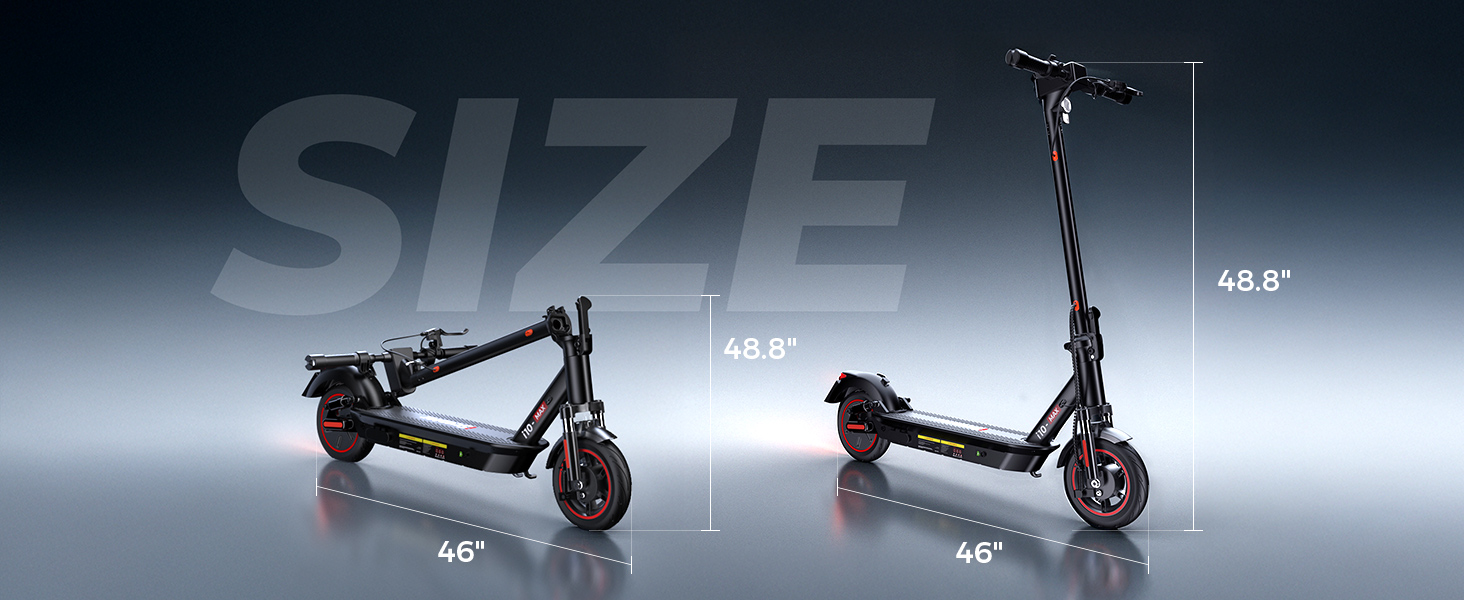
Figure 10: Dimensions of the i10Max Electric Scooter, showing both unfolded (48.8" height) and folded (46" length) states.
Warranty and Support
The iScooter i10Max Electric Scooter comes with a warranty. Please refer to the warranty description for specific terms and conditions:
- Warranty Description: 1 year or 6 months for different parts.
For any questions, technical assistance, or warranty claims, please contact iScooter customer support:
- Call Center: +1 (855) 916-2366
- Live Chat/Email: support@iscooterglobal.com

Figure 11: iScooter's commitment to perfect after-sale service, including contact information for their call center and live chat/email support.
Ask a question about this manual
Ask about setup, troubleshooting, compatibility, parts, safety, or missing instructions. Manuals+ will review the question and use this page’s manual context to help answer it.