
LiitoKala Lii-D4XL
LiitoKala Lii-D4XL Universal Battery Charger Instruction Manual
Model: Lii-D4XL
1. Introduction
The LiitoKala Lii-D4XL is a smart universal battery charger designed for a wide range of rechargeable batteries. It features four independent charging bays for cylindrical batteries and two additional bays for 9V batteries. The integrated LCD provides real-time charging information, including current, voltage, and capacity. This charger supports various battery chemistries, including Li-ion, LiFePO4, NiMH, and NiCd, and accommodates multiple sizes such as 18650, 21700, 26650, 32700, AA, AAA, and D cells.

Figure 1: LiitoKala Lii-D4XL Universal Battery Charger with included AC and car charger cables.
2. Safety Information
Please read and understand all safety instructions before using the charger. Failure to follow these instructions may result in electric shock, fire, or serious injury.
- Use this charger only for rechargeable batteries of the types specified in this manual. Attempting to charge non-rechargeable batteries may cause explosion, rupture, or leakage.
- Ensure correct battery polarity (+/-) when inserting batteries into the charging bays. Incorrect insertion can damage the charger and batteries.
- Do not expose the charger to rain, moisture, or extreme temperatures. Operate in a dry, well-ventilated area.
- Keep the charger away from flammable materials.
- Do not disassemble, modify, or attempt to repair the charger. Refer all servicing to qualified personnel.
- Unplug the charger from the power source when not in use or before cleaning.
- Supervise the charging process, especially when charging new or unfamiliar battery types.
- Avoid short-circuiting the charging terminals.
3. Product Features and Components
The Lii-D4XL charger is equipped with several features for efficient and safe battery charging.
- Four Independent Cylindrical Battery Bays: Supports simultaneous charging of different battery types and sizes.
- Two 9V Battery Bays: Dedicated slots for 9V NiMH/NiCd batteries.
- LCD Display: Provides real-time information for each bay, including battery type, voltage, charging current, and charged capacity (mAh).
- Touch Buttons: For mode selection and current adjustment.
- Multiple Power Inputs: AC 110-240V and DC 12V 2A (car charger).

Figure 2: Rear view of the charger showing AC 110-240V and DC 12V 2A power input ports.

Figure 3: Dimensions of the LiitoKala Lii-D4XL charger (169mm x 136mm x 47mm).
4. Setup
- Unpack: Carefully remove the charger and all accessories from the packaging.
- Power Connection:
- For home use, connect the provided AC power cord to the charger's AC input port and then plug it into a standard wall outlet (110-240V).
- For car use, connect the provided 12V car charger cable to the DC 12V 2A input port and plug it into your vehicle's cigarette lighter socket.
- Initial Display: Upon power-up, the LCD will illuminate, indicating the charger is ready for use.
5. Operating Instructions
The Lii-D4XL charger offers intuitive operation for various battery types.
5.1 Charging Cylindrical Batteries (Bays 1-4)
- Insert Battery: Carefully insert a rechargeable cylindrical battery into one of the four main charging bays (1-4), observing correct polarity (+/-). The charger will automatically detect the battery type (Li-ion, LiFePO4, NiMH, NiCd) and display its initial voltage.
- Select Mode (Optional):
- The charger will attempt to auto-detect the battery chemistry. If the detected chemistry is incorrect, or if you wish to manually set it (e.g., for LiFePO4), press the MODE button repeatedly until the desired chemistry (Li-ion 3.80V, Li-ion 3.70V, LiFePO4 3.20V, NiMH/NiCd 1.20V) is selected.
- Note: If a battery's voltage is too low, the charger may default to NiMH/NiCd. Ensure the battery is not over-discharged if it's a lithium type.
- Select Current (Optional): Press the CURRENT button to cycle through available charging currents (300mA, 500mA, 1000mA). Choose a current appropriate for your battery's capacity. Higher currents charge faster but may generate more heat.
- Monitor Charging: The LCD will display the charging progress, including real-time voltage, charging current, and accumulated capacity (mAh). The battery icon will animate to indicate charging.
- Charging Completion: When charging is complete, the display will show "End" and the battery icon will be full. Remove the battery from the charger.
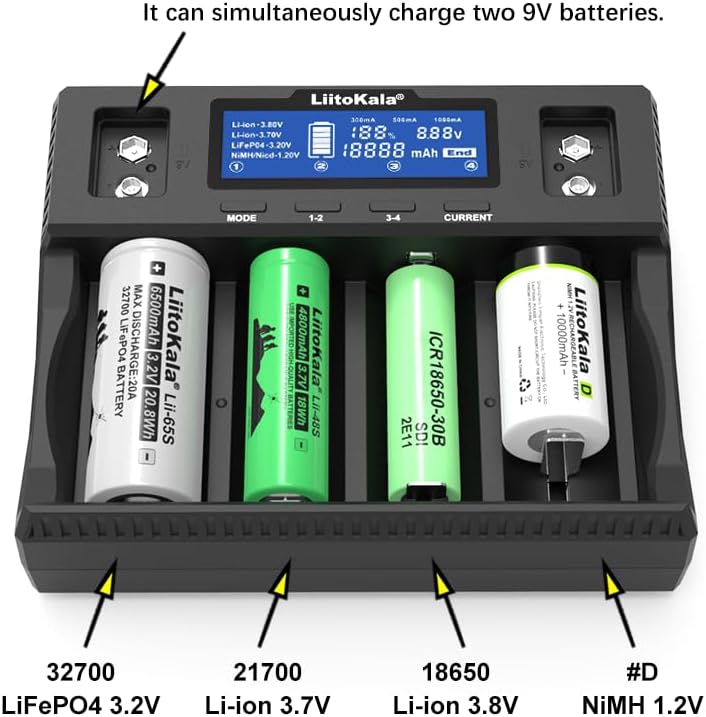
Figure 4: The charger accommodates various cylindrical battery sizes, including 32700, 21700, 18650, and D cells.

Figure 5: The charger can simultaneously accommodate up to four D-size batteries, with all slots capable of receiving 1000mA current.
5.2 Charging 9V Batteries (Top Bays)
- Insert Battery: Insert a 9V NiMH or NiCd battery into one of the two dedicated 9V bays at the top of the charger.
- Charging Indicator: A red indicator light will illuminate next to the 9V bay, indicating charging is in progress.
- Charging Completion: The indicator light will turn green when the 9V battery is fully charged. No detailed information is displayed on the LCD for 9V batteries.
Video 1: Demonstration of inserting various battery types into the LiitoKala Lii-D4XL charger, including cylindrical and 9V batteries, and observing the display.
6. Maintenance
- Cleaning: Use a soft, dry cloth to clean the charger's exterior. Do not use abrasive cleaners or solvents. Ensure the charger is unplugged before cleaning.
- Storage: Store the charger in a cool, dry place away from direct sunlight and extreme temperatures.
- Contact Points: Periodically check the charging contacts for any debris or corrosion and clean if necessary to ensure proper connection.
7. Troubleshooting
| Problem | Possible Cause | Solution |
|---|---|---|
| Charger not powering on. | No power connection; faulty power adapter/cable. | Ensure power cable is securely connected to the charger and wall outlet/car socket. Try a different outlet or power source. |
| Battery not charging / "Null" or "Error" on display. | Incorrect battery insertion; battery too low voltage; incompatible battery type; faulty battery. | Re-insert battery ensuring correct polarity. Check if battery is severely over-discharged. Ensure battery type is supported. Try a different battery. |
| Display shows incorrect battery type or voltage. | Auto-detection error; power interruption during charging. | Manually select the correct battery chemistry using the MODE button. If power was interrupted, remove and re-insert the battery to restart the detection process. |
| Charger gets warm during operation. | Normal operation; high charging current. | It is normal for the charger to get warm during charging. Ensure adequate ventilation around the charger. If it becomes excessively hot, reduce the charging current or remove batteries and allow it to cool. |
8. Specifications
- Model: Lii-D4XL
- Input Voltage: AC 100-240V, 50/60Hz; DC 12V 2A
- Output Voltage:
- Li-ion: 4.20V / 4.35V
- LiFePO4: 3.65V
- NiMH/NiCd: 1.48V
- 9V NiMH/NiCd: 9.0V
- Output Current:
- Cylindrical Batteries: 300mA / 500mA / 1000mA (per slot)
- 9V Batteries: 85mA (per slot)
- Compatible Battery Types:
- Li-ion / IMR / LiFePO4: 32700, 26650, 21700, 20700, 18650, 18490, 18350, 17500, 16340 (RCR123), 14500, 10440
- NiMH / NiCd: D, C, AA, AAA, SC, 9V
- Product Dimensions: 5.3 x 6.7 x 1.7 inches (136mm x 169mm x 47mm)
- Item Weight: 1.21 pounds
- Charging Time: Approximately 2.5 Hours (for typical 18650 battery at 1000mA)

Figure 6: Bottom label of the charger showing detailed specifications and certifications.
Related documentsLii-D4XL


Ask a question about this manual
Ask about setup, troubleshooting, compatibility, parts, safety, or missing instructions. Manuals+ will review the question and use this page’s manual context to help answer it.