
1. Introduction
Thank you for choosing the GENSROCK Portable Power Station H120. This manual provides essential information for the safe and efficient operation of your device. Please read it thoroughly before use and retain it for future reference.
1.1 Package Contents
- 1 x GENSROCK 88Wh Portable Power Station (H120)
- 1 x AC Power Adapter
- 1 x Car Charger
- 1 x User Manual

Image: The GENSROCK Portable Power Station H120 with its included AC power adapter, car charger, and user manual, illustrating the complete package contents.
2. Safety Instructions
To ensure safe operation, always follow these basic precautions:
- Do not disassemble, repair, or modify the unit.
- Keep the unit away from fire, water, and extreme temperatures.
- Do not use or store the unit in high-humidity environments.
- Avoid dropping or subjecting the unit to strong impacts.
- Keep out of reach of children.
- Ensure proper ventilation during use and charging.
- Do not insert foreign objects into the ports.
- If the unit emits smoke, unusual odors, or other abnormalities, stop using it immediately and contact support.
Image: A diagram highlighting the multiple system protection features, including temperature, overvoltage, overload, short circuit, overcurrent, and battery protection.
3. Product Features
3.1 Multi-Output Ports
The GENSROCK H120 is equipped with various output ports to power multiple devices simultaneously:
- AC Outlets: 2 x 110V AC outlets (120W running, 220W peak) for devices under 120W.
- USB Ports: 2 x QC 3.0 USB ports, 1 x standard USB port (5V 2.4A), 1 x USB-C port (18W).
- DC Ports: 2 x 12V/10A DC ports.
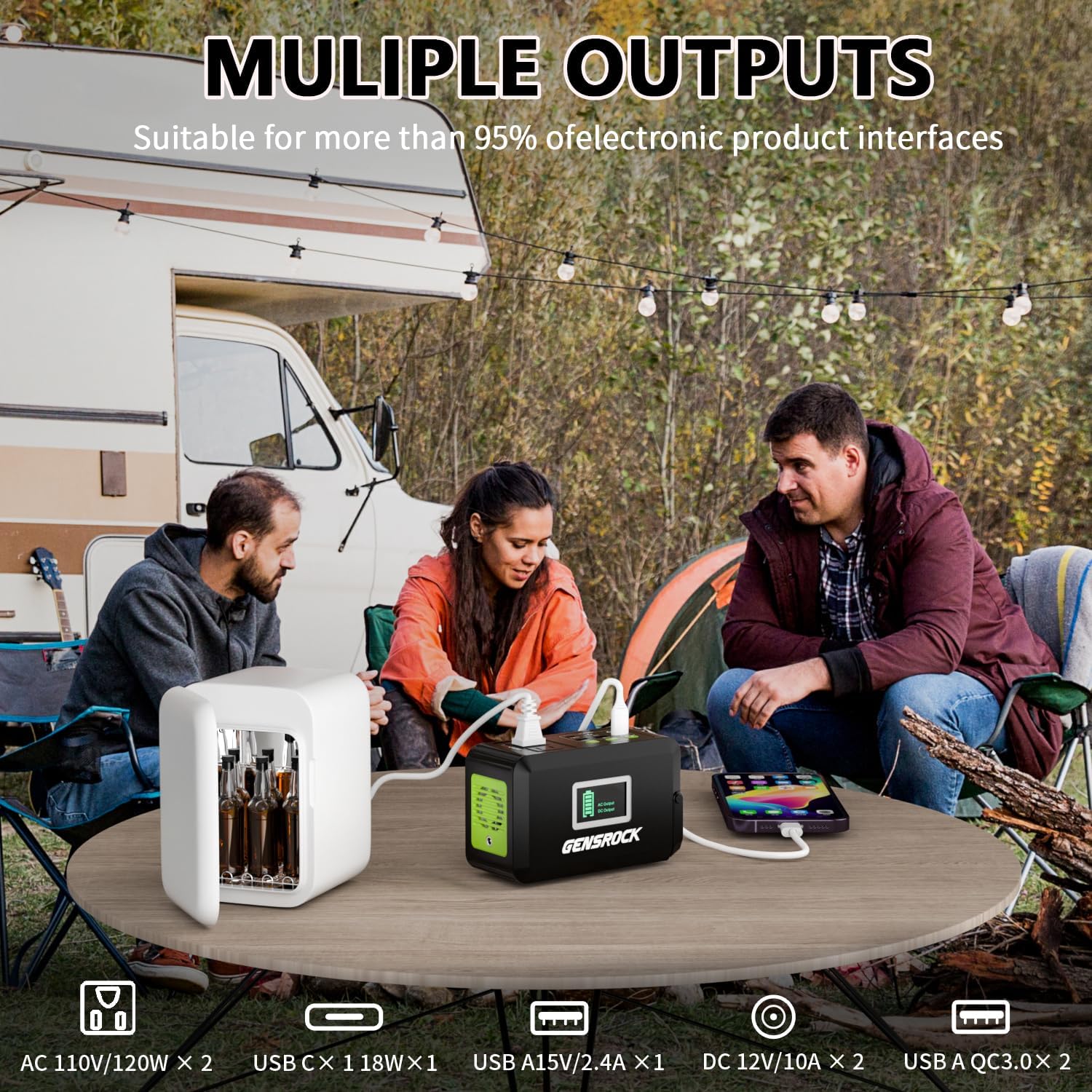
Image: The GENSROCK H120 power station connected to various devices, demonstrating its multiple output capabilities including AC, USB, and DC ports.
3.2 LED Flashlight
The unit features a built-in LED flashlight with two lighting modes:
- Steady Light Mode: 3 levels of brightness (Soft, Medium, Strong) for general illumination.
- SOS Mode: For emergency signaling.

Image: The GENSROCK H120 power station with its LED flashlight illuminated, showing the three brightness levels and the SOS emergency signal function.
3.3 Portability
Weighing only 2.3 lbs and featuring a compact design (6.6 x 4 x 3 inches) with a movable handle, the H120 is designed for easy transport.

Image: The GENSROCK H120 power station being placed into a backpack, illustrating its compact size and ease of portability.
4. Setup: Charging the Power Station
The GENSROCK H120 can be recharged using three methods:
4.1 AC Outlet Charging
Connect the included AC power adapter to the power station's input port and then plug it into a standard wall outlet. The display will indicate charging status.
4.2 Solar Panel Charging (Not Included)
Connect a compatible 15V-24V solar panel (not included) to the power station's DC input port. Ensure the solar panel is placed in direct sunlight for optimal charging efficiency.
4.3 Car Charger Charging
Use the included car charger to connect the power station to your vehicle's 12V cigarette lighter socket. This method allows for convenient charging while traveling.

Image: A composite image demonstrating the three ways to recharge the GENSROCK H120: via an AC 110V adapter, a car charger, and a solar panel (not included).
5. Operating Instructions
5.1 Powering On/Off
Press and hold the main power button for a few seconds to turn the unit on or off. The display will illuminate when the unit is active.
5.2 Using AC Outlets
Press the AC power button to activate the AC outlets. Plug your devices into the 110V AC ports. Ensure your devices do not exceed the 120W running power limit.
5.3 Using USB Ports
The USB ports (QC 3.0, standard USB, and USB-C) are typically active when the unit is on. Simply plug your USB-compatible devices into the appropriate port for charging.
5.4 Using DC Ports
Press the DC power button to activate the 12V/10A DC ports. Connect your 12V DC devices, such as CPAP machines, astronomical telescopes, or LED strips.

Image: A close-up view of the GENSROCK H120 power station, specifically highlighting the 12V DC output ports and examples of compatible devices like a lamp or projector.
5.5 Operating the LED Flashlight
Press the LED flashlight button to cycle through the brightness levels (Soft, Medium, Strong) and activate the SOS mode. Press again to turn off.
The GENSROCK H120 supports pass-through charging, allowing you to charge the power station while simultaneously powering other devices.

Image: The GENSROCK H120 power station connected to a wall outlet for charging, while simultaneously powering an external device, illustrating its pass-through charging capability.
6. Maintenance
6.1 Storage
Store the power station in a cool, dry place, away from direct sunlight and corrosive materials. For long-term storage, charge the unit to 50-80% every 3-6 months to preserve battery life.
6.2 Cleaning
Use a soft, dry cloth to clean the exterior of the unit. Do not use abrasive cleaners or solvents. Ensure all ports are free of dust and debris.
6.3 Battery Care
The GENSROCK H120 uses a lithium battery with a cycle life of over 1500 charges. Avoid fully discharging the battery frequently to extend its lifespan.
7. Troubleshooting
7.1 Device Not Charging
- Ensure the power station is turned on and the specific output (AC/DC/USB) is activated.
- Check if the device's power consumption exceeds the power station's output limit.
- Verify that the charging cable is securely connected to both the power station and the device.
- If using AC output, ensure the device's wattage is below 120W (220W peak).
7.2 Power Station Not Charging
- Confirm the charging adapter/cable is correctly connected to the input port and power source.
- If using solar charging, ensure the solar panel is in direct sunlight and within the 15V-24V input range.
- Check for any visible damage to the charging cables or adapters.
7.3 LED Flashlight Not Working
- Ensure the power station has sufficient battery charge.
- Press the LED flashlight button firmly to cycle through modes.
8. Specifications
| Feature | Specification |
|---|---|
| Brand | GENSROCK |
| Model Name | H120 |
| Capacity | 88Wh (24000mAh, 3.7V) |
| AC Output | 2 x 110V AC (120W Running, 220W Peak) |
| USB Output | 2 x QC 3.0, 1 x 5V/2.4A, 1 x Type-C (18W) |
| DC Output | 2 x 12V/10A |
| Input (Charging) | AC Adapter, 15V-24V Solar Panel (not included), Car Charger |
| Item Weight | 2.3 Pounds |
| Item Dimensions (L x W x H) | 6.6 x 4 x 3 inches |
| Special Features | Low Voltage Protection, Over Current Protection, Over Voltage Protection, Overload Protection, Short Circuit Protection, LED Flashlight (3 levels + SOS) |
| Cycle Life | >1500 times |
9. Warranty and Support
9.1 Product Guarantee
The GENSROCK Portable Power Station H120 comes with a 24-month product guarantee from the date of purchase, covering manufacturing defects.
9.2 Customer Service
For any questions, operational instructions, or support needs, please contact GENSROCK customer service. Refer to the contact information provided with your purchase or visit the official GENSROCK website for assistance.