
Skullcandy S2PPW-S795
Skullcandy Push Play Active Wireless Earbuds User Manual
Model: S2PPW-S795
1. Introduction
The Skullcandy Push Play Active Wireless Earbuds are designed for active lifestyles, offering durability and comfort. These earbuds are built to withstand sweat, water, dust, and dirt, making them suitable for various environments and activities. With secure over-ear hangers and long battery life, they provide a reliable audio experience.

Image: Skullcandy Push Play Active Wireless Earbuds in Preppy Blue, shown with their open charging case. The earbuds feature over-ear hangers for a secure fit.
What's in the Box:
- Skullcandy Push Play Active Wireless Earbuds
- Charging Case
- Eartips (various sizes)
- User Manual
- USB-C Charging Cable
2. Setup
Initial Charging:
Before first use, fully charge your Skullcandy Push Play Active earbuds and their charging case. The earbuds provide up to 34 hours of total playtime with the charging case. A full charge for the earbuds and case takes approximately 1.5 hours.
- Place both earbuds into the charging case.
- Connect the USB-C charging cable to the port on the charging case and plug the other end into a compatible USB power source.
- The LED indicators on the earbuds and case will show charging status.

Image: A person's hands holding the open Preppy Blue charging case, revealing the Skullcandy Push Play Active earbuds nestled inside, ready for charging or use.
Bluetooth Pairing:
The earbuds utilize Bluetooth 5.3 for a stable and efficient wireless connection.
- Ensure the earbuds are charged and inside the charging case.
- Open the charging case lid. The earbuds will automatically enter pairing mode (LEDs may flash).
- On your device (smartphone, tablet, etc.), go to Bluetooth settings and turn Bluetooth on.
- Select "Skullcandy Push Play Active" from the list of available devices.
- Once connected, you will hear an audio prompt, and the earbud LEDs will stop flashing.
For multipoint pairing, refer to the detailed instructions in the full user manual or Skullcandy's official support website.
3. Operating Instructions
Wearing the Earbuds:
The Skullcandy Push Play Active earbuds feature secure-fit over-ear hangers designed to keep them comfortably in place during physical activity.
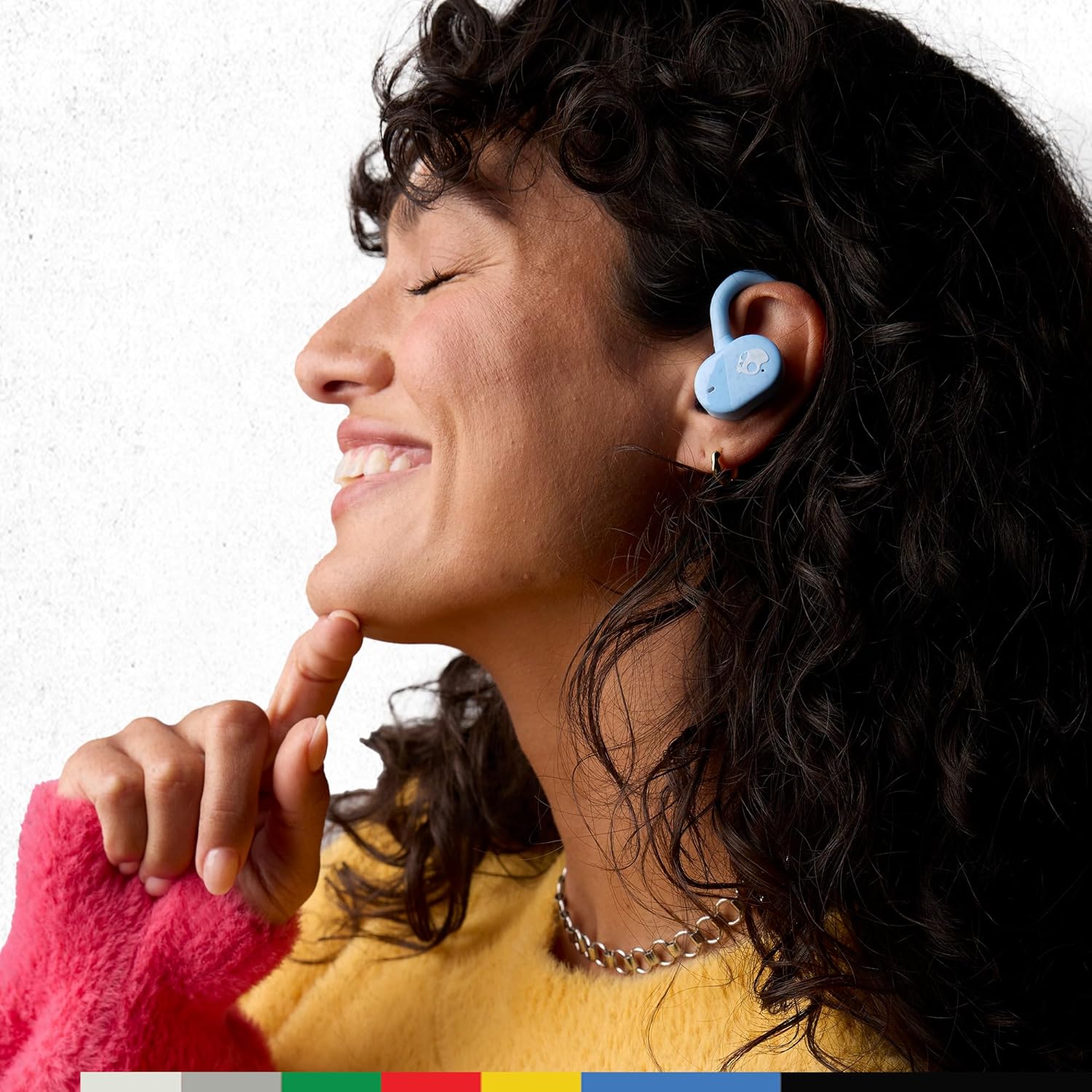
Image: A person wearing a Preppy Blue Skullcandy Push Play Active earbud, demonstrating the secure over-ear hanger design.
Touch Controls:
The earbuds are equipped with intuitive touch controls for managing your audio and calls. Specific functions may vary, but common controls include:
- Play/Pause: Single tap on either earbud.
- Skip Track: Double tap on the right earbud for next, double tap on the left for previous.
- Volume Up/Down: Triple tap on the right earbud for volume up, triple tap on the left for volume down.
- Answer/End Call: Single tap on either earbud during an incoming call.
- Activate Voice Assistant: Press and hold for 2 seconds on either earbud.
Refer to the detailed control scheme in the full user manual for advanced functions and customization options via the Skullcandy app.
Stay-Aware Mode:
Stay-Aware Mode allows you to hear your surroundings while still enjoying your audio. This feature is useful for safety in urban environments or when you need to be aware of announcements.
- Toggle Stay-Aware Mode: Typically activated by a specific touch gesture (e.g., press and hold for 3 seconds). Consult your full manual for the exact gesture.
4. Maintenance
Cleaning and Care:
The Skullcandy Push Play Active earbuds have an IP55 rating, meaning they are resistant to sweat, water, dust, and dirt. While durable, proper care will extend their lifespan.
- After workouts or exposure to sweat/water, gently wipe the earbuds and charging case with a soft, dry cloth.
- Do not use abrasive cleaners or submerge the earbuds or case in water.
- Ensure the charging contacts on both the earbuds and the case are clean and dry before charging.
Battery Longevity:
To maximize battery life over time:
- Avoid fully discharging the battery frequently.
- Store the earbuds and case in a cool, dry place when not in use.
- Charge the device regularly, even if not used daily, to prevent deep discharge.
5. Troubleshooting
If you encounter issues with your Skullcandy Push Play Active earbuds, try the following common troubleshooting steps:
| Problem | Solution |
|---|---|
| Earbuds not pairing |
|
| Only one earbud playing audio |
|
| Earbuds not charging |
|
| Poor sound quality |
|
For more detailed troubleshooting or persistent issues, visit the official Skullcandy support website.
6. Specifications
| Feature | Detail |
|---|---|
| Model Name | Push Play Active |
| Model Number | S2PPW-S795 |
| Connectivity Technology | Wireless (Bluetooth) |
| Bluetooth Version | 5.3 |
| Battery Life | Up to 34 Hours (with charging case) |
| Charging Time | 1.5 Hours |
| Water Resistance Rating | IP55 (Sweat, Water, Dust Resistant) |
| Control Type | Media Control, Touch Control |
| Ear Placement | In Ear (with Ear Hook) |
| Noise Control | Sound Isolation |
| Material | Plastic, Silicone |
| Item Weight | 2.12 ounces (60 Grams) |
| Product Dimensions | 5.83 x 4.09 x 1.61 inches |
| UPC | 810145320334 |
7. Warranty and Support
Warranty Information:
The Skullcandy Push Play Active Wireless Earbuds include a 1-year US warranty. This warranty covers manufacturing defects and ensures your product functions as intended under normal use.
For full details regarding warranty terms, conditions, and limitations, please refer to the official warranty documentation included with your product or visit the Skullcandy website.
Customer Support:
Should you require assistance with your Skullcandy Push Play Active earbuds, including technical support, warranty claims, or general inquiries, please contact Skullcandy Customer Support through their official website:
Please have your product model number (S2PPW-S795) and proof of purchase ready when contacting support.
Related documentsS2PPW-S795


Ask a question about this manual
Ask about setup, troubleshooting, compatibility, parts, safety, or missing instructions. Manuals+ will review the question and use this page’s manual context to help answer it.