
Important Safety Information
Please read all instructions carefully before operating this appliance. Retain this manual for future reference.
- This appliance is for indoor, residential use only.
- Always ensure the unit is placed on a flat, stable surface.
- Do not operate the unit with a damaged cord or plug. If the supply cord is damaged, it must be replaced by the manufacturer, its service agent, or similarly qualified persons to avoid a hazard.
- Keep the air intake and exhaust vents clear of obstructions.
- Do not insert objects into the air vents.
- Unplug the unit before cleaning or performing any maintenance.
- This appliance uses R32 refrigerant. Servicing should only be performed by qualified personnel.
Product Overview
The Global Commander Portable Air Conditioner Unit PAG-Y11KCO730C is a versatile 3-in-1 appliance designed for cooling, dehumidifying, and fan-only operation. It is ideal for cooling bedrooms, home offices, and other small to medium-sized rooms. The unit features an adjustable thermostat, a 24-hour programmable timer, and a washable, reusable filter for easy maintenance. Its portable design with integrated wheels allows for convenient movement between rooms.

Figure 1: Front-side view of the Global Commander Portable Air Conditioner Unit.
Setup Instructions
- Unpacking: Carefully remove the air conditioner from its packaging. Retain the packaging for future storage or transport.
- Placement: Place the unit on a firm, level surface. Ensure there is at least 20 inches (50 cm) of space around the unit for proper airflow. The unit is equipped with wheels for easy relocation.
- Window Kit Installation:
- Extend the exhaust hose and attach it to the exhaust outlet on the back of the unit.
- Install the window sealing plate kit into a compatible window opening. Adjust the plate to fit snugly.
- Attach the other end of the exhaust hose to the opening in the window sealing plate. Ensure a tight seal to prevent air leakage.
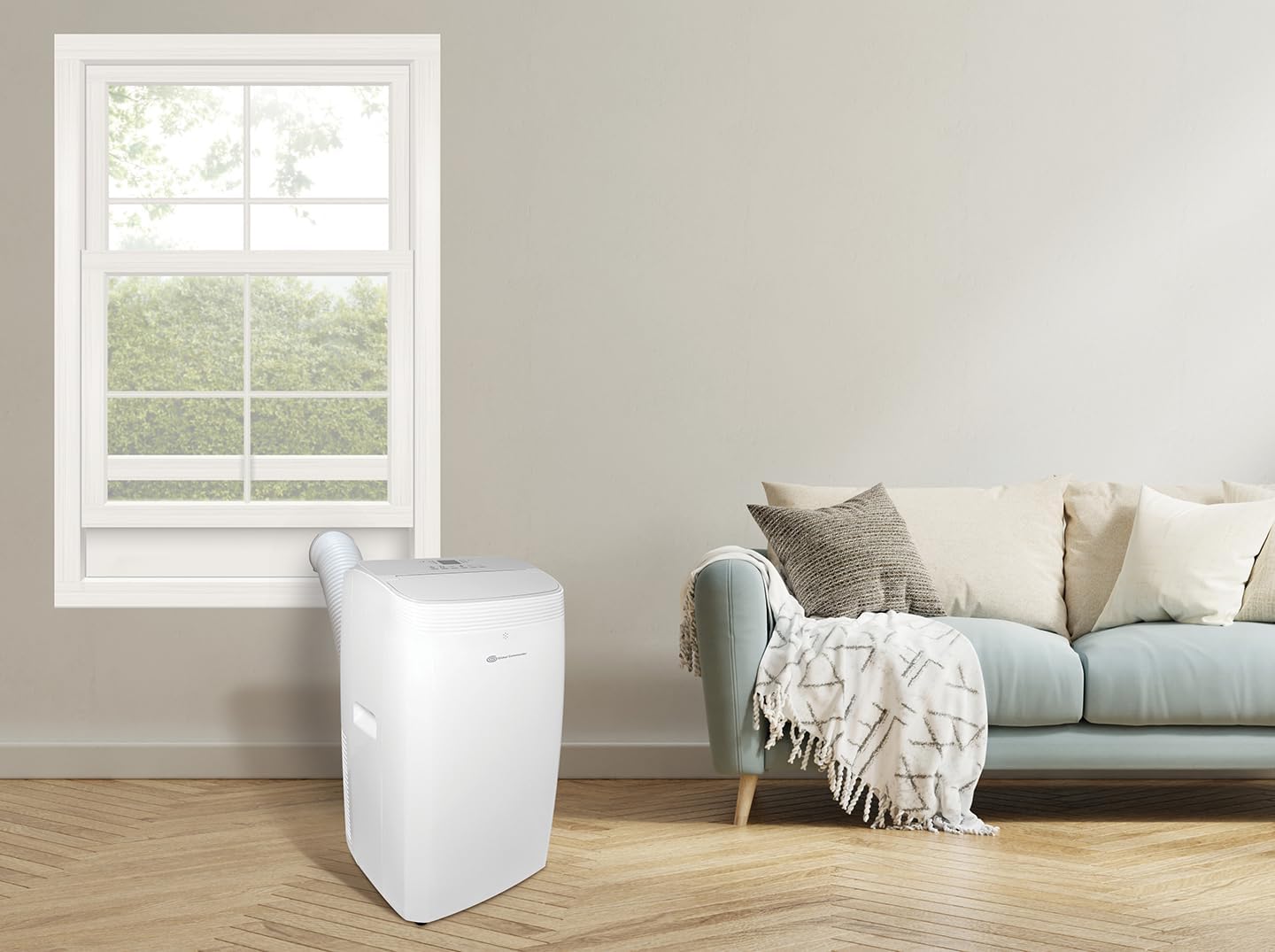
Figure 2: Portable air conditioner unit properly installed with its window kit.
- Power Connection: Plug the power cord into a grounded 115V electrical outlet. Do not use extension cords.
Operating Instructions
The unit can be operated via the control panel on top of the unit or with the included wireless remote control.
Control Panel
The control panel features an LED display and various buttons for mode selection, temperature adjustment, timer settings, and fan speed.
Remote Control
The wireless remote control provides convenient access to all functions from a distance.
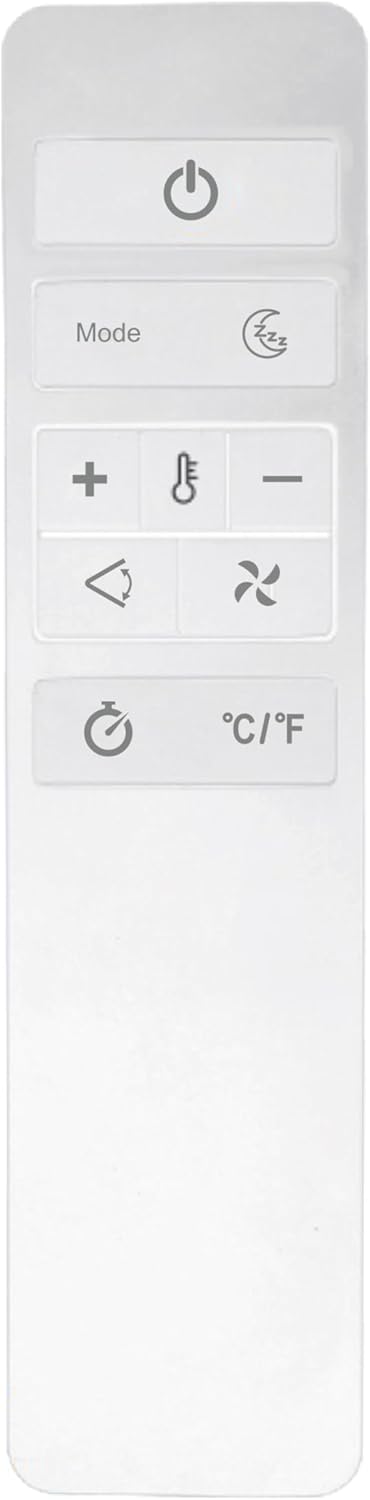
Figure 3: Wireless remote control for the air conditioner.
Operating Modes
- Cooling Mode: Select this mode for active cooling. Adjust the desired temperature using the temperature up/down buttons.
- Dehumidifier Mode: This mode removes excess moisture from the air. The fan will operate at a low speed.
- Fan Mode: Circulates air without cooling. Select from 3-speed automatic ventilation settings.
Additional Functions
- Programmable Timer: Set the unit to turn on or off automatically within a 24-hour period.
- Night Mode: Activates a quieter operation mode, often with gradual temperature adjustments for comfortable sleep.
- Automatic Restart: The unit will automatically restart with the previous settings after a power outage.
Maintenance
Regular maintenance ensures optimal performance and longevity of your air conditioner.
- Filter Cleaning: The unit features an easy-to-clean, washable, and reusable filter. It is recommended to clean the filter every two weeks or more frequently depending on usage and air quality.
- Turn off and unplug the unit.
- Locate and remove the air filter from the back of the unit.
- Wash the filter with warm, soapy water. Rinse thoroughly and allow it to air dry completely before reinserting.
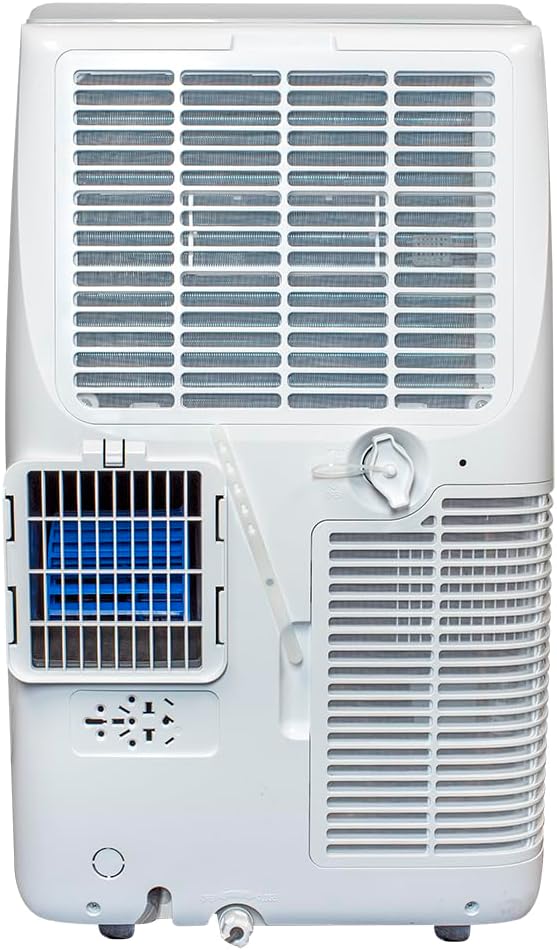
Figure 4: Back view of the unit, highlighting the air filter access and drain plug.
- Water Drainage: In dehumidifier mode or high humidity conditions, the internal water tank may fill. The unit will typically indicate when drainage is required. Connect a drain hose (not always included) to the drain port at the back of the unit and direct it to a suitable drain.
- Storage: Before long-term storage, ensure the unit is completely drained of water and the filter is clean and dry. Store the unit upright in a cool, dry place.
Troubleshooting
Refer to the following table for common issues and their solutions.
| Problem | Possible Cause | Solution |
|---|---|---|
| Unit does not turn on | No power; power cord unplugged; circuit breaker tripped | Check power connection; reset circuit breaker. |
| Unit not cooling effectively | Dirty air filter; blocked air intake/exhaust; room too large; window kit not sealed | Clean air filter; clear obstructions; ensure proper room size; check window kit seal. |
| Water leakage | Drain plug not secured; unit not level; internal water tank full | Ensure drain plug is tight; place unit on a level surface; drain water if tank is full. |
| Unusual noise | Unit not on a level surface; internal components loose | Ensure unit is on a level surface; contact customer support if noise persists. |
Specifications
Detailed technical specifications for the Global Commander Portable Air Conditioner Unit PAG-Y11KCO730C.

Figure 5: Dimensions of the portable air conditioner unit.
| Feature | Detail |
|---|---|
| Model Number | PAG-Y11KCO730C |
| Cooling Capacity | 12000 BTU (8.15K SACC) |
| Voltage | 115 Volts |
| Wattage | 1060 watts |
| Noise Level | 52 Decibels |
| Refrigerant | R-32 (Non-Ozone depleting) |
| Product Dimensions (D x W x H) | 16.5 x 14.06 x 27.09 inches |
| Item Weight | 63.9 pounds |
| Color | White |
| Special Features | Portable, 3-in-1 (Cooling, Dehumidifier, Fan), Programmable Timer, Night Mode, Automatic Restart |
Warranty and Support
This Global Commander Portable Air Conditioner Unit comes with a 1-year warranty against defects from the date of purchase.
For warranty claims, technical support, or service inquiries, please refer to the contact information provided with your purchase documentation or visit the official Global Commander website.


