Introduction
The Accsoon SeeMo 4K HDMI Adapter is a revolutionary device designed to transform your iOS device (iPhone or iPad) into a professional-grade monitor for your camera. It supports up to 4K 30fps and 1080p 60fps video transmission, utilizing H.264 encoding for visually lossless image quality. This adapter enables real-time monitoring, live streaming, recording, and sharing, providing a versatile solution for content creators.
Video: What is the Accsoon SeeMo 4K. This video provides an overview of the Accsoon SeeMo 4K HDMI Adapter and its core functionalities.
What's in the Box
Upon unboxing your Accsoon SeeMo 4K, you will find the following components:
- Accsoon SeeMo 4K Unit
- Accsoon Cold Shoe Adapter
- Lightning Cable (for iOS devices)
- USB-C Cable (for iOS devices)

Image: Contents of the Accsoon SeeMo 4K box, including the main unit, cables, and cold shoe adapter.
Product Overview and Interface
The Accsoon SeeMo 4K is designed for intuitive use with clearly marked ports and features.

Image: Detailed diagram of the Accsoon SeeMo 4K's interface, highlighting all ports and mounting points.
- Phone Clamp: Securely holds your iPhone or iPad.
- HDMI In: Connects to your camera's HDMI output for video input.
- USB-C 5V Out: Provides power output (5V/3A) to external devices.
- Power Button: Turns the device on/off.
- Power Indicator: Displays the current battery level.
- USB-C Video Out: Connects to your iOS device for video transmission and charging (5V/2.4A).
- Battery Holder: Accommodates NP-F550, NP-F750, or NP-F970 batteries (not included).
- Battery Safety Lock: Secures the battery in place.
- 1/4" Mounting Hole: For attaching to tripods or other camera accessories.
- SD Card Slot: For integrated SD card reader functionality (Note: videos cannot be recorded directly to the SD card from the SeeMo 4K).
- Cold Shoe Mount: For attaching the unit to your camera's cold shoe.
Setup Guide
Follow these steps to set up your Accsoon SeeMo 4K for optimal performance.
1. Powering the SeeMo 4K
The SeeMo 4K requires an NP-F550, NP-F750, or NP-F970 battery (not included) for operation. Ensure the battery is fully charged before use.
- Insert a charged NP-F battery into the battery holder on the back of the SeeMo 4K.
- Press the Power Button to turn on the device. The power indicators will light up.

Image: The SeeMo 4K can power your iPhone/iPad for extended operation times.
2. Mounting the SeeMo 4K
Attach the SeeMo 4K to your camera or rig using the included cold shoe adapter or the 1/4" mounting hole.
- Screw the cold shoe adapter into the 1/4" mounting hole on the bottom of the SeeMo 4K.
- Slide the cold shoe adapter into your camera's hot shoe or cold shoe mount and tighten securely.
- Open the phone clamp and carefully insert your iPhone or iPad. Ensure it is securely held.
Video: Accsoon SeeMo 4K Quick Installation. This video demonstrates the physical installation process of the SeeMo 4K onto a camera rig.
3. Connecting to Camera and iOS Device
Connect your camera's HDMI output to the SeeMo 4K, and then connect the SeeMo 4K to your iOS device.
- Connect an HDMI cable (not included) from your camera's HDMI output port to the HDMI In port on the SeeMo 4K.
- Use the provided Lightning or USB-C cable to connect the USB-C Video Out port on the SeeMo 4K to your iPhone or iPad's charging port.

Image: Connection diagram for the SeeMo 4K, showing HDMI input from various sources and USB-C output to iOS devices.
4. Accsoon SEE App Setup
The Accsoon SEE App is essential for utilizing the full features of your SeeMo 4K.
- Download and install the "Accsoon SEE" app from the Apple App Store.
- Launch the Accsoon SEE app. It should automatically detect the connected SeeMo 4K.
- Ensure your camera's HDMI output signal is set to 3840x2160 for 4K video reception.
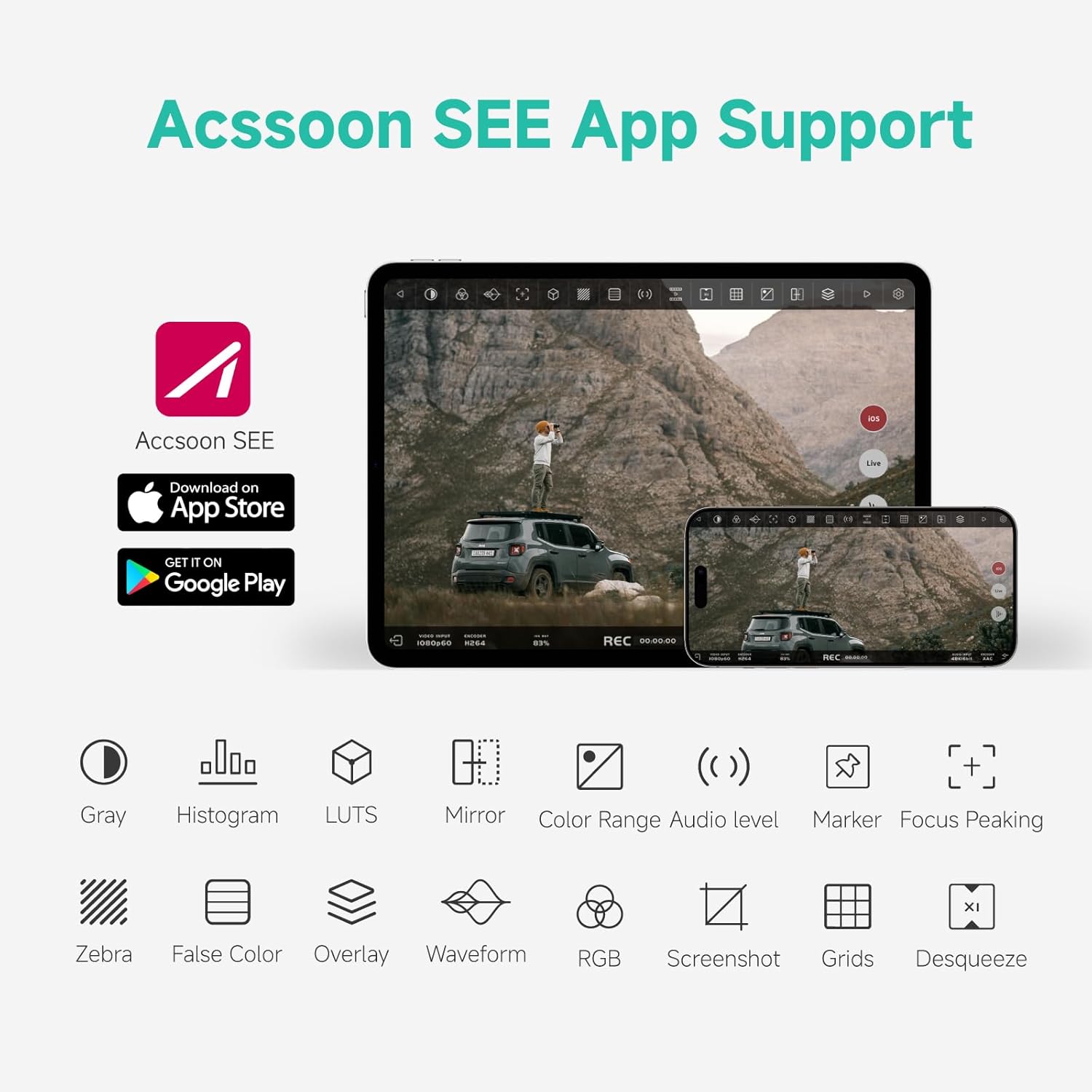
Image: Accsoon SEE App interface showcasing its comprehensive monitoring tools.
Operating Instructions
1. Real-Time Monitoring
Transform your iOS device into a high-quality monitor with professional monitoring tools.
- The Accsoon SEE app provides features like focus peaking, false color, LUT previews, waveforms, and more for precise monitoring.
- Enjoy visually lossless 4K 30fps or 1080p 60fps video quality on your iOS device's display.

Image: Accsoon SeeMo 4K in use, highlighting its key features for video professionals.
2. Recording and Sharing
Record 4K footage directly to your iOS device's camera roll for instant editing and sharing.
- Record high-quality H.264 encoded video files.
- Quickly access recorded footage from your camera roll for post-production or direct sharing.
- The integrated SD card reader allows for file backups and transfers (Note: direct video recording to SD card from SeeMo 4K is not supported).

Image: Demonstrates instant H.264 recording and sharing capabilities with the SeeMo 4K.
3. Live Streaming
Stream directly to popular social media platforms using RTMP/SRT protocols.
- Livestream via 4G/5G cellular data or Wi-Fi.
- The Accsoon SEE app supports streaming to platforms like Facebook Live (note: 4K not supported on Facebook Live), Twitch, and YouTube.
- Utilize vertical video mode for creators and SRT for live streamers.

Image: The Accsoon SEE App's interface for easy live streaming, showing various streaming options.
Maintenance
To ensure the longevity and optimal performance of your Accsoon SeeMo 4K, follow these maintenance guidelines:
- Cleaning: Use a soft, dry cloth to clean the exterior of the device. Avoid using harsh chemicals or abrasive materials.
- Storage: Store the device in a cool, dry place away from direct sunlight and extreme temperatures.
- Battery Care: Remove the NP-F battery if the device will not be used for an extended period. Store batteries properly according to their manufacturer's instructions.
- Cable Management: Avoid bending or crimping the connecting cables excessively to prevent damage.
Troubleshooting
If you encounter issues with your Accsoon SeeMo 4K, refer to the following common troubleshooting tips:
No Video Signal on iOS Device:
- Ensure the NP-F battery is fully charged and correctly inserted.
- Verify that the HDMI cable is securely connected from your camera to the SeeMo 4K's HDMI In port.
- Check that the USB-C cable is properly connected from the SeeMo 4K's USB-C Video Out to your iOS device.
- Confirm that the Accsoon SEE app is open and the correct SeeMo 4K device is selected.
- Check your camera's HDMI output settings. For 4K video, ensure the output is set to 3840x2160.
App Not Recognizing SeeMo 4K:
- Restart both the SeeMo 4K and your iOS device.
- Ensure the Accsoon SEE app is updated to the latest version.
- Check the physical connection of the USB-C/Lightning cable.
Firmware Updates:
Regularly check for and install firmware updates via the Accsoon SEE app to ensure optimal performance and access to new features.
Video: SeeMo Series Upgrade Tutorial. This video guides users through the firmware update process for the SeeMo series.
Video: Accsoon SEE App 1.7.3 Update. This video highlights new features and improvements in the Accsoon SEE App.
Specifications
| Feature | Detail |
|---|---|
| Product Dimensions | 6.22 x 4.06 x 2.24 inches |
| Item Weight | 11.7 ounces |
| Model Number | Accsoon SeeMo 4K |
| Brand | Accsoon |
| Color | Black |
| HDMI Input Support | 2160p 23.98/24/25/29.97/30fps (UHD 4K30), 1080p 23.98/24/25/29.97/30/50/59.94/60fps, 720p 50/59.94/60fps |
| Encoding Technology | H.264 |
| Power Output (USB-C) | 5V 2.4A (for Phone/iPad charging) |
| Power Source | NP-F550, NP-F750, or NP-F970 battery (not included) |
| Number of Ports | 2 (HDMI In, USB-C Video Out) |
| Country of Origin | China |
Compatibility
The Accsoon SeeMo 4K is compatible with a wide range of iOS devices running iOS 12 or later:
- iPhone: iPhone 16, 16 Plus, 16 Pro, 16 Pro Max; iPhone 15, 15 Plus, 15 Pro, 15 Pro Max; iPhone 14, 14 Plus, 14 Pro, 14 Pro Max; iPhone 13, 13 mini, 13 Pro, 13 Pro Max; iPhone 12, 12 mini, 12 Pro, 12 Pro Max; iPhone 11, 11 Pro, 11 Pro Max; iPhone XR, XS, XS Max; iPhone X; iPhone 8, 8 Plus.
- iPad: iPad mini 2/3/4/5/6/7; iPad Air/Air 2/Air 3/Air 4; 12.9-inch iPad Pro Gen 1/2; 10.5-inch iPad Pro; iPad 5/6/7/8.
Warranty and Support
Accsoon products are designed for reliability and performance. For specific warranty information and terms, please refer to the warranty card included with your product or visit the official Accsoon website.
For technical support, troubleshooting assistance, or any inquiries regarding your Accsoon SeeMo 4K, please contact Accsoon customer service or visit the Accsoon Official Store on Amazon.


