
1. Introduction
The HOZO M-Cube Pro is a modular, multi-function laser measuring tool designed for precision and adaptability in various applications, including surveying, construction, design, and home renovation. Its innovative magnetic locking system allows for effortless switching between the main unit and specialized modules, enhancing versatility and efficiency.
2. Package Contents
The M-Cube Pro Combo package includes the following components:
- M-Cube 00 Main Unit
- M-Cube 01 Smart Planner Adaptor
- M-Cube 03 Bilateral Laser+ Adaptor
- M-Cube 05 Scale Roller Adaptor
- 10-30 inch Aluminum Tripod with Rotating Ballhead
- M-Protection Case
- Rechargeable Lithium-Ion Battery (pre-installed)
- Charging Cable

Image 2.1: Overview of the HOZO M-Cube Pro Combo package contents, including the main unit, various modules, tripod, and protection case.

Image 2.2: The M-Tripod and M-Protection Case, essential accessories for stability and safe storage.
3. Product Overview
The M-Cube Pro system is built around a central main unit (M-Cube 00) to which various specialized modules can be magnetically attached.
3.1. Modular Design
The core feature of the M-Cube Pro is its modularity. Modules connect securely to the main unit via a magnetic locking mechanism, allowing for quick and easy interchangeability.

Image 3.1: Illustration of how different modules magnetically connect to the M-Cube main unit.

Image 3.2: The HOZO M-Cube system showcasing the main unit and its adaptable modules.
3.2. M-Cube 00 Main Unit
This is the primary laser measure unit, offering fast and accurate distance measurements up to 164ft (50m) with ±1/16 inch accuracy. It includes functions for distance, area, volume, Pythagorean calculations, Min-Max laser function, 1/N Line Segment Division, an electronic angle sensor, and two digital bubble levels.

Image 3.3: The M-Cube 00 Main Unit, the core component of the modular system.
3.3. M-Cube 01 Smart Planner Adaptor
When adapted with the M-Cube 00, this module provides 360° joystick control for versatile floorplan capture. It features a one-tap button for edge and corner accuracy and auto-leveling, ideal for quick and precise measurements in complex environments.
3.4. M-Cube 03 Bilateral Laser+ Adaptor
This adaptor extends the measurement range to 328ft (100m) with ±1/8 inch accuracy. It features a bright M-Green Cross Line and auto-leveling capabilities, useful for challenging measuring conditions or when hands are unsteady.
3.5. M-Cube 05 Scale Roller Adaptor
Functioning as an electronic digital tape measure, this module includes cross laser assistance, infinite customized scales, and ±1/32 inch accuracy. It has 93 built-in US Imperial and Metric scales and a Smart Point-to-Side Align feature for automatic alignment.
4. Setup
4.1. Charging the Device
The M-Cube Pro uses a rechargeable Lithium-Ion battery. Connect the provided charging cable to the main unit and a suitable USB power source. The device's display will indicate charging status. Ensure the device is fully charged before first use.
4.2. Attaching Modules
To attach a module, align the module with the magnetic connection points on the M-Cube 00 Main Unit. The module will snap into place securely. To detach, gently pull the module away from the main unit.
4.3. Connecting to the MEAZOR App
The M-Cube Pro can connect to the MEAZOR App via Bluetooth for enhanced functionality and data management. Download the MEAZOR App from your device's app store. Enable Bluetooth on your mobile device and follow the in-app instructions to pair with your M-Cube Pro.
5. Operating Instructions
5.1. M-Cube 00 Main Unit Operation
Power on the device. Use the touchscreen interface to select desired measurement functions:
- Distance Measurement: Point the laser at the target and press the measure button.
- Area/Volume Calculation: Take sequential length, width, and height measurements as prompted by the device.
- Pythagorean Function: Follow on-screen prompts to measure sides for indirect height or distance calculations.
- Electronic Angle Sensor & Digital Bubble Levels: These features provide real-time angle and level indications on the display.
5.2. M-Cube 01 Smart Planner Adaptor Operation
Attach the Smart Planner module to the M-Cube 00. Activate the Smart Planner function on the main unit's display or via the MEAZOR App. Use the joystick to navigate and capture room layouts. The one-tap button assists in precise edge and corner detection.

Image 5.1: A user demonstrating the use of the M-Cube 01 Smart Planner for capturing room dimensions.
5.3. M-Cube 03 Bilateral Laser+ Adaptor Operation
Attach the Bilateral Laser+ module. Select the Bilateral Laser+ mode. The module emits a bright green cross line for alignment and offers extended dual laser distance measurement. Auto-leveling assists in maintaining accuracy during use.
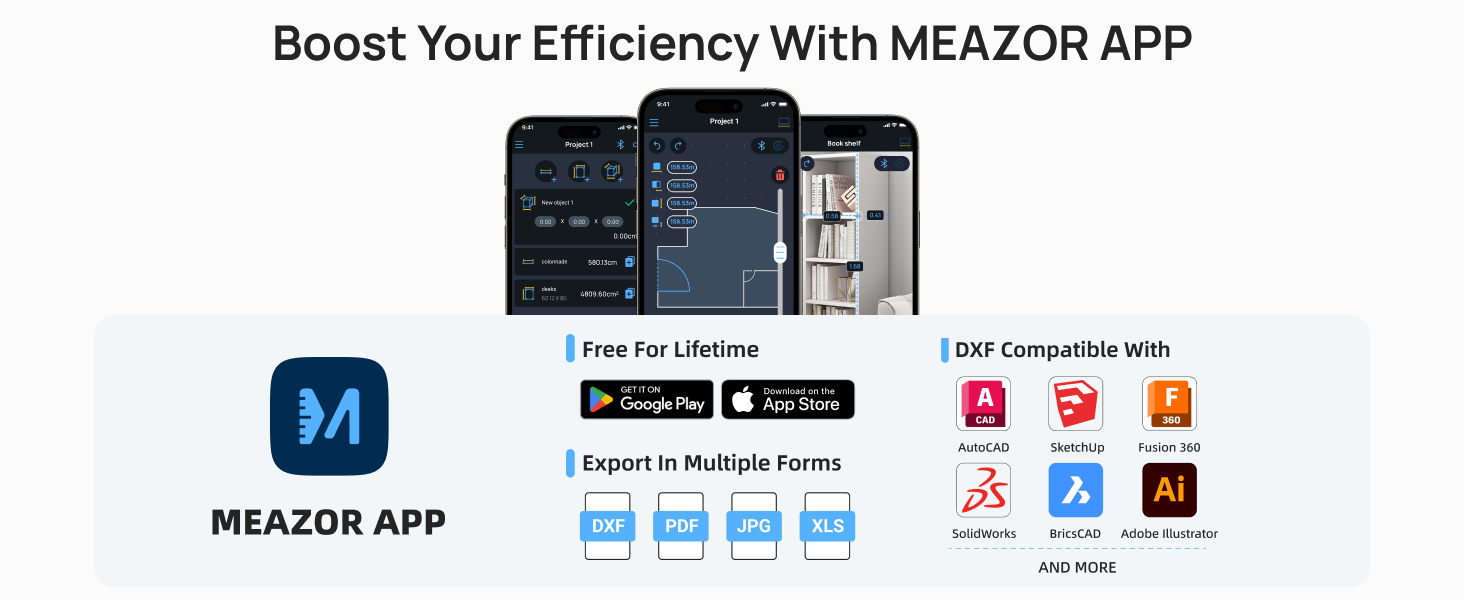
Image 5.2: A user utilizing the M-Cube 03 Bilateral Laser+ module to project a green cross line for alignment.
5.4. M-Cube 05 Scale Roller Adaptor Operation
Attach the Scale Roller module. Select the Scale Roller function. Roll the device along surfaces to measure distances. The integrated cross laser assists in maintaining a straight path. Choose from built-in scales or customize your own for specific project requirements.

Image 5.3: Detailed view of the M-Cube 05 Scale Roller, highlighting its features like customized scales and cross laser assistance.
5.5. Using the M-Tripod
The M-Tripod provides stability for precise measurements, especially when using the Bilateral Laser+ module for cross-line alignment. Attach the M-Cube 00 (with or without an adaptor) to the tripod's ballhead. Adjust the tripod height and angle as needed.

Image 5.4: The HOZO M-Tripod, designed for stable and precise measurements.
Image 5.5: The M-Cube main unit mounted on the tripod, projecting laser lines for accurate alignment.
5.6. MEAZOR App Integration
The MEAZOR App allows you to:
- View and manage measurements in real-time.
- Create and edit floorplans.
- Export data in various formats (DXF, PDF, JPG, XLS) for compatibility with software like AutoCAD, SketchUp, Fusion 360, SolidWorks, BricsCAD, and Adobe Illustrator.

Image 5.6: Screenshots of the MEAZOR App interface, demonstrating its features for project management and data export.
6. Maintenance
- Cleaning: Use a soft, damp cloth to clean the device and modules. Do not use abrasive cleaners or solvents.
- Storage: Store the device and its modules in the M-Protection Case when not in use to prevent damage. Keep in a dry environment away from extreme temperatures.
- Battery Care: Recharge the battery regularly, even if the device is not used frequently, to maintain battery health. Avoid fully discharging the battery for extended periods.

Image 6.1: The M-Protection Case, designed to protect and organize all components of the M-Cube Pro Combo.
7. Troubleshooting
- Inaccurate Measurements: Ensure the device is calibrated correctly (if applicable via settings). Verify the measurement reference point is set appropriately. Environmental factors like strong sunlight or reflective surfaces can affect accuracy. Use the M-Tripod for stability.
- Device Not Powering On: Check battery level and ensure the device is charged.
- Bluetooth Connectivity Issues: Ensure Bluetooth is enabled on both the M-Cube Pro and your mobile device. Restart both devices and try pairing again. Ensure the MEAZOR App is up to date.
- Module Not Recognized: Ensure the module is securely attached to the main unit via the magnetic connection. Detach and reattach the module.
- App Functionality Issues: Ensure the MEAZOR App is the latest version. Check for firmware updates for the M-Cube Pro via the app.
8. Specifications
| Feature | Specification |
|---|---|
| Brand | HOZO |
| Model | C00-P (M-Cube Pro Combo) |
| Measuring Range (M-Cube 00) | 164 feet (50 meters) |
| Accuracy (M-Cube 00) | ±1/16 inch |
| Measuring Range (Bilateral Laser+ 03) | 328 feet (100 meters) |
| Accuracy (Bilateral Laser+ 03) | ±1/8 inch |
| Accuracy (Scale Roller 05) | ±1/32 inch |
| Battery Type | Rechargeable Lithium-Ion, 900mAh, 3.7V |
| Material | 7075 Aluminum Alloy, ABS Plastic, PC Plastic, Silicone Rubber |
| Product Dimensions | 11.22"L x 7.63"W x 2.32"H (Combo Package) |
| Item Weight | 2.48 pounds (Combo Package) |
| International Protection Rating | IP54 (Water Resistant) |
| Connectivity | Bluetooth |
9. Warranty and Support
9.1. Warranty Information
The HOZO M-Cube Pro Combo comes with a 1-year limited warranty provided by HOZO. Please retain your proof of purchase for warranty claims.
9.2. Customer Support
For technical assistance, troubleshooting, or warranty inquiries, please visit the official HOZO store or contact HOZO customer support through their website. You can find more information at the HOZO Store on Amazon.