
DEWALT DCE3100AK
DEWALT DCE3100AK U-Type Aluminum Die Kit Instruction Manual
Model: DCE3100AK
1. Introduction and Overview
The DEWALT DCE3100AK U-Type Aluminum Die Kit is designed to produce UL Classified crimps when used with the DEWALT DCE310 20V MAX* Compact Crimper (sold separately). This kit provides a comprehensive range of dies for aluminum wire sizes from #8 to 350 MCM.
Each die features laser-etched markings and industry-standard color coding for easy identification of die sizes. After a crimping cycle, the wire size is imprinted onto the connector, allowing for simple and efficient inspection.
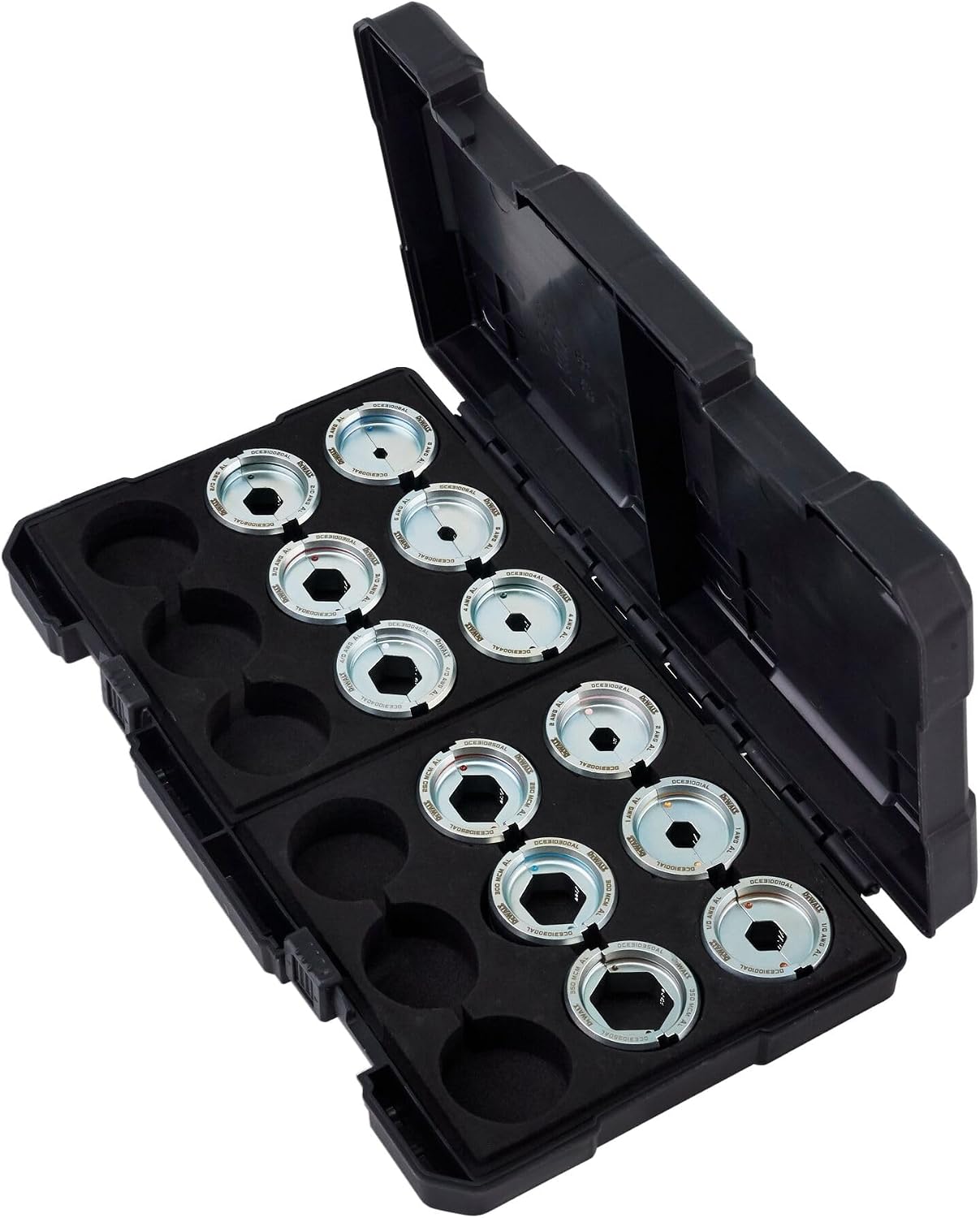
Figure 1: DEWALT DCE3100AK U-Type Aluminum Die Kit in its durable carrying case.
Key Features:
- Achieves UL Classified Crimps with compatible DEWALT DCE310 20V MAX* Compact Crimper.
- Features industry-standard color markings for quick die size identification.
- Imprints wire size onto the connector for post-crimp inspection.
- Manufactured by DEWALT for reliability and performance.
2. Safety Information
Always observe basic safety precautions when using power tools and accessories. Failure to follow these instructions may result in electric shock, fire, and/or serious injury.
- Read all instructions: Before using the die kit, read and understand all instructions in this manual and the manual for your DEWALT DCE310 Compact Crimper.
- Wear appropriate personal protective equipment (PPE): Always wear safety glasses, gloves, and other necessary PPE when operating crimping tools.
- Inspect dies: Before each use, inspect dies for damage, wear, or deformation. Do not use damaged dies.
- Use correct dies: Ensure you select the correct die size for the wire and connector being used. Refer to the crimper's user manual for a compliant chart of dies and connectors.
- Secure workpiece: Ensure the wire and connector are properly seated and secured in the crimper and dies before initiating a crimp.
- Keep work area clear: Maintain a clean and well-lit work area. Cluttered or dark areas invite accidents.
3. Package Contents
Your DEWALT DCE3100AK U-Type Aluminum Die Kit includes the following components:
- (1) #1 Aluminum U-Die Set (DCE31001AL)
- (1) #2 Aluminum U-Die Set (DCE31002AL)
- (1) #4 Aluminum U-Die Set (DCE31004AL)
- (1) #6 Aluminum U-Die Set (DCE31006AL)
- (1) #8 Aluminum U-Die Set (DCE31008AL)
- (1) 1/0 Aluminum U-Die Set (DCE310010AL)
- (1) 2/0 Aluminum U-Die Set (DCE310020AL)
- (1) 250 MCM Aluminum U-Die Set (DCE310250AL)
- (1) 3/0 Aluminum U-Die Set (DCE310030AL)
- (1) 300 MCM Aluminum U-Die Set (DCE310300AL)
- (1) 350 MCM Aluminum U-Die Set (DCE310350AL)
- (1) 4/0 Aluminum U-Die Set (DCE310040AL)
- (1) Carrying Case
4. Setup
Proper setup of the dies in your crimping tool is crucial for safe and effective operation. This die kit is designed for use with the DEWALT DCE310 20V MAX* Compact Crimper.
Die Selection:
- Identify the wire gauge and type (aluminum) you intend to crimp.
- Consult the compliant chart in your DEWALT DCE310 Compact Crimper user manual to determine the correct U-type die set for your specific wire and connector combination.
- Locate the corresponding die set from your DCE3100AK kit. The dies are marked with laser-etched sizes and color codes for easy identification.

Figure 2: Close-up view of DEWALT U-Type Aluminum Dies with visible size markings.
Die Installation (Refer to DCE310 Crimper Manual for detailed steps):
- Ensure the DEWALT DCE310 Compact Crimper is powered off and the battery is removed for safety.
- Open the crimper head according to its manual.
- Carefully insert the selected U-type die set into the designated slots in the crimper head. Ensure they are fully seated and aligned.
- Close the crimper head, ensuring the dies are securely held in place.
- Reinsert the battery into the crimper. The tool is now ready for operation.
5. Operating Instructions
Follow these steps to perform a UL Classified crimp using your DEWALT DCE3100AK dies and DCE310 Compact Crimper:
- Prepare the Wire: Strip the insulation from the electrical wire to the length specified by the connector manufacturer. Ensure the wire strands are clean and untwisted.
- Insert Wire into Connector: Fully insert the stripped wire into the barrel of the appropriate aluminum connector.
- Position for Crimping: Place the connector with the inserted wire into the selected U-type dies in the crimper head. Ensure the connector is centered within the dies and the crimp location aligns with the connector manufacturer's specifications.
- Initiate Crimp: Activate the DEWALT DCE310 Compact Crimper. The tool will cycle automatically, applying the necessary force to create a secure crimp. Allow the crimper to complete its full cycle.
- Remove and Inspect: Once the crimper cycle is complete, remove the crimped connector. Visually inspect the crimp for proper formation. The dies will have imprinted the wire size onto the connector for verification. Ensure the crimp is tight and secure, with no loose strands or signs of damage.
- Repeat as Needed: For multiple crimps on the same connector, reposition the connector and repeat the crimping process as per connector manufacturer guidelines.
Always refer to the specific instructions provided by the connector manufacturer for optimal crimping results and to maintain UL classification.
6. Maintenance
Proper maintenance extends the life of your DEWALT U-Type Aluminum Dies and ensures consistent performance.
- Cleaning: After each use, wipe the dies clean with a dry cloth to remove any debris, dust, or residue. Avoid using harsh chemicals or abrasive materials that could damage the die surfaces or markings.
- Lubrication: Periodically apply a light coat of machine oil to the die surfaces to prevent rust and ensure smooth operation. Consult your crimper's manual for any specific lubrication requirements related to die interaction.
- Inspection: Regularly inspect dies for signs of wear, cracks, chips, or deformation. Worn or damaged dies can lead to improper crimps and should be replaced immediately.
- Storage: Store the dies in their original carrying case in a dry, clean environment. The case protects the dies from damage and keeps them organized.
7. Troubleshooting
If you encounter issues while using your DEWALT U-Type Aluminum Die Kit, consider the following:
Issue: Improper Crimp (e.g., loose, deformed, or incomplete)
- Incorrect Die Size: Ensure the selected die size matches the wire gauge and connector. Refer to the crimper's manual for the correct die chart.
- Damaged Dies: Inspect dies for wear, cracks, or deformation. Replace any damaged dies.
- Improper Wire Preparation: Verify the wire is stripped to the correct length and fully inserted into the connector.
- Crimper Malfunction: If the dies appear fine, the issue might be with the crimping tool itself. Refer to your DEWALT DCE310 Compact Crimper's manual for troubleshooting its operation.
Issue: Difficulty Inserting/Removing Dies
- Debris: Check for any debris or foreign objects in the die slots of the crimper head or on the dies themselves. Clean thoroughly.
- Misalignment: Ensure the dies are correctly oriented and aligned with the crimper head slots. Do not force them.
- Damage: Inspect both the dies and the crimper head for any physical damage that might impede insertion or removal.
For persistent issues not resolved by these steps, contact DEWALT customer support or an authorized service center.
8. Specifications
| Specification | Detail |
|---|---|
| Model Number | DCE3100AK |
| Brand | DEWALT |
| Item Weight | 4.84 pounds |
| Product Dimensions | 12.7 x 7.25 x 1.95 inches |
| Material | Aluminum (dies), Blend (overall product material), Aluminum (handle material for dies) |
| Power Source | Hand-powered (as an accessory to a crimper) |
| Included Components | 12 U-Die Sets (#1, #2, #4, #6, #8, 1/0, 2/0, 250 MCM, 3/0, 300 MCM, 350 MCM, 4/0 Aluminum), 1 Carrying Case |
9. Warranty and Support
DEWALT stands behind its products. For specific warranty information regarding your DCE3100AK U-Type Aluminum Die Kit, please refer to the warranty card included with your purchase or visit the official DEWALT website.
Customer Support:
- For technical assistance, service, or to locate an authorized service center, please visit www.dewalt.com/support.
- You may also contact DEWALT customer service directly through the contact information provided on their website.
When contacting support, please have your product model number (DCE3100AK) and purchase date available.
Ask a question about this manual
Ask about setup, troubleshooting, compatibility, parts, safety, or missing instructions. Manuals+ will review the question and use this page’s manual context to help answer it.