
1. Introduction
This manual provides detailed instructions for the safe installation, operation, and maintenance of your Mount-It! MI-384 Fireplace Mantel TV Wall Mount. This spring-assisted pull-down mount is designed to position your television above a fireplace mantel, allowing it to be lowered to a comfortable viewing height when in use. Please read this manual thoroughly before installation and retain it for future reference.

Image 1.1: The Mount-It! MI-384 allows you to lower your TV from above the fireplace for optimal viewing.
2. Safety Information and Pre-Installation Checklist
WARNING: Failure to read and follow all instructions may result in personal injury or property damage. If you have any questions, please contact Mount-It! customer support.
- This wall mount requires installation into solid concrete or wood studs. It is not suitable for stone or marble surfaces unless proper anchoring methods for these materials are used. Consult a professional if unsure.
- Ensure the maximum allowable mantel depth is 16 inches (40.6 cm).
- When fully raised, the mount arm may extend up to 37 inches (94 cm) over the top of the mantel. Verify adequate vertical distance is available between the mantel and the ceiling, especially for larger televisions.
- For smaller TVs or TVs with lower VESA mounting holes, a portion of the wall mount might be visible under the TV when it is in the raised position.
- This is not a low-profile TV mount. Due to its height adjustment and extension capabilities, the TV mount sits a minimum of 5.7 inches (14.5 cm) away from the wall.
- Gas spring tension adjustment is crucial for proper operation and may be required for both heavier and lighter televisions to ensure smooth movement.
- Do not exceed the maximum weight capacity of 55 lbs (25 kg).
- Ensure your TV's VESA pattern is compatible with the mount (see Specifications section).

Image 2.1: Illustration of the mount's distance from the wall in both raised and lowered positions.

Image 2.2: Guide for calculating necessary vertical clearance above your mantel.

Image 2.3: Minimum TV size requirement to conceal the mount when in the raised position.
3. Package Contents
Please verify that all components are present and undamaged before beginning installation. If any parts are missing or damaged, do not attempt to install and contact Mount-It! customer support immediately.
The Mount-It! MI-384 includes all necessary hardware for installation. While specific component lists may vary, typical contents include:
- Wall Plate Assembly
- TV Bracket Arms
- Mounting Hardware (screws, anchors, washers for wall and TV attachment)
- Cushioned Handle
- Instruction Manual
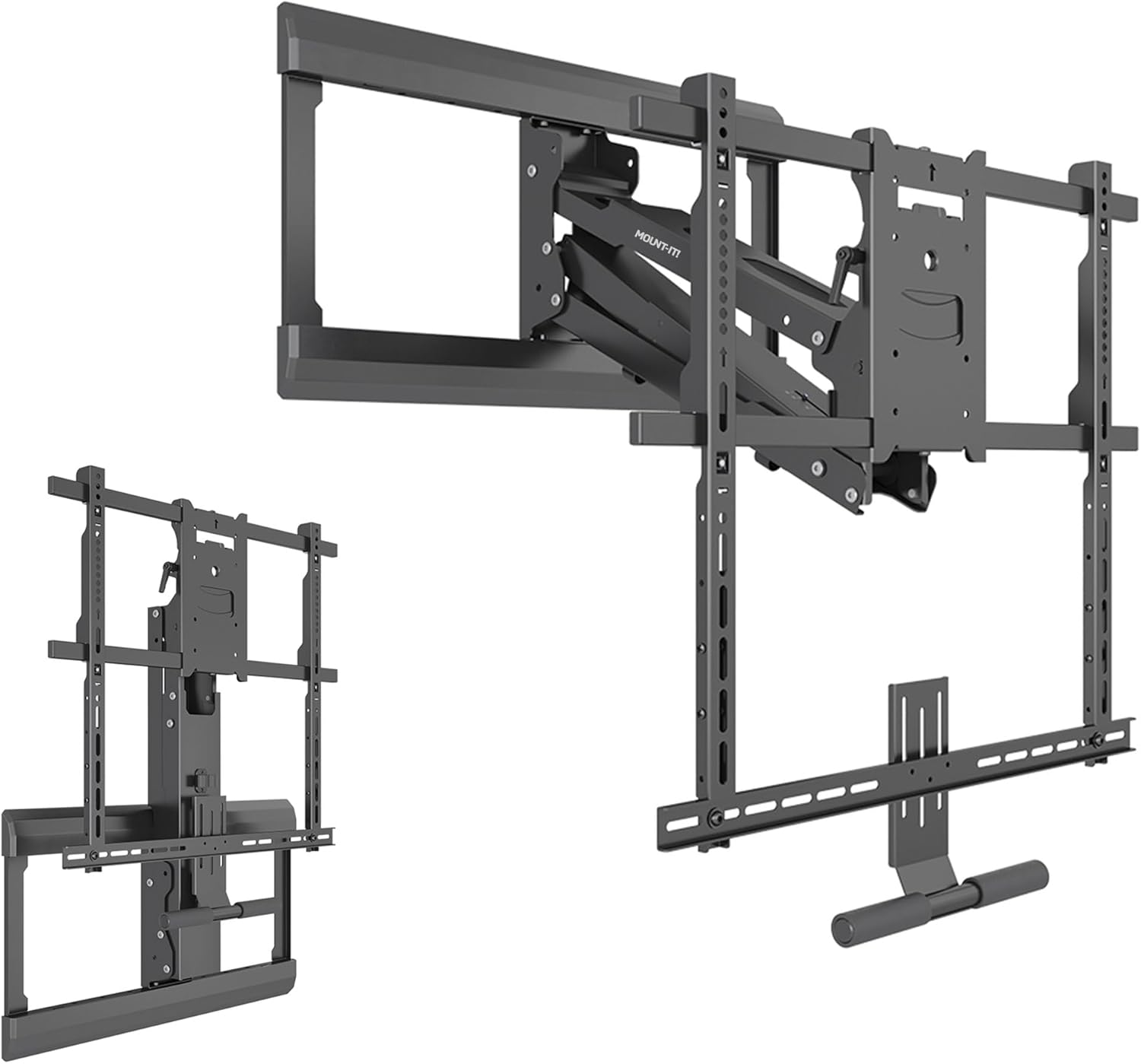
Image 3.1: Overview of Mount-It! MI-384 components.
4. Specifications
| Feature | Specification |
|---|---|
| Brand | Mount-It! |
| Model Number | MI-384 |
| TV Size Compatibility | 42 - 65 inches |
| Maximum Weight Capacity | 55 lbs (25 kg) |
| VESA Compatibility | 100x100, 200x200, 300x200, 300x300, 400x200, 400x300, 400x400, 600x500 |
| Mounting Type | Over Fireplace Mantel, Wall Mounted |
| Movement Type | Articulating, Tilt, Swivel, Height Adjustment |
| Height Adjustment Range | Up to 29 inches (73.7 cm) total |
| Tilt Range | +10 to -5 degrees |
| Swivel Range | +/- 30 degrees |
| Leveling Adjustment | +/- 5 degrees (post-installation) |
| Minimum Distance from Wall | 5.7 inches (14.5 cm) |
| Material | Alloy Steel |
| Color | Black |
| Product Dimensions | 31.75 x 15 x 6.5 inches (80.6 x 38.1 x 16.5 cm) |
| Item Weight | 34.9 pounds (15.8 kg) |
| UPC | 810041739643 |
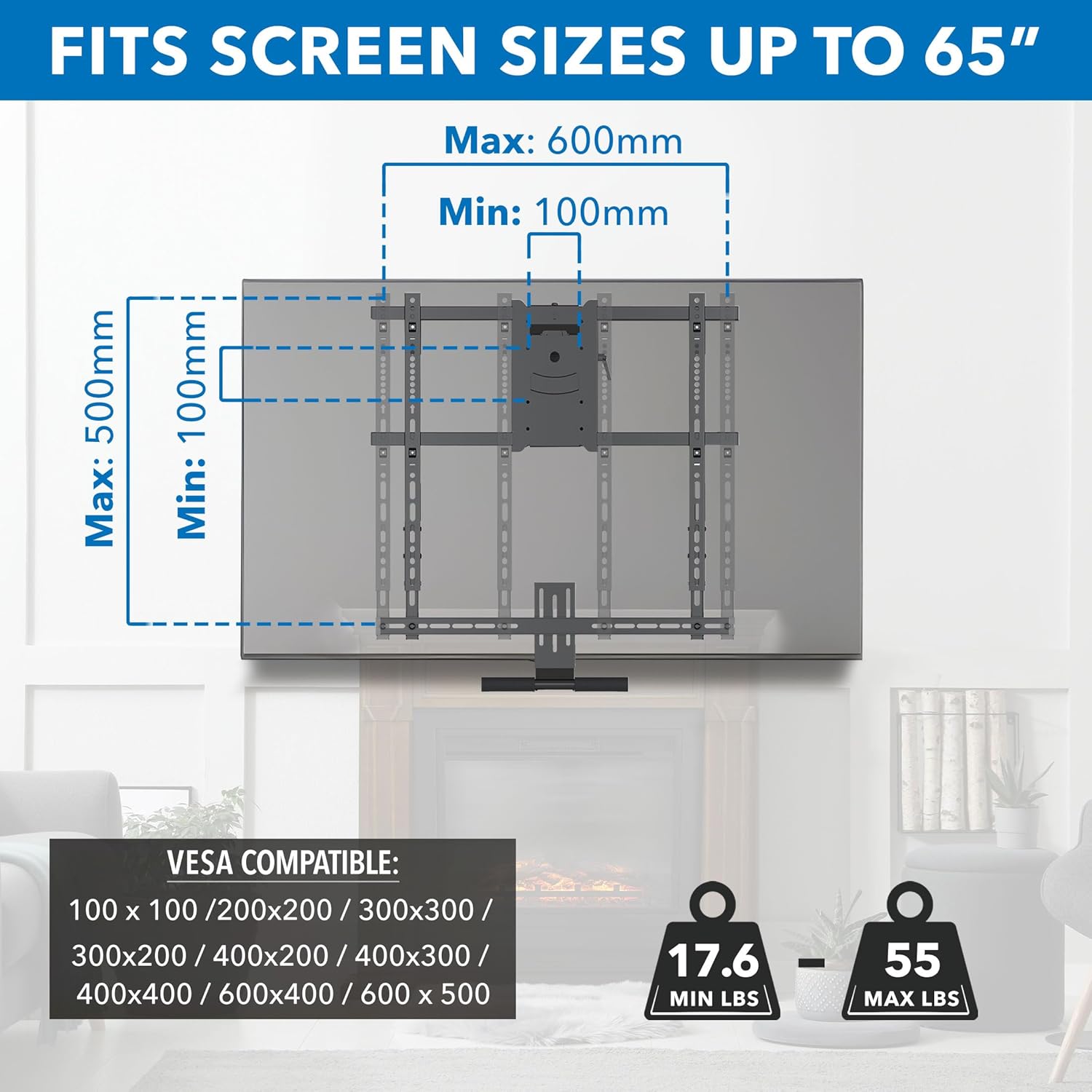
Image 4.1: VESA and TV size compatibility details.
5. Setup and Installation
Before starting, ensure you have read the Safety Information section and confirmed your wall type and TV compatibility. Professional installation is recommended if you are not confident with the process.
5.1 Tools Required (Not Included)
- Drill
- Stud Finder
- Level
- Tape Measure
- Socket Wrench / Spanner
- Phillips Head Screwdriver
- Pencil
5.2 Installation Steps
- Prepare the Wall: Locate wood studs or a solid concrete wall where you intend to mount the TV. Mark the desired height for the top of the wall plate, ensuring it allows for the TV to be raised above the mantel and lowered to a comfortable viewing position. Refer to Image 2.2 for vertical clearance calculations.
- Mount the Wall Plate: Secure the wall plate assembly to the wall using the provided hardware. Ensure it is level before tightening all fasteners. The mount features an adjustable wall plate for centering the TV above the fireplace, even if studs are off-center.
- Attach TV Brackets: Secure the TV bracket arms to the back of your television using the appropriate VESA screws and spacers from the hardware kit. Ensure the brackets are centered and securely fastened to your TV's VESA mounting holes.
- Hang the TV: Carefully lift the television with the attached brackets and hook it onto the wall plate assembly. Ensure the TV is securely seated on the mount.
- Secure the TV: Fasten any safety screws or locking mechanisms to prevent the TV from accidentally disengaging from the mount.
- Adjust Spring Tension: The gas spring mechanism requires tension adjustment to match your TV's weight. Use the provided tool to adjust the spring tension until the TV can be smoothly lowered and raised with minimal effort and stays in position when released. Refer to the operating instructions for more details.

Image 5.1: Adjustable wall plate for TV centering.
6. Operating Instructions
The Mount-It! MI-384 offers dynamic height adjustment, tilt, and swivel capabilities for an optimal viewing experience.
6.1 Lowering and Raising the TV
To lower the TV, grasp the cushioned handle located at the bottom of the TV bracket. Gently pull the TV downwards. The spring-assisted mechanism will provide a counterbalance, allowing for smooth, controlled movement. To raise the TV, push it upwards until it locks into its raised position. Ensure the spring tension is correctly adjusted for your TV's weight (see Setup section).

Image 6.1: Lowering the TV using the cushioned handle.
6.2 Adjusting Tilt and Swivel
Once the TV is in your desired viewing position, you can adjust its angle:
- Tilt: The mount allows for a tilt range of +10 degrees (upwards) to -5 degrees (downwards). Gently push or pull the top or bottom of the TV to achieve the desired tilt angle and reduce glare.
- Swivel: The mount can swivel up to +/- 30 degrees left or right. Carefully rotate the TV horizontally to adjust the viewing angle for different seating positions.
- Leveling: After installation, a micro-adjustment of +/- 5 degrees is available to ensure the TV is perfectly level.

Image 6.2: Full motion capabilities: Swivel, Level, and Tilt.
7. Maintenance
Regular maintenance ensures the longevity and safe operation of your TV mount.
- Cleaning: Wipe the mount with a soft, dry cloth. Avoid abrasive cleaners or solvents that could damage the finish.
- Check Connections: Periodically check all screws and fasteners to ensure they are tight and secure. Loose connections can lead to instability.
- Inspect Moving Parts: Occasionally inspect the articulating arms and spring mechanism for any signs of wear or damage. Ensure smooth movement.
- Re-adjust Tension: If you notice the TV becoming difficult to move, or if it doesn't stay in its desired position, re-adjust the gas spring tension according to your TV's weight.
8. Troubleshooting
| Problem | Possible Cause | Solution |
|---|---|---|
| TV is difficult to pull down or push up. | Gas spring tension is not correctly adjusted for TV weight. | Adjust the gas spring tension. Increase tension for heavier TVs, decrease for lighter TVs. |
| TV does not stay in the desired position (sags or floats). | Gas spring tension is not correctly adjusted. | Re-adjust the gas spring tension until the TV holds its position. |
| Wall plate is visible when TV is in the raised position. | TV is too small or VESA mounting holes are too low on the TV. | This is an inherent characteristic for smaller TVs or those with lower VESA patterns. Ensure your TV meets the minimum height requirement (Image 2.3). |
| Mount feels unstable or wobbly. | Loose fasteners or incorrect installation. | Check all wall and TV fasteners and tighten them securely. Ensure installation followed instructions for wall type. |
| Mount is too far from the wall. | This is a feature of the mount's design. | The mount sits a minimum of 5.7 inches from the wall due to its articulating and height adjustment capabilities. This is not a low-profile mount. |
9. Warranty and Customer Support
The Mount-It! MI-384 Pull Down TV Mount over Fireplace comes with a LIFETIME warranty, reflecting our commitment to quality and durability.
If you encounter any issues, have questions during installation, or require assistance, please do not hesitate to contact our knowledgeable and responsive US-based customer support team. They are available to answer any questions you may have during standard business hours.
For support, please visit the official Mount-It! website or refer to the contact information provided with your product packaging.


