
1. Introduction
This manual provides detailed instructions for the installation, operation, and maintenance of the Haofy Sliding Gate Motor Control Board (110V). This control board is designed to provide efficient and reliable control for sliding gate motors, featuring LED indications, adjustable settings, and robust anti-interference capabilities. Please read this manual thoroughly before installation and use to ensure proper function and safety.
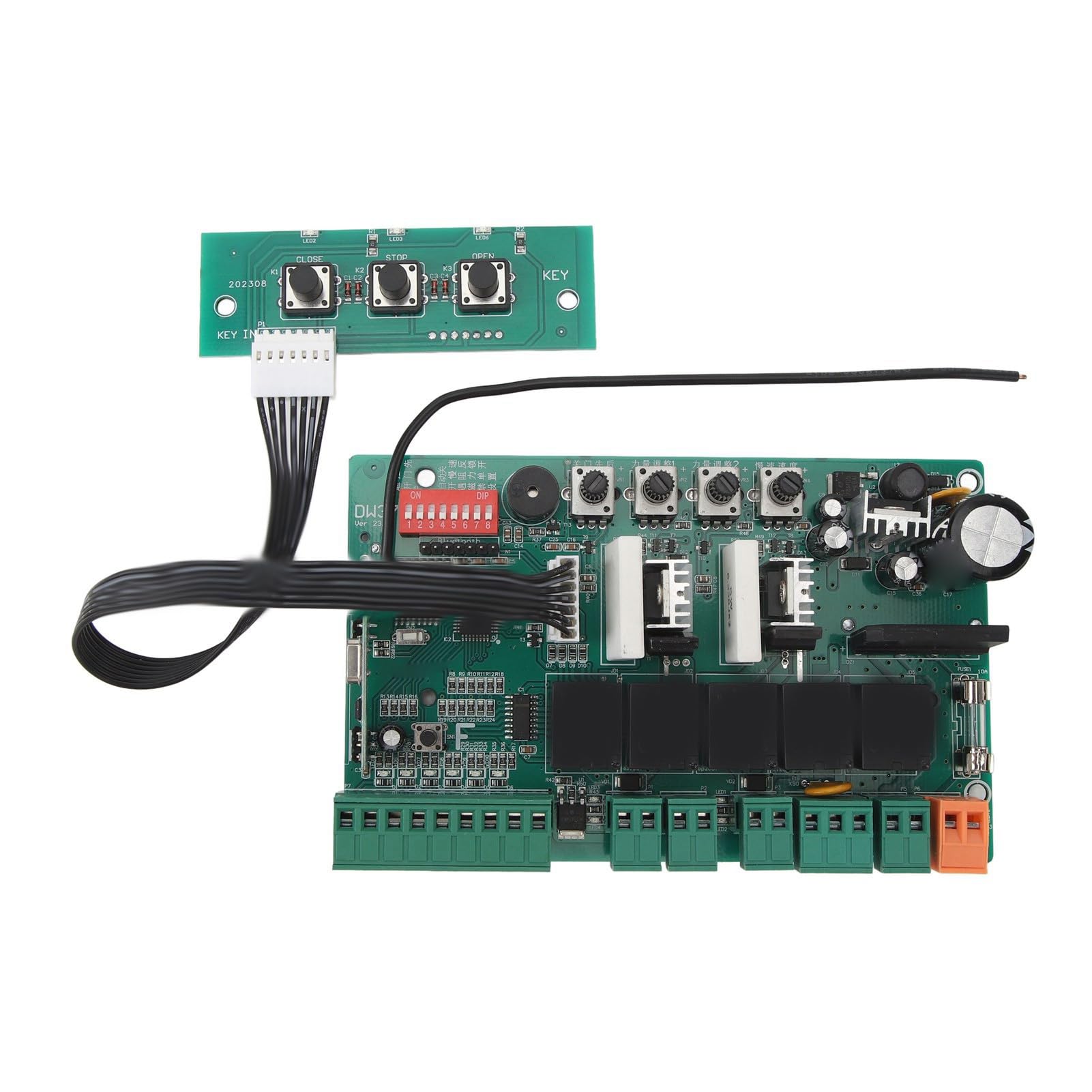
Image 1.1: Overview of the Haofy Sliding Gate Motor Control Board with its auxiliary control panel.
2. Safety Information
Always observe the following safety precautions to reduce the risk of injury or damage:
- Ensure the power supply is disconnected before performing any installation, maintenance, or troubleshooting.
- Installation should be performed by qualified personnel or under the supervision of a professional.
- Verify that the motor voltage matches the control board's specifications (DC 24V for the motor, 110V for the board's input). Connecting a 220V motor to this board will cause damage.
- Keep children and pets away from the gate area during operation.
- Do not attempt to modify the control board or its components.
- Use appropriate personal protective equipment during installation.
3. Package Contents
Upon opening the package, please verify that all items are present and undamaged:
- 1 x Haofy Gate Motor Controller Board
4. Product Features
The Haofy Sliding Gate Motor Control Board offers the following key features:
- Manual Switch Operation: Provides convenient one-button control for ease of use.
- LED Indication: Each operational step is indicated by an LED, simplifying debugging and maintenance.
- Anti-interference Design: Features strong anti-interference ability for sensitive and reliable control.
- Adjustable Slow Settings: Allows for fine-tuning of slow-speed operation for efficient gate driving.
- External Switch Interface: Supports connection of an external switch for opening and closing the gate.
- Integrated 10A Fuse: Enhances safety and protects the circuit.
5. Specifications
| Parameter | Value |
|---|---|
| Product Material | Electronic Components |
| Motor Voltage | DC 24V |
| Product Size | Approx. 145 x 91 mm (5.7 x 3.6 in) |
| Installation Hole Distance | Approx. 123 x 70 mm (4.8 x 2.8 in), 133 x 112 mm (5.2 x 4.4 in), 78 mm (3.1 in) |
| Item Weight | Approx. 244 g (8.61 oz) |
| Model Number | Haofyh24dv1siw3-12 |
6. Setup and Installation
Follow these steps for proper installation of the control board:
- Power Disconnection: Ensure that the main power supply to the gate motor system is completely disconnected before beginning any installation work.
- Mounting: Securely mount the control board in a protected enclosure, away from moisture and direct sunlight, using the specified installation hole distances.
- Motor Connection: Connect the DC 24V gate motor to the designated motor terminals on the control board. Important: Do not connect a 220V motor to this board; it is designed for DC 24V motors only.
- Power Supply Connection: Connect the 110V AC power supply to the appropriate input terminals on the control board. Double-check all wiring connections for polarity and security.
- External Switch (Optional): If using an external switch for gate control, connect it to the designated external switch interface. This allows for alternative methods of opening and closing the gate.
- Single Door Configuration: For single door applications, ensure the connection is made to the correct door machine terminal as indicated on the board.

Image 6.1: Top-down view of the control board, showing various terminals and components.

Image 6.2: Angled view of the control board, highlighting connection points.
7. Operating Instructions
Once the control board is installed and powered, follow these instructions for operation:
- Manual Operation: The control board supports manual switch operation. Use the connected auxiliary control panel (if applicable) or designated manual input to open, stop, or close the gate. Each action will be accompanied by an LED indication on the board.
- Remote Control Learning: To pair a remote control with the system:
- Press and hold the white button on the control board for approximately 3-4 seconds until the indicator light turns off.
- Release the white button.
- Press and hold the desired key on your remote control. The buzzer on the control board should sound once, indicating successful pairing.
- Press the 'open' key on the remote control again to confirm functionality.
- Adjusting Slow Settings: The control board features adjustable settings for slow driving. Use the potentiometers (rotary knobs) on the board to fine-tune the gate's slow speed and deceleration points as needed for optimal performance.

Image 7.1: The control board in an operational context, with a sliding gate.
8. Maintenance
Regular maintenance ensures the longevity and reliable operation of your Haofy Sliding Gate Motor Control Board:
- Visual Inspection: Periodically inspect the control board for any signs of damage, loose connections, or corrosion.
- Cleaning: Keep the board free from dust and debris. Use a soft, dry brush or compressed air for cleaning. Do not use liquids.
- Wiring Check: Ensure all wiring connections remain secure and free from wear or damage.
- Fuse Check: If the board loses power, check the 10A fuse. Replace it with a fuse of the same rating if blown.
9. Troubleshooting
If you encounter issues with your control board, refer to the following troubleshooting tips:
- Gate Not Responding:
- Check if the power supply is connected and active.
- Verify all wiring connections, especially to the motor and power input.
- Ensure the remote control is properly paired (refer to Section 7).
- Check the 10A fuse on the board.
- Motor Not Moving:
- Confirm the motor is a DC 24V type. This board is not compatible with 220V motors.
- Inspect motor connections for looseness or damage.
- LED Indicators Not Functioning:
- Ensure the board is receiving power.
- If specific LEDs are not lighting up during operation, it may indicate an issue with that particular function or component.
If problems persist after following these steps, please contact customer support.
10. Warranty and Support
Haofy products are designed for reliability and performance. For warranty information or technical support, please refer to the contact details provided with your purchase or visit the official Haofy website. Please have your product model number (Haofyh24dv1siw3-12) and purchase details ready when contacting support.