
1. Product Overview
The Safemo Smart Hub (Model SS011) is a central component of your Safemo smart surveillance system, designed to provide secure local storage and intelligent monitoring capabilities. This hub is engineered to work exclusively with Safemo wireless outdoor security cameras, offering a robust and private security solution without recurring monthly fees.
What's in the Box:
- Safemo Smart Hub
Key Features:
- Local Storage: Supports up to 4TB of expandable storage via SSD hard drive, ensuring your data and footage are stored directly on the device for enhanced privacy.
- No Monthly Fees: Eliminate cloud reliance and external services, providing immediate access to your surveillance without subscriptions.
- AI-Driven Intelligence: Features hub-focused AI for smart alerts, efficiently differentiating people, vehicles, packages, and pets from other motion types.
- Seamless Integration: Connects with Safemo cameras for comprehensive home security.

Figure 1: Front view of the Safemo Smart Hub.
2. Setup
Follow these steps to set up your Safemo Smart Hub and connect it to your network and cameras.
2.1 Initial Hub Connection
- Connect to Power: Plug the power adapter into the Smart Hub and then into a power outlet.
- Connect to Router: Use an Ethernet cable to connect the Smart Hub to your internet router. Ensure your router is powered on and has an active internet connection.
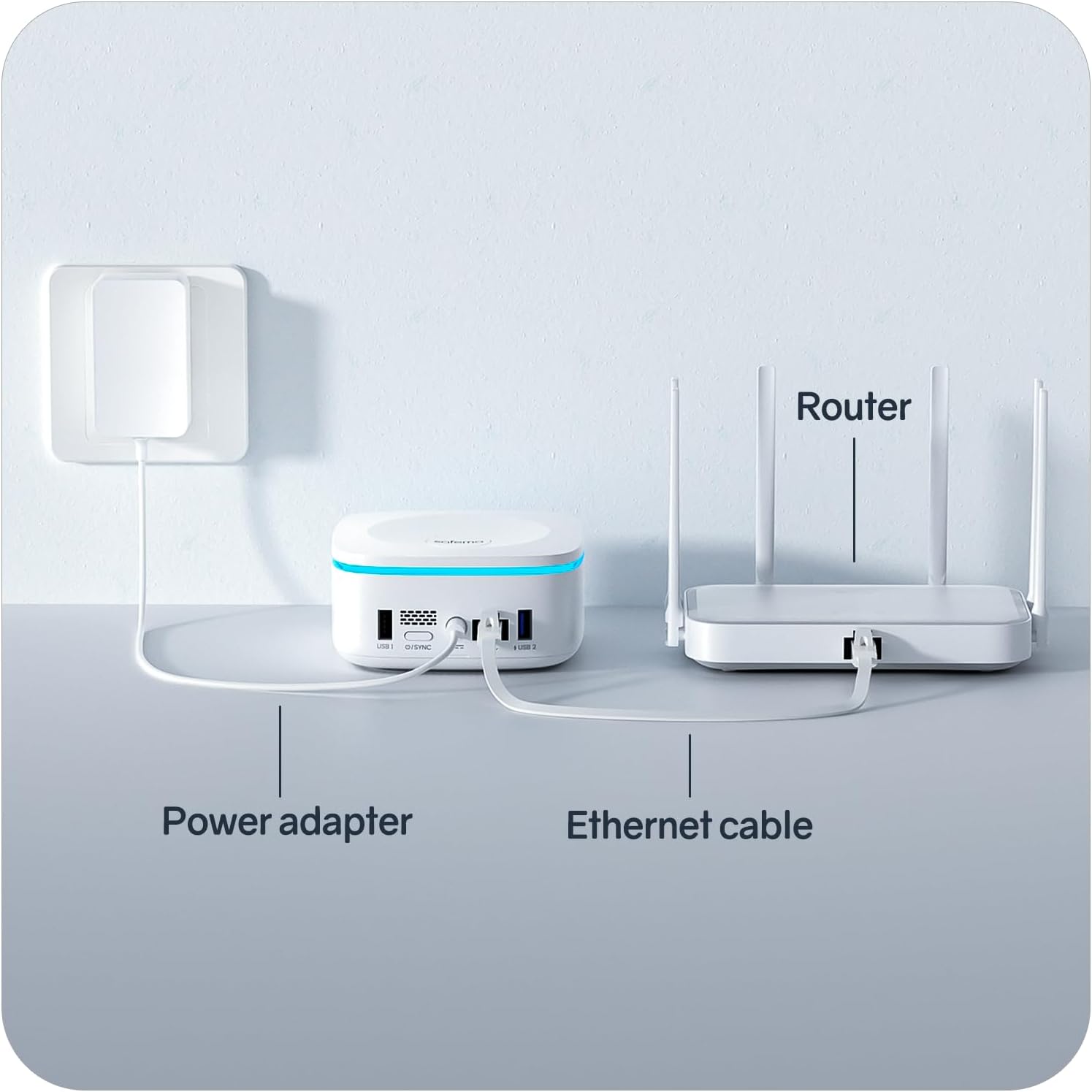
Figure 2: The Safemo Smart Hub connected to its power adapter and an Ethernet cable to a router.
2.2 App Installation and Camera Pairing
- Download the Safemo App: Search for "Safemo" in your mobile device's app store (iOS or Android) and download the official application.
- Create/Log In to Account: Open the Safemo app and follow the on-screen instructions to create a new account or log in if you already have one.
- Add Smart Hub: Within the app, follow the prompts to add your new Smart Hub. The app will guide you through the process of detecting and connecting to the hub.
- Pair Cameras: Once the hub is connected, proceed to pair your Safemo cameras with the hub through the app. Ensure your cameras are powered on and within range.

Figure 3: The Safemo app interface demonstrating the easy setup process for the hub and cameras.
2.3 Connecting to Amazon Alexa
Integrate your Safemo cameras with Amazon Alexa for convenient voice control and monitoring.
Video 1: This video provides a step-by-step guide on how to connect your Safemo Camera to Amazon Alexa, enabling voice commands for viewing live feeds and receiving motion announcements.
3. Camera Installation
Safemo cameras offer versatile installation options to suit various environments.
3.1 Mounting Options
Your Safemo security cameras can be installed in three primary ways:
- Wall Mount: Securely attach the camera to a wall using the provided mounting hardware.
- Ceiling Mount: Install the camera on a ceiling for an overhead view.
- Flat Surface Placement: Simply place the camera on any flat surface, such as a shelf or table, for easy positioning.
Choose the installation method that best provides the desired coverage and security for your property.

Figure 4: Rear view of the Safemo Smart Hub, showing USB ports and Ethernet connection for versatile setup.
4. Operation
The Safemo app provides comprehensive control and monitoring capabilities for your security system.
4.1 Monitoring via App
- Live View: Access real-time footage from your cameras anytime, anywhere.
- Two-Way Talk: Communicate with visitors or deter intruders using the integrated two-way audio feature.
- Motion Alerts: Receive instant notifications on your mobile device when motion is detected. The AI system intelligently filters alerts for people, vehicles, packages, and pets.
- Customizable Motion Zones: Define specific areas within the camera's view to monitor for motion, reducing unnecessary alerts.

Figure 5: The Safemo app displaying various monitoring and control features, including live view, motion zones, and event timelines.
5. Local and Expandable Storage
The Safemo Smart Hub prioritizes your privacy by offering robust local storage options.
- Internal Storage: The hub comes with internal storage (e.g., 32GB) capable of storing up to 6 months of footage (based on 600s of video footage per day).
- Expandable Storage: You can expand the storage capacity up to 4TB by adding an SSD hard drive. This allows for extensive video archives without relying on cloud services.
- Cloud Upload Option: While local storage is emphasized, the option to upload videos to the cloud is available if needed.

Figure 6: The Safemo Smart Hub highlighting its local storage capabilities and the benefit of no monthly fees.
6. Compatibility
The Safemo Smart Hub is designed for seamless integration within the Safemo ecosystem.
- Exclusive Compatibility: The Smart Hub is only compatible with Safemo wireless outdoor security cameras. It will not function with cameras from other brands.
- App Compatibility: The Safemo app is compatible with iOS and Android devices.
7. Environmental Conditions
The Safemo Smart Hub and compatible cameras are built to withstand a range of environmental conditions.
- Operating Temperature: The cameras are designed to operate in temperatures ranging from -20°C (-4°F) to 60°C (140°F).
- Waterproof Rating: Safemo cameras and solar panels are IP65 waterproof, ensuring reliable performance in various weather conditions.
8. Maintenance
To ensure optimal performance and longevity of your Safemo Smart Hub and cameras, consider the following maintenance tips:
- Regular Cleaning: Periodically wipe down the exterior of the hub and cameras with a soft, dry cloth to remove dust and debris. Avoid using harsh chemicals or abrasive materials.
- Firmware Updates: Regularly check the Safemo app for firmware updates for both the hub and cameras. Updates often include performance improvements, bug fixes, and new features.
- Power Cycle: If you experience connectivity issues, try power cycling the Smart Hub by unplugging it from the power source for 30 seconds and then plugging it back in.
- Check Connections: Ensure all cables (power, Ethernet) are securely connected to the hub and router.
9. Troubleshooting
If you encounter issues with your Safemo Smart Hub, refer to these common troubleshooting steps:
- No Power: Ensure the power adapter is correctly plugged into the hub and a working electrical outlet. Check if the power indicator light on the hub is on.
- No Internet Connection: Verify that your router is working correctly and has an active internet connection. Check the Ethernet cable connection between the hub and the router.
- Cameras Not Connecting: Ensure cameras are powered on and within range of the hub. Try re-pairing the cameras through the Safemo app. Check camera battery levels if applicable.
- App Issues: Ensure your Safemo app is updated to the latest version. Try force-closing and reopening the app, or reinstalling it if problems persist.
- Motion Detection Problems: Review your motion detection settings in the app, including sensitivity and defined motion zones. Ensure the camera lens is clean and unobstructed.
For persistent issues, contact Safemo customer support.
10. Specifications
| Feature | Detail |
|---|---|
| Product Dimensions | 4.33 x 4.33 x 2.18 inches |
| Item Weight | 10.9 ounces (0.31 Kilograms) |
| Model Number | SS011 |
| Brand | Safemo |
| Hardware Interface | Solid State Drive (for expandable storage) |
| Compatible Devices | iOS/Android (for app control) |
| Total USB Ports | 1 |
| Number of Ports | 1 (Ethernet) |
| UPC | 788362550134 |
| Manufacturer | SAFEMO |
| First Available | March 18, 2024 |
11. Warranty & Support
For information regarding product warranty, technical support, or service inquiries, please refer to the official Safemo website or contact their customer service directly. Keep your purchase receipt for warranty claims.
Online Support: Visit the Safemo Store on Amazon for additional resources and contact information.