
Introduction
This manual provides essential information for the safe and efficient operation of your LG OLED83C46LA 83-inch C4 Series 4K OLED Smart TV. Please read this manual thoroughly before using the product and retain it for future reference. This television features an 83-inch 4K OLED display, WebOS 24 Smart TV platform, a9 Gen7 AI Processor, and advanced gaming capabilities.
Safety Information
Always follow basic safety precautions when using this product to reduce the risk of fire, electric shock, and injury to persons. Keep the TV away from water and moisture. Do not block ventilation openings. Use only attachments/accessories specified by the manufacturer. Refer to the full safety guidelines in the printed manual included with your product.
Package Contents
Verify that all items are present in the box:
- LG OLED83C46LA 83-inch 4K OLED Smart TV
- Magic Remote MR24
- Power Cable (connected)
- IR Blaster Cable
- Quick Setup Guide / Simple Manual
- Batteries (AA x 2 units) for Magic Remote
- Grace Card (if applicable)

Image 1: Front view of the LG OLED83C46LA 83-inch C4 Series 4K OLED Smart TV. This image displays the television's sleek design and thin bezels, highlighting its large screen size.
Setup
1. Physical Installation
Carefully unpack the television. For stand installation, attach the included stand according to the instructions in the Quick Setup Guide. Ensure the TV is placed on a stable, level surface. For wall mounting, use a VESA-compatible wall mount (sold separately) and follow the wall mount manufacturer's instructions. Always ensure proper ventilation around the TV.
2. Connecting External Devices
Your LG OLED83C46LA TV offers various connection ports for external devices. Refer to the image below for port locations.

Image 2: Rear view of the LG OLED83C46LA TV, illustrating the location of various input and output ports. This includes HDMI, USB, and optical audio ports.
- HDMI Ports (x4): Connect Blu-ray players, game consoles, soundbars, and other HDMI-enabled devices. All HDMI ports support 144 Hz VRR, ALLM, QMS, eARC, and Simplink.
- USB Ports (x3, 2.0): Connect USB storage devices for media playback or external cameras.
- Optical Digital Audio Out: Connect to a sound system or soundbar for digital audio output.
- Antenna/Cable Input: Connect an antenna or cable TV signal.
- Ethernet Port: For wired network connection.
3. Power On and Initial Setup
After connecting all necessary cables, plug the power cord into an electrical outlet. Press the power button on the remote control or the TV. Follow the on-screen instructions to complete the initial setup, including language selection, network connection (Wi-Fi 5 or Ethernet), and channel scanning.
Operating the TV
1. Magic Remote MR24
The included Magic Remote MR24 allows for intuitive control of your TV. Point and click, use voice commands, or navigate with the scroll wheel. Refer to the remote's specific manual for detailed button functions.
2. WebOS 24 Smart TV Features
Your TV runs on WebOS 24, offering a smart and user-friendly interface. Key features include:
- Voice Control: Integrated Google Assistant and Alexa for hands-free operation.
- Multi-Screen: Display content from two different sources simultaneously.
- TV Always Ready: A low-power mode for quick access to information or ambient display.
- ThinQ AI: Smart home integration and personalized recommendations.
- Chromecast Built-in & Screen Share: Easily cast content from compatible devices.
- Apple HomeKit & AirPlay2: Seamless integration with Apple ecosystems.
- LG Channels & IP TV Channels: Access a wide range of free and subscription-based content.
- Sports Alerts: Stay updated on your favorite sports teams.
- PC Remote: Access your PC from the TV.
3. Picture and Sound Settings
The LG OLED83C46LA features advanced picture and sound technologies:
- a9 Gen7 AI Processor 4K: Enhances picture and sound quality through deep learning.
- Deep Learning AI Picture Pro: Optimizes image quality by analyzing thousands of independent zones.
- OLED Dynamic Tone Mapping Pro: Improves brightness, color, and contrast.
- Dolby Vision / HDR10 / HLG: Support for various High Dynamic Range formats.
- Pixel Dimming: Individual pixel control for perfect black levels.
- AI Brightness Control: Adjusts screen brightness based on ambient light.
- DOLBY ATMOS / DTS:X (by-pass through): Immersive audio experience.
- a9 AI Sound Pro (Virtual 9.1.2 Up-mix): Virtual surround sound.
- WOW Cast & WOW Orchestra: Enhanced audio integration with compatible LG soundbars.
- AI Acoustic Tuning: Optimizes sound based on room acoustics.
Gaming Features
This TV is optimized for gaming, offering a superior experience:
- 144 Hz VRR (Variable Refresh Rate): Ensures smooth, tear-free gameplay.
- nVIDIA G-Sync & AMD FreeSync Certified: Compatible with leading adaptive sync technologies.
- ALLM (Auto Low Latency Mode): Automatically switches to low-latency mode for gaming.
- HDR HGiG: Delivers accurate HDR gaming visuals.
- Response Time: Less than 0.1 ms for ultra-fast pixel response.
- Input Lag: Less than 6 ms for minimal delay between input and on-screen action.
- Cloud Gaming: Access services like GeForce Now, Luna, Utomik, Boosteroid, and Blacknut directly from the TV.
Connectivity
The LG OLED83C46LA offers comprehensive connectivity options:
- Tuners: DVB-T2/T/DVB-S2/S/DVB-C for various broadcast standards.
- HDMI: 4 ports, supporting 144 Hz VRR, ALLM, QMS, eARC, and Simplink.
- USB: 3 ports (2.0).
- Optical Output: For audio.
- Wi-Fi: Wi-Fi 5 for wireless network connection.
- Bluetooth: Bluetooth 5.1 for wireless audio devices and accessories.
Maintenance
To ensure the longevity and optimal performance of your TV:
- Cleaning the Screen: Gently wipe the screen with a soft, dry, lint-free cloth. For stubborn marks, slightly dampen the cloth with water or a specialized screen cleaner (do not spray directly on the screen).
- Cleaning the Frame: Use a soft, dry cloth to wipe the frame and stand.
- Ventilation: Ensure the ventilation openings on the back of the TV are not blocked.
- Power Cord: Regularly check the power cord for any damage.
Troubleshooting
If you encounter issues with your TV, refer to the following common solutions:
- No Power: Check if the power cord is securely plugged into both the TV and the wall outlet. Test the outlet with another device.
- No Picture/Sound: Ensure the correct input source is selected. Check all cable connections (HDMI, antenna).
- Remote Not Working: Replace the batteries in the Magic Remote. Ensure there are no obstructions between the remote and the TV.
- Network Connection Issues: Restart your router and modem. Reconnect the TV to the Wi-Fi network or check the Ethernet cable.
- Picture Quality Issues: Adjust picture settings (brightness, contrast, color). Ensure the content source is high quality.
For more complex issues, consult the full user manual or contact LG customer support.
Specifications
| Feature | Detail |
|---|---|
| Model Number | OLED83C46LA |
| Screen Size | 83 inches (210 cm) |
| Display Technology | OLED 4K |
| Resolution | 3840 x 2160 pixels |
| Refresh Rate | 144 Hz (Gaming), 120 Hz (Standard) |
| Operating System | WebOS 24 |
| Processor | a9 Gen7 AI Processor 4K |
| HDR Support | Dolby Vision, HDR10, HLG |
| Audio Output | 40W (2.2 Ch, 20W Woofer), Dolby Atmos, DTS:X |
| Connectivity | 4x HDMI, 3x USB 2.0, Optical Out, Wi-Fi 5, Bluetooth 5.1 |
| Gaming Features | 144 Hz VRR, ALLM, G-Sync, FreeSync, HGiG, <0.1ms Response, <6ms Input Lag |
| Dimensions (W x H x D) | 185.1 x 109.2 x 27.9 cm (with stand) |
| Energy Efficiency Class (SDR) | F (150 W) |
| Energy Efficiency Class (HDR) | G (283 W) |

Image 3: LG OLED83C46LA TV with key dimensions labeled, including width, height, and depth, useful for planning installation space.
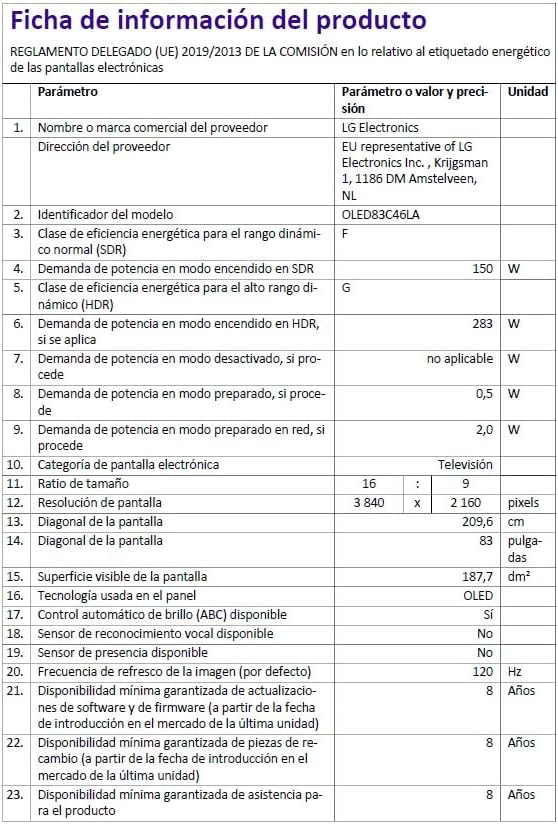
Image 4: Energy efficiency label for the LG OLED83C46LA TV, showing its energy class ratings for SDR and HDR content. More details can be found on the EPREL database.

Image 5: Detailed product information sheet for the LG OLED83C46LA TV, providing comprehensive technical data and compliance information.
Warranty and Support
Your LG OLED83C46LA TV comes with a standard manufacturer's warranty covering manufacturing defects for a specified period. For warranty details, please refer to the warranty card included in your package or visit the official LG website.
For technical support, troubleshooting assistance, or service requests, please contact LG customer support. You can find contact information on the LG official website or in the documentation provided with your TV.
Software updates are guaranteed for 4 years from the date of introduction to the market. Spare parts availability is guaranteed for 8 years from the date of introduction to the market.