
1. Introduction
The KuWFi CPE131 is a 5.8G Long Distance Outdoor Wireless Bridge designed for extending network coverage and supporting CCTV projects. This pre-configured 2-pack simplifies point-to-point pairing, eliminating the need for complex Graphical User Interface (GUI) access for initial setup. It is engineered to provide stable and professional long-range wireless coverage and data transmission, suitable for various outdoor environments.

Figure 1.1: KuWFi CPE131 Wireless Bridge Units
This image displays two KuWFi CPE131 wireless bridge units, highlighting their key specifications: 5.8G frequency, 2KM transmission range, and 900Mbps data rate. These units are designed for outdoor point-to-point wireless connectivity.
2. Package Contents
Verify that all items are present in your package:
- Two high-performance CPE131 WiFi bridge units
- Two PoE adapters
- Two LAN cables
- User manual
3. Setup Guide
The CPE131 units are pre-configured for ease of use. Follow these steps for initial setup:
- Identify Master and Slave Units: The units are pre-configured as a pair. One unit will function as the 'Host' (Master) and the other as the 'Client' (Slave). The LED display on each unit will indicate its mode (H for Host, C for Client) and the channel number.
- Power Connection: Connect each CPE131 unit to its respective PoE adapter using a LAN cable. Then, plug the PoE adapter into a power outlet.
- Network Connection:
- For the Master (Host) unit, connect the LAN port of its PoE adapter to your router or network switch.
- For the Slave (Client) unit, connect the LAN port of its PoE adapter to the device you wish to provide network access to (e.g., a computer, security camera, or another router).
- Mounting: Mount the units outdoors in a clear line of sight between them for optimal performance. They can be mounted on poles or walls. Ensure they are securely fastened and pointed towards each other.
- Signal Verification: Observe the LED indicators on both units to confirm a successful connection and signal strength. The LED display provides full information including host-client mode and signal strength.

Figure 3.1: Master and Slave Bridge Configuration
This image illustrates the LED display on both the Master (Host) and Slave (Client) KuWFi CPE131 units, showing how their modes and channel numbers are indicated for easy identification and setup.

Figure 3.2: Mounting Options
This diagram demonstrates the two primary mounting methods for the KuWFi wireless bridge: securely attaching it to a pole or mounting it directly onto a wall, providing flexibility for outdoor installations.
4. Operating Modes and Applications
The CPE131 supports multiple operating modes to suit various networking needs:
- Point-to-Point (PTP): Connects two locations wirelessly, ideal for extending network coverage to a second building or for dedicated CCTV links.
- Point-to-Multi-Point (PTMP): Allows one master unit to connect to multiple slave units, useful for covering a wider area with multiple remote devices or cameras.
- AP (Access Point) Mode: Functions as a wireless access point.
- Bridge Mode: Extends an existing network wirelessly.
The device provides up to 900Mbps wireless speeds with a PTP WiFi distance of up to 2000 meters (barrier-free), significantly improving coverage and signal stability.
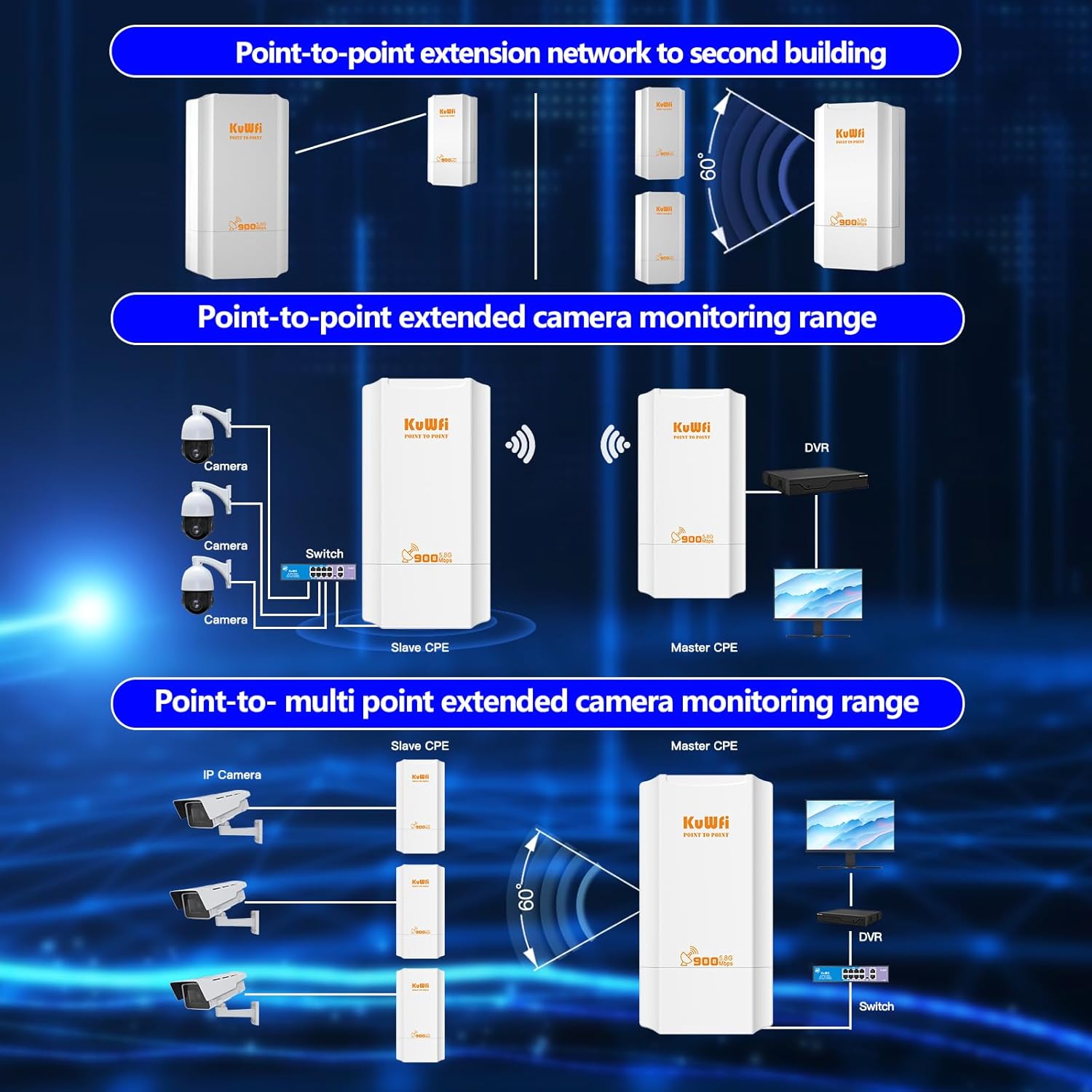
Figure 4.1: Application Scenarios
This diagram illustrates common applications for the KuWFi wireless bridge, such as extending a network to a second building, and setting up point-to-point or point-to-multi-point connections for camera monitoring systems.

Figure 4.2: Diverse Applications
This image highlights the versatility of the KuWFi wireless bridge, showcasing its applicability in diverse settings including residential areas, industrial factories, and remote rural locations, emphasizing its 2KM range and 5.8G frequency.
5. Maintenance
The KuWFi CPE131 is designed for outdoor use with an IP65-rated weatherproof shell, offering protection against various environmental conditions. This includes all-weather sunscreen, lightning protection, antifreeze, waterproof, and dustproof sealing. No specific routine maintenance is required beyond ensuring clear line of sight and secure mounting.
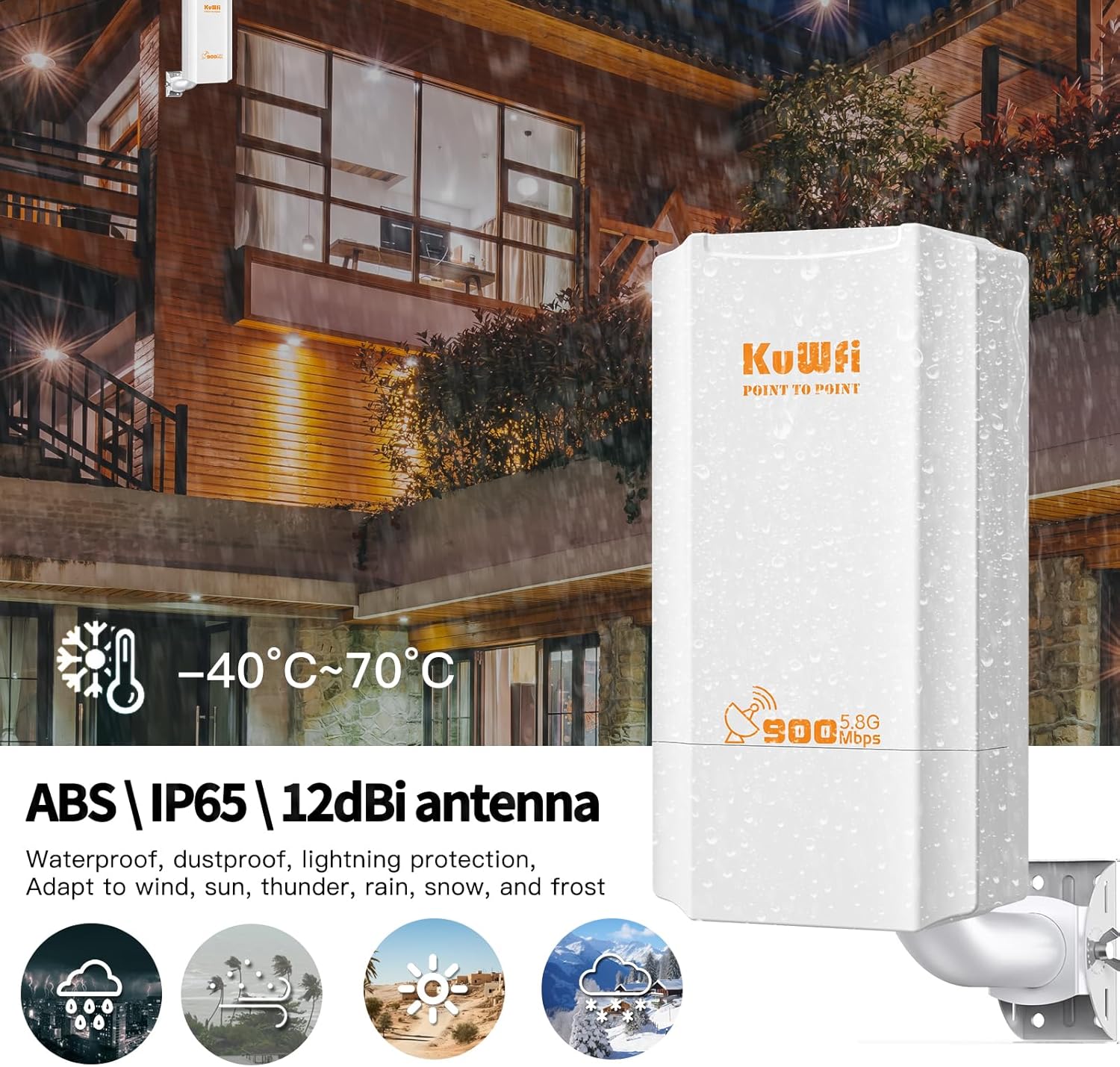
Figure 5.1: Weatherproof Design
This image emphasizes the robust, weatherproof design of the KuWFi wireless bridge, indicating its ability to withstand harsh outdoor conditions such as wind, lightning, rain, snow, and frost, with an operating temperature range of -40°C to 70°C.
6. Troubleshooting
If you encounter issues with your KuWFi CPE131, consider the following troubleshooting steps:
- No Connection/Poor Signal:
- Ensure both units have a clear line of sight to each other. Obstructions like trees or buildings can degrade signal quality.
- Verify that both units are powered on and their LED indicators show proper status.
- Check all Ethernet cable connections between the units and PoE adapters, and between PoE adapters and network devices.
- Incorrect Gateway/DNS Information: If the device transmits incorrect gateway or DNS information, try setting a manual IP address on the connected device. Use the original modem's gateway address and your preferred DNS server.
- Resetting the Device: The reset button on the unit can be used to restore factory settings if necessary. Refer to the device's physical interface for the exact location of the reset button.
7. Specifications
| Feature | Specification |
|---|---|
| Model Name | CPE131 |
| Item Model Number | CPE131-US |
| Product Dimensions | 3.5 x 1.9 x 6.6 inches |
| Item Weight | 2.05 pounds |
| Frequency Band Class | Single-Band (5.85 GHz) |
| Wireless Communication Standard | 802.11n, 802.11a, 802.11ac |
| Ethernet Port | 100Mbps WAN/LAN Port |
| Antenna Gain | 12dBi High-gain antenna |
| Transmission Distance | Up to 2KM (barrier-free) |
| Weatherproof Rating | IP65 |
| Special Features | Beamforming, Weatherproof, Access Point Mode, Internet Security, LED Indicator |
| Compatible Devices | Security Camera, Personal Computer, Tablet, Smart Television, Smartphone |
8. Warranty and Support
KuWFi offers comprehensive customer support and warranty for the CPE131 Wireless Bridge:
- 30-Day Return Policy: You may return your KuWFi long-range WiFi antenna intact within 30 days of purchase for a refund for any reason.
- 12-Month Warranty: A 12-month warranty covers quality-related issues, offering a replacement or refund.
- 3-Year Warranty: All wireless bridges come with a 3-year warranty.
- For any inquiries or support, please contact KuWFi customer service.
9. Official Product Videos
No official product videos from the seller were found to be relevant for inclusion in this instruction manual.


