
WAVLINK AX3000 WiFi 6 Outdoor Repeater WN573HX3
WAVLINK AX3000 WiFi 6 Wireless Outdoor Repeater User Manual
Model: AX3000 WiFi 6 Outdoor Repeater WN573HX3
1. Introduction
The WAVLINK AX3000 WiFi 6 Wireless Outdoor Repeater is designed to provide robust and high-speed wireless connectivity in outdoor environments. Adhering to IEEE 802.11ax/ac/a/b/g/n standards, this dual-band device offers speeds up to 5GHz at 2402Mbps and 2.4GHz at 573Mbps. With up to 600mW of power and an enhanced receiver design, it supports up to 256 devices, making it ideal for extending network coverage in large outdoor areas such as farms, campsites, and commercial buildings. Its IP67 waterproof enclosure, 15kV ESD protection, and 6kV lightning protection ensure reliable performance in various weather conditions.
2. Key Features
- WiFi 6 (802.11ax) Standard: Supports the latest WiFi standard for improved efficiency and speed.
- Dual-Band Connectivity: Simultaneous 5GHz (2402Mbps) and 2.4GHz (573Mbps) for flexible and high-speed connections.
- Extended Coverage: Features four 8dBi omnidirectional fiberglass tube antennas and dual built-in high-power amplifiers for unparalleled WiFi coverage up to 300 meters in open environments.
- High Device Capacity: Connects up to 256 devices simultaneously.
- Outdoor Durability: IP67 waterproof enclosure, 15kV ESD protection, and 6kV lightning Protection for harsh outdoor conditions.
- Flexible Power Options: Supports both 802.3AF/AT active PoE and passive PoE (PoE converter not waterproof).
- Multiple Operating Modes: Supports Mesh, AP, Router, Repeater, and AP+Repeater modes.
3. What's in the Box
- 1 x AX3000 WiFi 6 Outdoor Access Point
- 4 x Omni Antennas
- 4 x Cable Ties
- 1 x Ethernet Cable Connectors
- 1 x Quick Installation Guide
- 1 x Wrench
- 2 x Silicone Pads
- Several Screws
- Passive PoE (Optional): 1 x 54V Power Adapter, 1 x PoE Converter, 1 x Ethernet Cable

Figure 1: All components included in the WAVLINK AX3000 WiFi 6 Outdoor Repeater package.
4. Setup Guide
4.1 Physical Installation
- Attach Antennas: Carefully screw the four omnidirectional antennas onto the corresponding ports on the top of the device. Ensure 2.4GHz antennas are connected to 2.4G ports and 5GHz antennas to 5G ports.
- Mounting: Use the provided screws and wall plugs to mount the device securely on a pole or wall. For pole mounting, use the included metal straps and cable ties. Ensure the device is positioned for optimal signal coverage, ideally with a clear line of sight to the desired area.

Figure 2: WAVLINK AX3000 Outdoor Repeater mounted on a wall, showing attached antennas and power cable connection.

Figure 3: WAVLINK AX3000 Outdoor Repeater mounted on a pole, illustrating its outdoor placement.
4.2 Powering On (PoE Connection)
- Connect Ethernet Cable: Pass the RJ45 Ethernet cable through the waterproof connector cover. Connect one end of the Ethernet cable to the WAN/LAN port of the repeater.
- Connect to PoE Converter: Connect the other end of the Ethernet cable to the 'PoE' port of the provided PoE converter.
- Power Adapter: Plug the power adapter into the 'DC IN' port of the PoE converter.
- Connect to Router: Connect the 'LAN DATA IN' port of the PoE converter to a LAN port on your existing router using another Ethernet cable.
- Power On: Plug the power adapter into a power outlet. The device will power on and the LED indicators will light up.
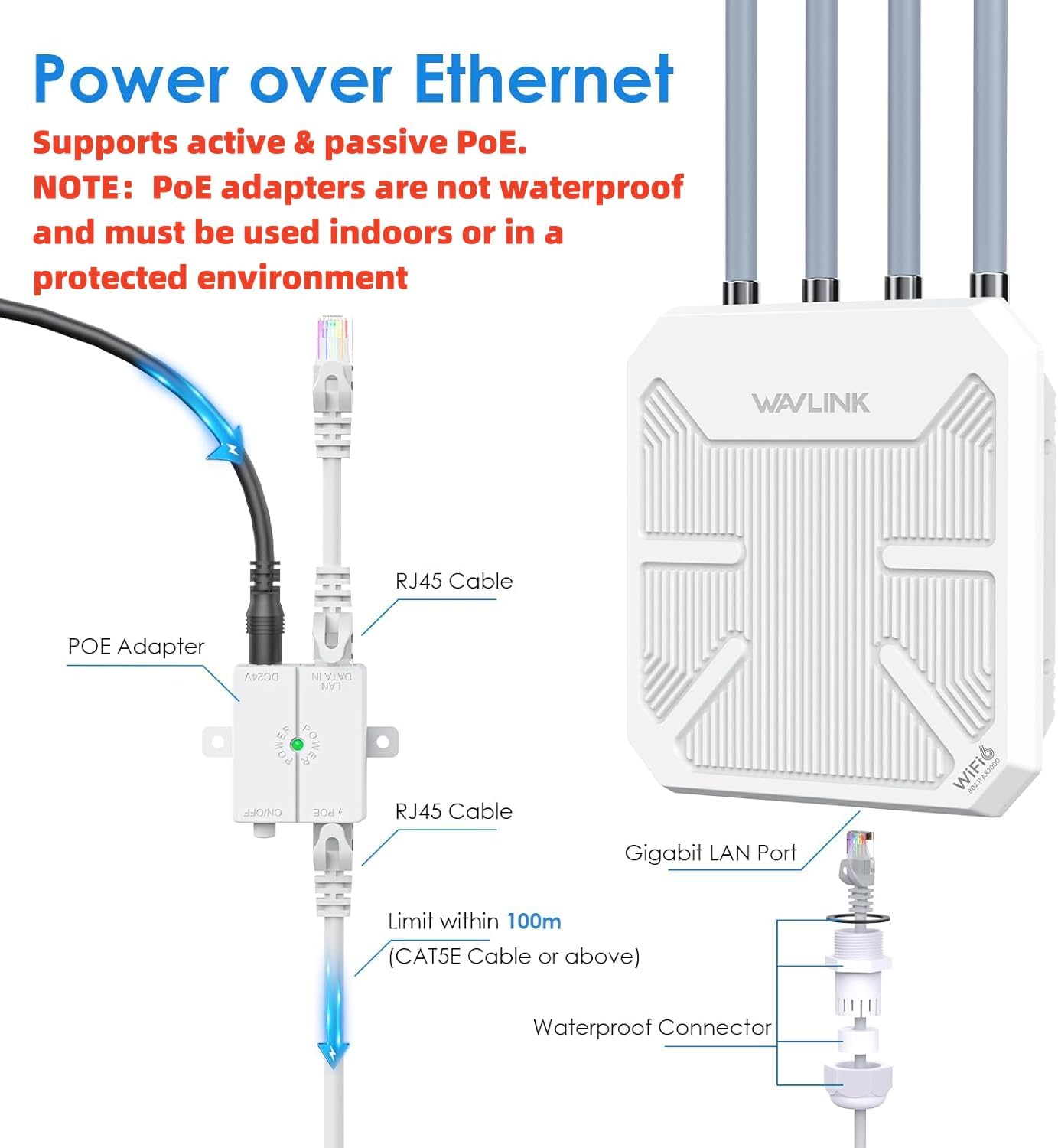
Figure 4: Diagram illustrating the Power over Ethernet (PoE) connection for the WAVLINK AX3000.
Video 1: A short demonstration of the physical installation process for the WAVLINK AX3000, including antenna attachment and cable connection. This video provides a quick visual guide to setting up the device.
4.3 Initial Configuration
- Connect to Device: On your computer or mobile device, connect to the WAVLINK's default Wi-Fi network (SSID usually starts with "WAVLINK-AX").
- Access Web Interface: Open a web browser and enter the default IP address (refer to the Quick Start Guide for the exact IP, usually 192.168.10.1) in the address bar.
- Login: Enter the default username and password (usually "admin" for both).
- Setup Wizard: Follow the on-screen setup wizard to configure your desired operating mode (e.g., Repeater, AP, Router), set Wi-Fi names (SSIDs), and passwords.
5. Operating Modes
The WAVLINK AX3000 supports various operating modes to suit different network requirements:
- Mesh Mode: Extends Wi-Fi coverage by creating a seamless mesh network with other compatible WAVLINK devices. Ideal for large properties requiring unified Wi-Fi.
- AP (Access Point) Mode: Converts a wired network connection into a wireless one, allowing multiple devices to connect wirelessly.
- Router Mode: Functions as a primary router, providing internet access to connected devices.
- Repeater Mode: Extends the range of an existing Wi-Fi network by receiving and re-transmitting the signal.
- AP+Repeater Mode: Combines the functionalities of an Access Point and a Repeater for enhanced flexibility.

Figure 5: Visual representation of the different operating modes (Mesh, AP, Repeater, AP+Repeater) for the WAVLINK AX3000.
Video 2: A user's experience with the AX3000 WiFi Beast, demonstrating its performance and ease of use in various scenarios.
6. Specifications
| Feature | Specification |
|---|---|
| Brand | WAVLINK |
| Wireless Communication Standard | 802.11ax (WiFi 6) |
| Data Transfer Rate | Up to 3000 Mbps (5GHz: 2402Mbps, 2.4GHz: 573Mbps) |
| Frequency Band Class | Dual-Band |
| Antennas | 4 x 8dBi Omnidirectional Fiberglass Tube Antennas |
| Power Output | Up to 600mW |
| Device Capacity | Up to 256 devices |
| Weather Protection | IP67 Waterproof, 15kV ESD Protection, 6kV Lightning Protection |
| PoE Support | 802.3AF/AT Active PoE & Passive PoE |
| LAN Port | Gigabit LAN Port |
| Dimensions | 17.6 x 13.11 x 3.58 inches |
| Item Weight | 2.42 pounds |
7. Troubleshooting
- No Signal/Weak Signal:
- Ensure clear line of sight between the repeater and your main router/target area. Obstructions like trees or walls can significantly reduce signal strength.
- Adjust the height of the repeater. Mounting it higher can improve coverage.
- Verify antenna connections. Ensure 2.4GHz and 5GHz antennas are correctly installed on their respective ports.
- Cannot Repeat Existing Wi-Fi Signal:
- Confirm you have entered the correct Wi-Fi password for your existing network.
- Ensure the host router's MAC filter is disabled and DHCP is enabled.
- For 5GHz signals, ensure there is minimal wireless interference.
- PoE Not Working:
- Verify the PoE converter is correctly connected and powered. Note that the PoE converter is not waterproof and must be used indoors or in a protected environment.
- Use CAT5E or above Ethernet cable within a 100m/328ft range for optimal performance.
- Confirm voltage and power requirements for both the WAVLINK AP and PoE injector (Active PoE: 48V; Passive PoE: 54V).
Video 3: A user review highlighting the ease of setup and great coverage/speed of the WAVLINK AX3000.
8. Warranty & Support
WAVLINK products come with a 30-day free return and refund service, and a 12-month warranty. For any technical questions or support needs, please contact WAVLINK directly:
- Phone Support: +18889730883 (UTC-5) Mon - Fri 9 AM - 6 PM
- Email Support: Contact@wavlink.com (Solutions provided within 8 hours)
- Website: www.wavlink.com
WAVLINK is committed to providing life-long technical support for its products. Please be aware that WAVLINK will never charge for support or sell services. Any third-party claims to represent WAVLINK for support or sales should be verified.
Related documentsAX3000 WiFi 6 Outdoor Repeater WN573HX3


Ask a question about this manual
Ask about setup, troubleshooting, compatibility, parts, safety, or missing instructions. Manuals+ will review the question and use this page’s manual context to help answer it.