Introduction
Thank you for choosing the KOPJIPPOM Large Print Backlit Keyboard. This manual provides essential information for setting up, operating, and maintaining your new keyboard. Designed for enhanced visibility and comfort, this keyboard features oversized characters and customizable backlighting, making it ideal for users with visual impairments or those who prefer larger, clearer keys.

Setup
1. Unpacking
Carefully remove the keyboard from its packaging. Ensure all components are present: the KOPJIPPOM Large Print Backlit Keyboard with its integrated USB cable.
2. Connecting the Keyboard (Plug and Play)
- Locate an available USB-A port on your computer (PC, laptop, or Raspberry Pi).
- Insert the USB connector of the keyboard firmly into the USB port.
- The keyboard is plug-and-play; no additional drivers are required for basic functionality. Your operating system should automatically detect and configure the device.
3. Compatibility
This keyboard is compatible with a wide range of operating systems:
- Windows 2000/XP/7/8/10/11
- Vista
- Raspberry Pi 3/4
- Mac OS (Note: Multimedia keys may not be fully compatible with Mac OS systems.)

Operating Instructions
1. Basic Typing
The keyboard features a full QWERTY English (US) 104-key layout with a numeric keypad. Simply begin typing as you would with any standard keyboard. The large print keys provide enhanced visibility and comfort.
2. Ergonomic Design and Foldable Stands
For improved typing posture and reduced hand fatigue during extended use, unfold the two feet located on the underside of the keyboard. This elevates the keyboard to a more ergonomic angle.
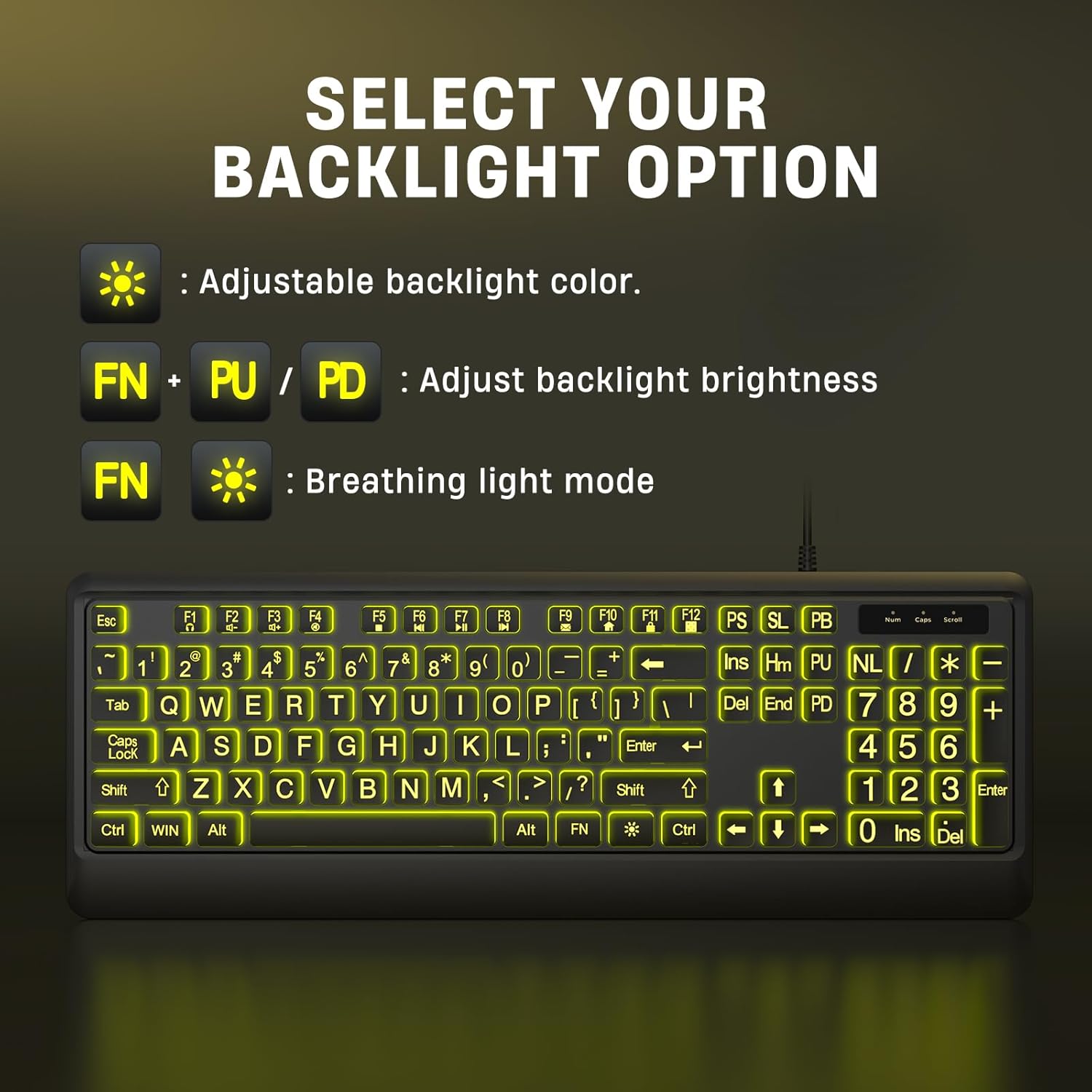
3. Backlight Control
The keyboard features adjustable backlighting with multiple color options and brightness levels. Use the following key combinations to customize your backlight settings:
- Changing Backlight Color: Press the Light Bulb key (usually located near the top right of the keyboard) to cycle through the 7 available colors: Blue, Green, Red, Cyan, Purple, Yellow, and White.
- Adjusting Backlight Brightness: Press Fn + PU (Page Up) to increase brightness, or Fn + PD (Page Down) to decrease brightness. There are 3 brightness levels.
- Breathing Light Mode: Press Fn + Light Bulb key to activate or deactivate the breathing light mode, where the backlight slowly fades in and out.


Maintenance
1. Cleaning
To clean your keyboard, disconnect it from the computer. Use a soft, lint-free cloth lightly dampened with water or a mild cleaning solution. Avoid harsh chemicals or abrasive materials. For dust and debris between keys, use compressed air.
2. Spill-Proof Design
The keyboard features a spill-resistant design, offering protection against accidental spills of liquids like coffee or water. In case of a spill, immediately disconnect the keyboard from your computer and allow it to dry completely before reconnecting. While resistant, it is not waterproof, and excessive liquid exposure should be avoided.
Troubleshooting
- Keyboard not responding:
- Ensure the USB cable is securely plugged into a working USB port on your computer.
- Try plugging the keyboard into a different USB port.
- Restart your computer.
- Backlight not working or stuck:
- Ensure the keyboard is properly connected and receiving power.
- Press the Light Bulb key to cycle through colors and ensure it's not set to off or minimum brightness.
- Try adjusting brightness using Fn + PU/PD.
- Multimedia keys not functioning on Mac OS:
- As noted, some multimedia functions may have limited compatibility with Mac OS. This is a system-specific limitation and not a defect of the keyboard.
- Keys are sticky or unresponsive:
- Clean the keyboard as per the Maintenance section.
- Ensure no debris is lodged under the keys.
Specifications
| Feature | Detail |
|---|---|
| Product Dimensions | 17.7 x 6.3 x 1.16 inches (44.96 x 16.00 x 2.95 cm) |
| Item Weight | 1.54 pounds (0.7 kg) |
| Manufacturer | KOPJIPPOM |
| Connectivity Technology | USB-A (Wired) |
| Keyboard Description | Membrane |
| Number of Keys | 104 (Full QWERTY US Layout with Numeric Keypad) |
| Special Feature | Backlit (7 Interchangeable Colors, 3 Brightness Levels) |
| Power Source | USB powered |
| Compatibility | Windows 2000/XP/7/8/10/11, Vista, Raspberry Pi 3/4, Mac OS |
Warranty and Support
For warranty information and technical support, please refer to the product packaging or contact KOPJIPPOM customer service directly through the retailer where the product was purchased. Keep your purchase receipt as proof of purchase.
For further assistance, you may visit the KOPJIPPOM store on Amazon: KOPJIPPOM Store