
1. Product Overview
The TEMOLA Cordless Tire Inflator is a portable air compressor designed for quick and convenient inflation of various items, including car tires, bicycle tires, motorcycle tires, sports balls, and inflatable toys. It features a dual power supply (rechargeable battery and 12V DC car power), a digital display for real-time pressure monitoring, and an integrated LED light for emergency use.
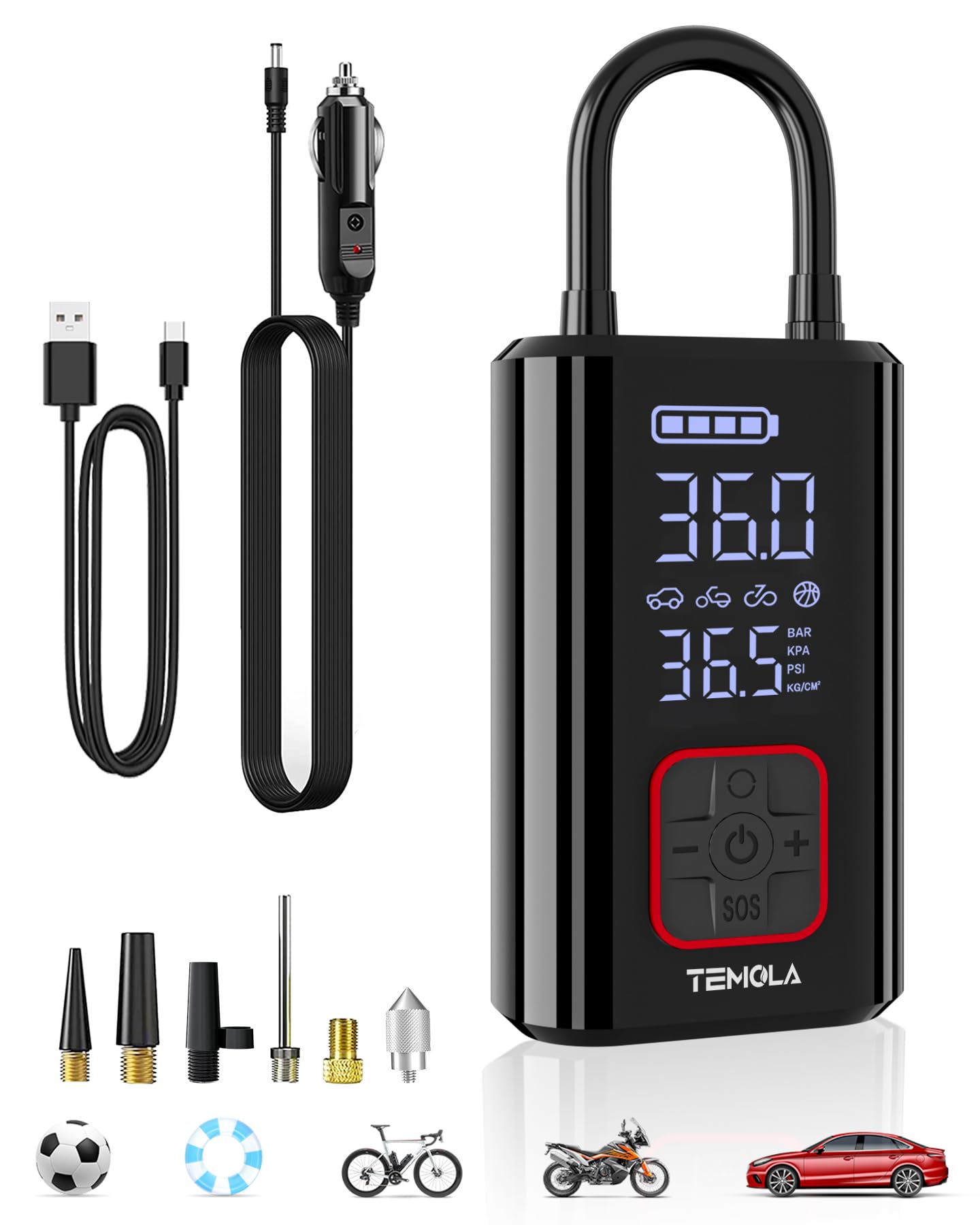
Image 1: TEMOLA Cordless Tire Inflator
2. What's in the Box
Carefully unpack all components and ensure everything is present:
- 1 x TEMOLA Cordless Tire Inflator
- 1 x Air Tube
- 3 x Air Nozzle Cones
- 1 x Needle Valve Adapter
- 1 x Presta to Schrader Valve Adapter
- 1 x Safety Hammer (integrated)
- 1 x User Manual
- 1 x Type-C Charging Cable
- 1 x Storage Bag
- 1 x 12V DC Car Power Supply Cable

Image 2: All included components of the TEMOLA Cordless Tire Inflator package.
Video 1: Unboxing and overview of the TEMOLA Cordless Tire Inflator and its accessories.
3. Product Features and Components
3.1 Key Features
- Fast Inflation: Quickly inflates tires and other items.
- Dual Power Supply: Operates on a built-in rechargeable battery (2x 2000mAh) or via a 12V DC car power cable.
- Multi-Accessories: Includes various nozzles for cars, motorcycles, bicycles, swimming rings, and balls.
- Digital Display & LED Light: Clear display shows pressure in PSI, BAR, KPA, KG/CM² and features an ultra-bright LED light with strobe and SOS functions for night use.
- Portable Design: Compact and lightweight for easy storage and transport.
- Emergency Escape Hammer: Integrated safety hammer for emergency situations.
- USB Output Port: Can be used as an emergency power bank for mobile phones.
3.2 Component Identification
Familiarize yourself with the main parts of the inflator:

Image 3: Digital display showing real-time and preset pressure values.

Image 4: Close-up of the digital display.

Image 5: The inflator's LED light in use, showing its illumination capability.

Image 6: The integrated emergency escape hammer.

Image 7: The inflator functioning as a power bank for a mobile phone.
4. Setup and Initial Use
4.1 Charging the Device
Before first use, fully charge the tire inflator using the provided Type-C charging cable. Connect the cable to the inflator's Type-C port and a suitable USB power adapter (not included). The battery indicator on the digital display will show charging status.
4.2 Attaching the Air Tube and Nozzle
Screw the air tube securely into the air outlet port on the inflator. Select the appropriate nozzle for your item and attach it to the other end of the air tube.

Image 8: Multiple accessories for different inflation needs.
5. Operating Instructions
5.1 Power On/Off and Mode Selection
- Power On/Off: Press and hold the power button (U) to turn the inflator on or off.
- Select Mode: Short press the mode button (~) to cycle through the 4 inflation modes: Car, Motorcycle, Bicycle, and Ball.
- Adjust Pressure: Use the '+' and '-' buttons to increase or decrease the target inflation pressure.
- Change Pressure Unit: Long press the mode button (~) to switch between pressure units (PSI, BAR, KPA, KG/CM²).
5.2 Inflation Process
- Connect the air tube with the appropriate nozzle to the item you wish to inflate.
- Power on the inflator and select the desired mode and target pressure.
- Press the power button (U) briefly to start inflation. The inflator will automatically stop once the preset pressure is reached.
- Disconnect the air tube from the item and the inflator.
Video 2: Demonstrates powering on, selecting modes, adjusting pressure, connecting the hose, and inflating a basketball and swimming ring.
5.3 LED Light Functions
The integrated LED light can be activated for various purposes:
- Illumination: Press the light button (SOS) once for steady illumination.
- Strobe: Press the light button (SOS) twice for a flashing strobe light.
- SOS Signal: Press the light button (SOS) three times for an SOS emergency signal.
6. Maintenance
To ensure the longevity and optimal performance of your TEMOLA Cordless Tire Inflator:
- Keep the device clean and free from dust and debris. Wipe with a soft, dry cloth.
- Store the inflator and its accessories in the provided storage bag in a cool, dry place.
- Avoid exposing the device to extreme temperatures or direct sunlight for extended periods.
- Charge the battery regularly, even if not in use, to maintain battery health.
7. Troubleshooting
If you encounter issues with your inflator, refer to the following common problems and solutions:
| Problem | Possible Cause | Solution |
|---|---|---|
| Inflator does not turn on. | Low battery or no power. | Charge the battery or connect to 12V DC car power. Ensure the power button is pressed and held. |
| No air comes out. | Air tube not securely connected; nozzle blocked; incorrect mode selected. | Ensure air tube is tightly screwed in. Check nozzle for obstructions. Verify correct inflation mode is selected. |
| Inaccurate pressure reading. | Loose connection; sensor error. | Ensure all connections are secure. Recalibrate if possible (refer to full manual if available). |
| Inflator stops prematurely. | Preset pressure reached; overheating. | This is normal if preset pressure is met. If not, allow device to cool down before resuming. |
If the problem persists, please contact customer support.
8. Specifications
| Feature | Specification |
|---|---|
| Model Name | TN09AA-DJDE |
| Brand | TEMOLA |
| Dimensions (L x W x H) | 10.5 x 11 x 16.5 cm |
| Weight | 740 grams |
| Battery | 1 Lithium-ion (included) |
| Color | Black |
| Material | Aluminum |
| Power Source | Corded Electric & Battery Powered |
| Maximum Pressure | 150 PSI (35 pounds per square inch) |
| Noise Level | 65 Decibels |
| Recommended Use | Tire Inflation |
9. Warranty and Support
TEMOLA products are designed for reliability and performance. For warranty information or technical support, please refer to the contact details provided on the product packaging or visit the official TEMOLA website. Keep your purchase receipt as proof of purchase for any warranty claims.


