Introduction
This user manual provides comprehensive instructions for the safe handling, installation, operation, and maintenance of your SUNELL CS-ABL300VX replacement battery. Please read this manual thoroughly before using the battery to ensure optimal performance and longevity.
Important Safety Information
WARNING: Failure to follow these safety instructions could result in fire, electric shock, injury, or damage to the battery or device.
- Do not disassemble, open, or service the battery pack. Unauthorized modification can lead to hazards.
- Replace only with the battery pack designated for this product. Using an incompatible battery may cause damage.
- Do not crush, puncture, short external contacts, or dispose of in fire or water. Exposure to extreme conditions can cause the battery to explode or leak.
- Do not store above 60°C (140°F). High temperatures can degrade battery performance and pose a safety risk.
- A new battery pack must be fully charged before use to ensure proper calibration and initial performance.
- Observe all local regulations for battery disposal. Do not dispose of batteries with household waste.
- The built-in safety chip prevents overheating, overcharging, and over-discharging, but proper handling is still crucial.
Setup: Installation
Before installing the new SUNELL battery, ensure your device is powered off and disconnected from any power source. Refer to your device's original user manual for specific battery compartment access and removal instructions.
- Locate the battery compartment on your Alpina device.
- Carefully remove the old battery, if present.
- Align the SUNELL replacement battery (Model: CS-ABL300VX) with the battery compartment, ensuring the contacts match correctly.
- Gently press the battery into place until it is securely seated. Do not force the battery.
- Close the battery compartment cover.

Image: Top view of the SUNELL CS-ABL300VX replacement battery, showing its overall shape and label.
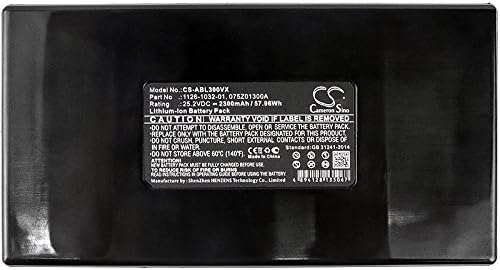
Image: Bottom view of the SUNELL CS-ABL300VX battery, highlighting the four contact terminals for connection to the device.
Operating: Charging and Initial Use
After installation, it is recommended to fully charge the battery before its first use. This helps to calibrate the battery and ensure optimal performance.
- Connect your Alpina device to its original charger.
- Allow the device to charge uninterrupted until the battery indicator shows a full charge. The charging time may vary depending on the device and the initial battery level.
- The SUNELL battery is equipped with a built-in safety chip designed to prevent overcharging, over-discharging, and overheating, contributing to extended battery life.
- Once fully charged, you can power on your device and begin normal operation.
Maintenance: Care and Storage
Proper care and storage will help maximize the lifespan and performance of your SUNELL battery.
- Regular Charging: Avoid completely draining the battery frequently. For best results, charge the battery before it reaches critically low levels.
- Temperature: Store and operate the battery within recommended temperature ranges. Avoid extreme hot or cold environments, as these can degrade battery performance and capacity. Do not store above 60°C (140°F).
- Cleaning: Keep the battery contacts clean and free of dust or debris. Use a dry, soft cloth to wipe them if necessary.
- Long-Term Storage: If storing the battery for an extended period, charge it to approximately 50-70% capacity and store it in a cool, dry place. Recharge it every 3-6 months to prevent deep discharge.
Troubleshooting
If you encounter issues with your SUNELL replacement battery, consider the following common troubleshooting steps:
- Battery Not Charging:
- Ensure the battery is correctly seated in the device's compartment.
- Verify that the charger and charging cable are functioning correctly and are securely connected to both the device and a power outlet.
- Check for any visible damage to the battery or device charging port.
- Short Battery Life:
- Ensure the battery has been fully charged.
- Review your device's power settings and usage patterns. High-power applications or continuous use of features like GPS can deplete the battery faster.
- Consider if the battery has been stored in extreme temperatures, which can affect its capacity.
- Device Not Powering On:
- Confirm the battery is fully charged.
- Re-install the battery to ensure proper connection.
- If possible, test the device with another known-good battery to rule out device issues.
If problems persist after attempting these steps, please refer to the Warranty and Support section for further assistance.
Specifications
| Feature | Detail |
|---|---|
| Model Number | CS-ABL300VX |
| Battery Type | Lithium-Ion (Li-ion) |
| Voltage | 25.2V |
| Capacity | 2300mAh / 57.96Wh |
| Dimensions (L x W x H) | 144.30 x 76.96 x 38.00mm (5.68 x 3.03 x 1.5 inches) |
| Weight | 625.4g (1.38 pounds) |
| Manufacturer | SUNELL |
| Safety Features | Built-in safety chip prevents overheating, overcharging, over-discharging. |
Warranty and Support
Your SUNELL replacement battery comes with a FULL ONE YEAR WARRANTY from the date of purchase. This warranty covers manufacturing defects and ensures the battery meets strict quality control standards.
For warranty claims, technical support, or any inquiries regarding your SUNELL battery, please contact our customer service. Please have your purchase details and the battery model number (CS-ABL300VX) ready when contacting support.
Contact Information:
- Email: support@sunell.com
We are committed to providing high-quality products and excellent customer service.


