
1. Product Overview
The Spider Farmer Grow Tent Fan is designed to provide optimal air circulation and environmental control within grow tents and other indoor spaces. Featuring an advanced EC motor and intelligent controls, it ensures a healthy and stable environment for plant growth.
- Powerful Airflow: Professional EC motor delivers strong airflow with 10 customizable speeds (0-2100 RPM).
- Flexible Oscillation: 90° horizontal automatic oscillation and 100° vertical manual adjustment for comprehensive air distribution.
- Secure Mounting: Adjustable grip clip fits poles from 16mm to 25mm, featuring a thick rubber pad to prevent scratching.
- Quiet Operation: Operates at a low noise level, as quiet as 35 dB at its loudest setting.
- Durable Design: IP-54 protection rated for resistance to high humidity and heat, ensuring long-term performance.
- Easy Maintenance: Detachable front frame simplifies cleaning.
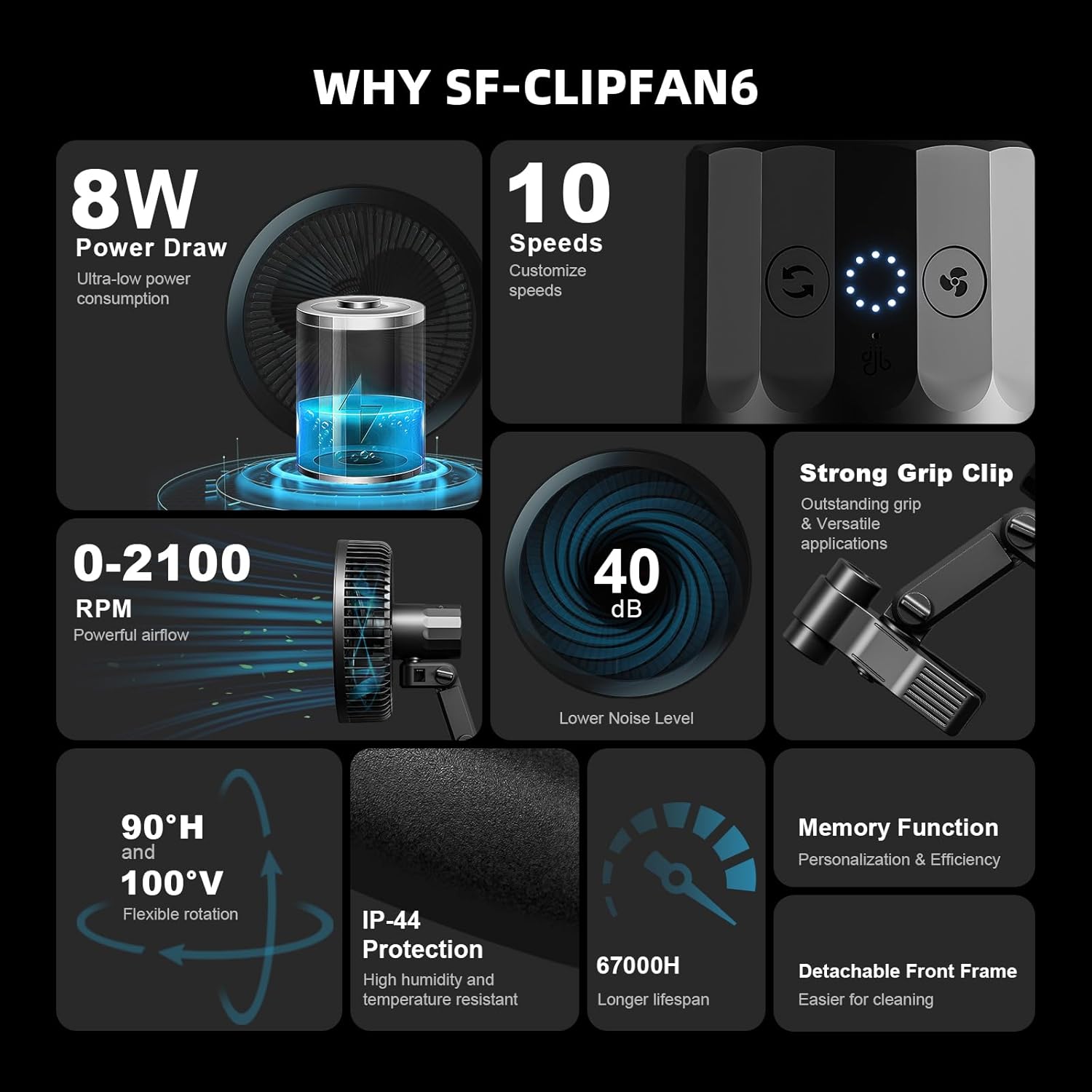
Figure 1: Key features of the Spider Farmer Grow Tent Fan.
2. Setup
Follow these steps to set up your Spider Farmer Grow Tent Fan:
- Unpack: Carefully remove all components from the packaging. Ensure all parts are present: fan unit, power cord, and clip attachment.
- Attach Clip: Securely attach the fan unit to the adjustable grip clip.
- Mount Fan: Choose a suitable vertical or horizontal pole within your grow tent (16mm to 25mm diameter). Open the grip clip and firmly attach the fan to the pole. Ensure the rubber pad is positioned to prevent scratching.
- Positioning: Adjust the fan's vertical angle manually (up to 100°) to direct airflow as needed.
- Power Connection: Plug the fan's power cord into a standard AC outlet (230 Volts AC).

Figure 2: Two Spider Farmer Grow Tent Fans mounted in a grow tent environment.

Figure 3: Detailed view of fan dimensions and grip clip mechanism.
3. Operating Instructions
Your Spider Farmer Grow Tent Fan offers versatile control options for optimal air circulation.
Manual Control
The fan features intuitive controls directly on the unit for speed and oscillation adjustment.
- Power On/Off: Press the power button to turn the fan on or off.
- Speed Adjustment: Use the speed control buttons to cycle through 10 dynamic wind speeds (0-2100 RPM).
- Oscillation: Activate the 90° horizontal automatic oscillation feature for wider air distribution. Manually adjust the vertical angle up to 100°.

Figure 4: The fan's 90° horizontal oscillation feature.

Figure 5: Illustration of the 5-blade gentle airflow for plant growth.
Smart Control via App or GGS Controller
For advanced control, connect your fan to the GGS controller and use the accompanying mobile application.
- App Connection: Ensure your phone is connected to the smart power strip.
- Fan Control: Within the app, locate the fan outlet and switch it on. You can rename outlets for easier management.
- Precise Settings: In manual mode, adjust fan speed (1-10 levels), oscillation angle (10 levels), and activate natural wind mode.
- Time Slot Mode: Customize fan behavior for specific hours by setting start/end times, fan speed, oscillation level, and standby speed.
- Cycle Mode: Set precise run times and pause durations for cyclical operation, including the number of repetitions.
- Environmental Mode: Prioritize fan operation based on temperature or humidity readings from connected sensors. The system defaults to temperature priority if both are out of range.
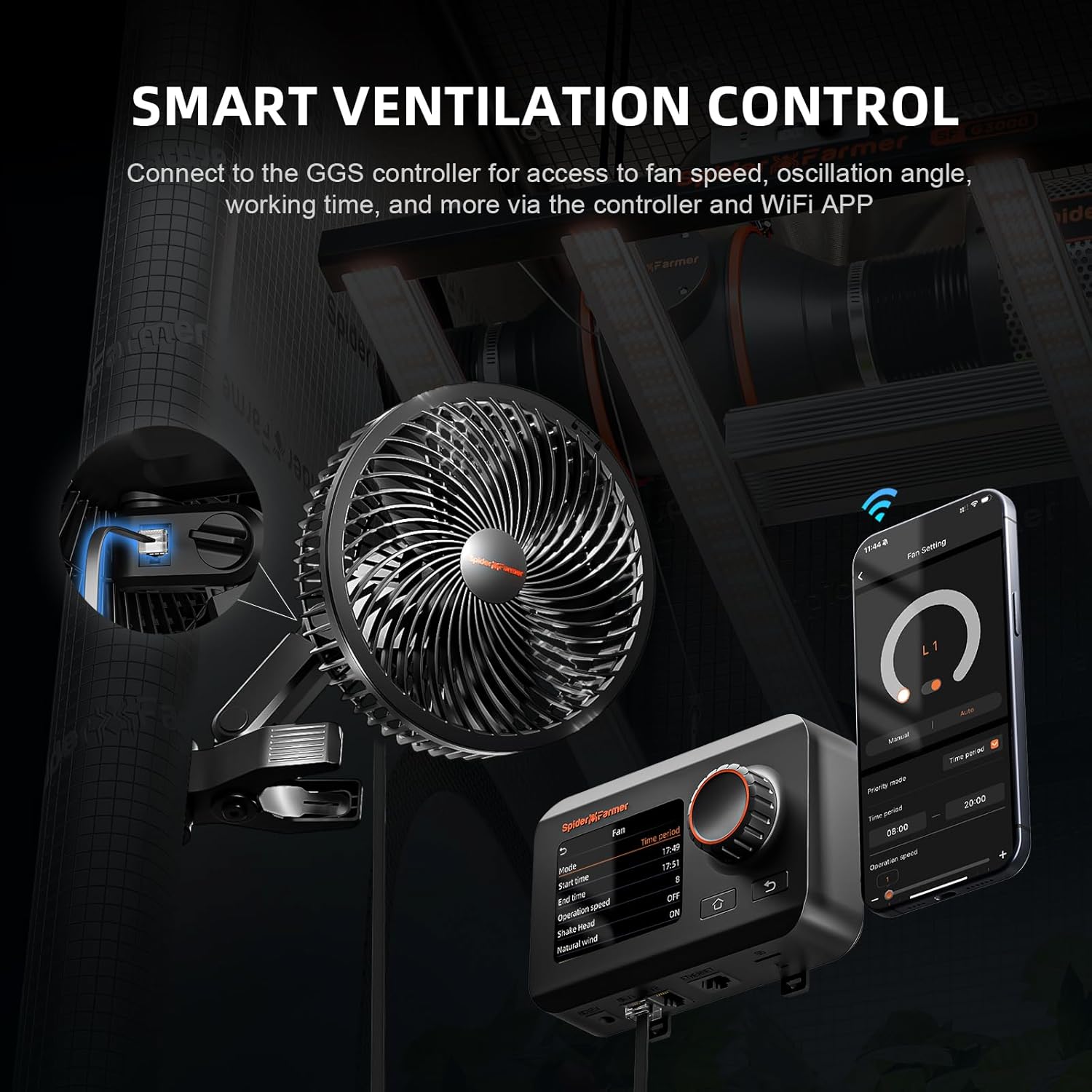
Figure 6: Smart ventilation control setup with GGS controller and mobile app.
Video 1: Demonstrates how to control the Spider Farmer Clip-on Fan using the GGS controller and mobile application, including manual, time slot, and cycle modes.
Video 2: Shows the Spider Farmer Grow Tent Fan operating with its 10-speed settings, highlighting its powerful yet quiet airflow.
4. Maintenance
Regular maintenance ensures the longevity and optimal performance of your fan.
- Cleaning: The fan features a detachable front frame for easy cleaning. Regularly wipe down the fan blades and grille to prevent dust and debris buildup, which can affect airflow and motor efficiency. Ensure the fan is unplugged before cleaning.
- Environmental Protection: The fan is IP-54 rated, meaning it is protected against dust ingress and splashing water. While durable, avoid submerging the fan in water or exposing it to direct water jets.
- Storage: If storing the fan for an extended period, clean it thoroughly, disconnect it from power, and store it in a cool, dry place.

Figure 7: Easy disassembly of the fan for cleaning.
5. Troubleshooting
If you encounter issues with your Spider Farmer Grow Tent Fan, refer to the following common problems and solutions:
- Fan Not Turning On:
- Check if the power cord is securely plugged into both the fan and the electrical outlet.
- Verify that the electrical outlet is functioning by plugging in another device.
- If using a smart controller, ensure the fan's outlet is enabled and the controller is powered on.
- Weak Airflow:
- Increase the fan speed setting.
- Check for any obstructions around the fan grille or blades.
- Clean the fan blades and grille if dust or debris has accumulated.
- Fan Making Unusual Noise:
- Ensure the fan is securely mounted and not vibrating against the pole or other surfaces.
- Check for any loose parts or foreign objects inside the fan grille.
- Clean the fan to remove any debris that might be causing imbalance.
- Oscillation Not Working:
- Ensure the oscillation feature is activated (if applicable, via manual button or app setting).
- Check for any physical obstructions preventing the fan from oscillating freely.
If the issue persists after trying these steps, please contact Spider Farmer customer support for further assistance.
6. Specifications
| Feature | Specification |
|---|---|
| Brand | Spider Farmer |
| Model Name | SF-ClipFan |
| Fan Size | 6 inches |
| Color | Black |
| Power Source | AC |
| Voltage | 230 Volts (AC) |
| Wattage | 8 watts |
| Air Flow Capacity | 315 Cubic Feet Per Minute (CFM) |
| Number of Power Levels | 10 |
| Noise Level | 35 dB (max) |
| Special Feature | Oscillating (90°H Auto, 100°V Manual) |
| IP Rating | IP-54 Dust & Splashproof |
| Lifespan | 67000H |
| Item Weight | 3.2 Pounds |
| Product Dimensions | 8.8"D x 6"W x 10.6"H |
7. Warranty and Support
The Spider Farmer Grow Tent Fan comes with a 1-year warranty from the date of purchase, covering manufacturing defects and malfunctions under normal use. Please retain your proof of purchase for warranty claims.
For technical support, troubleshooting assistance, or warranty inquiries, please contact Spider Farmer customer service through their official website or the retailer where the product was purchased.