1. Introduction
The CFTGIW SWM-530 is a versatile single DIN in-dash car radio MP3 player designed to enhance your in-car audio experience. It supports a full range of lossless music formats, offers AUX audio input, and features music classification capabilities, allowing you to organize songs into various folders. Built with an international standard universal model and metal heat dissipation, it ensures stable performance and a long service life. This unit also includes multi-functional features such as hands-free calling, multiple circuit protection (overload, over voltage, short circuit), time display, and fast cell phone charging. This manual provides comprehensive instructions for installation, operation, maintenance, and troubleshooting.

Figure 1: Front view of the CFTGIW SWM-530 Car Radio MP3 Player. This image displays the main unit with its display, control knob, buttons, USB port, and AUX input.
2. Key Features
- Lossless Music Support: Supports a full range of lossless music for any audio format, including MP3, WMA, WAV, and FLAC, with AUX audio input.
- Music Classification: Classify songs as popular, classical, or create numerous folders for distinct song categories.
- Durability & Performance: International standard universal model with metal heat dissipation for stable performance and extended service life.
- Multi-functional: Features hands-free calling, multiple circuit protection (overload, over voltage, short circuit), time display, and mobile phone fast charging (10W USB).
- Media Playback: Supports large capacity TF/MMC cards and U disks for music playback.
- FM Radio: Built-in FM radio with automatic reception and power-off memory.
- Display: Large colorful display with ultra-bright illumination, not dazzling.
- Sound Effects: Multiple EQ sound effects including Jazz, Rock, Classical, Pop, Flat, etc.
- Easy Operation: Designed for user-friendly operation to enjoy stereo HI-FI car audio and video effects.

Figure 2: The car radio unit highlighting its lossless music playback capability. The display shows various audio format indicators.
3. Package Contents
Please check the package contents carefully upon unboxing. If any items are missing or damaged, contact your retailer immediately.
- 1 x CFTGIW SWM-530 Car Radio MP3 Player
- 1 x Remote Control
- 2 x Wiring Harnesses (Power and Speaker)
- 2 x Disassembly Keys

Figure 3: All components included in the product package. This image shows the main car radio unit, a remote control, two wiring harnesses, and two metal disassembly keys.
4. Setup & Installation
Professional installation is recommended. Ensure the vehicle's battery is disconnected before beginning installation to prevent electrical shorts or damage.
4.1 Wiring Diagram
Refer to the wiring diagram on the unit's chassis or the included wiring harness for specific connections. General connections are as follows:
- Yellow Wire: Constant 12V (Battery Positive)
- Red Wire: Switched 12V (Accessory/Ignition)
- Black Wire: Ground (Chassis Ground)
- Blue Wire: Power Antenna / Amplifier Remote Turn-On
- Speaker Wires: Connect to vehicle's speaker wires. Ensure correct polarity.
- White / White-Black: Front Left Speaker
- Grey / Grey-Black: Front Right Speaker
- Green / Green-Black: Rear Left Speaker
- Purple / Purple-Black: Rear Right Speaker

Figure 4: Rear view of the car radio unit, illustrating the various wiring connections, including power, speaker outputs, and RCA audio outputs.
4.2 Mounting the Unit
Insert the metal mounting sleeve (if included with your vehicle's installation kit) into the dashboard opening. Secure it by bending the tabs outwards. Slide the radio unit into the sleeve until it clicks into place. Use the provided disassembly keys to remove the unit if needed.
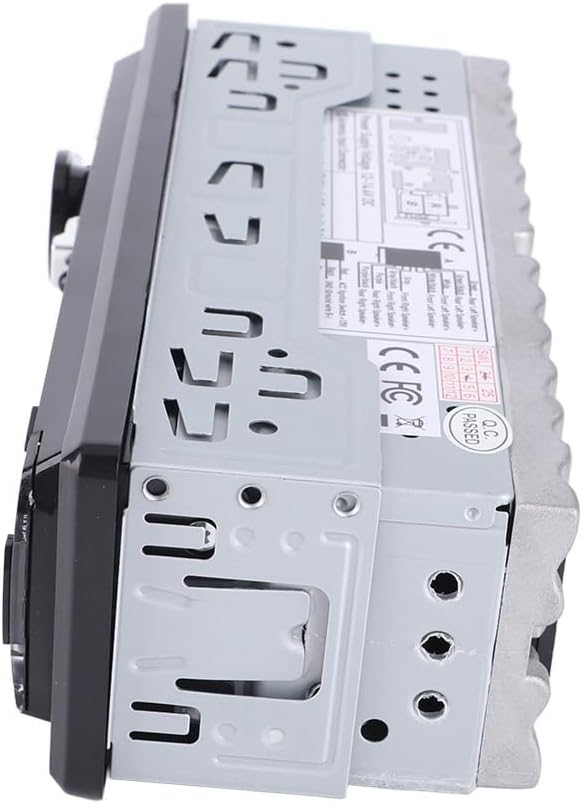
Figure 5: Side view of the car radio, showing the mounting holes and the heat dissipation fins on the chassis.
5. Operating Instructions
5.1 Front Panel Controls
Figure 6: Detailed view of the front panel, indicating the location of buttons and ports for operation.
- Power Button (⑂): Press to turn the unit on/off.
- MODE Button: Press to cycle through available modes: Radio (FM), USB, TF Card, AUX Input, Bluetooth.
- Volume Knob (SEL): Rotate to adjust volume. Press to cycle through audio settings (Bass, Treble, Balance, Fader, EQ, Loudness).
- BAND Button: In Radio mode, press to switch between FM bands (FM1, FM2, FM3).
- EQ/LOUD Button: Press to select preset equalizer settings (Jazz, Rock, Classical, Pop, Flat) or activate/deactivate Loudness.
- USB Port: Insert a USB flash drive for music playback or connect a mobile device for fast charging.
- TF Card Slot: Insert a TF (MicroSD) card for music playback.
- AUX Input: Connect external audio devices using a 3.5mm audio cable.
- MIC: Built-in microphone for hands-free calling.
5.2 Remote Control Operation

Figure 7: Layout of the remote control for the car radio, showing all buttons and their functions.
The remote control provides convenient access to most functions. Point the remote towards the unit's IR receiver.
5.3 Radio Operation
- Automatic Search: Press and hold the BAND button for automatic station search and storage.
- Manual Tuning: Use the ◀◀ / ▶▶ buttons to manually tune frequencies.
- Preset Stations: Press number buttons (1-6) to select stored stations. Press and hold to store current station.
5.4 USB/TF Card Playback
- Insert a USB drive or TF card into the respective slot. The unit will automatically switch to USB/TF mode and begin playback.
- Use the ◀◀ / ▶▶ buttons to skip tracks.
- Press the AMS button to browse folders/files.
5.5 AUX Input
- Connect your external audio device (e.g., smartphone, MP3 player) to the AUX input jack using a 3.5mm audio cable.
- Press the MODE button until "AUX" is displayed.
- Control playback from your external device.
5.6 Bluetooth Operation
- Pairing: Ensure the unit is in Bluetooth mode. On your mobile device, search for Bluetooth devices and select "SWM-530" (or similar name). Enter "0000" if a PIN is required.
- Hands-Free Calling: When a call comes in, press the Answer button (usually the green phone icon) on the unit or remote to answer. Press again to end the call.
- Audio Streaming: Once paired, you can stream audio from your device to the car radio.
6. Maintenance
Proper maintenance ensures the longevity and optimal performance of your car radio.
- Cleaning: Use a soft, dry cloth to clean the unit's front panel. For stubborn dirt, slightly dampen the cloth with water. Do not use abrasive cleaners or solvents.
- Ventilation: Ensure the unit's heat dissipation fins (on the sides and rear) are not obstructed to prevent overheating.
- Environmental Conditions: Avoid exposing the unit to extreme temperatures, direct sunlight for prolonged periods, or excessive moisture.
7. Troubleshooting
If you encounter issues with your car radio, refer to the table below for common problems and their solutions.
| Problem | Possible Cause | Solution |
|---|---|---|
| No Power | Blown fuse; Incorrect wiring; Loose connection | Check and replace fuse; Verify wiring connections (Yellow, Red, Black); Ensure all connections are secure. |
| No Sound | Volume too low; Mute activated; Speaker wires disconnected/shorted | Increase volume; Deactivate mute; Check speaker wiring for proper connection and no shorts. |
| Poor Radio Reception | Antenna not connected; Weak signal area; Damaged antenna | Ensure antenna is securely connected; Try tuning to stronger stations; Inspect antenna for damage. |
| USB/TF Card Not Playing | Unsupported file format; Corrupted media; Incorrect file system | Ensure files are MP3/WMA/WAV/FLAC; Try a different USB/TF card; Format media to FAT32. |
| Bluetooth Not Connecting/Pairing | Bluetooth not enabled on device; Unit not in pairing mode; Interference | Ensure Bluetooth is on and discoverable on your phone; Re-enter pairing mode on the unit; Move closer to the unit. |
8. Specifications
Detailed technical specifications for the CFTGIW SWM-530 Car Radio MP3 Player.
| Feature | Specification |
|---|---|
| Product Model | SWM-530 |
| Spindle | Single spindle: 5.0 |
| Voltage | DC 12V |
| Screen Type | LCD VA 7 color lights (red, green, blue, yellow, white) |
| Audio Formats Supported | MP3/WMA/WAV/FLAC |
| USB Interface | Dual USB (USB1: U disk songs, USB2: phone charging) |
| Mobile Phone Charging | 10W USB fast charging |
| Code Chip | Jerry 4900 |
| Radio Chip | QN8035 |
| Power Amplifier Chip | TDA7388 |
| Output Power | 10 Watts |
| Number of Channels | 4 |
| Audio Output Mode | Stereo |
| Connectivity Technology | Auxiliary, USB |
| Compatible Devices | Smartphone, Speaker |
| Item Weight | 14.3 ounces |
| Package Dimensions | 8.35 x 5.24 x 3.07 inches |
| ASIN | B0CY7WLX7K |
| Date First Available | March 16, 2024 |
9. Warranty and Support
This product comes with a standard manufacturer's warranty. Please refer to the product packaging or your purchase receipt for specific warranty terms and duration. Keep your proof of purchase for warranty claims.
Customer Support
For technical assistance, troubleshooting beyond this manual, or warranty inquiries, please contact CFTGIW customer support through the retailer where you purchased the product or visit the official CFTGIW brand store on Amazon:
Please have your product model number (CFTGIW12ky5i3thx) and purchase details ready when contacting support.