Introduction
The Haiku Coastal Smart Outdoor Ceiling Fan is engineered for superior performance in harsh coastal environments. This fan features wet-rated, salt-resistant, corrosion-resistant, and wind-resistant components, ensuring durability and longevity. It integrates smart controls, dimmable LED lighting, and a robust design to provide optimal air circulation and comfort in outdoor spaces like balconies, patios, and pergolas.
This manual provides essential information for the safe and efficient installation, operation, and maintenance of your Haiku Coastal fan.
Safety Information
Always read and understand all instructions before beginning installation or operation. Failure to follow these instructions may result in electric shock, fire, or serious personal injury.
- Ensure power is disconnected at the circuit breaker before installation or servicing.
- All electrical wiring must be performed by a qualified electrician in accordance with local and national electrical codes.
- Mount the fan securely to a structural support capable of holding the fan's weight.
- Do not operate the fan with damaged wiring or if the fan is visibly damaged.
- Keep hands, hair, and clothing clear of moving fan blades.
- This fan is designed for outdoor use and is IP56 rated for dust and water protection.
What's in the Box?
Verify that all components are present before beginning installation.

Image: Contents of the Haiku Coastal fan packaging, including airfoils, remote, LED kit, and downrod.
- Motor Unit with Sealed LED Light Kit
- 3 Hybrid Resin Airfoils
- Mounting Bracket
- Mounting Bracket Cover
- Control Box
- Fan Stabilizer
- Wiring Cover
- IR Remote Control
- 5-inch Extension Tube (Downrod)
- Hardware Pack (screws, washers, etc.)

Image: Detailed exploded view of Haiku Coastal fan components.
Setup and Installation
Installation should be performed by a qualified professional. Refer to the detailed installation guide provided with your fan for specific wiring diagrams and mounting instructions.
Mounting Location
Select a mounting location that can support the fan's weight and allows for at least 7 feet (2.1 meters) of clearance from the floor to the bottom of the fan blades. Ensure there is adequate clearance from walls and other obstructions for optimal airflow.
Electrical Connection
Connect the fan's wiring to the appropriate power supply according to local electrical codes. The fan operates on AC/DC power. Ensure proper grounding.
Assembly
- Secure the mounting bracket to the ceiling joist or suitable structural support.
- Attach the downrod to the motor unit and feed the electrical wires through.
- Hang the motor unit assembly onto the mounting bracket.
- Connect the electrical wiring from the fan to the house wiring within the control box.
- Attach the airfoils to the motor unit, ensuring they are securely fastened.
- Install the mounting bracket cover and wiring cover.

Image: Haiku Coastal fan installed in an outdoor setting.
Operating Instructions
Your Haiku Coastal fan can be controlled via the included IR remote control or the Big Ass Fans mobile application.

Image: Control options for the Haiku Coastal fan: IR remote, mobile app, and optional wall control.
Using the IR Remote Control
The remote allows for direct control of fan speed and light settings.
- Power Button: Turns the fan and light on/off.
- Fan Speed Buttons (+/-): Adjusts fan speed through 7 available levels.
- Light Buttons (+/-): Adjusts light brightness through 16 dimmable settings.
- Whoosh Mode: Simulates natural breezes.
- Sleep Mode: Gradually reduces fan speed for comfortable sleep.
- Timer: Sets a timer for fan operation.
Using the Big Ass Fans Mobile App
For advanced control and smart features, download the Big Ass Fans app from the App Store or Google Play. The app allows you to:
- Control fan speed and light brightness remotely.
- Set schedules for fan operation.
- Integrate with smart home systems (e.g., Amazon Alexa, Google Assistant).
- Access additional fan modes and settings.
LED Light Features
The integrated LED light kit offers versatile illumination.

Image: Details on the Haiku Coastal fan's LED light capabilities.
- Dimmable: 16 light levels.
- Light Output: Up to 1,280 lumens.
- Color Temperature: Warm 2,700 K.
Maintenance
Regular maintenance ensures optimal performance and longevity of your Haiku Coastal fan.
- Cleaning: Wipe the fan blades and motor housing with a soft, damp cloth. Do not use abrasive cleaners or solvents. The fade-defiant airfoils are designed to resist discoloration.
- Hardware Check: Periodically check all mounting hardware and screws to ensure they are tight and secure.
- Salt Exposure: Due to its marine/coastal grade construction, the fan is built to resist corrosion. However, in extremely salty environments, occasional rinsing with fresh water may help prolong its appearance.
- No Lubrication Required: The fan motor is permanently lubricated and does not require additional oiling.
Troubleshooting
If you encounter issues with your Haiku Coastal fan, refer to the following common problems and solutions.
| Problem | Possible Cause | Solution |
|---|---|---|
| Fan does not turn on. | No power, loose wiring, remote battery dead. | Check circuit breaker. Ensure all wiring connections are secure. Replace remote batteries. |
| Fan makes excessive noise. | Loose mounting, unbalanced blades, motor issue. | Verify mounting hardware is tight. Check blades for damage or proper attachment. Contact customer support if noise persists. |
| Light does not work. | Loose wiring, LED module issue. | Check light kit wiring connections. If problem persists, contact customer support. |
| Remote control not responding. | Dead batteries, remote out of range, interference. | Replace remote batteries. Ensure remote is within range of the fan. Minimize interference from other electronic devices. |
| Fan wobbles. | Improper mounting, unbalanced blades. | Ensure mounting bracket is securely installed. Check blade balance and attachment. |
For issues not listed here or if troubleshooting steps do not resolve the problem, please contact Big Ass Fans customer support.
Specifications
| Feature | Detail |
|---|---|
| Brand | Big Ass Fans |
| Model Name | Haiku Coastal |
| Model Number | MK-HKC1 |
| Color | Matte Black |
| Product Dimensions | 52"D x 52"W x 11.5"H |
| Number of Blades | 3 |
| Power Source | AC/DC |
| Voltage | 240 Volts |
| Wattage | 26.7 watts |
| Air Flow Capacity | 6553 Cubic Feet Per Minute |
| Noise Level | 35 dB |
| Control Method | App, Remote |
| Special Features | App Operable, LED Light, Remote Controlled, Waterproof, Wi-Fi Enabled |
| Indoor/Outdoor Usage | Outdoor |
| IP Rating | IP56 (Dust and Water Protection) |
| LED Light Color Temp | 2700K |
| LED Light Output | Up to 1280 Lumens |

Image: Room coverage and downrod specifications.
Warranty and Support
Big Ass Fans products are designed for durability and performance. For specific warranty details, please refer to the warranty card included with your product or visit the official Big Ass Fans website. Keep your proof of purchase for warranty claims.
For technical support, replacement parts, or service inquiries, please contact Big Ass Fans customer service. Contact information can typically be found on the Big Ass Fans website or in your product packaging.
Online Resources: Visit the Big Ass Fans Store on Amazon
Product Features Overview
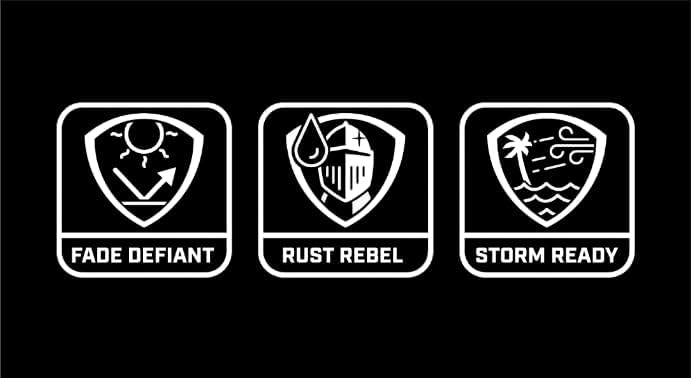
Image: Key durability features of the Haiku Coastal fan.
- Storm-Ready Durability: Engineered for coastal environments, wet-rated, salt-resistant, corrosion-resistant, and wind-resistant.
- Rust-Resistant Construction: Crafted with stainless steel hardware to endure extreme salt, sun, and wind exposure.
- Fade-Defiant Airfoils: Three molded hybrid resin airfoils with a matte finish resist UV and temperature discoloration.
- Sealed Protection: IP56 rated for dust and water protection, ensuring reliable functionality in harsh conditions.
Official Product Videos
No official product videos with "Seller" as creator type were found in the provided data. Please refer to the manufacturer's website for any available video resources.