
Introduction
Thank you for purchasing the Trevi XFest XF 1600 KB Amplified Speaker. This powerful portable speaker is designed to deliver high-quality audio with versatile connectivity options, including wireless Bluetooth, USB, MicroSD, and AUX-IN. It also features a karaoke function with an included microphone and True Wireless Stereo (TWS) capability for connecting two speakers.
This manual provides essential information for the safe and efficient operation of your speaker. Please read it thoroughly before use and keep it for future reference.

Image: Front view of the Trevi XFest XF 1600 KB Amplified Speaker, showcasing its integrated colorful LED lighting around the main speaker cone.
Package Contents
Please check that all items are present and in good condition:
- Trevi XFest XF 1600 KB Amplified Speaker
- Power Adapter
- User Manual (this document)
- Warranty Certificate
- Dynamic Microphone
- Full Control Remote Control
Safety Information
To ensure safe operation and prevent damage, please observe the following precautions:
- Do not expose the unit to rain or moisture to prevent fire or electric shock.
- Do not block ventilation openings. Ensure adequate space around the unit for proper airflow.
- Use only the power adapter supplied with the unit.
- Do not open the speaker casing. Refer all servicing to qualified personnel.
- Keep the unit away from direct sunlight, heat sources, and strong magnetic fields.
- Avoid placing heavy objects on top of the speaker.
- When moving the speaker, ensure the trolley handle is fully extended and locked, and use caution due to its weight.
Product Components and Controls
Familiarize yourself with the various parts and controls of your Trevi XFest XF 1600 KB speaker.

Image: Close-up of the speaker's control panel, showing the LED display, volume knobs, equalizer sliders, and various input ports (USB, MicroSD, AUX-IN, Microphone 1, Microphone 2, Guitar).
Control Panel Overview:
- 1. LED Light Switch: Toggles the speaker's integrated LED lights on/off.
- 2. Master Volume Control: Adjusts the overall output volume of the speaker.
- 3. Microphone Volume Control: Adjusts the volume of the connected microphones.
- 4. Guitar Input: 6.3mm jack for connecting a guitar.
- 5. Microphone Inputs (MIC1, MIC2): Two 6.3mm jacks for connecting microphones.
- 6. Power Switch: Turns the speaker on or off.
- 7. LED Display: Shows current mode, track information, and other status indicators.
- USB Port: For playing audio files from a USB flash drive.
- MicroSD Card Slot: For playing audio files from a MicroSD card.
- AUX-IN: 3.5mm jack for connecting external audio devices.
- Equalizer Controls: Adjust bass, treble, and other audio frequencies.
- Echo/Delay Controls: Adjust echo and delay effects for microphone inputs.

Image: Side view of the speaker, highlighting the extendable trolley handle for easy transport and additional side handles.
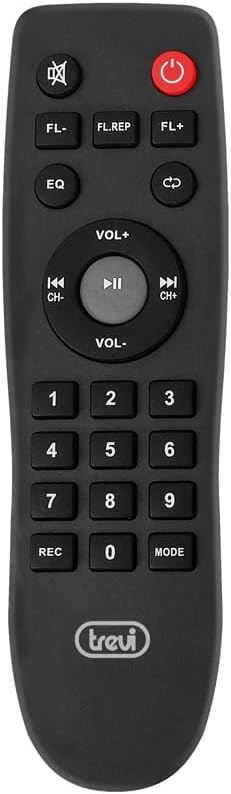
Image: The full-function remote control, featuring buttons for power, mode selection, volume, track control, EQ, and more.
Setup
Initial Charging:
Before first use, fully charge the speaker's internal rechargeable battery. Connect the supplied power adapter to the DC 15V input port on the speaker and plug it into a wall outlet. The charging indicator light will show the charging status. A full charge typically takes several hours.
Powering On/Off:
Locate the Power Switch (6) on the control panel. Flip the switch to the "ON" position to power on the speaker. The LED display will light up. To power off, flip the switch to the "OFF" position.
Microphone Connection:
Connect the included dynamic microphone to either MIC1 or MIC2 input (5) on the control panel. Adjust the Microphone Volume Control (3) to your desired level. You can also adjust echo and delay effects using the dedicated controls.

Image: A person demonstrating the extendable trolley handle, making the speaker easy to move despite its size.
Operating Instructions
Mode Selection:
Press the "MODE" button on the control panel or remote control to cycle through available input modes: Bluetooth, USB, MicroSD, AUX-IN, and FM Radio (if available).
Bluetooth Pairing:
- Turn on the speaker and select Bluetooth mode. The LED display will show "BLUE" and a blinking Bluetooth icon, indicating it's ready for pairing.
- Enable Bluetooth on your smartphone, tablet, or other device.
- Search for "TREVI XF 1600 KB" in your device's Bluetooth list and select it to connect.
- Once paired, the Bluetooth icon on the speaker's display will stop blinking, and you will hear a confirmation sound.
- You can now play audio wirelessly from your device.
USB/MicroSD Playback:
Insert a USB flash drive or MicroSD card (with MP3 files) into the corresponding port. The speaker will automatically switch to USB or MicroSD mode and begin playing audio. Use the playback controls (Play/Pause, Next/Previous Track) on the control panel or remote control.
AUX-IN Connection:
Connect an external audio device (e.g., MP3 player, computer) to the AUX-IN port using a 3.5mm audio cable. Select AUX-IN mode on the speaker. Audio will be played through the speaker, controlled by the external device's volume.
Karaoke Function:
With a microphone connected to MIC1 or MIC2, you can sing along to your music. Adjust the microphone volume and apply echo/delay effects as desired for a better karaoke experience.

Image: A person using the microphone with the speaker, demonstrating its karaoke capabilities.
True Wireless Stereo (TWS) Pairing:
The TWS function allows you to connect two XF 1600 KB speakers wirelessly for a more immersive stereo sound experience.
- Ensure both XF 1600 KB speakers are powered on and in Bluetooth mode, but not connected to any device.
- On one of the speakers (this will be the master), press and hold the TWS button (usually indicated by two interlocking arrows or "TWS").
- The speaker will search for the other unit. Once connected, you will hear a confirmation sound, and the TWS indicator will light up on both speakers.
- Now, connect your Bluetooth device to the master speaker. Audio will play in stereo through both speakers.

Image: A visual representation of how two XF 1600 KB speakers connect wirelessly using the TWS function to create a stereo sound system.
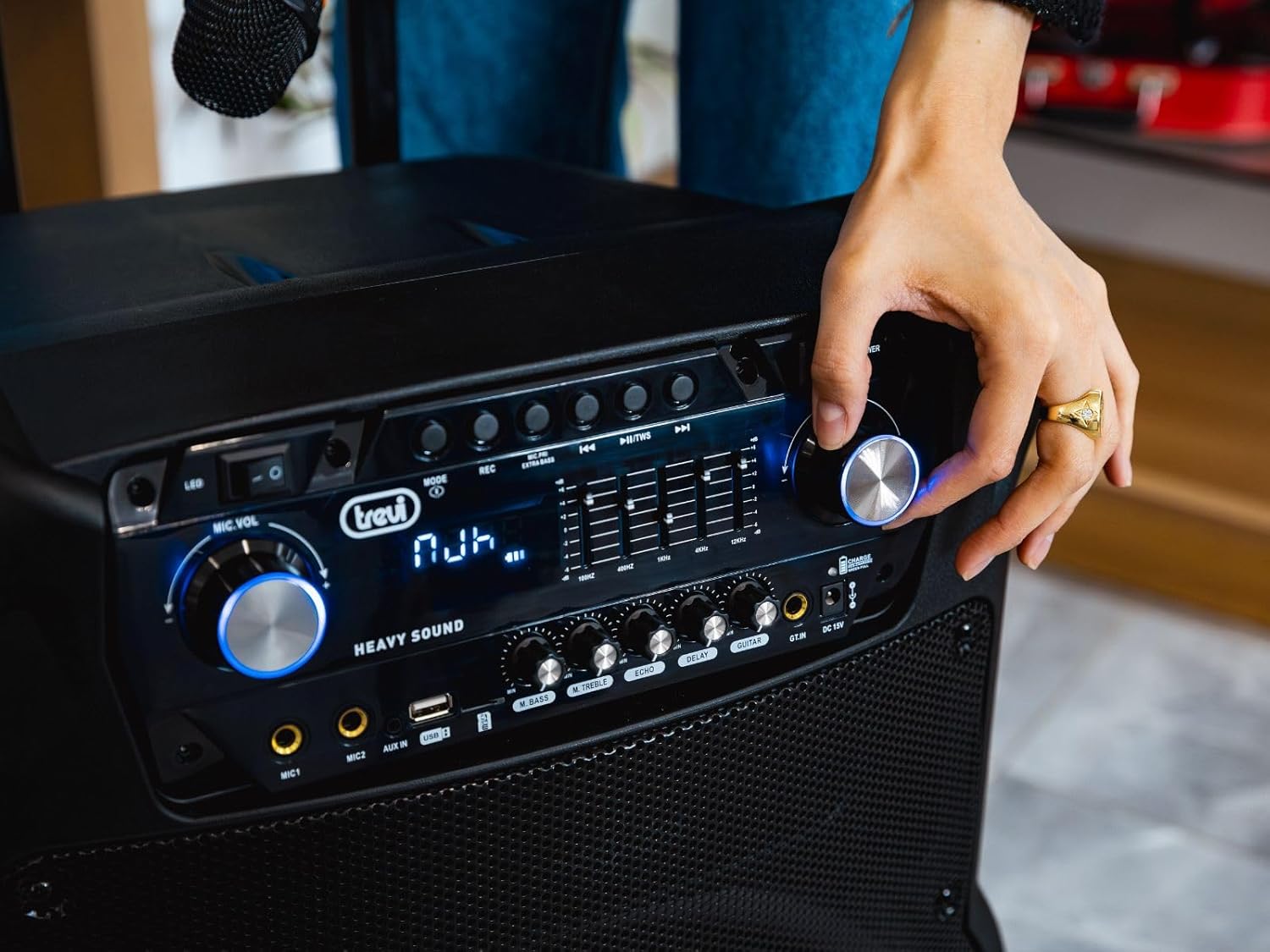
Image: A hand turning a control knob on the speaker's top panel, demonstrating user interaction with the device's settings.
Maintenance
Cleaning:
Wipe the speaker's exterior with a soft, dry cloth. Do not use abrasive cleaners, waxes, or solvents as they may damage the finish. Avoid spraying liquids directly onto the speaker.
Storage:
When not in use for extended periods, store the speaker in a cool, dry place, away from direct sunlight and extreme temperatures. It is recommended to charge the battery periodically (e.g., every 3-6 months) to maintain its lifespan.
Battery Care:
To maximize battery life, avoid fully discharging the battery frequently. Recharge the speaker when the low battery indicator appears. Do not leave the speaker uncharged for very long periods.
Troubleshooting
| Problem | Possible Cause | Solution |
|---|---|---|
| No power | Battery is depleted; Power adapter not connected properly. | Charge the speaker using the supplied power adapter; Ensure power adapter is securely connected to both the speaker and a working power outlet. |
| No sound | Volume is too low; Incorrect input mode selected; Device not properly connected (Bluetooth, AUX, USB/MicroSD). | Increase master volume; Select the correct input mode; Re-pair Bluetooth device, check AUX cable, or re-insert USB/MicroSD. |
| Bluetooth pairing fails | Speaker not in pairing mode; Device too far from speaker; Interference; Speaker already connected to another device. | Ensure speaker is in Bluetooth pairing mode (blinking "BLUE"); Move device closer to speaker; Turn off other Bluetooth devices; Disconnect from previous device. |
| Microphone not working | Microphone not connected; Microphone volume too low; Microphone faulty. | Ensure microphone is securely plugged into MIC1 or MIC2; Increase microphone volume; Test with another microphone if available. |
| TWS pairing fails | Speakers not in TWS pairing mode; Speakers too far apart; One speaker already connected to a Bluetooth device. | Ensure both speakers are in Bluetooth mode and not connected to any device before initiating TWS pairing; Move speakers closer; Disconnect any Bluetooth devices from both speakers. |
Specifications
| Feature | Detail |
|---|---|
| Model Number | 0X160000 |
| Power Output | 200W (Max) |
| Connectivity Technology | Bluetooth, USB, MicroSD, AUX-IN |
| Audio Inputs | 2 x Microphone (6.3mm), 1 x Guitar (6.3mm), 1 x AUX-IN (3.5mm) |
| Channels | 2 |
| Power Source | Battery Powered / AC Adapter |
| Battery Type | Internal Rechargeable (12V-7Ah) |
| Material | Robust materials |
| Color | Black |
| Item Weight | 18.5 Kilograms |
| Product Dimensions (LxWxH) | 34.5 x 51.8 x 70.25 cm |
| Mounting Type | Floor Standing |
| Special Features | Karaoke Function, TWS (True Wireless Stereo), Integrated LED Lights, Trolley System |
Warranty and Support
This product is manufactured by Trevi. For warranty information and support, please refer to the warranty certificate included in your package.
In case of a defective or damaged product, please consult the return policy of your retailer. For purchases made on Amazon.it, you may return a product within 30 days of receipt if you change your mind. Specific information regarding returns for defective or damaged products, or purchases from marketplace sellers, can be found on Amazon's help pages.
For technical assistance or further inquiries, please contact Trevi customer support through their official channels, as indicated in the warranty documentation or on their website.


