
Introduction
Thank you for choosing the SENSYNE 88-inch Phone Tripod & Selfie Stick. This versatile device is designed to enhance your photography and videography experience, offering stability and flexibility for various shooting scenarios. Please read this manual carefully to ensure proper setup, operation, and maintenance of your new device.
Safety Information
- Do not expose the device to extreme temperatures or direct sunlight for prolonged periods.
- Keep the device away from water and other liquids.
- Ensure all locking mechanisms are securely fastened before placing a device on the tripod.
- Do not overload the tripod beyond its intended weight capacity.
- Keep out of reach of small children to prevent accidental injury.
Package Contents
Verify that all items are present in your package:
- SENSYNE 88-inch Phone Tripod & Selfie Stick
- Upgraded Phone Holder (up to 5.7 inches wide)
- Wireless Remote Control (with 1 CR2 battery included)
- GoPro Adapter
- Portable Bag

Figure 1: SENSYNE 88-inch Phone Tripod and Selfie Stick, showing its compact form, extended tripod mode, and included wireless remote.
Setup
Unfolding the Tripod Base
Gently spread the three legs of the tripod until they are fully extended and stable. Ensure the base is locked into position for maximum stability.
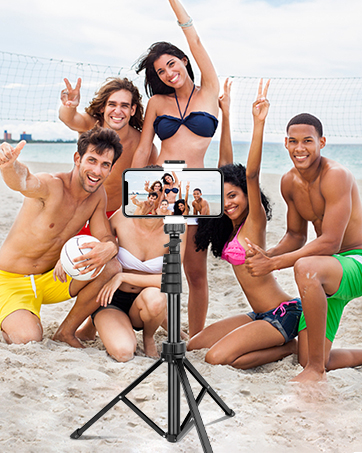
Figure 2: The tripod base fully extended for stability.
Extending the Main Pole
Unlock the section clamps along the main pole and extend it to your desired height. Securely close all clamps to lock the pole in place. The tripod can extend up to 88 inches.

Figure 3: Adjustable height levels of the tripod.
Attaching the Phone Holder or Gooseneck
Screw the phone holder or the flexible gooseneck onto the 1/4" screw mount at the top of the main pole. Ensure it is tightened securely.

Figure 4: Flexible gooseneck and 1/4" screw mount for device attachment.
Pairing the Wireless Remote
Turn on the wireless remote control. On your smartphone, enable Bluetooth and search for "UBeesize" or a similar device name. Select it to pair. Once paired, you can use the remote to trigger your phone's camera shutter.

Figure 5: Wireless remote control for convenient photo and video capture.
Operating Instructions
Using as a Tripod
Place your smartphone or camera securely into the phone holder. Adjust the height and angle as needed for stable shots. The wide base ensures dependable support.

Figure 6: The tripod's stable design prevents wobbling.
Using as a Selfie Stick
Collapse the tripod legs and hold the main pole. Extend the pole to your desired length for wider selfie shots or group photos. The gooseneck offers additional flexibility for unique angles.

Figure 7: Versatile usage as a selfie stick and for various photography needs.
Adjusting Shooting Angles
The phone holder allows for 90° vertical shooting and 360° panoramic rotation. Loosen the adjustment knob, position your device, and then tighten the knob to secure the angle.
Device Compatibility
The universal 1/4" screw mount ensures compatibility with a wide range of devices, including iPhones (15, 14, 13, 12 Series), Android phones, digital cameras, action cameras, webcams, and camcorders.

Figure 8: Broad compatibility with various devices.
Maintenance
- Clean the tripod with a soft, dry cloth. Avoid abrasive cleaners or solvents.
- Store the tripod in its portable bag in a cool, dry place when not in use.
- Regularly check all screws and clamps to ensure they are tight and functioning correctly.
Troubleshooting
| Problem | Possible Cause | Solution |
|---|---|---|
| Remote control not pairing. | Bluetooth is off on phone; remote battery low; remote not in pairing mode. | Ensure Bluetooth is enabled. Check remote battery and replace if necessary. Press and hold the remote button to enter pairing mode. |
| Tripod is wobbly/unstable. | Legs not fully extended; clamps not tightened; uneven surface. | Fully extend and lock all tripod legs. Ensure all pole clamps are securely fastened. Place the tripod on a flat, stable surface. |
| Phone not fitting in holder. | Phone size exceeds holder capacity. | The phone holder supports devices up to 5.7 inches wide. Ensure your phone fits within this range. |
Specifications
- Product Dimensions: 88 x 88 x 88 inches (fully extended)
- Item Weight: 1.9 pounds
- Material: Aluminum Alloy
- Maximum Height: 88 Inches
- Folded Size: 24 inches x 4 inches x 4 inches
- Phone Holder Compatibility: Up to 5.7 inches wide
- Remote Control Range: 30 ft (10M)
- Battery (Remote): 1 CR2 battery (included)
Warranty and Support
SENSYNE offers a 12-month replacement service for any concerns with your product. For dedicated support or any inquiries, please reach out to our customer service team through the platform where you purchased the product. We are committed to standing behind our product and ensuring your satisfaction.