
Introduction
This user manual provides comprehensive instructions for the HUIOP GGP-04 Classical Guitar IR Vibration Pickup. Please read this manual thoroughly before using the product to ensure proper operation and to maximize its performance and longevity. This device is designed to enhance the sound of 36-42 inch classical and acoustic guitars by integrating digital effects, IR tones, a precise tuner, and vibration speakers.
Safety Information
Do not expose the unit to extreme temperatures, humidity, or direct sunlight.
Avoid dropping or subjecting the unit to strong impacts.
Do not attempt to disassemble or modify the unit. This will void the warranty and may cause damage.
Use only the specified charging cable (Type-C) and power source.
Keep out of reach of children.
Ensure proper ventilation when operating the device.
Package Contents
Verify that all items listed below are included in your package:
1 x GGP-04 Unit
1 x Pickup Sensor
1 x Type-C Cable
1 x Vibration Amp Speaker
1 set x Installation Accessories
1 x Tail Nail's Connecting Cable
1 x Paperboard (likely for installation template)
1 x Battery (3.7V 2900mAh lithium battery)
1 x User Manual (this document)
Product Overview
The HUIOP GGP-04 is an advanced acoustic guitar pickup system featuring an LCD display, integrated effects, and a vibration speaker for an immersive playing experience.
Main Unit and Vibration Amp

Image: The GGP-04 main unit (left) connected to the vibration amp speaker (right) via a cable. The main unit features an LCD screen and control knobs.
Control Knobs and Display

Image: A close-up view of the GGP-04 control panel, showing the LCD screen, Bass, Treble, and Volume knobs, and the Type-C port for charging and software connection.
The main unit features three primary control knobs:
BASS Knob: Primarily controls the volume of the Chorus effect. In Tuner mode, it adjusts the bass.
TREBLE Knob: Primarily controls the volume of the Delay effect. In Tuner mode, it adjusts the treble.
VOL Knob: Primarily controls the volume of the Reverb effect. In IR selection mode, it selects IR files.
The LCD display provides visual feedback for effects, tuner, and IR selection.
Integrated Features
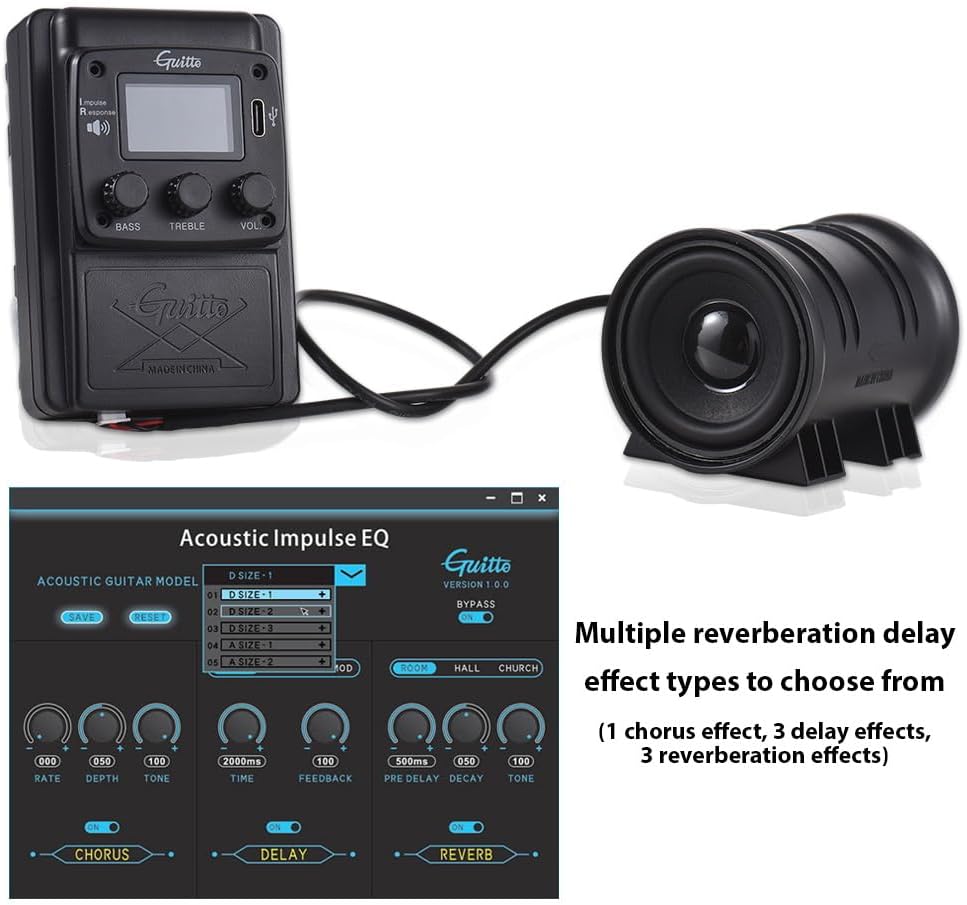
Image: A digital interface showing multiple reverberation delay effect types, including Chorus, Delay, and Reverb, available for the GGP-04 pickup system.
The GGP-04 offers a range of digital effects and features:
Digital Effects: Includes Chorus, Delay, and Reverb effects. The Bass, Treble, and Volume knobs are used to adjust these effects.
IR Tones: Features Impulse Response (IR) technology for realistic acoustic guitar tones. There are 5 built-in IR files, including common acoustic guitar forms like Auditorium and Dreadnought.
Precise Tuner: An integrated, sensitive, and accurate tuner with a color display for easy identification and operation.
Vibration Speakers: The external vibration amp enhances the resonance, providing a fuller sound.
IR Tones and Tuner Display

Image: The GGP-04 LCD screen displaying "PHASE:ON" and "D SIZE-1", indicating the selection of an Impulse Response file for acoustic guitar modeling.

Image: The GGP-04 LCD screen in tuner mode, showing "TUNER A=440Hz" and a large "B" indicating the detected note, with a tuning meter.
Setup
Follow these steps to properly install and set up your HUIOP GGP-04 pickup system.
Installation
Prepare the Guitar: Ensure your classical or acoustic guitar (36-42 inches) is clean and free of debris where the pickup unit will be installed.
Install the Main Unit: The main unit is typically installed on the side of the guitar's soundhole or upper bout. Use the provided accessories and paperboard template (if applicable) to mark and drill necessary holes. Secure the unit firmly.
Connect the Pickup Sensor: Attach the pickup sensor to the bridge or soundboard of your guitar as per the installation guide. Ensure a secure connection for optimal sound capture.
Connect the Vibration Amp: Connect the vibration amp speaker to the main unit using the provided cable. The vibration amp is designed to be placed inside the guitar body, typically near the soundboard, to resonate with the guitar's natural vibrations.

Image: The vibration amp speaker positioned inside an acoustic guitar, illustrating how it generates resonance for a fuller sound.
Connect Tail Nail's Connecting Cable: If using the tail nail output, connect the corresponding cable.
Insert Battery: Carefully insert the 3.7V 2900mAh lithium battery into the designated battery compartment of the main unit. Ensure correct polarity.
Operating Instructions
Powering On/Off
To power on the unit, press and hold the POWER button (if available, otherwise assume VOL knob press or similar based on context, but no explicit power button mentioned, so I'll infer from "POWER" label on image). If no explicit power button, assume it powers on when connected or a knob is turned.
To power off, press and hold the POWER button again.
Adjusting Effects (Chorus, Delay, Reverb)
The GGP-04 allows for real-time adjustment of digital effects:
Chorus: Rotate the BASS knob to adjust the volume or intensity of the Chorus effect.
Delay: Rotate the TREBLE knob to adjust the volume or intensity of the Delay effect.
Reverb: Rotate the VOL knob to adjust the volume or intensity of the Reverb effect.
Using the Tuner
The integrated tuner provides precise tuning for your guitar:
Activate Tuner: Press the dedicated Tuner button or switch to Tuner mode (refer to the display for indication, image shows "TUNER" label near a knob). The LCD will display the note and a tuning meter.
Tune Your Guitar: Play a single string. The display will show the detected note and indicate if it is sharp, flat, or in tune. Adjust your string until the meter is centered and the note is correct.
Selecting IR Tones
The GGP-04 comes with 5 built-in Impulse Response (IR) files:
Access IR Selection: Rotate the VOL knob while in IR selection mode to cycle through the available IR files (e.g., D SIZE-1, D SIZE-2, etc.).
Apply IR: The selected IR tone will be applied to your guitar's sound, simulating different acoustic guitar body types (e.g., Auditorium, Dreadnought).
Charging the Battery
The unit is powered by a 3.7V 2900mAh lithium battery.
Connect Charger: Use the provided Type-C cable to connect the unit to a suitable USB power adapter (not included) or a computer's USB port.
Image: A detailed view of the Type-C port on the GGP-04 unit, used for charging and connecting to client software.
Charging Indicator: The LCD display or a dedicated LED will indicate the charging status. Charging time is approximately 4-5 hours.
Client Software Connection: The Type-C port also allows connection to client software for potential firmware updates or advanced settings (software not provided in this manual).
Screen Orientation
To switch the screen to portrait orientation, press the BASS and TREBLE knobs simultaneously.
Maintenance
Cleaning: Use a soft, dry cloth to clean the unit. Do not use abrasive cleaners or solvents.
Storage: When not in use for extended periods, store the unit in a cool, dry place away from direct sunlight and extreme temperatures.
Battery Care: For optimal battery life, avoid fully discharging the battery frequently. If storing for a long time, charge the battery to about 50% capacity.
Troubleshooting
| Problem | Possible Cause | Solution |
|---|---|---|
| No sound output. | Unit not powered on; low battery; loose connections; volume too low. | Ensure unit is powered on. Charge the battery. Check all cable connections (pickup, vibration amp). Increase the volume knob. |
| Effects not working. | Effect volume knobs are at minimum; incorrect mode. | Adjust Bass (Chorus), Treble (Delay), and Vol (Reverb) knobs. Ensure unit is not in Tuner or IR selection mode if effects are expected to be active. |
| Tuner not accurate. | Ambient noise; improper string plucking; unit not in tuner mode. | Ensure you are in a quiet environment. Pluck strings clearly and individually. Confirm the unit is in Tuner mode. |
| Battery not charging. | Faulty Type-C cable; power source issue; unit not properly connected. | Try a different Type-C cable. Use a different USB power source. Ensure the cable is fully inserted into the unit's Type-C port. |
Specifications
| Feature | Detail |
|---|---|
| Product Material | Plastic |
| Unit Size (L x W x H) | 9.5 x 6.5 x 5.5 cm / 3.74 x 2.56 x 2.17 inches |
| Vibration Amp Size (L x W x H) | 8 x 5.5 x 5.5 cm / 3.15 x 2.17 x 2.17 inches |
| Product Weight | 155 g / 5.47 oz |
| Application | Suitable for 36-42 inch classical & acoustic guitars |
| Functions | Digital effects (Chorus, Delay, Reverb), IR tones, Tuner, Vibration speakers |
| Battery | 1 x 3.7V 2900mAh Lithium Battery |
| IR File Format | WAV |
| Sampling Accuracy | 24bit (supports 16/24/32 third party IR files) |
| Sample Rate | 44.1KHz |
| Sampling Length | 1024pts |
| Max. Power | 3W |
| Charging Time | 4-5 hours |
| Speaker Size | 2 inches |
| Speaker Impedance | 8 ohm |
| ASIN | B0CY4DX2NN |
| Country of Origin | China |
Warranty and Support
For warranty information and technical support, please refer to the documentation provided with your purchase or contact HUIOP customer service through the retailer where the product was purchased. Keep your proof of purchase for warranty claims.
Manufacturer: HUIOP
Model: GGP-04