
1. Introduction
The Janome Memory Craft 550E Limited Edition is an advanced embroidery machine designed to bring precision and creativity to your projects. This manual provides essential information for setting up, operating, maintaining, and troubleshooting your machine to ensure optimal performance and longevity. Please read these instructions thoroughly before using the machine.

Figure 1: Front view of the Janome Memory Craft 550E Limited Edition embroidery machine.
2. Setup
2.1 Unpacking and Placement
- Carefully remove the machine and all accessories from the packaging. Retain the original packaging for future transport or storage.
- Place the machine on a stable, level surface with adequate space for embroidery operations.
2.2 Power Connection
- Ensure the power switch is in the OFF position.
- Connect the power cord to the machine and then to a suitable electrical outlet.
2.3 Attaching the Embroidery Unit and Hoops
- Slide the embroidery unit onto the machine until it clicks securely into place.
- Select the appropriate hoop for your design. The machine includes four hoops: RE36b (7.9 x 14.2"), SQ20b (7.9 x 7.9"), RE20b (5.5 x 7.9"), and SQ14b (5.5 x 5.5").
- Secure your fabric within the hoop, ensuring it is taut and wrinkle-free.
- Attach the hooped fabric to the embroidery unit.

Figure 2: The embroidery machine with a hoop attached to the embroidery unit.
2.4 Threading the Machine
- Upper Thread: Follow the numbered guides on the machine to correctly thread the upper thread. Utilize the built-in advanced needle threader for ease of use.
- Bobbin Thread: Insert a pre-wound or manually wound bobbin into the top-loading full rotary hook bobbin case. Ensure the thread is correctly routed through the tension spring.
3. Operating Instructions
3.1 Powering On and LCD Touchscreen Navigation
- Turn on the power switch. The advanced color LCD touchscreen will illuminate.
- Use the touchscreen to navigate through menus, select designs, and adjust settings.

Figure 3: Detailed view of the LCD touchscreen interface, showing design selection and settings.
3.2 Selecting and Editing Designs
- The machine comes with 180 built-in designs and 6 fonts for monogramming. Browse these directly on the screen.
- Utilize the on-screen editing functions to resize, rotate, combine, or reposition designs.
- Import additional designs via the USB port. The included USB drive contains 30 exclusive large designs.
- AcuStitch software (PC compatible) is provided for further design editing and management.
3.3 Starting Embroidery
- Once your design is selected, fabric is hooped, and the machine is threaded, press the Start/Stop button to begin embroidering.
- Adjust the embroidery speed using the controls on the touchscreen or machine panel. The machine operates at speeds up to 860 stitches per minute (spm).
- The machine features programmable jump thread trimming and auto-return post thread break for efficient operation.
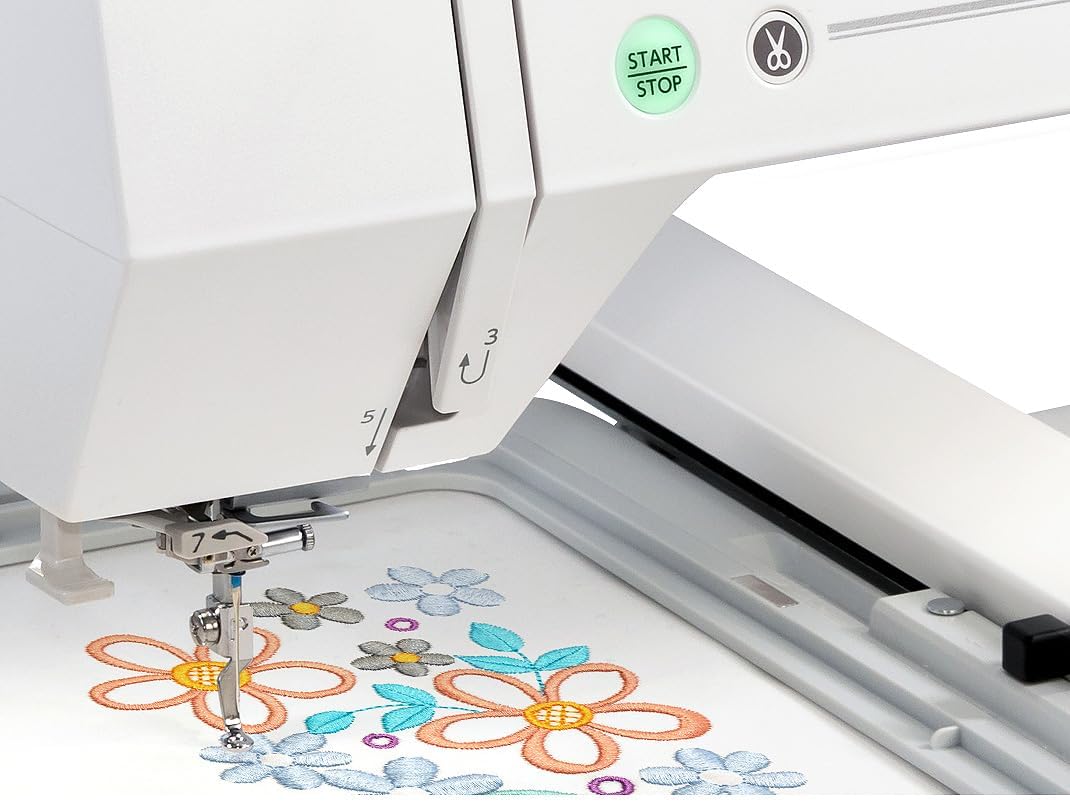
Figure 4: The needle mechanism actively embroidering a design.

Figure 5: A floral design being embroidered within the hoop.
4. Maintenance
4.1 Cleaning
- Regularly clean lint and dust from the bobbin area, feed dogs, and needle plate using a small brush or vacuum cleaner.
- Wipe the machine's exterior with a soft, dry cloth. Avoid using harsh chemicals.
4.2 Needle Replacement
- Replace the needle frequently, especially after 8-10 hours of embroidery or if it becomes bent or dull.
- Always use the correct type and size of needle for your fabric and thread.
4.3 General Care
- Keep the machine covered when not in use to protect it from dust.
- Avoid pulling on the fabric while embroidering, as this can damage the needle or machine.
5. Troubleshooting
5.1 Common Issues and Solutions
| Problem | Possible Cause | Solution |
|---|---|---|
| Thread breaks frequently | Incorrect threading, dull needle, poor quality thread, incorrect tension | Re-thread the machine, replace needle, use quality thread, adjust tension settings. |
| Skipped stitches | Bent or incorrect needle, improper hooping, lint in bobbin area | Replace needle, re-hoop fabric tightly, clean bobbin area. |
| Poor stitch quality | Incorrect tension, wrong needle/thread combination, stabilizer issues | Adjust tension, ensure appropriate needle and thread for fabric, use correct stabilizer. |
| Machine not powering on | Power cord not connected, power outlet issue | Check power cord connection, test outlet with another device. |
For more detailed troubleshooting or issues not listed here, please refer to the comprehensive troubleshooting guide in the full Janome manual or contact Janome customer support.
6. Specifications
- Maximum Embroidery Size: 7.9” x 14.2” (200mm x 360mm)
- Built-in Designs: 180
- Fonts: 6
- Embroidery Hoops Included: RE36b (7.9 x 14.2"), SQ20b (7.9 x 7.9"), RE20b (5.5 x 7.9"), SQ14b (5.5 x 5.5")
- Embroidery Speed: Up to 860 spm
- Bobbin Type: Top loading full rotary hook
- Needle Threader: Built-in advanced
- Display: Advanced color LCD touchscreen
- Connectivity: USB port for design import
- Included Software: AcuStitch (PC compatible)
- Product Dimensions: 23.9 x 13.43 x 11.54 inches
- Item Weight: 12.38 pounds
- Model Number: 550ELE
- UPC: 732212467875

Figure 6: Dimensional overview of the Janome Memory Craft 550E.
7. Warranty and Support
For information regarding your product's warranty, please refer to the warranty card included with your machine or visit the official Janome website. Warranty terms and conditions may vary by region and retailer.
For technical assistance, spare parts, or service, please contact Janome customer support or an authorized Janome dealer. Contact information can typically be found on the Janome website or in your product documentation.