
1. Product Overview
The Xiaomi Redmi 10000mAh Power Bank is a portable charging device designed to provide power to your electronic devices on the go. It features a compact design, high-capacity lithium polymer cells, and multiple charging ports for convenience.

Figure 1: Xiaomi Redmi 10000mAh Power Bank (Main View)
Key Features:
- 10000mAh High Capacity: Provides sufficient power to charge a typical smartphone 2-3 times.
- Dual USB-A Output Ports: Allows charging of up to two devices simultaneously.
- Dual Input Ports (Micro USB & USB-C): Offers flexibility for recharging the power bank.
- Lithium Polymer Cells: Ensures high quality and a long service life.
- Compact and Portable Design: Easy to carry for travel and daily use.
- Fast Charging: Supports fast charging for compatible devices.
2. Getting Started
Package Contents:
- Xiaomi Redmi 10000mAh Power Bank
- USB Charging Cable (Micro USB to USB-A)
- User Manual
Charging the Power Bank:
Before first use, fully charge the power bank. To charge the power bank:
- Connect the provided USB cable (or a compatible USB-C cable) to one of the power bank's input ports (Micro USB or USB-C).
- Connect the other end of the cable to a USB power adapter (not included) or a computer's USB port.
- The LED indicators on the power bank will illuminate to show the charging status. All four LEDs will be solid when fully charged.
A full charge typically takes approximately 3 hours with a suitable power adapter.
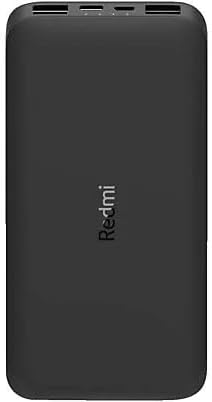
Figure 2: Power Bank Side View showing Input/Output Ports and LED Indicators
3. Operating Instructions
Charging Your Devices:
The power bank is equipped with two USB Type-A output ports to charge your devices.
- Connect your device's charging cable to one of the USB Type-A output ports on the power bank.
- Connect the other end of the cable to your device.
- The power bank will automatically begin charging your device. If it does not, press the power button once to activate charging.
- The LED indicators will show the remaining battery level of the power bank during charging.
You can charge up to two devices simultaneously using both USB-A output ports.
Checking Battery Level:
Press the power button once to check the remaining battery level. The LED indicators will light up:
- 1 LED: 0-25% remaining battery
- 2 LEDs: 25-50% remaining battery
- 3 LEDs: 50-75% remaining battery
- 4 LEDs: 75-100% remaining battery
4. Maintenance and Safety
General Care:
- Keep the power bank dry and away from moisture.
- Avoid exposing the power bank to extreme temperatures (hot or cold).
- Do not drop, puncture, or disassemble the power bank.
- Clean the power bank with a soft, dry cloth. Do not use harsh chemicals or abrasive cleaners.
Safety Precautions:
- Do not use the power bank if it is damaged or swollen.
- Keep out of reach of children.
- Dispose of the power bank responsibly according to local regulations. Do not dispose of it in household waste.
- Use only compatible charging cables and adapters.
5. Troubleshooting
Power Bank Not Charging:
- Ensure the charging cable is securely connected to both the power bank and the power adapter.
- Try a different charging cable or power adapter.
- Check if the power outlet is working.
Device Not Charging from Power Bank:
- Ensure the power bank has sufficient charge. Check the LED indicators.
- Press the power button on the power bank to activate output.
- Try a different charging cable for your device.
- Ensure your device is compatible with USB charging.
Slow Charging:
- Ensure you are using a fast-charging compatible cable and adapter for both the power bank and your device.
- Charging multiple devices simultaneously may reduce charging speed.
- Some devices may limit charging speed to protect their battery.
6. Specifications
| Feature | Specification |
|---|---|
| Brand Name | Xiaomi |
| Model Name | PB100LZM |
| Battery Capacity | 10000 mAh |
| Battery Cell Composition | Lithium Polymer |
| Power Source | Battery Powered |
| Special Features | Fast Charging |
| Input Ports | Micro USB, USB Type-C |
| Output Ports | 2 x USB Type-A |
| Compatible Devices | All Smartphones, Electronics |
| Color | Black |
| Item Weight | 200 grams |
| Battery Charging Time | Approx. 3 hours (for power bank) |
| GTIN (UPC/EAN) | 06934177716881 |
7. Warranty and Support
Warranty Information:
This product carries a manufacturer's warranty for 6 months from the date of purchase. For warranty claims or service, please contact the manufacturer or their authorized service agent.
Customer Support:
For further assistance, troubleshooting, or product inquiries, please refer to the official Xiaomi support channels or contact your retailer.


