
Product Overview
The PEMP 10.25" Linux Head Unit is designed to upgrade your BMW X1 E84 (2009-2015) CIC system with modern features. This unit provides a vertical screen display, wired and wireless CarPlay, Android Auto, and Mirror Link capabilities. It features a 1920x720 HD capacitive touchscreen and integrates with your vehicle's existing controls and information display.
Key features include:
- Vertical Screen Style: Parallel with eye line of sight for safe and comfortable viewing.
- Wired and Wireless CarPlay & Android Auto: Seamless smartphone integration with steering wheel button support.
- Quick System Boot: Linux system ensures fast startup and immediate reverse camera video display.
- HD Display: 1920x720 resolution with capacitive touch function.
- OEM Info Integration: Supports factory monitor information display and switching between OEM and CarPlay interfaces.
Setup and Installation
This section provides a general guide for installing your PEMP Linux Head Unit. Professional installation is recommended.
Installation Overview
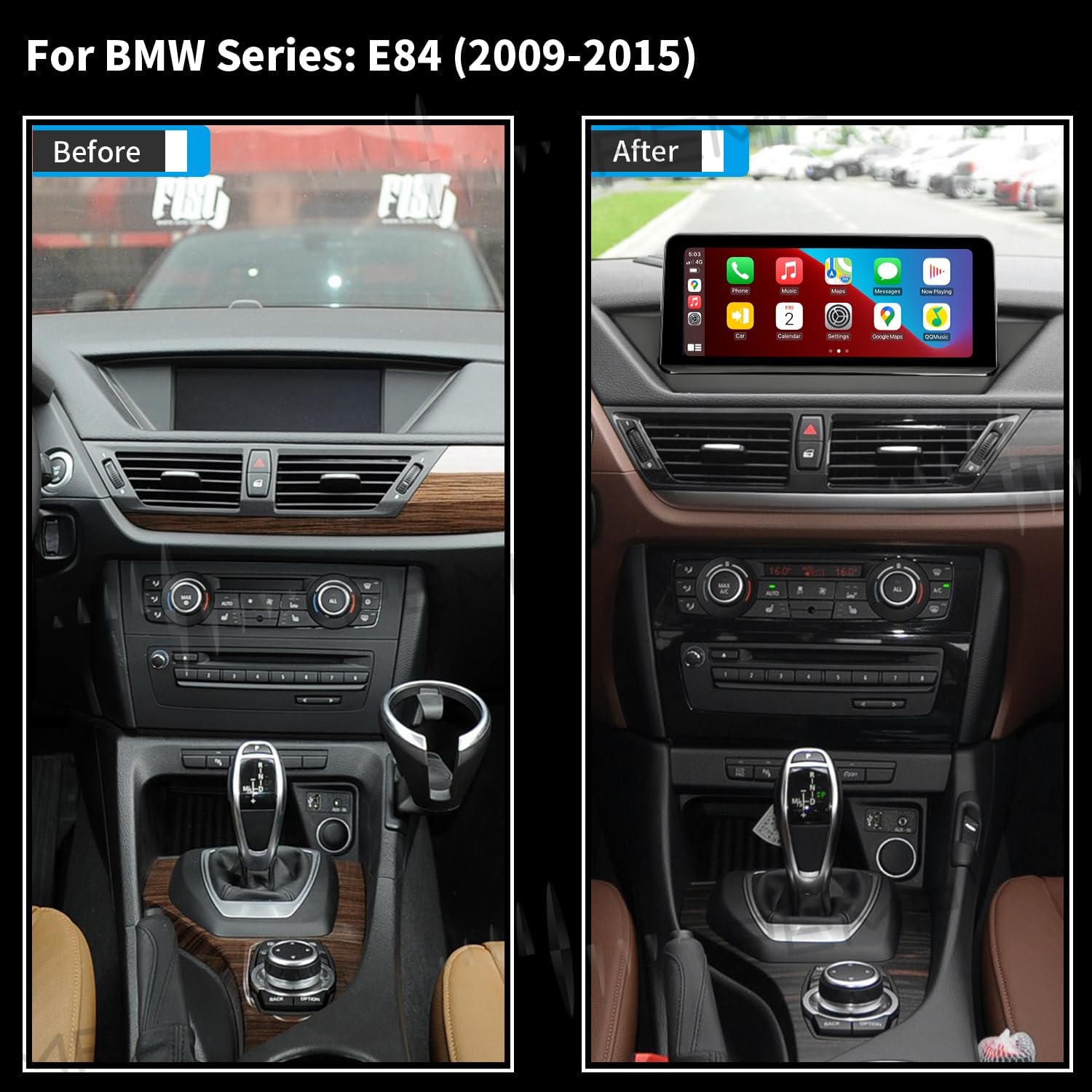
This image shows a side-by-side comparison of the BMW X1 E84 dashboard before and after the installation of the PEMP 10.25" Linux Head Unit. The 'Before' image displays the original smaller screen, while the 'After' image shows the larger, integrated PEMP unit.
Fiber Optic Cable Connection
Proper connection of the fiber optic cable is crucial for audio functionality. If your vehicle has a fiber optic cable, it must be correctly transferred to the new harness.
This video demonstrates the process of transferring the 2-pin green optical fiber cable from the original harness to the Linux harness. This step is vital for ensuring proper audio signal transmission.
Operating Instructions
CarPlay Connection
The unit supports both wired and wireless Apple CarPlay. Follow these steps to connect your iPhone:
This video provides a step-by-step guide on how to connect your Apple iPhone to the PEMP Head Unit for CarPlay functionality.
Android Auto Connection
Connect your Android phone for Android Auto functionality:
This video demonstrates the process of connecting an Android phone to the PEMP Head Unit for Android Auto.
Fast Boot and CarPlay Connection
Experience quick system boot-up and seamless CarPlay connection:
This video illustrates the fast boot sequence of the system and how to quickly connect to CarPlay.
Using OEM Bluetooth for Calls
Utilize your vehicle's original Bluetooth system for calls while using CarPlay:
This video guides you through the steps to use your OEM Bluetooth for making and receiving calls within the CarPlay interface.
Troubleshooting
No Sound Issue
If you encounter a 'no sound' issue, follow these troubleshooting steps:
This video explains how to diagnose and resolve common 'no sound' problems with the head unit.
OEM Resolution Issues
If you experience problems with OEM resolution, refer to the following guide:
This video demonstrates how to troubleshoot and resolve issues related to OEM resolution settings.
Setting OEM Resolution
Learn how to correctly set the OEM resolution for optimal display:
This video provides instructions on how to properly configure the OEM resolution settings for your head unit.
Specifications
| Feature | Detail |
|---|---|
| Brand | PEMP |
| Model Name | X1 |
| Screen Size | 10.25 Inches |
| Resolution | 1920 x 720 |
| Operating System | Linux |
| Connectivity Technology | Bluetooth |
| Special Feature | Bluetooth, Touchscreen |
| Compatible Devices | iPhone and Android phone |
| Vehicle Service Type | Car |
| Model Year Compatibility | 2009-2015 (BMW X1 E84 CIC) |
What's in the Box
- ISO Harness
Warranty and Support
Warranty Description
- I. Free returns: Within 1 month according to Amazon rules (contact Amazon Buyer Services before returning).
- II. Free warranty service: After 1 month, free warranty service within 12 months for non-human damage. You will need to cover the cost of shipping the product back and forth within the U.S.
- III. Repair service: After 1 year, repair service is available. In addition to paying for postage within the U.S., you will need to pay for additional parts replacement and labor costs.
Support & FAQs
- How about our service? Respond to your message within 24 hours, with a professional after-sales team.
- What is the quality of the product? Please be assured that product quality is the first priority.
- Vehicle fitment questions? If in doubt, please send us a photo of the car's dashboard and model year to avoid mistakes.
