
Noaton AVC600 Deluxe
Noaton AVC600 Deluxe Cordless Vacuum Cleaner User Manual
Introduction
Thank you for choosing the Noaton AVC600 Deluxe Cordless Vacuum Cleaner. This manual provides essential information for the safe and efficient operation, maintenance, and troubleshooting of your new appliance. Please read it thoroughly before first use and keep it for future reference.
Safety Instructions
To ensure safe operation, please adhere to the following precautions:
- Read all instructions: Familiarize yourself with the vacuum cleaner's functions and safety warnings before use.
- Indoor use only: This appliance is designed for household indoor use. Do not use it outdoors or on wet surfaces.
- Keep away from water: Do not immerse the vacuum cleaner or its components in water or other liquids.
- Power supply: Use only the original charger and power adapter provided with the appliance. Ensure the voltage matches your local power supply.
- Avoid hazardous materials: Do not vacuum flammable or combustible liquids, hot ashes, sharp objects, or toxic materials.
- Filter maintenance: Regularly clean or replace filters as instructed to maintain optimal performance and prevent overheating.
- Children and pets: Keep the appliance out of reach of children and pets. Supervise children to ensure they do not play with the vacuum cleaner.
- Maintenance: Disconnect the power supply before performing any maintenance or cleaning.
- Damage: Do not operate the vacuum cleaner if it has been damaged in any way. Contact customer support for repairs.
Package Contents
Please check the box for the following items:
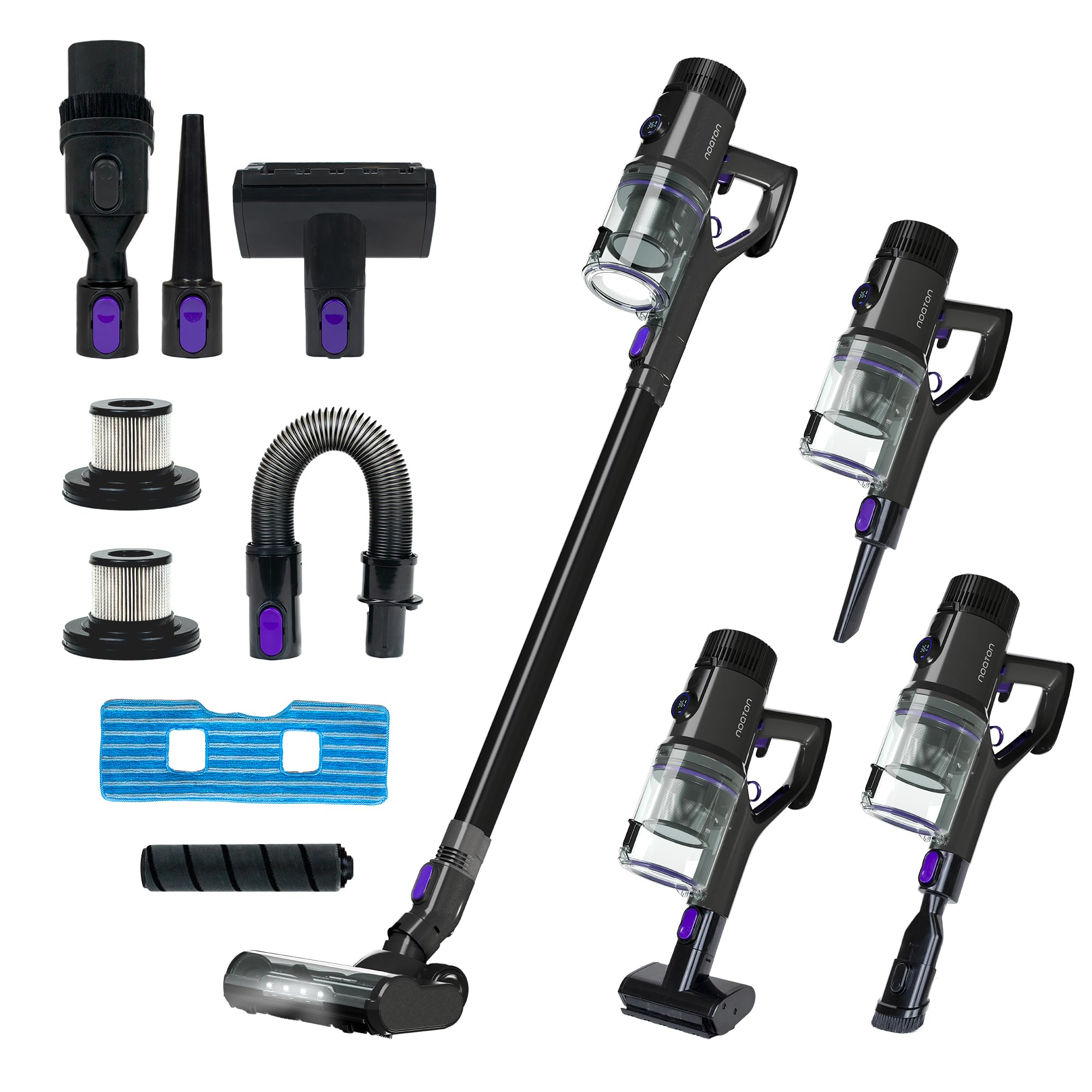
Image: Complete set of Noaton AVC600 Deluxe Cordless Vacuum Cleaner components, including the main unit, extension wand, floor brush with LED lights, various nozzles (crevice tool, brush tool, mini motorized brush), flexible hose, wall mount, charger, and spare HEPA filters.
- Noaton AVC600 Deluxe Main Unit
- Extension Wand
- Motorized Floor Brush with LED Lights
- Crevice Tool
- 2-in-1 Brush Tool
- Mini Motorized Brush (for pet hair/upholstery)
- Flexible Hose
- Wall Mount with Charging Function
- Power Adapter
- Spare HEPA Filter
- Cleaning Brush
- User Manual (this document)
Setup
1. Assembly
- Attach the Extension Wand: Insert the extension wand into the main unit until it clicks securely.
- Connect the Floor Brush: Attach the motorized floor brush to the other end of the extension wand, ensuring it clicks into place.
- Install Battery: Ensure the battery is securely inserted into the main unit.
2. Charging the Battery
Before first use, fully charge the battery. The battery can be charged while attached to the main unit or separately.
- Using Wall Mount: Mount the wall bracket in a suitable location. Connect the power adapter to the wall mount and plug it into a power outlet. Hang the vacuum cleaner on the wall mount; it will begin charging automatically.
- Direct Charging: Connect the power adapter directly to the charging port on the main unit or the removable battery. Plug the adapter into a power outlet.
The display will indicate charging status. A full charge takes approximately 4-6 hours.
Operating Instructions
1. Power On/Off
Press and hold the power button for 2-3 seconds to turn the vacuum cleaner on. Press and hold again to turn it off.
2. Suction Modes
The Noaton AVC600 Deluxe features an intelligent automatic mode and manual power settings.
- Automatic Mode: The vacuum cleaner starts in automatic mode. In this mode, the intelligent sensor detects the floor type and adjusts suction power accordingly, optimizing battery life and cleaning performance.
- Manual Mode: Press the mode button (usually next to the power button) to cycle through different suction power levels (e.g., Eco, Standard, Max). The display will show the current mode.
3. Using Attachments
Different attachments are designed for specific cleaning tasks:
- Motorized Floor Brush: Ideal for all floor types, including hard floors and carpets. The integrated LED lights illuminate dust and debris.
- Crevice Tool: Perfect for narrow gaps, corners, and hard-to-reach areas.
- 2-in-1 Brush Tool: Use the brush for delicate surfaces like curtains or keyboards, and the nozzle for upholstery or car interiors.
- Mini Motorized Brush: Excellent for removing pet hair from upholstery, stairs, and car seats.
- Flexible Hose: Provides extended reach and flexibility for cleaning awkward spaces.
To change attachments, press the release button on the current attachment and pull it off. Then, align the new attachment and push it on until it clicks.
Maintenance
Regular maintenance ensures optimal performance and extends the lifespan of your Noaton AVC600 Deluxe.
1. Emptying the Dustbin
Empty the 0.7-liter dustbin regularly, ideally after each use or when the MAX line is reached.
- Hold the main unit over a trash can.
- Press the dustbin release button (usually located near the bottom of the dustbin) to open the flap and release debris.
- Close the flap securely after emptying.
2. Cleaning the HEPA Filter
The HEPA filter captures fine particles and allergens. Clean it regularly to maintain suction power.
- Twist and pull to remove the dustbin from the main unit.
- Remove the HEPA filter from the dustbin.
- Tap the filter gently to remove loose dust. For a deeper clean, rinse the filter under cold running water.
- Important: Ensure the HEPA filter is completely dry (allow 24-48 hours) before reinserting it into the vacuum cleaner. Do not use the vacuum with a wet filter.
- Reassemble the filter and dustbin, then reattach to the main unit.
3. Cleaning the Brush Roll
Periodically check the brush roll for tangled hair or debris.
- Turn off the vacuum cleaner and disconnect it from power.
- Press the release tab on the side of the floor brush to remove the brush roll.
- Use scissors or the provided cleaning tool to cut and remove any tangled hair or fibers.
- Reinsert the brush roll until it clicks into place.
4. Battery Care
- Store the vacuum cleaner in a cool, dry place.
- Avoid fully discharging the battery frequently.
- If storing for an extended period, charge the battery to about 50% and recharge every few months.
Troubleshooting
| Problem | Possible Cause | Solution |
|---|---|---|
| Vacuum cleaner does not turn on. | Battery is not charged or not properly installed. | Charge the battery fully. Ensure the battery is securely clicked into place. |
| Low suction power. | Dustbin is full; Filter is clogged; Brush roll is tangled; Blockage in the hose/wand. | Empty the dustbin. Clean the HEPA filter. Remove tangled hair from the brush roll. Check for and remove any blockages. |
| Brush roll not spinning. | Brush roll is tangled; Attachment not properly connected; Motor protection activated. | Clean the brush roll. Ensure the floor brush is securely attached. Turn off the vacuum, clear any obstructions, and restart. |
| Short battery runtime. | Battery not fully charged; Using Max power mode frequently; Battery aging. | Ensure battery is fully charged. Use Automatic or lower power modes for longer runtime. Consider battery replacement if significantly degraded. |
| Unusual noise. | Blockage in the air path; Damaged component. | Check for and remove any blockages in the dustbin, filters, wand, or brush head. If noise persists, contact customer support. |
Specifications
| Feature | Detail |
|---|---|
| Brand | Noaton |
| Model | AVC600 Deluxe |
| Suction Power | 46,000 Pa |
| Motor Power | 600 Watts |
| Voltage | 220 Volts |
| Runtime | Up to 85 minutes (depending on mode) |
| Noise Level | 62 dB |
| Dustbin Capacity | 0.7 Liters |
| Filter Type | HEPA Filter |
| Weight | 5.4 Kilograms |
| Dimensions (Package) | 87.2 x 26 x 15 cm |
| Power Source | Battery Powered (1 Lithium-ion included) |
| Recommended Surface | Wood, Laminate, Tile, Vinyl |
Warranty and Support
No specific warranty information is provided in the product details. For warranty claims, technical support, or spare parts, please contact Noaton customer service or the retailer from whom you purchased the product. Keep your proof of purchase for any warranty-related inquiries.
For further assistance, please visit the official Noaton website or contact their customer support channels.
Related documentsAVC600 Deluxe


Ask a question about this manual
Ask about setup, troubleshooting, compatibility, parts, safety, or missing instructions. Manuals+ will review the question and use this page’s manual context to help answer it.