Introduction
Thank you for choosing the ZERFUN D240 Dual Rechargeable Wireless Microphones. This system is designed to provide high-quality audio for various applications, including home karaoke, meetings, parties, church events, and DJ performances. This manual will guide you through the setup, operation, and maintenance of your new wireless microphone system to ensure optimal performance and longevity.
Package Contents
Please verify that all items listed below are included in your package:
- ZERFUN Rechargeable Cordless Mics x 2
- Receiver x 1
- Charging Cable x 2
- Microphone Windscreen x 2
- Antiskid Ring x 2
- User Manual x 1

Figure 1: ZERFUN D240 Package Contents
Product Overview
The ZERFUN D240 system features two rechargeable handheld microphones and a compact receiver. The microphones are designed with a durable metal body and a clear LED display for frequency and battery status. The receiver is equipped with a 1/4-inch (6.35mm) output for easy connection to compatible audio devices.

Figure 2: ZERFUN D240 Wireless Microphone System
Microphone Features
- Metal Mesh Head: Durable and designed for clear sound capture.
- Clear LED Display: Shows battery level and frequency.
- USB-C Charging Port: Convenient for recharging.
- Controls: Independent Volume, Echo, Treble, and Bass adjustments.

Figure 3: Microphone Components and Charging

Figure 4: Microphone Control Panel
Receiver Features
- 1/4" (6.35mm) Mic Plug: For connecting to audio input devices.
- Receiving Indicators (A.RF, B.RF): Show active microphone connection.
- Charging Indicator: Displays charging status.
- Power Indicator: Shows power status.
- Power Switch Button: To turn the receiver on/off.
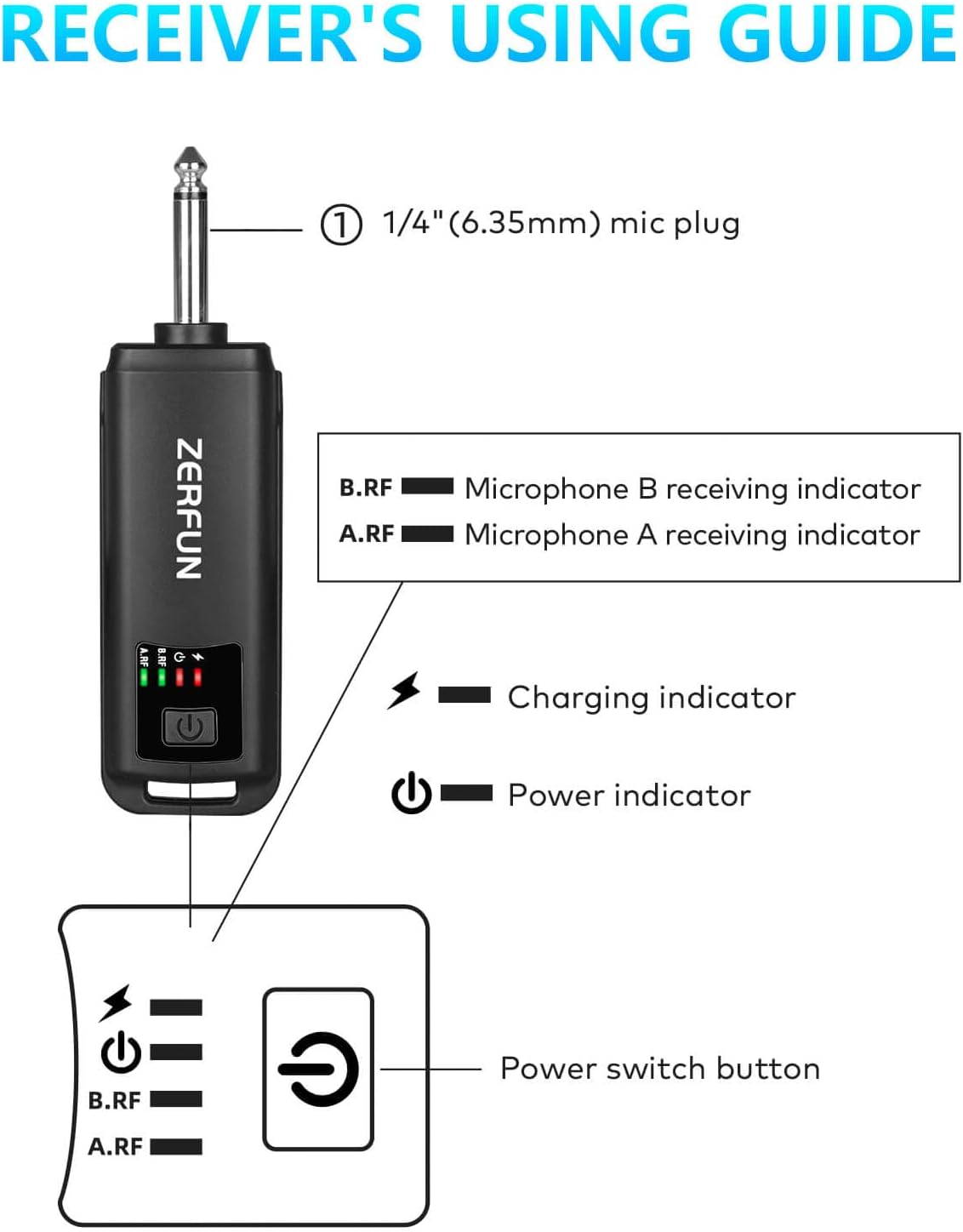
Figure 5: Receiver Components and Indicators
Setup
- Charge the Microphones and Receiver: Before first use, fully charge both microphones and the receiver using the provided charging cables. Refer to the 'Charging and Battery Life' section for details.
- Connect the Receiver: Plug the 1/4" (6.35mm) mic plug of the receiver into the MIC input of your compatible audio device (e.g., speaker, PA system, amplifier, mixing board, karaoke machine).
- Power On: Turn on the receiver using its power switch button. Then, turn on each microphone. The system is designed for automatic frequency scanning and transmission, ensuring a quick and stable connection.
- Adjust Volume: Start with the microphone volume at a low setting on both the microphone and your audio device, then gradually increase to a comfortable level.

Figure 6: System Compatibility Overview
Operating Instructions
The ZERFUN D240 microphones offer independent controls for a customized audio experience:
- Volume Control (VOL): Adjusts the overall loudness of the microphone output. Features ±15 levels of adjustment.
- Echo Control (ECHO): Adds a reverberation effect to your voice. Features ±15 levels of adjustment.
- Treble Control (TREBLE): Adjusts the high-frequency tones for clarity. Features ±7 levels of adjustment.
- Bass Control (BASS): Adjusts the low-frequency tones for richness. Features ±7 levels of adjustment.
These are cardioid wireless microphones, meaning they primarily pick up sound from the front (unidirectionally). For best results, speak directly towards the top of the microphone. This pickup pattern helps isolate your vocals from background noise.
Charging and Battery Life
Both the microphones and the receiver are equipped with built-in rechargeable batteries.
- Charging Time: Approximately 3-4 hours for a full charge.
- Microphone Working Time: About 8-10 hours when fully charged.
- Receiver Working Time: About 4-5 hours when fully charged.
Use the provided charging cables to recharge the devices. The LED display on the microphone and the charging indicator on the receiver will show the charging status.
Transmission Range
The ZERFUN Cordless Microphone system operates on 2.4Ghz frequencies, compliant with FCC regulations. It supports a transmission range of up to 164 feet (approximately 50 meters) in outdoor environments. Optimal performance is achieved within this range and without significant obstructions.
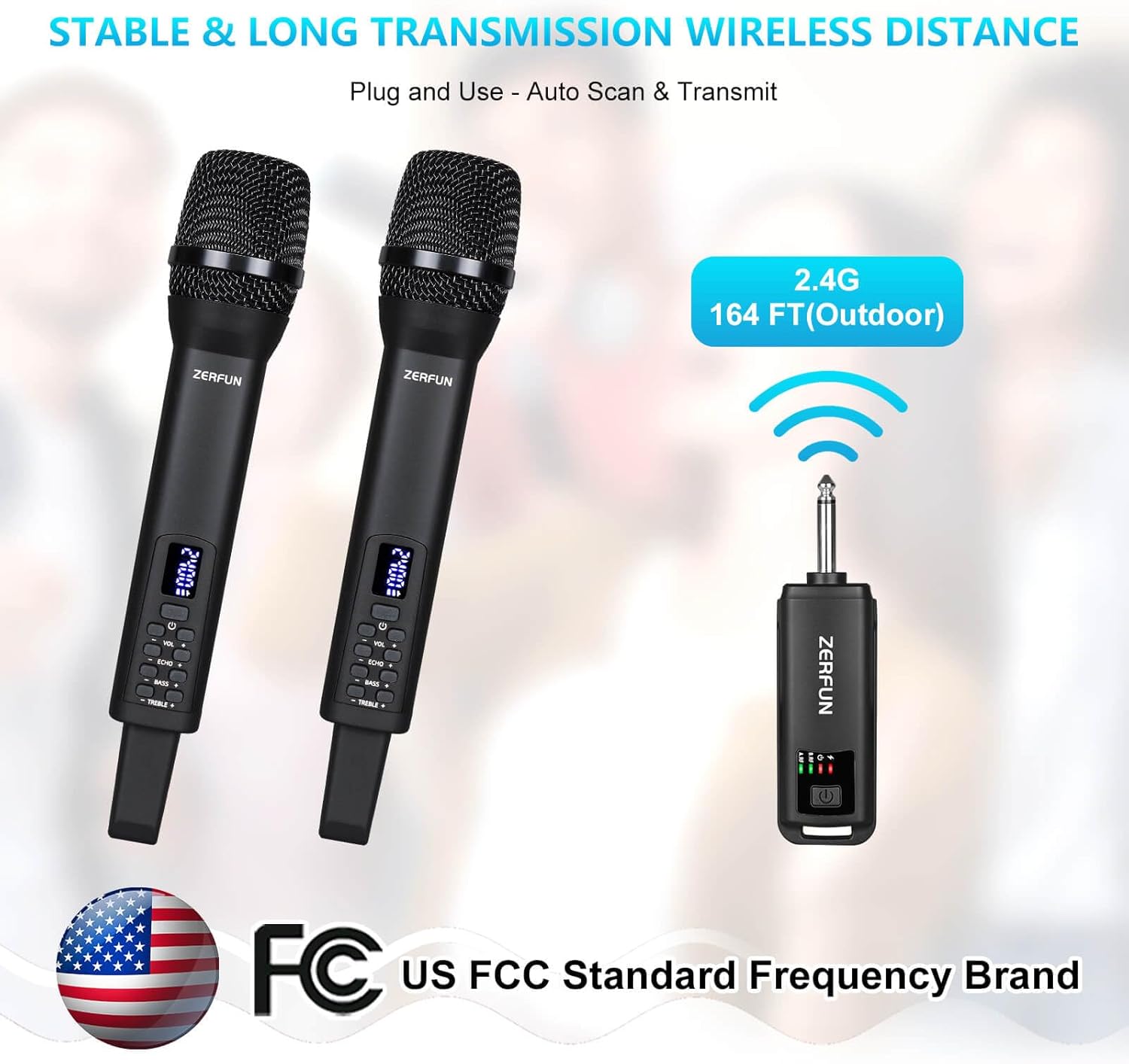
Figure 7: Wireless Transmission Range
Maintenance
- Cleaning: Use a soft, dry cloth to clean the microphones and receiver. Do not use abrasive cleaners or immerse in water.
- Storage: Store the system in a cool, dry place away from direct sunlight and extreme temperatures when not in use.
- Battery Care: For prolonged storage, charge the batteries to about 50% every few months to maintain battery health.
Troubleshooting
| Problem | Possible Cause | Solution |
|---|---|---|
| No sound from microphone | Microphone or receiver not powered on; Low battery; Incorrect connection; Out of range. | Ensure both devices are on; Recharge batteries; Check receiver is plugged into MIC input; Move closer to receiver. |
| Poor sound quality/Interference | Obstructions; Other 2.4Ghz devices nearby; Microphone not pointed correctly. | Reduce obstructions; Move away from other wireless devices; Speak directly into the top of the microphone. |
| Microphone not charging | Faulty cable or power source; Charging port issue. | Try a different charging cable or USB port; Contact customer support if issue persists. |
Specifications
| Feature | Detail |
|---|---|
| Brand | ZERFUN |
| Model Number | D240 |
| Connectivity Technology | 2.4Ghz |
| Polar Pattern | Unidirectional (Cardioid) |
| Microphone Form Factor | Handheld |
| Connector Type | 6.35 mm Jack |
| Power Source | Battery Powered (Lithium Ion) |
| Microphone Battery Life | 8-10 Hours |
| Receiver Battery Life | 4-5 Hours |
| Transmission Range | Up to 164 feet (Outdoor) |
| Item Dimensions (L x W x H) | 11.9 x 7.5 x 2.3 inches |
| Item Weight | 1.48 pounds |
| Compatible Devices | Amplifier, Audio Interface, Audio Mixer, Karaoke Machine, Speaker |
| Special Feature | Rechargeable |
Warranty and Support
Genuine ZERFUN Wireless Microphone products come with supportive 24-Hours After-Sales Customer Service and a 12-Month Manufacturer Assurance. For any inquiries or assistance, please contact ZERFUN customer service.


