1. Introduction
Thank you for choosing the VEVOR Digital Crane Scale SF921. This industrial-grade hanging scale is designed for precise and reliable weighing across various applications, including farm, hunting, fishing, and garage use. Please read this manual thoroughly before operation to ensure correct usage and to maximize the lifespan of your device.
Key Features:
- Weighing Capacity: 0.3 lb (0.15 kg) to 880 lb (400 kg)
- Accuracy: 0.1 lb (0.05 kg)
- Durable Cast Aluminum Case
- LCD Screen with Backlit Display
- Built-in 1M Measuring Tape
- Peak Hold Function
- Tare and Zero Functions
- Unit Conversion (lb/kg/N)
- Secure Anti-Drop S-Hook
2. Setup
2.1 Unboxing and Inspection
Carefully remove the crane scale from its packaging. Inspect the device for any signs of damage during transit. Ensure all components are present:
- VEVOR Digital Crane Scale SF921
- User Manual (this document)
Note: 2 x AA batteries are required and not included in the package.
2.2 Battery Installation
- Locate the battery compartment cover on the back of the scale.
- Open the cover by sliding or unscrewing it.
- Insert two (2) AA batteries, ensuring correct polarity (+/-) as indicated inside the compartment.
- Replace the battery compartment cover securely.
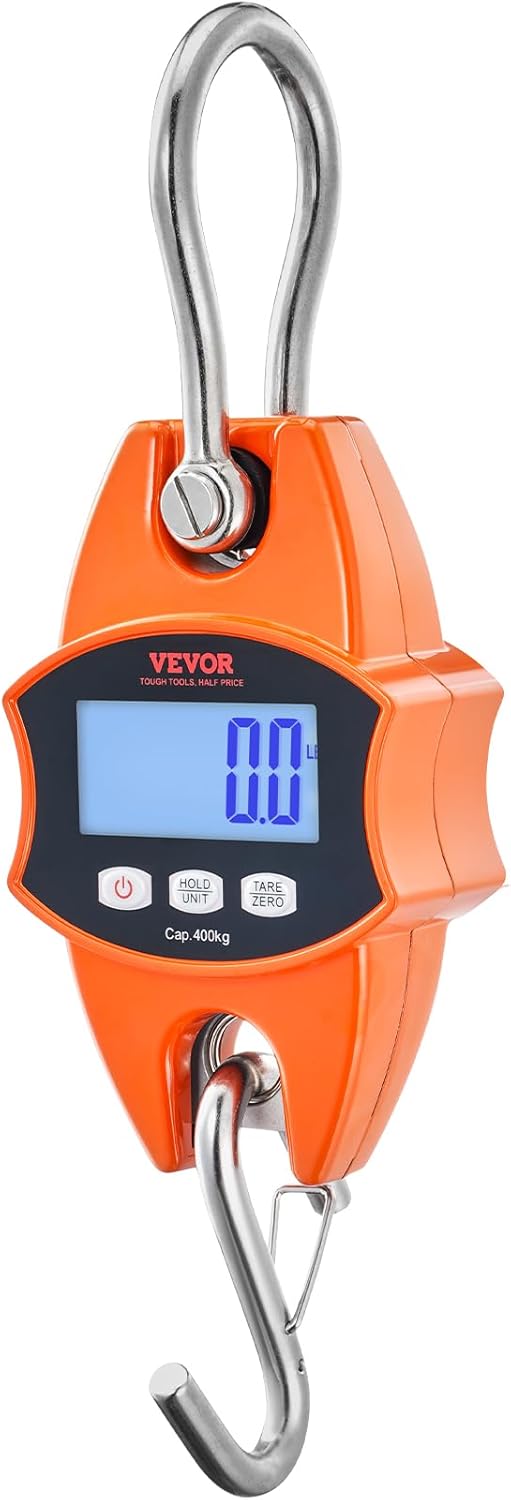
Image: Close-up of the VEVOR Digital Crane Scale SF921, highlighting the display and control buttons. This view helps in identifying the battery compartment location.
3. Operating Instructions
3.1 Power On/Off
- To power on: Press the Power button (
 ) once. The LCD will light up.
 - To power off: Press and hold the Power button for a few seconds until the display turns off. The scale also features an auto-off function to conserve battery power.
3.2 Basic Weighing
- Ensure the scale is powered on and displaying "0.0" in your desired unit.
- Securely attach the item to be weighed to the bottom S-hook.
- Hold the scale steady or hang it from a stable support.
- The weight will be displayed on the LCD screen. Wait for the reading to stabilize.

Image: The VEVOR Digital Crane Scale in use, demonstrating its wide weighing range from small items like eggs to larger objects like a stag, emphasizing its precision.
3.3 Unit Conversion (lb/kg/N)
With the scale powered on, press the UNIT button to cycle through the available weighing units: pounds (lb), kilograms (kg), and Newtons (N). The selected unit will be displayed on the LCD.
3.4 Tare Function
The Tare function allows you to subtract the weight of a container or attachment, so only the net weight of the item is measured.
- Hang the empty container or attachment on the scale.
- Wait for the weight to stabilize.
- Press the TARE/ZERO button. The display will reset to "0.0".
- Place the item to be weighed into the container. The display will show only the weight of the item.
3.5 Zero Function
If the scale does not display "0.0" when nothing is attached, press the TARE/ZERO button to reset it to zero before weighing.
3.6 Hold Function
To hold a stable weight reading on the display, press the HOLD button. The reading will lock, indicated by a "HOLD" icon. Press HOLD again to release the reading.
3.7 Peak Hold Function
This function captures and displays the maximum force applied during a measurement, useful for testing pull strength.
- With the scale on, press the PEAK button (if available, or a combination of buttons as per specific model instructions, often integrated with HOLD).
- Apply force to the hook (e.g., pulling a bowstring, testing a chain).
- The display will show the maximum force detected.
- Press the PEAK button again to exit Peak Hold mode.
Image: The VEVOR Digital Crane Scale displaying the Peak Hold function, showing its application in measuring the pull strength of a bow and testing chain integrity.
3.8 Using the Built-in 1M Measuring Tape
The scale includes a retractable 1-meter measuring tape for convenience.
- Gently pull the tape measure from the side of the scale.
- Measure the desired length.
- To retract, press the button next to the tape measure slot (if present) or gently guide it back into the housing.

Image: The VEVOR Digital Crane Scale showcasing its integrated 1-meter tape measure, extended for use, demonstrating its dual functionality for weighing and measuring.
3.9 Secure Anti-Drop S-Hook
The scale features an S-hook with a security clip to prevent accidental detachment of items during weighing.

Image: A visual comparison highlighting the secure anti-drop S-hook of the VEVOR scale versus a standard hook, demonstrating how it keeps items like fish tightly secured.
4. Maintenance
4.1 Cleaning
To clean the scale, wipe it with a soft, damp cloth. Do not use abrasive cleaners, solvents, or immerse the scale in water. Ensure the scale is completely dry before storage or next use.
4.2 Storage
Store the scale in a dry, cool place away from direct sunlight and extreme temperatures. If the scale will not be used for an extended period, remove the batteries to prevent leakage and damage.
4.3 Battery Replacement
When the battery indicator appears on the LCD, replace the batteries promptly to ensure accurate readings and continuous operation. Follow the battery installation steps in Section 2.2.
5. Troubleshooting
| Problem | Possible Cause | Solution |
|---|---|---|
| Scale does not turn on | Dead or incorrectly installed batteries | Replace batteries with new AA batteries, ensuring correct polarity. |
| Inaccurate readings | Unstable surface; Overload; Low battery; Scale not zeroed | Ensure stable hanging point; Do not exceed max capacity; Replace batteries; Press TARE/ZERO before weighing. |
| Display shows "O-Ld" or similar | Overload | Remove the item immediately. The scale's capacity is 880 lbs (400 kg). |
| Display is dim or flickering | Low battery | Replace batteries. |
6. Specifications
| Feature | Specification |
|---|---|
| Model Number | SF921 |
| Max Weighing Capacity | 880 lb / 400 kg |
| Min Weighing Capacity | 0.3 lb / 0.15 kg |
| Accuracy | 0.1 lb / 0.05 kg |
| Measurement Units | lb / kg / N |
| Display Type | LCD with Backlit Display |
| Power Source | 2 x AA Batteries (not included) |
| Product Dimensions | 18.01 x 10.01 x 3.99 cm (approx.) |
| Item Weight | 798 g (approx.) |
| Operating Temperature | -10℃ to 40℃ |

Image: A detailed diagram illustrating the dimensions (3.77 in / 96 mm width, 12.4 in / 315 mm height, 1.88 in / 48 mm depth) and key specifications of the VEVOR Digital Crane Scale SF921.
7. Warranty and Support
VEVOR products are designed for durability and performance. For specific warranty information, please refer to the warranty card included with your purchase or visit the official VEVOR website. If you encounter any issues or require technical assistance, please contact VEVOR customer support through their official channels.
Online Support: www.vevor.com/support