
1. Introduction
Thank you for choosing the Bebird M9 Ear Care Wax Removal Tool. This device is designed to provide a clear, magnified view of your ear canal, allowing for safe and effective ear wax removal and general inspection. It features a high-definition camera, LED illumination, and a stable gyroscope for ease of use. This manual will guide you through the setup, operation, and maintenance of your new device.
2. What's in the Box
Your Bebird M9 package includes the following components:
- Bebird M9 Wireless Otoscope
- Magnetic Charging Base / Storage Cube
- 10 Replacement Ear Scoops (various types for different wax consistencies)
- 3 Self-service Checking Attachments (Ear Canal Observation, Ear/Nose Speculum, Tongue Depressor)
- USB-C Charging Cable
- Cleaning Brush
- User Manual
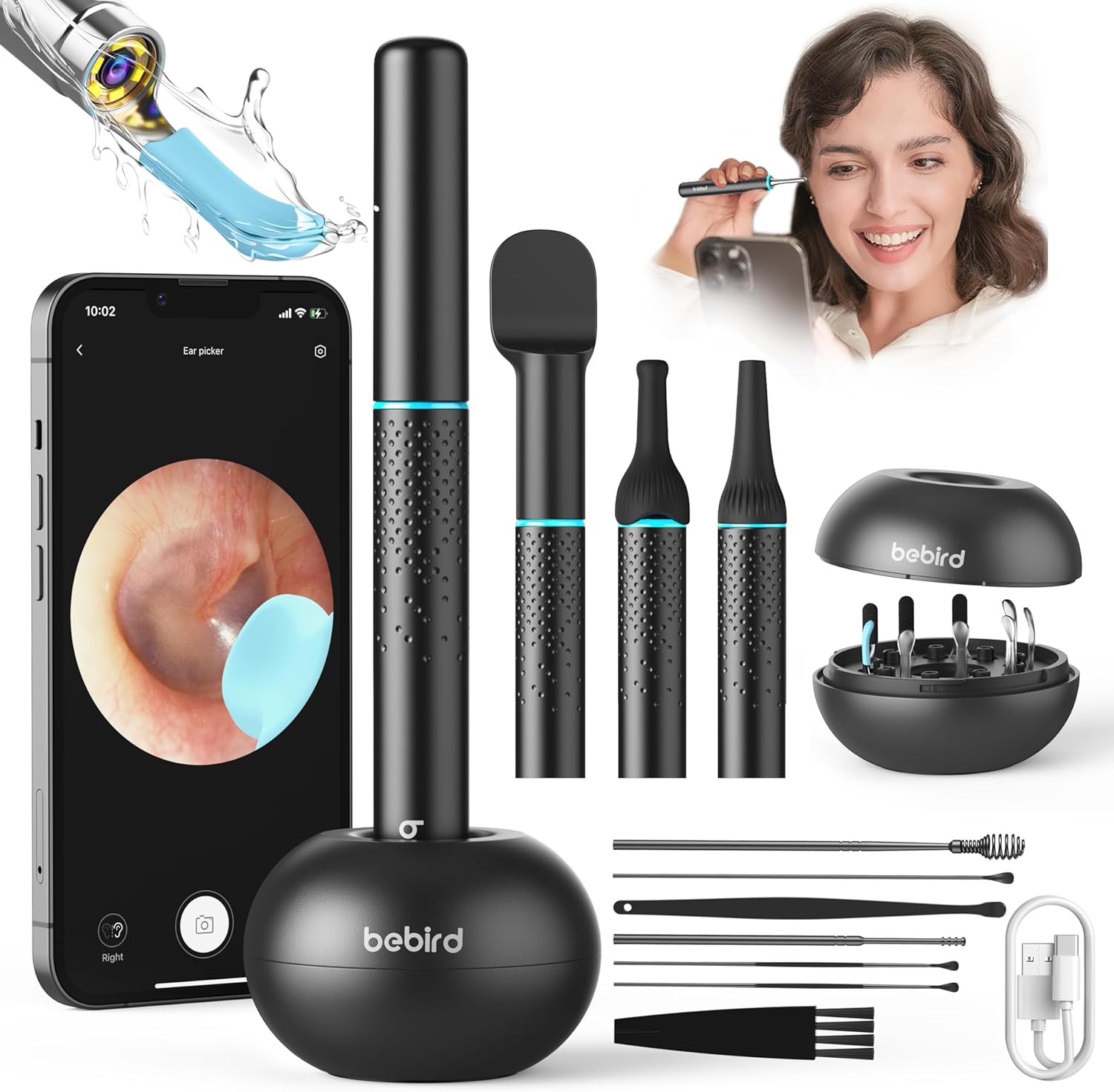
Image: All components included in the Bebird M9 package.
Video: A detailed look at the Bebird M9 S Ear Wax Removal Tool Camera package contents, including the device, replacement tips, and various attachments.
3. Product Overview
The Bebird M9 is equipped with advanced features for comprehensive ear care and inspection:
- 10 Megapixel 1080p HD Camera: Provides clear and stable images of the ear canal.
- 6 LED Lights: Illuminates the entire ear canal for optimal visibility.
- 3-Axis Gyroscope Stabilization: Ensures the image remains right-side-up regardless of device orientation.
- Soft Silicone Ear Scoops: Designed for safer ear picking, preventing scratches or damage.
- Magnetic Cover: Conveniently protects the camera and acts as a power switch.
- USB-C Port: For easy and fast charging.
- Multi-functional Attachments: Beyond ear care, it can be used for nose, throat, and teeth inspection.

Image: Key performance components of the Bebird M9, highlighting the camera, LED lights, and design features.

Image: Demonstrates the multi-purpose functionality of the Bebird M9 for oral, ear, and nasal examinations.
4. Setup
Follow these steps to set up your Bebird M9 device and connect it to the app:
- Charge the Device: Ensure your Bebird M9 is fully charged using the provided USB-C cable and charging base. The indicator light will show charging status.
- Download the Bebird App: Scan the QR code in the quick start guide or search for "Bebird" in your device's app store (iOS/Android) and install the application.
- Turn on the Device: Remove the magnetic cover from the device. The indicator light will flash, and the device's Wi-Fi signal will become active.
- Connect to Device Wi-Fi:
- Go to your phone's Wi-Fi settings.
- Find and connect to the network named "bebird-XXXX" (where XXXX is a unique identifier).
- Enable Local Network Access (iOS Users):
- Go to your phone's Settings.
- Scroll down and find the "bebird" app.
- Tap on "bebird" and enable "Local Network" access.
- Also, ensure "Wireless Data" is set to "WLAN & Cellular Data" for optimal performance.
- Open the Bebird App: Launch the Bebird app. It should automatically detect and connect to your device. Click 'Go' to start the live view.
Video: A step-by-step guide on how to set up and connect the Bebird M9 S Ear Cleaner to your mobile device.
Video: Instructions on how to open the local network settings for the Bebird app before connecting to Wi-Fi.
5. Operating Instructions
Once connected, you can begin using your Bebird M9:
- Select the Right Tip: Choose an ear scoop or attachment suitable for your needs (e.g., soft silicone for general cleaning, specialized tips for different wax types, or observation attachments for nose/throat). Rotate to securely attach the ear scoop.
- Adjust View: In the app, you can switch between left ear and right ear modes to ensure the image orientation is correct. The 3-axis gyroscope will keep the image stable.
- Gentle Insertion: Carefully and slowly insert the device into the ear canal while observing the live feed on your phone. Do not force the device.
- Wax Removal: Use the ear scoop to gently dislodge and remove ear wax. Always move slowly and observe the screen to avoid touching the eardrum or sensitive areas.
- Capture Images/Videos: Use the camera and video buttons within the app to take photos or record videos of your ear canal for monitoring or sharing with a healthcare professional.
- Other Inspections: Attach the appropriate speculum for nose or throat inspection. Use the tongue depressor for oral examinations.
Video: Demonstrates the process of using the Bebird M9 S ear wax camera to remove buildup safely and effectively.
Video: Illustrates how the Bebird ear wax camera provides a clear view, offering a modern alternative to traditional cotton swabs.
6. Maintenance
Proper maintenance ensures the longevity and hygiene of your Bebird M9:
- Clean Ear Scoops: After each use, remove the ear scoop and clean it thoroughly with water or an alcohol wipe. Ensure it is completely dry before reattaching or storing.
- Clean the Lens: Use the provided cleaning brush or a soft, dry cloth to gently wipe the camera lens. Avoid using abrasive materials that could scratch the lens.
- Store Properly: Store the device and all accessories in the magnetic charging base/storage cube when not in use. This keeps them organized, clean, and protected.
- Charging: Recharge the device when the battery is low. The indicator light will signal low battery.

Image: The storage base for the Bebird M9, designed for easy access and organization of tips.
7. Troubleshooting
| Problem | Possible Cause | Solution |
|---|---|---|
| Device not connecting to app / Wi-Fi issues | Incorrect Wi-Fi selection, local network access disabled, low battery. | Ensure you're connected to the correct "bebird-XXXX" Wi-Fi. For iOS, verify Local Network access is enabled for the app in phone settings. Charge the device fully. |
| Tips do not stay on securely | Tip not rotated fully, wear and tear on tip. | Ensure the tip is rotated clockwise until it clicks securely into place. Replace worn tips with new ones from the kit. |
| Poor image quality / Blurry view | Dirty lens, insufficient lighting, device too far/close to target. | Clean the camera lens with the provided brush. Ensure the 6 LED lights are on. Adjust the distance to the area being viewed for optimal focus. |
| Video recording not saving | App permissions, insufficient phone storage. | Check app permissions for photo/video access in your phone settings. Ensure sufficient storage space on your phone. |
8. Specifications
- Product Dimensions: 0.5 x 0.5 x 5.7 inches
- Weight: 8.47 ounces
- Manufacturer: Heifeng Zhizao (Shenzhen) Technology Co., Ltd
- ASIN: B0CY19866G
- First Available Date: March 13, 2024
9. Warranty and Support
Bebird is committed to quality assurance and provides after-sales guarantee for your product. If you encounter any issues with your Bebird M9 Ear Care Wax Removal Kit, please do not hesitate to contact our customer support team. You can reach us via Amazon Messaging for prompt assistance. We are always ready to help.
Legal Disclaimer: Statements regarding dietary supplements have not been evaluated by the FDA and are not intended to diagnose, treat, cure, or prevent any disease or health condition. This device is intended for personal hygiene and observation purposes. Consult a medical professional for any serious health concerns.


