
Antminer T19 Pro Hydro
Contents
Antminer T19 Pro Hydro User Manual
Model: T19 Pro Hydro | Brand: Antminer
1. Introduction
This manual provides comprehensive instructions for the safe and efficient operation of your BITMAIN Antminer T19 Pro Hydro ASIC miner. It covers setup, operation, maintenance, and troubleshooting to ensure optimal performance and longevity of your device. The Antminer T19 Pro Hydro is designed for high-efficiency Bitcoin (BTC), Bitcoin Cash (BCH), and Bitcoin SV (BSV) mining using the SHA256 algorithm, featuring an advanced liquid-cooling system.
2. Safety Information
Please read all safety warnings and instructions carefully before operating the miner. Failure to follow these instructions may result in electric shock, fire, or serious injury.
- Electrical Safety: The miner requires a 380-415V AC power supply. Using incorrect voltage can cause severe damage to the unit and pose a fire hazard. Ensure all electrical connections are secure and meet local electrical codes. A power cord is NOT included; use an appropriate cord for the specified voltage and current (12 Amp).
- Liquid Cooling Safety: The liquid cooling system requires deionized water or pure water. Do NOT use tap water or other liquids, as this can lead to corrosion, blockages, and system failure. Ensure all water pipe connections are secure to prevent leaks.
- Environmental Conditions: Operate the miner within the specified environmental conditions (temperature, humidity) to prevent overheating and damage.
- Handling: The miner is heavy (approximately 30 lbs). Use proper lifting techniques or assistance when moving the unit to prevent injury.
- Ventilation: Ensure adequate ventilation around the miner to dissipate heat effectively, even with liquid cooling.
3. Product Overview
The Antminer T19 Pro Hydro is a high-performance ASIC miner featuring a robust liquid-cooling system for enhanced efficiency and stability. Key components include the main mining unit, liquid cooling ports, Ethernet port, and power input.
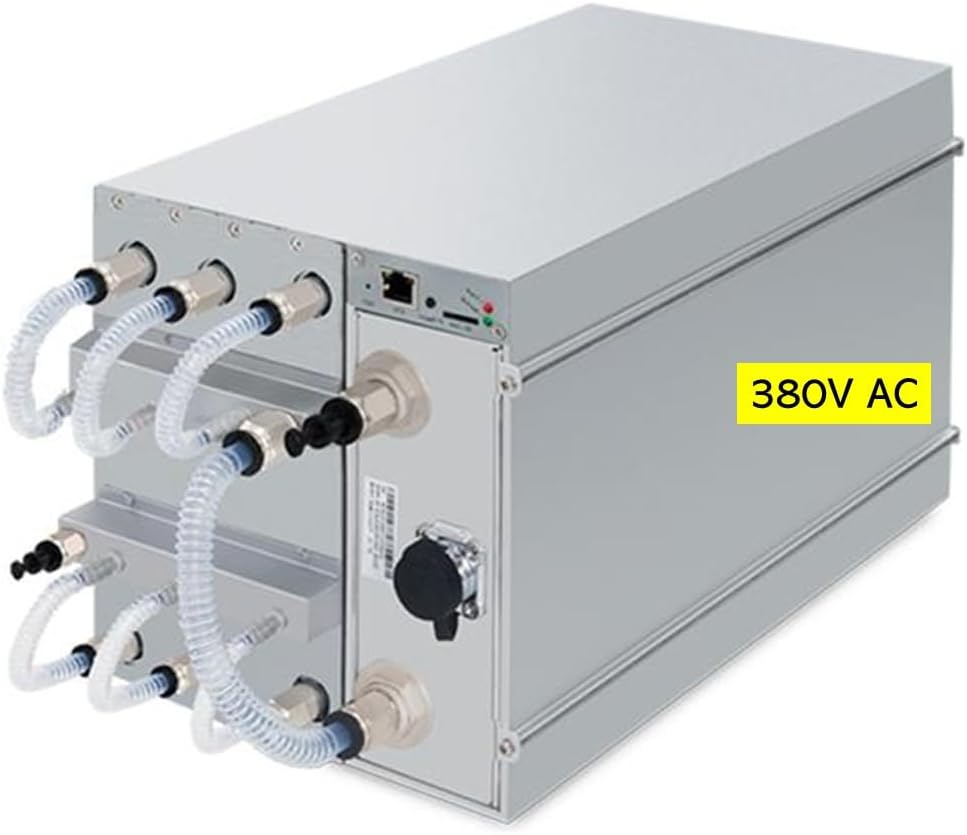
Figure 3.1: Front view of the Antminer T19 Pro Hydro, showing the liquid cooling pipe connectors, Ethernet port, and power input. Note the "380V AC" label indicating the required input voltage.

Figure 3.2: Angled view of the Antminer T19 Pro Hydro, providing a clearer perspective of its compact design and the arrangement of its liquid cooling connections.
4. Setup
4.1 Unpacking
- Carefully remove the miner from its packaging.
- Inspect the unit for any signs of physical damage during transit. If damage is found, contact your supplier immediately.
- Retain the original packaging for future transport or storage.
4.2 Environmental Requirements
Ensure the operating environment meets the following specifications:
- Inlet Water Temperature: The miner cannot be started if the inlet water temperature is lower than 20 °C (68 °F).
- Ambient Temperature: For optimal performance and longevity, maintain ambient temperatures within recommended ranges. For the external dry cooler (EC2-DT), if the outlet water temperature is 35°C, the maximum ambient temperature is 30°C; if the outlet water temperature is 45°C, the maximum ambient temperature is 40°C; if the outlet water temperature is 50°C, the maximum ambient temperature is 45°C.
- Operation Humidity: 10-90% RH (non-condensing).
4.3 Electrical Connection
The Antminer T19 Pro Hydro requires a specific power input:
- Input Voltage: 380-415V AC.
- Frequency Range: 50-60 Hz.
- Input Current: 12 Amp.
- Power Cord: A power cord is NOT included. You must provide a suitable power cord rated for 380-415V and 12 Amp, compatible with your electrical infrastructure.
WARNING: Using an incorrect input voltage (e.g., 110V or 220V) will cause irreparable damage to the miner and void the warranty. Ensure the power source is stable and properly grounded.
4.4 Liquid Cooling System Setup
Proper setup of the liquid cooling system is critical for the miner's operation.
- Working Fluid: Use only deionized water or pure water. Do NOT use tap water, distilled water (unless specified as pure), or any other liquids. The liquid PH should be between 8.5 and 9.5.
- Water Flow: Ensure a water flow rate of 8.0-10.0 L/min.
- Water Pressure: The water pressure should be ≤3.5 bar.
- Pipe Connection: Connect the liquid cooling pipes to the DN10 diameter connectors on the miner. Ensure all connections are tight and leak-free. Refer to the external dry cooler (EC2-DT) manual for specific connection diagrams if applicable.
- System Priming: Follow the instructions for your external liquid cooling system (e.g., EC2-DT) to properly fill and prime the loop, removing any air bubbles.
4.5 Network Connection
Connect the miner to your network using an Ethernet cable (10/100M) to the RJ45 port on the unit. Ensure your network provides a stable internet connection for mining operations.
5. Operating Instructions
5.1 Initial Power On
- Before powering on, double-check all electrical and liquid cooling connections.
- Ensure the liquid cooling system is fully operational and circulating the working fluid at the correct temperature and flow rate.
- Connect the power cord to the miner and then to the 380-415V AC power outlet.
- The miner will begin its boot sequence. Allow a few minutes for the system to initialize and connect to the network.
- Access the miner's web interface via its IP address (which can be found using an IP scanner tool on your network) to configure mining pool settings and monitor performance.
5.2 Monitoring
Regularly monitor the miner's performance through its web interface. Key metrics to observe include:
- Hashrate: Verify that the hashrate is stable and close to the specified 235 TH/s (or actual 246 TH/s).
- Temperature: Monitor the chip temperatures and water temperatures to ensure they remain within safe operating limits.
- Fan Speed: Although liquid-cooled, internal fans may still operate. Ensure they are functioning correctly.
- Network Status: Confirm continuous network connectivity to the mining pool.
5.3 Shutdown Procedure
To safely shut down the miner:
- Access the miner's web interface and initiate a graceful shutdown if available.
- Once the miner has powered down, disconnect the power cord from the outlet.
- If storing or moving the unit, ensure the liquid cooling system is drained according to its specific instructions to prevent damage from freezing or leaks.
6. Maintenance
6.1 Regular Cleaning
Periodically clean the exterior of the miner to prevent dust buildup. Use a soft, dry cloth. Do not use liquid cleaners directly on the unit.
6.2 Liquid System Maintenance
- Fluid Replacement: Regularly check the quality of the deionized/pure water. Replace it according to the recommendations of your external liquid cooling system manufacturer or if contamination is observed.
- Leak Inspection: Periodically inspect all liquid cooling connections and hoses for any signs of leaks. Address any leaks immediately.
- Filter Cleaning/Replacement: If your external cooling system includes filters, clean or replace them as recommended to maintain optimal water flow.
6.3 Firmware Updates
Check the official BITMAIN website regularly for firmware updates. Keeping the firmware updated can improve performance, stability, and security. Follow the provided instructions carefully when performing firmware updates.
7. Troubleshooting
| Problem | Possible Cause | Solution |
|---|---|---|
| Miner does not power on. | Incorrect voltage, loose power connection, power supply failure. | Verify input voltage is 380-415V. Check power cord connection. Test power supply if possible. |
| Low hashrate or unstable operation. | Insufficient water flow, high water temperature, network issues, outdated firmware, mining pool configuration errors. | Check water flow rate and temperature. Verify network connectivity. Update firmware. Review mining pool settings. |
| Water leakage from cooling system. | Loose pipe connections, damaged hoses. | Immediately power off the miner. Tighten all pipe connections. Inspect hoses for damage and replace if necessary. |
| Miner not detected on network. | Loose Ethernet cable, network configuration issue, miner IP address conflict. | Check Ethernet cable connection. Restart network router/switch. Use an IP scanner to find the miner's IP. |
| Miner shuts down unexpectedly. | Overheating (due to cooling system failure), power fluctuations. | Check water temperature and flow. Ensure stable power supply. |
8. Specifications
| Parameter | Value |
|---|---|
| Model | T19 Pro Hydro |
| Algorithm | Cryptocurrency | SHA256 | BTC/BCH/BSV |
| Hashrate | 235 TH/s ± 3% (Actual: 246 TH/s) |
| Power on wall @95°F(35°C) | 5412 W ± 5% |
| Power efficiency on wall @95°F(35°C) | 22 J/TH ± 5% |
| Power supply AC Input voltage | 380-415 V |
| Power supply AC Input Frequency Range | 50-60 Hz |
| Power supply AC Input current | 12 Amp |
| Networking connection mode | Ethernet 10/100M |
| Miner Size (Length*Width*Height, w/o package) | 13.35 x 6.42 x 8.15 inches |
| Net weight | 27.12 lbs (12.3 kg) |
| Gross weight (with package) | 29.99 lbs (13.6 kg) |
| Inlet water temperature (min) | 20 °C (68 °F) for startup |
| Water flow | 8.0-10.0 L/min |
| Water pressure | ≤3.5 bar |
| Working fluid | Deionized water/Pure water |
| Liquid PH | 8.5-9.5 |
| Diameter of water pipe connector | DN10 |
| Storage temperature | -4-158 °F (-20-70 °C) |
| Operation humidity (non-condensing) | 10-90% RH |
9. Warranty and Support
For brand new BITMAIN Antminer units, warranty coverage is provided directly by BITMAIN. We are not responsible for the warranty process. Customers are required to proactively contact BITMAIN's official website for any warranty claims or technical support. Dedicated personnel at BITMAIN will assist you with warranty-related inquiries.
Please note that if a return of a brand new BITMAIN Antminer unit is not due to product malfunction, a 40% restocking fee may be applied. Consider your purchase carefully.
For official support and warranty information, please visit the BITMAIN Official Website.
Documents and downloads
Ask a question about this manual
Ask about setup, troubleshooting, compatibility, parts, safety, or missing instructions. Manuals+ will review the question and use this page’s manual context to help answer it.