Introduction
This manual provides essential information for the safe and effective use of your DALY Smart 3S BMS 12V 150A. This Battery Management System is designed to protect and manage Li-ion battery packs, ensuring optimal performance and longevity. It features advanced communication capabilities including WiFi, CAN, and RS485.

Image: DALY Smart 3S BMS 12V 150A unit with WiFi module and various connection cables.
Key Features:
- Multiple Protection: Overcharge, overdischarge, overcurrent, short circuit, and temperature protection.
- Smart BMS: Remote monitoring via WiFi module and smartphone app, with abnormality alerts.
- Advanced Communication: CAN, RS485, and dual UART interfaces for rich expansion applications.
- Enhanced Design: Smaller size, parallel protection, pre-charging function, 100mA passive equalization, low temperature rise, and consistent charge/discharge current.
Setup
Proper installation is crucial for the safe and correct operation of the DALY Smart BMS. Please follow these steps carefully.
Wiring Instructions:
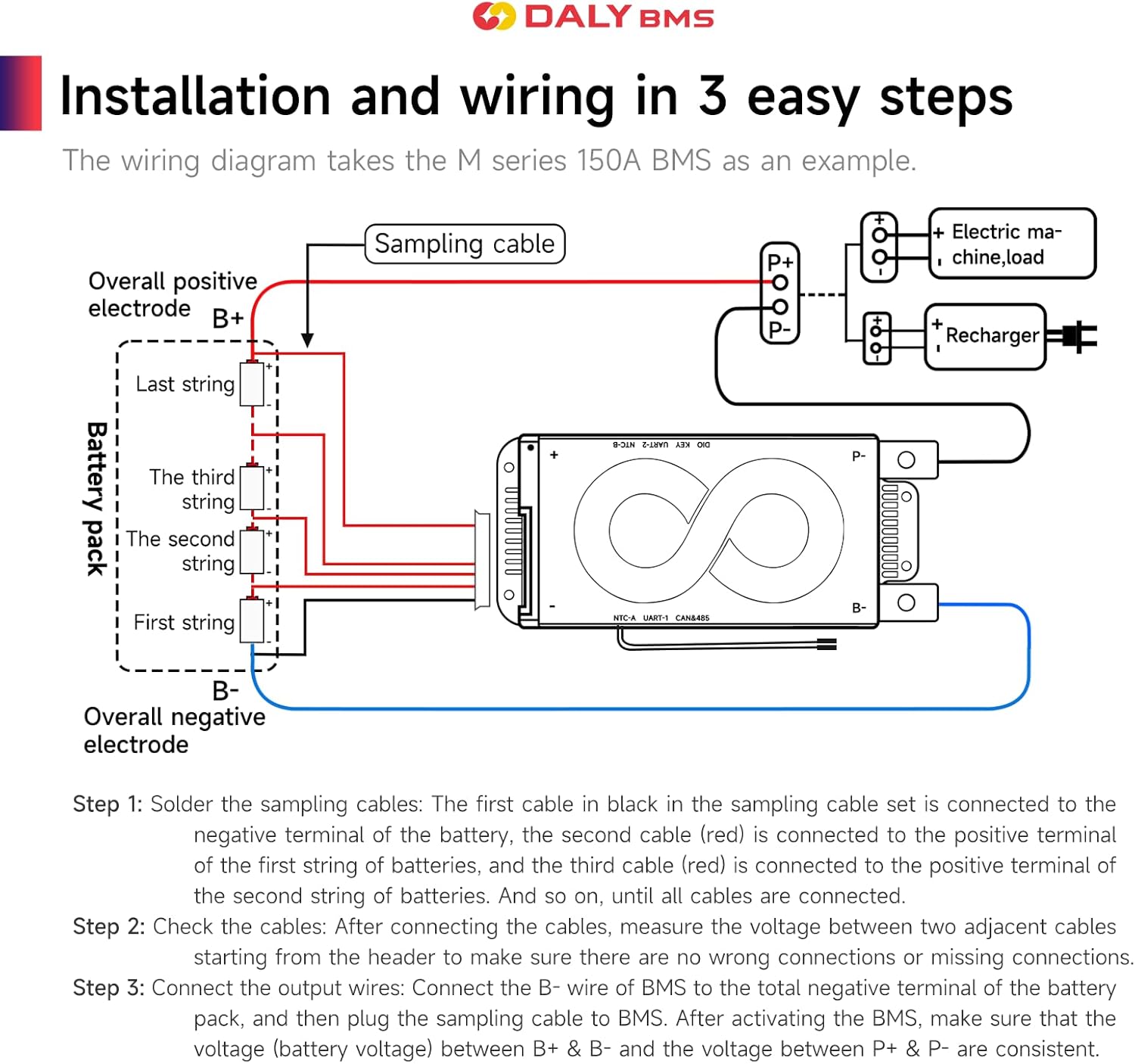
Image: Detailed wiring diagram illustrating connections for the DALY Smart BMS to a battery pack, electric machine, load, and recharger.
- Solder Sampling Cables: The black cable in the sampling cable set connects to the negative terminal of the battery. Subsequent red cables connect to the positive terminals of the first, second, and all subsequent battery strings until all cells are connected.
- Check Cable Connections: After connecting the cables, measure the voltage between two adjacent cables starting from the header. Ensure there are no wrong connections or missing connections.
- Connect Output Wires: Connect the B- wire of the BMS to the total negative terminal of the battery pack. Then, plug the sampling cable to the BMS. After activating the BMS, verify that the voltage (battery voltage) between B+ & B- and the voltage between P+ & P- are consistent.
For detailed connection points for NTC, UART, and CAN/485, refer to the ports labeled on the BMS unit.
Operating
The DALY Smart BMS offers intelligent monitoring and control through its dedicated smartphone application and various communication interfaces.
Smartphone Application (Smart BMS APP):
The Smart BMS APP allows you to view and set various battery parameters remotely. Connect the WiFi module to the BMS to enable internet-based monitoring. The app supports iOS and Android systems and automatically switches with the system language.

Image: Screenshot of the DALY Smart BMS mobile application displaying battery State of Charge (SOC), voltage, current, temperature, and other status indicators.
When the BMS detects any abnormality in the battery pack, it will send an alert via the smartphone app, allowing for timely intervention.
Communication Interfaces:
The BMS is equipped with CAN, RS485, and dual UART communication interfaces, enabling integration with various systems and expansion applications. These interfaces allow for advanced data exchange and control.
Maintenance
Regular maintenance and proper handling will extend the lifespan and ensure the reliability of your DALY Smart BMS.
General Care:
- Ensure the BMS is installed in a location that minimizes exposure to extreme temperatures and moisture. The unit features waterproof protection, but avoiding direct exposure to harsh elements is recommended.
- Periodically check all wiring connections for tightness and corrosion. Loose connections can lead to performance issues or safety hazards.
- The BMS includes 100mA passive equalization current to help balance cell voltages. While this feature operates automatically, monitoring cell voltage balance via the app is advisable for optimal battery health.
- Keep the BMS unit clean and free from dust and debris to ensure proper heat dissipation.
Troubleshooting
This section addresses common issues and their potential solutions. For complex problems, contact customer support.
Common Issues and Solutions:
| Problem | Possible Cause | Solution |
|---|---|---|
| BMS not powering on or no output | Incorrect wiring, low battery voltage, or internal fault. | Verify all wiring connections according to the diagram. Check battery voltage. If issues persist, contact support. |
| Overcharge/Overdischarge protection triggered | Battery voltage exceeded safe limits. | Ensure charger/load settings are within battery specifications. The BMS will automatically recover when voltage returns to safe levels. |
| Overcurrent/Short circuit protection triggered | Excessive current draw or short circuit detected. | Reduce load or identify and remove the short circuit. The BMS will recover once the fault is cleared. |
| Temperature protection triggered | BMS or battery temperature outside operating range. | Ensure adequate ventilation. Allow the unit to cool down or warm up to within operating temperatures. |
| WiFi module not connecting | Module not properly connected, network issues, or app configuration error. | Check WiFi module connection to BMS. Verify network connectivity and app settings. |
Specifications
Detailed technical specifications for the DALY Smart 3S BMS 12V 150A.

Image: Product specification sheet for the DALY Smart 3S BMS, detailing electrical parameters and physical dimensions.
| Parameter | Value |
|---|---|
| Product Type | Li-ion 3S 150A common port with balance |
| Discharge Current | 150A |
| Overdischarge Current | 225A |
| Charging Current | 150A |
| Overcharge Current | 225A |
| Overcharge Voltage | 4.25V ± 0.05V (Can be set) |
| Overdischarge Voltage | 2.7V ± 0.05V (Can be set) |
| Charge Voltage | 12.6V |
| Model | R10M (3~10S) |
| Dimensions (L x W x H) | 164 x 66 x 21 mm (6.46 x 2.6 x 0.83 inches) |
| Item Weight | 340-360g (13.4 ounces) |
| Output Wire | 4AWG/150mm |
| Cable | 24AWG/300~450mm |
| UPC | 784868983285 |
Additional Detailed Specifications:

Image: Table detailing passive equalization function, short circuit protection, single cell over-charge/over-discharge protection, charge/discharge over-current protection, and temperature protection parameters.
Product Overview Videos
Watch these official videos from DALY for a visual overview of the Smart BMS features and capabilities.
DALY S Series Smart BMS Overview
Video: An overview of the DALY S series Smart BMS, highlighting its comprehensive upgrade and professional resistance to high current, parallel connection support, smart features, waterproof design, and rapid heat dissipation.
DALY K Series Smart BMS Overview
Video: An overview of the DALY K series Smart BMS, showcasing its powerful and upgraded features, applicability to multiple scenarios, intelligent protection, high-end configuration, and moisture-proof design.
Warranty and Support
DALY is committed to providing high-quality products and excellent customer service.
Customer Support:
We provide 24-hour one-on-one customer service and technical support. If you have any questions or require assistance, please feel free to contact us.
Certifications:
Our products are manufactured to high standards and are ISO, FCC, RoHS, PSE, and CE APPROVED, ensuring reliability and safety.


