
1. Introduction
This user manual provides essential information for the safe and efficient operation, maintenance, and troubleshooting of your INOKIM OX Hero Electric Scooter. Please read this manual thoroughly before your first ride to ensure proper usage and to maximize the lifespan of your scooter.

Figure 1: The INOKIM OX Hero Electric Scooter, showcasing its sleek design and robust build.
2. Safety Guidelines
Your safety is paramount. Always adhere to the following guidelines:
- Wear a Helmet: Always wear a certified helmet and other protective gear (knee pads, elbow pads) when riding.
- Check Local Laws: Be aware of and comply with all local laws and regulations regarding electric scooter usage.
- Pre-Ride Check: Before each ride, inspect the brakes, tires, and folding mechanism to ensure they are in good working order.
- Weight Limit: Do not exceed the maximum weight limit of 265 pounds (120 kg).
- Weather Conditions: Avoid riding in heavy rain, snow, or icy conditions. The scooter is not waterproof.
- Visibility: Use the integrated lights for enhanced visibility, especially during dawn, dusk, or night riding.
- Riding Surface: Exercise caution on uneven or slippery surfaces.
3. Components Overview
Familiarize yourself with the main components of your INOKIM OX Hero Electric Scooter:
3.1. Handlebars and Display
The handlebars feature user-friendly controls and a smart control digital display for monitoring speed, battery level, and other ride data.

Figure 2: Close-up of the digital display and dual braking system, showing the front and rear disc brakes.
3.2. Motor and Tires
Equipped with a powerful 1000W brushless hub motor (peak 1300W) and 10-inch pneumatic tires for a smooth and powerful ride.

Figure 3: Detail of the 10-inch pneumatic tires and the powerful 1300W peak motor, highlighting the dual shock absorption system.
3.3. Suspension System
Features the Patented Adjustable Suspension (PAS) with two rubber suspensions, allowing adjustment for city riding (low center of gravity) or off-road terrain (higher clearance for comfort).
3.4. Braking System
The scooter utilizes a front drum brake and a rear hydraulic disc brake for reliable and precise stopping power in various conditions.
3.5. Lighting System
A comprehensive 6-light system includes 2 headlights, 2 side mood lights, 1 tail light, and 1 brake light for enhanced visibility and safety.

Figure 4: Illustration of the INOKIM OX Hero's 6-light system, including headlights, side mood lights, tail light, and brake light.
3.6. Folding Mechanism
The quick folding design allows the scooter to be folded in approximately 5 seconds for easy transport and storage.
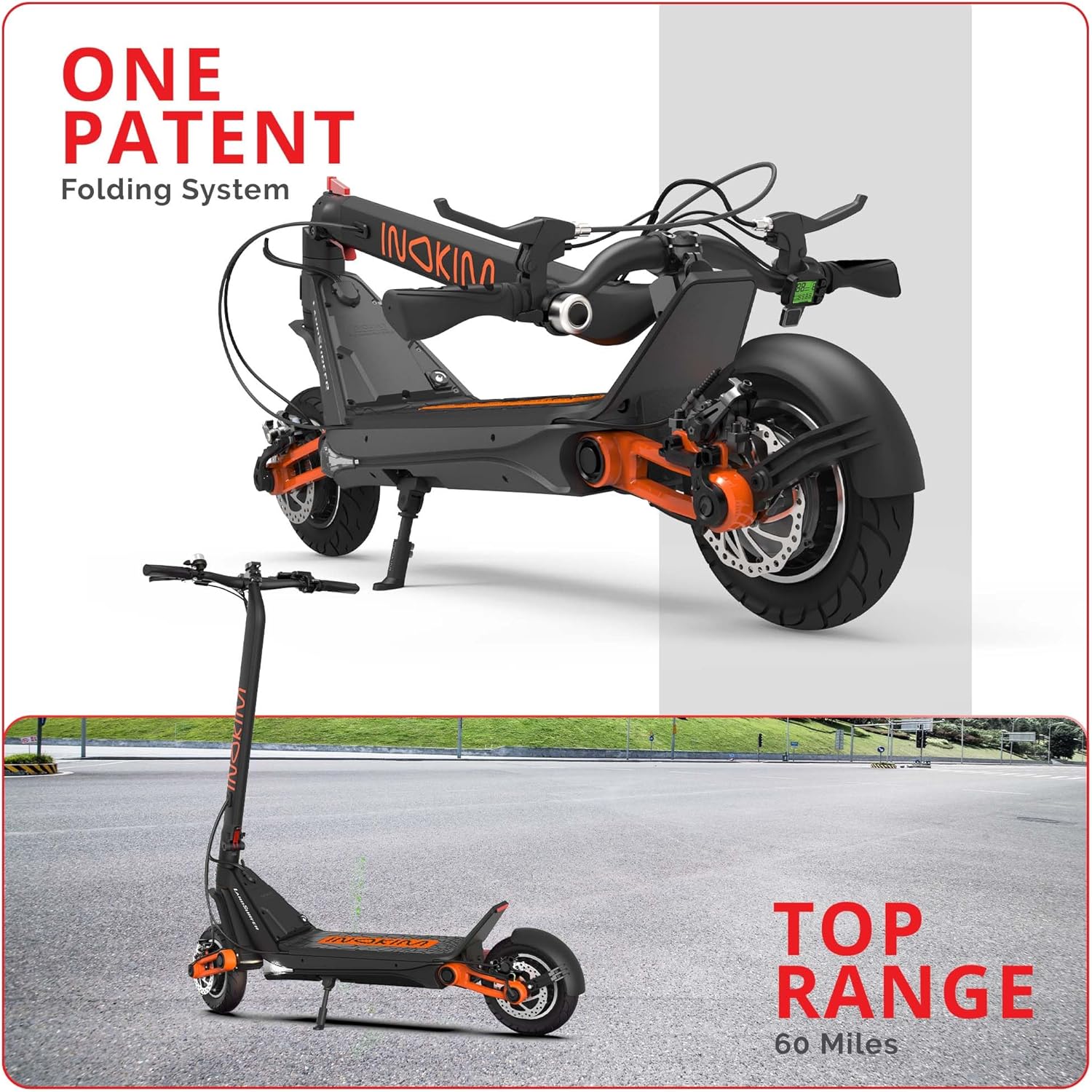
Figure 5: The INOKIM OX Hero in both unfolded and folded states, demonstrating its patented folding system for portability.
4. Setup and First Use
- Unpacking: Carefully remove the scooter and all accessories from the packaging. Retain packaging for future transport or storage.
- Unfolding:
- Place the scooter on a flat surface.
- Locate the quick-release lever for the folding mechanism.
- Release the latch and carefully unfold the stem until it locks securely into place.
- Handlebar Adjustment: Adjust the handlebar height to a comfortable position and secure it firmly.
- Initial Charging:
- Before first use, fully charge the battery. The charging time is approximately 4-7 hours.
- Connect the charger to the scooter's charging port and then to a power outlet. Ensure the charging port cover is securely closed after charging to protect against elements.
- The charging connector is located near the footrest.
- Tire Pressure Check: Verify that the pneumatic tires are inflated to the recommended pressure for optimal performance and safety.
- Suspension Adjustment (PAS): The Patented Adjustable Suspension allows you to fine-tune the ride.
- Low Setting: Ideal for city riding, providing a lower center of gravity for stability and speed.
- High Setting: Suitable for off-road or rough terrain, offering a softer, more comfortable ride.
- Refer to the detailed instructions in the separate suspension adjustment guide (if provided) for precise adjustments.
5. Operating Instructions
- Power On/Off: Press and hold the power button on the display to turn the scooter on or off.
- Speed Modes: The scooter offers three selectable speed modes. Use the mode button on the display to cycle through them. The top speed is 27.9 mph (approximately 45 km/h).
- Acceleration: Use the thumb throttle to control your speed. Apply gentle pressure to accelerate smoothly.
- Braking:
- Engage the brake levers on the handlebars to activate the front drum brake and rear hydraulic disc brake.
- Apply both brakes simultaneously for optimal stopping power.
- User-adjustable sensitivity for brakes is available.
- Lights: Activate the integrated LED lights for improved visibility, especially in low-light conditions. Refer to the display controls for light operation.
- Folding for Transport: To fold the scooter, reverse the unfolding steps. Ensure the quick-release lever is securely latched when folded.
Video 1: "OX Feel The Ride" - This video demonstrates the INOKIM OX Hero in various riding environments, highlighting its suspension, speed, and overall performance. It shows the scooter handling different terrains and its quick folding feature.
6. Maintenance
Regular maintenance ensures the longevity and optimal performance of your scooter:
- Battery Care:
- Charge the battery regularly, even if not in use, to maintain its health.
- Avoid completely draining the battery.
- Store the scooter in a cool, dry place when not in use for extended periods.
- The high-capacity 57.6V 13 Ah battery offers a range of up to 37 miles on a single charge.
- Tire Maintenance:
- Check tire pressure weekly and inflate to the recommended PSI.
- Inspect tires for wear, punctures, or damage.
- Brake Inspection: Regularly check the brake levers, cables, and pads for wear. Adjust or replace as necessary to ensure effective braking.
- Cleaning: Clean the scooter with a damp cloth. Do not use high-pressure water jets or immerse the scooter in water.
- General Inspection: Periodically check all screws and bolts for tightness. Ensure the folding mechanism operates smoothly and locks securely.
7. Troubleshooting
This section addresses common issues you might encounter:
| Problem | Possible Cause | Solution |
|---|---|---|
| Scooter does not power on. | Low or depleted battery; loose battery connection. | Charge the battery fully. Check battery connections. |
| Reduced speed or range. | Low battery charge; incorrect speed mode; tire pressure too low; rider weight exceeds limit; riding uphill frequently. | Ensure battery is fully charged. Select a higher speed mode. Inflate tires to recommended pressure. Reduce load if possible. |
| Error Code 30 on display. | Motor or controller communication issue. | Turn the scooter off and on again. If the error persists, contact customer support. |
| Brakes feel weak or squeaky. | Worn brake pads; misaligned caliper; loose brake cable. | Inspect brake pads for wear and replace if necessary. Adjust the brake caliper or cable tension. |
| Folding mechanism is stiff or stuck. | Lack of lubrication; debris in mechanism. | Clean the mechanism and apply a small amount of lubricant. Ensure no debris is obstructing the latch. |
8. Specifications
Key technical specifications for the INOKIM OX Hero Electric Scooter:
| Feature | Detail |
|---|---|
| Brand | INOKIM |
| Model Name | OX Hero |
| Motor Power | 1000W Brushless Hub Motor (Peak 1300W) |
| Top Speed | 27.9 mph |
| Battery | 57.6V 13 Ah Lithium-ion |
| Maximum Distance Range | Up to 37 miles |
| Charging Time | 4-7 hours |
| Weight Limit | 265 Pounds (120 kg) |
| Item Weight | 62 Pounds |
| Product Dimensions (L x W x H) | 47"L x 23"W x 51"H |
| Wheel Size | 10 Inches |
| Wheel Type | Pneumatic |
| Brake Style | Front Drum Brake, Rear Hydraulic Disc Brake |
| Material | Aluminum 6061 T6 |

Figure 6: Dimensional overview of the INOKIM OX Hero Electric Scooter, showing its length, width, and height.
9. Warranty and Support
The INOKIM OX Hero Electric Scooter comes with a 2-year manufacturer limited warranty. For warranty claims, technical support, or replacement parts, please contact INOKIM customer service.
You can visit the official INOKIM store for more information and support: INOKIM Official Store.


